<!DOCTYPE html>
    <html lang="vi" xmlns="http://www.w3.org/1999/xhtml" prefix="og: http://ogp.me/ns#">
    <head>
<title>Cách buộc xóa file trong Windows 10</title>
<meta name="description" content="Cách buộc xóa file trong Windows 10 - Savefile - Tin Tức -...">
<meta name="author" content=".: Nguoicodonvn2008.info - Cõi lòng người cô đơn :.">
<meta name="copyright" content=".: Nguoicodonvn2008.info - Cõi lòng người cô đơn :. [admin@nguoicodonvn2008.info]">
<meta name="robots" content="index, archive, follow, noodp">
<meta name="googlebot" content="index,archive,follow,noodp">
<meta name="msnbot" content="all,index,follow">
<meta name="generator" content="NukeViet v4.5">
<meta http-equiv="Content-Type" content="text/html; charset=utf-8">
<meta property="og:title" content="Cách buộc xóa file trong Windows 10">
<meta property="og:type" content="website">
<meta property="og:description" content="Savefile - Tin Tức - https&#x3A;&#x002F;&#x002F;www.nguoicodonvn2008.info&#x002F;vi&#x002F;news&#x002F;savefile&#x002F;kien-thuc-may-tinh&#x002F;cach-buoc-xoa-file-trong-windows-10-2009.html">
<meta property="og:site_name" content=".&#x3A; Nguoicodonvn2008.info - Cõi lòng người cô đơn &#x3A;.">
<meta property="og:url" content="https://www.nguoicodonvn2008.info/vi/news/savefile/kien-thuc-may-tinh/cach-buoc-xoa-file-trong-windows-10-2009.html">
<link rel="shortcut icon" href="https://www.nguoicodonvn2008.info/favicon.ico">
<link rel="canonical" href="https://www.nguoicodonvn2008.info/vi/news/savefile/kien-thuc-may-tinh/cach-buoc-xoa-file-trong-windows-10-2009.html">
<link rel="alternate" href="https://www.nguoicodonvn2008.info/vi/news/rss/" title="Tin Tức" type="application/rss+xml">
<link rel="alternate" href="https://www.nguoicodonvn2008.info/vi/news/rss/karaoke-dual/" title="Tin Tức - Karaoke Dual" type="application/rss+xml">
<link rel="alternate" href="https://www.nguoicodonvn2008.info/vi/news/rss/nhac-tre/" title="Tin Tức - Nhạc trẻ" type="application/rss+xml">
<link rel="alternate" href="https://www.nguoicodonvn2008.info/vi/news/rss/tru-tinh/" title="Tin Tức - Trữ tình" type="application/rss+xml">
<link rel="alternate" href="https://www.nguoicodonvn2008.info/vi/news/rss/nuoc-ngoai/" title="Tin Tức - Nước ngoài" type="application/rss+xml">
<link rel="alternate" href="https://www.nguoicodonvn2008.info/vi/news/rss/remix/" title="Tin Tức - Remix" type="application/rss+xml">
<link rel="alternate" href="https://www.nguoicodonvn2008.info/vi/news/rss/tam-su-tinh-yeu/" title="Tin Tức - Tâm sự tình yêu" type="application/rss+xml">
<link rel="alternate" href="https://www.nguoicodonvn2008.info/vi/news/rss/tho-suu-tam/" title="Tin Tức - Thơ sưu tầm" type="application/rss+xml">
<link rel="alternate" href="https://www.nguoicodonvn2008.info/vi/news/rss/cuoc-song/" title="Tin Tức - Cuộc sống" type="application/rss+xml">
<link rel="alternate" href="https://www.nguoicodonvn2008.info/vi/news/rss/phan-mem/" title="Tin Tức - Phần mềm" type="application/rss+xml">
<link rel="alternate" href="https://www.nguoicodonvn2008.info/vi/news/rss/kien-thuc-may-tinh/" title="Tin Tức - Kiến thức máy tính" type="application/rss+xml">
<link rel="alternate" href="https://www.nguoicodonvn2008.info/vi/news/rss/hoc-tap/" title="Tin Tức - Học tập" type="application/rss+xml">
<link rel="alternate" href="https://www.nguoicodonvn2008.info/vi/news/rss/tai-lieu/" title="Tin Tức - Tài liệu" type="application/rss+xml">
<link rel="alternate" href="https://www.nguoicodonvn2008.info/vi/news/rss/de-thi/" title="Tin Tức - Đề thi" type="application/rss+xml">
<link rel="preload" as="style" href="https://www.nguoicodonvn2008.info/assets/css/font-awesome.min.css" type="text/css">
<link rel="preload" as="style" href="https://www.nguoicodonvn2008.info/themes/default/css/bootstrap.non-responsive.css" type="text/css">
<link rel="preload" as="style" href="https://www.nguoicodonvn2008.info/themes/default/css/style.css" type="text/css">
<link rel="preload" as="style" href="https://www.nguoicodonvn2008.info/themes/default/css/style.non-responsive.css" type="text/css">
<link rel="preload" as="style" href="https://www.nguoicodonvn2008.info/themes/default/css/news.css" type="text/css">
<link rel="preload" as="style" href="https://www.nguoicodonvn2008.info/themes/default/css/custom.css" type="text/css">
<link rel="preload" as="script" href="https://www.nguoicodonvn2008.info/assets/js/jquery/jquery.min.js" type="text/javascript">
<link rel="preload" as="script" href="https://www.nguoicodonvn2008.info/assets/js/language/vi.js" type="text/javascript">
<link rel="preload" as="script" href="https://www.nguoicodonvn2008.info/assets/js/DOMPurify/purify3.js" type="text/javascript">
<link rel="preload" as="script" href="https://www.nguoicodonvn2008.info/assets/js/global.js" type="text/javascript">
<link rel="preload" as="script" href="https://www.nguoicodonvn2008.info/assets/js/site.js" type="text/javascript">
<link rel="preload" as="script" href="https://www.nguoicodonvn2008.info/themes/default/js/news.js" type="text/javascript">
<link rel="preload" as="script" href="https://www.nguoicodonvn2008.info/themes/default/js/main.js" type="text/javascript">
<link rel="preload" as="script" href="https://www.nguoicodonvn2008.info/themes/default/js/custom.js" type="text/javascript">
<link rel="preload" as="script" href="https://www.nguoicodonvn2008.info/themes/default/js/bootstrap.min.js" type="text/javascript">
<link rel="stylesheet" href="https://www.nguoicodonvn2008.info/assets/css/font-awesome.min.css">
<link rel="stylesheet" href="https://www.nguoicodonvn2008.info/themes/default/css/bootstrap.non-responsive.css">
<link rel="stylesheet" href="https://www.nguoicodonvn2008.info/themes/default/css/style.css">
<link rel="stylesheet" href="https://www.nguoicodonvn2008.info/themes/default/css/style.non-responsive.css">
<link rel="StyleSheet" href="https://www.nguoicodonvn2008.info/themes/default/css/news.css">
<link rel="stylesheet" href="https://www.nguoicodonvn2008.info/themes/default/css/custom.css">
<style type="text/css">
	body{background: #fff;}
</style>
    </head>
    <body>
<div id="print">
	<div id="hd_print">
		<h2 class="pull-left">.&#x3A; Nguoicodonvn2008.info - Cõi lòng người cô đơn &#x3A;.</h2>
		<p class="pull-right"><a title=".&#x3A; Nguoicodonvn2008.info - Cõi lòng người cô đơn &#x3A;." href="https://www.nguoicodonvn2008.info/">https://www.nguoicodonvn2008.info</a></p>
	</div>
	<div class="clear"></div>
	<hr />
	<div id="content">
		<h1>Cách buộc xóa file trong Windows 10</h1>
		<ul class="list-inline">
			<li>Thứ bảy - 09/05/2020 00:53</li>
			<li class="hidden-print txtrequired"><em class="fa fa-print">&nbsp;</em><a title="In ra" href="javascript:;" onclick="window.print()">In ra</a></li>
			<li class="hidden-print txtrequired"><em class="fa fa-power-off">&nbsp;</em><a title="Đóng cửa sổ này" href="javascript:;" onclick="window.close()">Đóng cửa sổ này</a></li>
		</ul>
		<div class="clear"></div>
		<div id="hometext">
		</div>
				<div class="imghome">
			<img alt="Cách buộc xóa file trong Windows 10" src="https://st.quantrimang.com/photos/image/2020/05/09/buoc-xoa-file-trong-windows-10-3.jpg" width="460" class="img-thumbnail" />
		</div>
		<div class="clear"></div>
		<div id="bodytext" class="clearfix">
			<p style="text-align: justify;">Nếu Windows ngăn bạn xóa một file, bạn có thể sử dụng một lệnh duy nhất để buộc xóa file từ dòng lệnh. Đây là cách để bạn thực hiện việc đó.</p>

<h2 style="text-align: justify;">File trong Windows được xóa như thế nào?</h2>

<p style="text-align: justify;">Bạn thường có thể xóa hầu hết mọi file hoặc thư mục bằng cách nhấn nút&nbsp;<code>Delete</code>&nbsp;trên bàn phím. Khi bị xóa, file sẽ được chuyển đến&nbsp;<strong>Recycle Bin</strong>&nbsp;để bạn có thể khôi phục dữ liệu đã xóa khi cần. Để bỏ qua&nbsp;<strong>Recycle Bin</strong>&nbsp;và xóa vĩnh viễn một file, bạn có thể sử dụng phím tắt&nbsp;<code>Shift</code>+<code>Delete</code>.</p>

<p style="text-align: justify;">Khi một file đang được sử dụng, nó không thể bị xóa theo những cách thông thường. Nếu bạn cố gắng làm điều đó, bạn có thể nhận được thông báo lỗi&nbsp;<strong>&quot;Access Denied: File in use&quot;</strong>. Điều này chủ yếu là do file bị khóa bởi một ứng dụng. Thường thì không có cách đơn giản nào để biết ứng dụng nào đang khóa file và chặn bạn xóa nó.</p>

<p style="text-align: justify;">Trong những tình huống đó, bạn có thể thực thi một lệnh để buộc xóa các file.</p>

<p style="text-align: justify;"><strong>Lưu ý quan trọng</strong>: Trước khi buộc xóa, hãy đảm bảo rằng không có dữ liệu quan trọng nào được lưu trữ trong file và việc xóa file là an toàn. Ngoài ra, hãy tạo bản sao lưu trước khi xóa file. Sau khi xóa, bạn không thể khôi phục file nữa.</p>

<div style="text-align: justify;">&nbsp;</div>

<h2 style="text-align: justify;">Lệnh buộc xóa file</h2>

<p style="text-align: justify;">Để buộc xóa một file trong Windows, ta sẽ sử dụng một dòng lệnh duy nhất. Ngay khi bạn thực thi lệnh, file đích sẽ buộc bị xóa.</p>

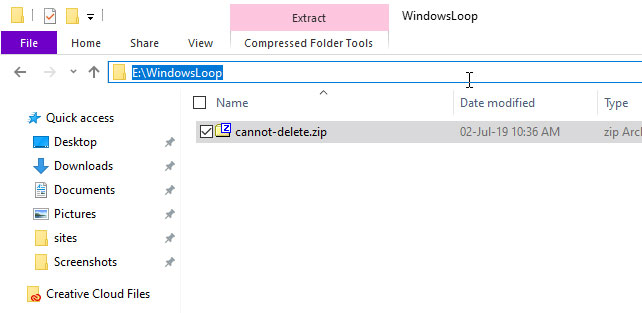
<p style="text-align: justify;">1. Điều đầu tiên bạn cần là đường dẫn file.&nbsp;Mở File Explorer&nbsp;và đi đến nơi file được lưu trữ. Tiếp theo, nhấp vào thanh địa chỉ và sao chép đường dẫn.</p>

<figure>
<div style="text-align: justify;"><img alt="Sao chép đường dẫn file" data-i="0" data-src="https://st.quantrimang.com/photos/image/2020/05/09/buoc-xoa-file-trong-windows-10-1.jpg" data-was-processed="true" height="313" src="https://st.quantrimang.com/photos/image/2020/05/09/buoc-xoa-file-trong-windows-10-1.jpg" width="642" /></div>

<figcaption>
<div style="text-align: justify;">Sao chép đường dẫn file</div>
</figcaption>
</figure>

<p style="text-align: justify;">2. Bây giờ, hãy&nbsp;<a href="https://quantrimang.com/huong-dan-mo-command-prompt-duoi-quyen-admin-tren-windows-8-va-10-119884" title="Cách mở và chạy cmd với quyền Admin trên Windows">mở Command Prompt với quyền admin</a>.</p>

<p style="text-align: justify;">3. Trong cửa sổ&nbsp;<strong>Command Prompt</strong>, thực thi lệnh bên dưới, thay thế&nbsp;<strong>X</strong>&nbsp;bằng ký tự ổ thực tế. Ví dụ, file của bài viết được lưu trữ trong ổ&nbsp;<strong>E:.</strong>&nbsp;Vì vậy,&nbsp;<strong>E</strong>&nbsp;được nhập trong lệnh dưới đây.</p>

<p style="text-align: justify;">Nếu file bạn đang cố xóa trong ổ C, bạn có thể bỏ qua bước này.</p>

<pre id="pre0">
<code>X:</code></pre>

<figure>
<div style="text-align: justify;"><img alt="Thực thi lệnh với ổ chứa file cần xóa" data-i="1" data-src="https://st.quantrimang.com/photos/image/2020/05/09/buoc-xoa-file-trong-windows-10-2.jpg" data-was-processed="true" height="121" src="https://st.quantrimang.com/photos/image/2020/05/09/buoc-xoa-file-trong-windows-10-2.jpg" width="650" /></div>

<figcaption>
<div style="text-align: justify;">Thực thi lệnh với ổ chứa file cần xóa</div>
</figcaption>
</figure>

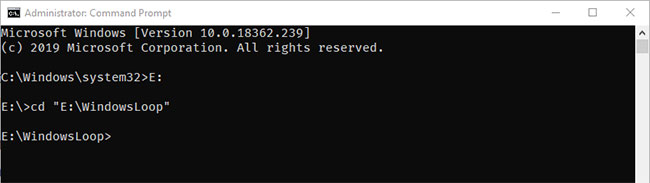
<p style="text-align: justify;">4. Khi bạn đang ở trong ổ đích, hãy thực thi lệnh bên dưới, thay thế bằng đường dẫn thực tế bạn đã sao chép trước đó.</p>

<pre id="pre1">
<code>cd &quot;E:\Dummy\Folder&quot;</code></pre>

<figure>
<div style="text-align: justify;"><img alt="Thực thi lệnh với đường dẫn file đã sao chép" data-i="2" data-src="https://st.quantrimang.com/photos/image/2020/05/09/buoc-xoa-file-trong-windows-10-3.jpg" data-was-processed="true" height="183" src="https://st.quantrimang.com/photos/image/2020/05/09/buoc-xoa-file-trong-windows-10-3.jpg" width="650" /></div>

<figcaption>
<div style="text-align: justify;">Thực thi lệnh với đường dẫn file đã sao chép</div>
</figcaption>
</figure>

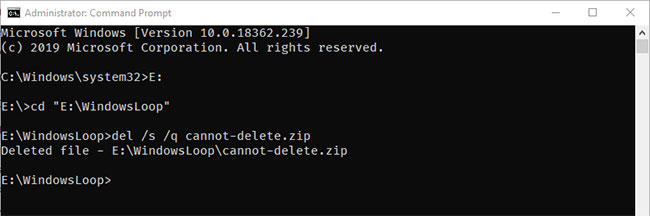
<p style="text-align: justify;">5. Bước này sẽ đưa bạn đến thư mục chứa file. Bây giờ, thực thi lệnh dưới đây, thay thế&nbsp;<strong>fileName.ext</strong>&nbsp;bằng tên file thực tế cùng với phần mở rộng.</p>

<p style="text-align: justify;">Trong trường hợp ví dụ, file cần xóa là một file zip. Vì vậy, tên file cùng với phần mở rộng .zip được nhập.</p>

<pre id="pre2">
<code>del /s /q &quot;fileName.ext&quot;</code></pre>

<figure>
<div style="text-align: justify;"><img alt="Thực thi lệnh với tên file thực tế cùng với phần mở rộng" data-i="3" data-src="https://st.quantrimang.com/photos/image/2020/05/09/buoc-xoa-file-trong-windows-10-4.jpg" data-was-processed="true" height="216" src="https://st.quantrimang.com/photos/image/2020/05/09/buoc-xoa-file-trong-windows-10-4.jpg" width="650" /></div>

<figcaption>
<div style="text-align: justify;">Thực thi lệnh với tên file thực tế cùng với phần mở rộng</div>
</figcaption>
</figure>

<p style="text-align: justify;">6. Nếu Windows có thể xóa file, bạn sẽ thấy phản hồi&nbsp;<strong>Deleted File.</strong></p>
		</div>
				<div id="author">
						<p>
				<strong>Nguồn tin:</strong>
				Quantrimang.com
			</p>
		</div>
	</div>
	<div id="footer" class="clearfix">
		<div id="url">
			<strong>URL của bản tin này: </strong><a href="https://www.nguoicodonvn2008.info/vi/news/savefile/kien-thuc-may-tinh/cach-buoc-xoa-file-trong-windows-10-2009.html" title="Cách buộc xóa file trong Windows 10">https://www.nguoicodonvn2008.info/vi/news/savefile/kien-thuc-may-tinh/cach-buoc-xoa-file-trong-windows-10-2009.html</a>

		</div>
		<div class="clear"></div>
		<div class="copyright">
			&copy; .&#x3A; Nguoicodonvn2008.info - Cõi lòng người cô đơn &#x3A;.
		</div>
		<div id="contact">
			<a href="mailto:admin@nguoicodonvn2008.info">admin@nguoicodonvn2008.info</a>
		</div>
	</div>
</div>
        <div id="timeoutsess" class="chromeframe">
            Bạn đã không sử dụng Site, <a onclick="timeoutsesscancel();" href="https://www.nguoicodonvn2008.info/#">Bấm vào đây để duy trì trạng thái đăng nhập</a>. Thời gian chờ: <span id="secField"> 60 </span> giây
        </div>
        <div id="openidResult" class="nv-alert" style="display:none"></div>
        <div id="openidBt" data-result="" data-redirect=""></div>
		</script>
		<div class="car-top">
  <span><img src="https://www.nguoicodonvn2008.info/themes/default/images/car.png" alt=""></span>
</div>
<script src="https://www.nguoicodonvn2008.info/assets/js/jquery/jquery.min.js"></script>
<script>var nv_base_siteurl="/",nv_lang_data="vi",nv_lang_interface="vi",nv_name_variable="nv",nv_fc_variable="op",nv_lang_variable="language",nv_module_name="news",nv_func_name="savefile",nv_is_user=0, nv_my_ofs=-4,nv_my_abbr="EDT",nv_cookie_prefix="nv4c_e856T",nv_check_pass_mstime=1738000,nv_area_admin=0,nv_safemode=0,theme_responsive=0,nv_recaptcha_ver=2,nv_recaptcha_sitekey="",nv_recaptcha_type="image",XSSsanitize=1;</script>
<script src="https://www.nguoicodonvn2008.info/assets/js/language/vi.js"></script>
<script src="https://www.nguoicodonvn2008.info/assets/js/DOMPurify/purify3.js"></script>
<script src="https://www.nguoicodonvn2008.info/assets/js/global.js"></script>
<script src="https://www.nguoicodonvn2008.info/assets/js/site.js"></script>
<script src="https://www.nguoicodonvn2008.info/themes/default/js/news.js"></script>
<script src="https://www.nguoicodonvn2008.info/themes/default/js/main.js"></script>
<script src="https://www.nguoicodonvn2008.info/themes/default/js/custom.js"></script>
<script type="application/ld+json">
        {
            "@context": "https://schema.org",
            "@type": "Organization",
            "url": "https://www.nguoicodonvn2008.info",
            "logo": "https://www.nguoicodonvn2008.info/uploads/angel.gif"
        }
        </script>
<script src="https://www.nguoicodonvn2008.info/themes/default/js/bootstrap.min.js"></script>
<script type="text/javascript">
var $scrolltop = $('.car-top');
$scrolltop.on('click', function () {
    $('html,body').animate({
        scrollTop: 0
    }, 800);
    $(this).addClass("car-run");
    setTimeout(function(){ $scrolltop.removeClass('car-run');}, 1000);
    return false;
});
$(window).on('scroll', function ()
{ 
    if($(window).scrollTop() >= 200)
    {
        $scrolltop.addClass("show");
        $scrolltop.addClass("car-down");
    }
    else
    {
       $scrolltop.removeClass("show");
       setTimeout(function(){ $scrolltop.removeClass('car-down');}, 300);
    }
});
</script>
</body>
</html>