<!DOCTYPE html>
    <html lang="vi" xmlns="http://www.w3.org/1999/xhtml" prefix="og: http://ogp.me/ns#">
    <head>
<title>Cách benchmark các thiết bị lưu trữ với Gnome Disk Utility</title>
<meta name="description" content="Cách benchmark các thiết bị lưu trữ với Gnome Disk Utility - Savefile - Tin Tức -...">
<meta name="author" content=".: Nguoicodonvn2008.info - Cõi lòng người cô đơn :.">
<meta name="copyright" content=".: Nguoicodonvn2008.info - Cõi lòng người cô đơn :. [admin@nguoicodonvn2008.info]">
<meta name="robots" content="index, archive, follow, noodp">
<meta name="googlebot" content="index,archive,follow,noodp">
<meta name="msnbot" content="all,index,follow">
<meta name="generator" content="NukeViet v4.5">
<meta http-equiv="Content-Type" content="text/html; charset=utf-8">
<meta property="og:title" content="Cách benchmark các thiết bị lưu trữ với Gnome Disk Utility">
<meta property="og:type" content="website">
<meta property="og:description" content="Savefile - Tin Tức - https&#x3A;&#x002F;&#x002F;www.nguoicodonvn2008.info&#x002F;vi&#x002F;news&#x002F;savefile&#x002F;kien-thuc-may-tinh&#x002F;cach-benchmark-cac-thiet-bi-luu-tru-voi-gnome-disk-utility-1315.html">
<meta property="og:site_name" content=".&#x3A; Nguoicodonvn2008.info - Cõi lòng người cô đơn &#x3A;.">
<meta property="og:url" content="https://www.nguoicodonvn2008.info/vi/news/savefile/kien-thuc-may-tinh/cach-benchmark-cac-thiet-bi-luu-tru-voi-gnome-disk-utility-1315.html">
<link rel="shortcut icon" href="https://www.nguoicodonvn2008.info/favicon.ico">
<link rel="canonical" href="https://www.nguoicodonvn2008.info/vi/news/savefile/kien-thuc-may-tinh/cach-benchmark-cac-thiet-bi-luu-tru-voi-gnome-disk-utility-1315.html">
<link rel="alternate" href="https://www.nguoicodonvn2008.info/vi/news/rss/" title="Tin Tức" type="application/rss+xml">
<link rel="alternate" href="https://www.nguoicodonvn2008.info/vi/news/rss/karaoke-dual/" title="Tin Tức - Karaoke Dual" type="application/rss+xml">
<link rel="alternate" href="https://www.nguoicodonvn2008.info/vi/news/rss/nhac-tre/" title="Tin Tức - Nhạc trẻ" type="application/rss+xml">
<link rel="alternate" href="https://www.nguoicodonvn2008.info/vi/news/rss/tru-tinh/" title="Tin Tức - Trữ tình" type="application/rss+xml">
<link rel="alternate" href="https://www.nguoicodonvn2008.info/vi/news/rss/nuoc-ngoai/" title="Tin Tức - Nước ngoài" type="application/rss+xml">
<link rel="alternate" href="https://www.nguoicodonvn2008.info/vi/news/rss/remix/" title="Tin Tức - Remix" type="application/rss+xml">
<link rel="alternate" href="https://www.nguoicodonvn2008.info/vi/news/rss/tam-su-tinh-yeu/" title="Tin Tức - Tâm sự tình yêu" type="application/rss+xml">
<link rel="alternate" href="https://www.nguoicodonvn2008.info/vi/news/rss/tho-suu-tam/" title="Tin Tức - Thơ sưu tầm" type="application/rss+xml">
<link rel="alternate" href="https://www.nguoicodonvn2008.info/vi/news/rss/cuoc-song/" title="Tin Tức - Cuộc sống" type="application/rss+xml">
<link rel="alternate" href="https://www.nguoicodonvn2008.info/vi/news/rss/phan-mem/" title="Tin Tức - Phần mềm" type="application/rss+xml">
<link rel="alternate" href="https://www.nguoicodonvn2008.info/vi/news/rss/kien-thuc-may-tinh/" title="Tin Tức - Kiến thức máy tính" type="application/rss+xml">
<link rel="alternate" href="https://www.nguoicodonvn2008.info/vi/news/rss/hoc-tap/" title="Tin Tức - Học tập" type="application/rss+xml">
<link rel="alternate" href="https://www.nguoicodonvn2008.info/vi/news/rss/tai-lieu/" title="Tin Tức - Tài liệu" type="application/rss+xml">
<link rel="alternate" href="https://www.nguoicodonvn2008.info/vi/news/rss/de-thi/" title="Tin Tức - Đề thi" type="application/rss+xml">
<link rel="preload" as="style" href="https://www.nguoicodonvn2008.info/assets/css/font-awesome.min.css" type="text/css">
<link rel="preload" as="style" href="https://www.nguoicodonvn2008.info/themes/default/css/bootstrap.non-responsive.css" type="text/css">
<link rel="preload" as="style" href="https://www.nguoicodonvn2008.info/themes/default/css/style.css" type="text/css">
<link rel="preload" as="style" href="https://www.nguoicodonvn2008.info/themes/default/css/style.non-responsive.css" type="text/css">
<link rel="preload" as="style" href="https://www.nguoicodonvn2008.info/themes/default/css/news.css" type="text/css">
<link rel="preload" as="style" href="https://www.nguoicodonvn2008.info/themes/default/css/custom.css" type="text/css">
<link rel="preload" as="script" href="https://www.nguoicodonvn2008.info/assets/js/jquery/jquery.min.js" type="text/javascript">
<link rel="preload" as="script" href="https://www.nguoicodonvn2008.info/assets/js/language/vi.js" type="text/javascript">
<link rel="preload" as="script" href="https://www.nguoicodonvn2008.info/assets/js/DOMPurify/purify3.js" type="text/javascript">
<link rel="preload" as="script" href="https://www.nguoicodonvn2008.info/assets/js/global.js" type="text/javascript">
<link rel="preload" as="script" href="https://www.nguoicodonvn2008.info/assets/js/site.js" type="text/javascript">
<link rel="preload" as="script" href="https://www.nguoicodonvn2008.info/themes/default/js/news.js" type="text/javascript">
<link rel="preload" as="script" href="https://www.nguoicodonvn2008.info/themes/default/js/main.js" type="text/javascript">
<link rel="preload" as="script" href="https://www.nguoicodonvn2008.info/themes/default/js/custom.js" type="text/javascript">
<link rel="preload" as="script" href="https://www.nguoicodonvn2008.info/themes/default/js/bootstrap.min.js" type="text/javascript">
<link rel="stylesheet" href="https://www.nguoicodonvn2008.info/assets/css/font-awesome.min.css">
<link rel="stylesheet" href="https://www.nguoicodonvn2008.info/themes/default/css/bootstrap.non-responsive.css">
<link rel="stylesheet" href="https://www.nguoicodonvn2008.info/themes/default/css/style.css">
<link rel="stylesheet" href="https://www.nguoicodonvn2008.info/themes/default/css/style.non-responsive.css">
<link rel="StyleSheet" href="https://www.nguoicodonvn2008.info/themes/default/css/news.css">
<link rel="stylesheet" href="https://www.nguoicodonvn2008.info/themes/default/css/custom.css">
<style type="text/css">
	body{background: #fff;}
</style>
    </head>
    <body>
<div id="print">
	<div id="hd_print">
		<h2 class="pull-left">.&#x3A; Nguoicodonvn2008.info - Cõi lòng người cô đơn &#x3A;.</h2>
		<p class="pull-right"><a title=".&#x3A; Nguoicodonvn2008.info - Cõi lòng người cô đơn &#x3A;." href="https://www.nguoicodonvn2008.info/">https://www.nguoicodonvn2008.info</a></p>
	</div>
	<div class="clear"></div>
	<hr />
	<div id="content">
		<h1>Cách benchmark các thiết bị lưu trữ với Gnome Disk Utility</h1>
		<ul class="list-inline">
			<li>Thứ hai - 11/11/2019 06:32</li>
			<li class="hidden-print txtrequired"><em class="fa fa-print">&nbsp;</em><a title="In ra" href="javascript:;" onclick="window.print()">In ra</a></li>
			<li class="hidden-print txtrequired"><em class="fa fa-power-off">&nbsp;</em><a title="Đóng cửa sổ này" href="javascript:;" onclick="window.close()">Đóng cửa sổ này</a></li>
		</ul>
		<div class="clear"></div>
		<div id="hometext">
		</div>
				<div class="imghome">
			<img alt="Cách benchmark các thiết bị lưu trữ với Gnome Disk Utility" src="https://st.quantrimang.com/photos/image/2019/11/11/benchmark-cac-thiet-bi-luu-tru-voi-gnome-disk-utility-1.jpg" width="460" class="img-thumbnail" />
		</div>
		<div class="clear"></div>
		<div id="bodytext" class="clearfix">
			<p style="text-align: justify;">Gnome Disk Utility có thể đóng rất nhiều vai trò. Nó có thể vừa là nguồn thông tin cho tất cả các thiết bị lưu trữ, vừa là giải pháp sao lưu và khôi phục chúng từ image. Gnome Disk Utility cũng có thể benchmark chúng để cho bạn thấy hiệu suất thực tế của phương tiện lưu trữ. Đây có thể chỉ là một quá trình gồm 2 hoặc 3 lần nhấp đơn giản, nhưng nhiều người không biết đến sự tồn tại của nó.</p>

<h2 style="text-align: justify;">&nbsp;</h2>

<h2 id="mcetoc_1dpc46le40" style="text-align: justify;">Cài đặt Gnome Disk Utility</h2>

<p style="text-align: justify;">Nếu đang sử dụng Gnome desktop, có lẽ bạn đã cài đặt Gnome Disk Utility trên máy tính của mình. Nếu không, với điều kiện bạn sử dụng bản phân phối&nbsp;Linux&nbsp;dựa trên Debian, bạn có thể cài đặt nó bằng lệnh:</p>

<pre id="pre0">
<code>sudo apt-get install gnome-disk-utility</code></pre>

<p style="text-align: justify;">Ứng dụng có thể truy cập được từ menu&nbsp;<strong>Accessories &gt; Drives</strong>&nbsp;hoặc nếu bạn muốn khởi chạy nó từ terminal, hãy nhập:</p>

<pre id="pre1">
<code>gnome-disk</code></pre>

<p style="text-align: justify;"><img alt="Cài đặt Gnome Disk Utility" data-i="0" data-src="https://st.quantrimang.com/photos/image/2019/11/11/benchmark-cac-thiet-bi-luu-tru-voi-gnome-disk-utility-1.jpg" data-was-processed="true" height="609" src="https://st.quantrimang.com/photos/image/2019/11/11/benchmark-cac-thiet-bi-luu-tru-voi-gnome-disk-utility-1.jpg" width="650" /></p>

<h2 id="mcetoc_1dpc46le41" style="text-align: justify;">Chọn những gì để benchmark?</h2>

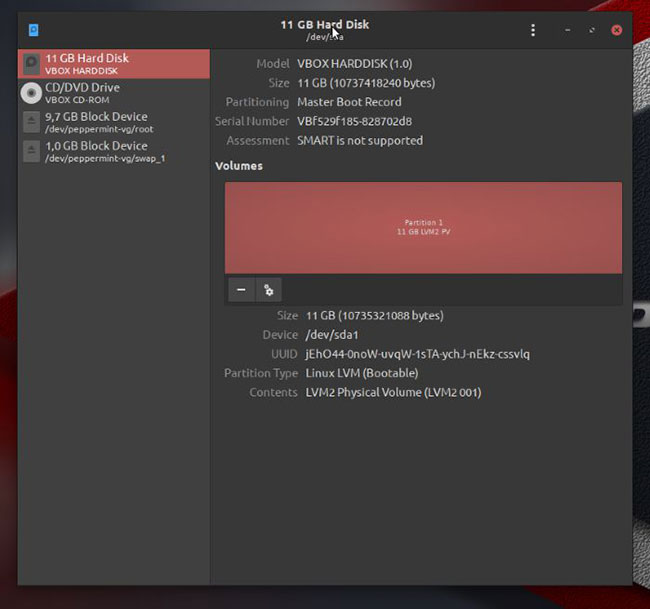
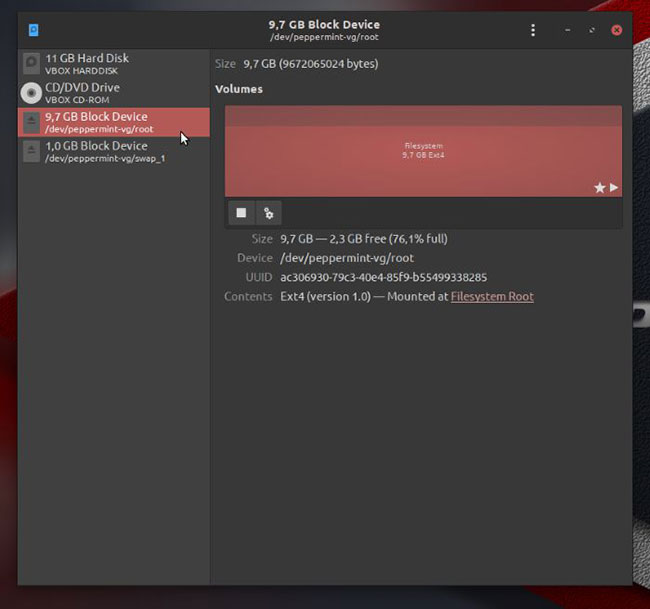
<p style="text-align: justify;">Ứng dụng này không giành được bất kỳ lợi thế nào xét về giao diện, nhưng thực hiện chính xác nhiệm vụ của mình - không hơn, không kém. Trong bảng điều khiển bên trái của cửa sổ, bạn có thể thấy danh sách tất cả các thiết bị lưu trữ được kết nối với máy tính. Chọn một trong số chúng sẽ cập nhật phần bên phải của màn hình, hiển thị trạng thái của thiết bị đã chọn, cũng như biểu diễn đồ họa cho nội dung của nó.</p>

<p style="text-align: justify;">Trong trường hợp ví dụ, bạn chỉ thấy một màu được sử dụng xuyên suốt, vì ổ cứng (ảo) trong trường hợp này tương đối nhỏ, do vậy, bài viết đã sử dụng nó dưới dạng một đối tượng duy nhất mà không tách thành các phân vùng riêng lẻ.</p>

<p style="text-align: justify;"><img alt="Chọn thứ để benchmark" data-i="1" data-src="https://st.quantrimang.com/photos/image/2019/11/11/benchmark-cac-thiet-bi-luu-tru-voi-gnome-disk-utility-2.jpg" data-was-processed="true" height="609" src="https://st.quantrimang.com/photos/image/2019/11/11/benchmark-cac-thiet-bi-luu-tru-voi-gnome-disk-utility-2.jpg" width="650" /></p>

<h2 id="mcetoc_1dpc46le42" style="text-align: justify;">Những hành động có thể thực hiện</h2>

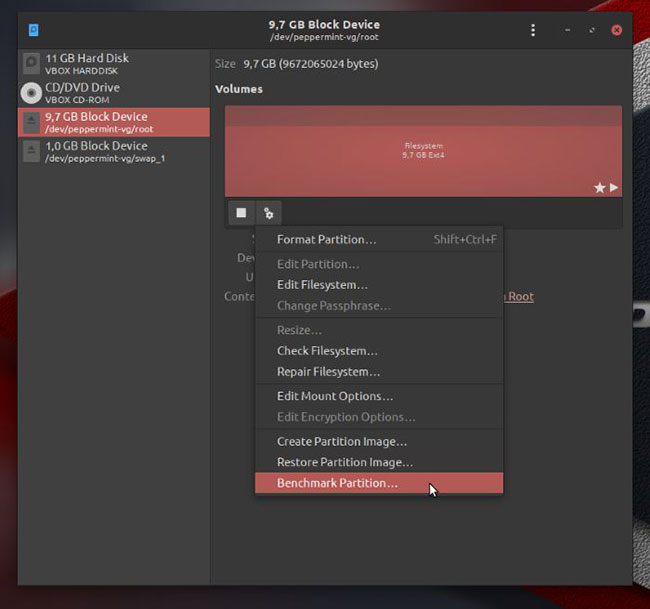
<p style="text-align: justify;">Khi đã chọn một thiết bị lưu trữ, nhấp chuột vào nút có hai bánh răng sẽ làm xuất hiện một menu các hành động bạn có thể thực hiện trên thiết bị. Bạn có thể xóa phân vùng, hoàn thành kiểm tra hoặc sửa chữa hệ thống file, lấy hoặc khôi phục bản sao lưu và benchmark phương tiện lưu trữ đã chọn.</p>

<p style="text-align: justify;"><img alt="Những hành động có thể thực hiện" data-i="2" data-src="https://st.quantrimang.com/photos/image/2019/11/11/benchmark-cac-thiet-bi-luu-tru-voi-gnome-disk-utility-3.jpg" data-was-processed="true" height="609" src="https://st.quantrimang.com/photos/image/2019/11/11/benchmark-cac-thiet-bi-luu-tru-voi-gnome-disk-utility-3.jpg" width="650" /></p>

<h2 id="mcetoc_1dpc46le43" style="text-align: justify;">Đồ thị trống</h2>

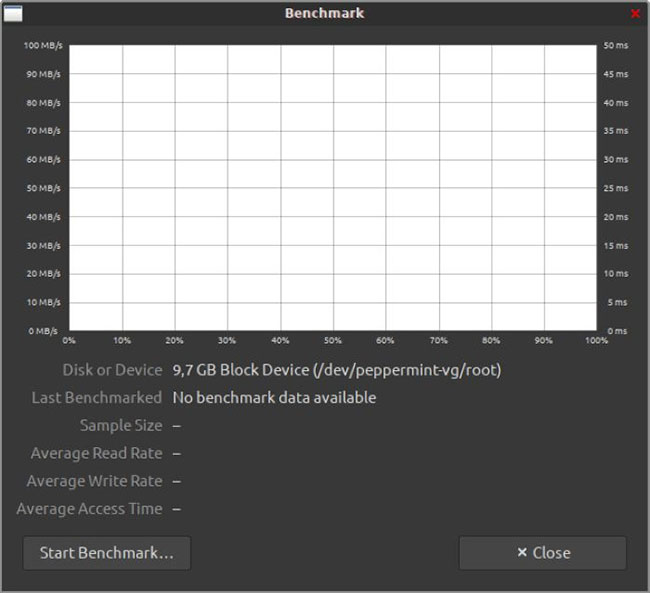
<p style="text-align: justify;">Sau khi quyết định muốn benchmark thiết bị nào đó, một cửa sổ mới sẽ xuất hiện trên màn hình và hiện tại, nó trống. Nhấp vào nút&nbsp;<strong>“Start Benchmark”</strong>&nbsp;để bắt đầu quá trình đo benchmark.</p>

<p style="text-align: justify;"><img alt="Nhấp vào nút “Start Benchmark” để bắt đầu quá trình đo benchmark" data-i="3" data-src="https://st.quantrimang.com/photos/image/2019/11/11/benchmark-cac-thiet-bi-luu-tru-voi-gnome-disk-utility-4.jpg" data-was-processed="true" height="593" src="https://st.quantrimang.com/photos/image/2019/11/11/benchmark-cac-thiet-bi-luu-tru-voi-gnome-disk-utility-4.jpg" width="650" /></p>

<div style="text-align: justify;">&nbsp;</div>

<h2 id="mcetoc_1dpc46le44" style="text-align: justify;">Để đạt được độ chính xác thì cần nhiều thời gian hơn</h2>

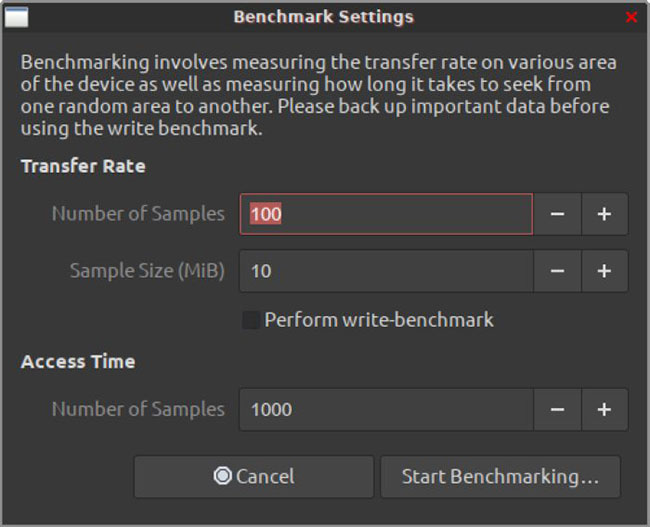
<p style="text-align: justify;">Trước khi Gnome Disk Utility bắt đầu đo hiệu năng của phương tiện lưu trữ, bạn cần xác định mức độ chi tiết mà bạn muốn quy trình thực hiện. Trong cửa sổ&nbsp;<strong>Benchmark Settings</strong>&nbsp;xuất hiện, bạn có thể tăng các giá trị để có kết quả chính xác hơn. Bạn càng muốn kết quả chính xác bao nhiêu, quá trình benchmark sẽ càng mất nhiều thời gian để hoàn thành hơn bấy nhiêu.</p>

<p style="text-align: justify;"><img alt="Để đạt được độ chính xác thì cần nhiều thời gian hơn" data-i="4" data-src="https://st.quantrimang.com/photos/image/2019/11/11/benchmark-cac-thiet-bi-luu-tru-voi-gnome-disk-utility-5.jpg" data-was-processed="true" height="527" src="https://st.quantrimang.com/photos/image/2019/11/11/benchmark-cac-thiet-bi-luu-tru-voi-gnome-disk-utility-5.jpg" width="650" /></p>

<h2 id="mcetoc_1dpc46le45" style="text-align: justify;">Việc ghi cần quyền truy cập độc quyền</h2>

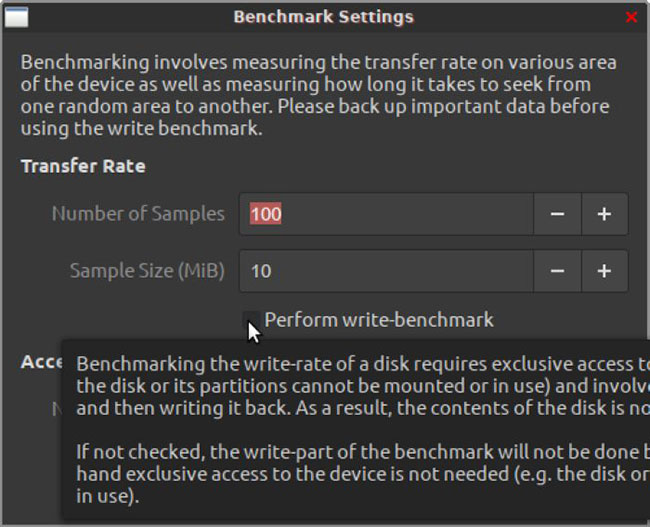
<p style="text-align: justify;">Quá trình đo lường hiệu suất chỉ đánh giá khả năng của thiết bị về mặt đọc dữ liệu. Để đo hiệu suất của thiết bị khi ghi, bạn cần kích hoạt tùy chọn&nbsp;<strong>“Perform write-benchmark”</strong>. Tuy nhiên, xin lưu ý rằng để ứng dụng ghi vào thiết bị đã chọn, nó không được mount trên hệ điều hành. Ứng dụng sẽ có thể giành được quyền “truy cập độc quyền” vào thiết bị để ghi khi làm việc.</p>

<p style="text-align: justify;">Điều đáng nói là không giống như các giải pháp tương tự, Gnome Disk Utility không ảnh hưởng đến nội dung của phương tiện lưu trữ trong quá trình kiểm tra việc ghi, vì vậy sử dụng công cụ này được coi là an toàn. Tất nhiên, luôn luôn nên giữ một bản sao lưu dữ liệu gần đây, đặc biệt là trước khi bất kỳ quy trình nào hoạt động theo mọi cách trên phương tiện lưu trữ.</p>

<p style="text-align: justify;"><img alt="Việc ghi cần quyền truy cập độc quyền" data-i="5" data-src="https://st.quantrimang.com/photos/image/2019/11/11/benchmark-cac-thiet-bi-luu-tru-voi-gnome-disk-utility-6.jpg" data-was-processed="true" height="527" src="https://st.quantrimang.com/photos/image/2019/11/11/benchmark-cac-thiet-bi-luu-tru-voi-gnome-disk-utility-6.jpg" width="650" /></p>

<h2 id="mcetoc_1dpc46le46" style="text-align: justify;">Có thể mất một lúc để hoàn thành</h2>

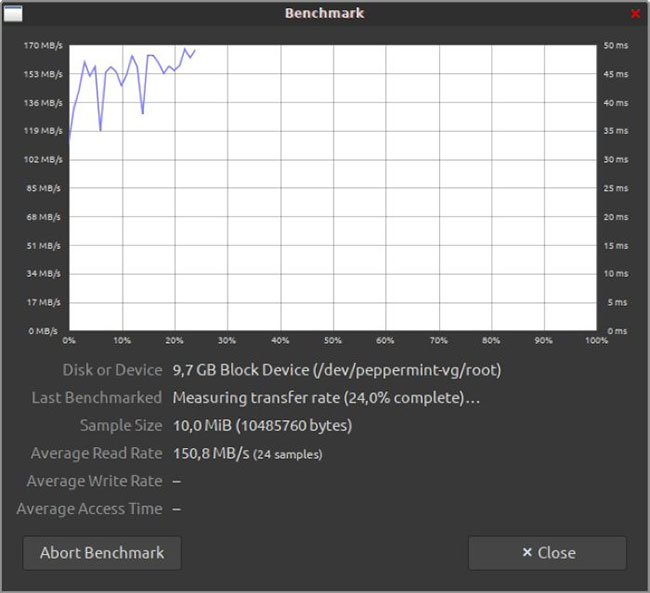
<p style="text-align: justify;">Lưu ý rằng để ứng dụng truy cập vào một thiết bị và đo lường hiệu suất của nó, bạn sẽ được nhắc cấp cho nó quyền truy cập root. Ngay sau khi nhập mật khẩu, Gnome Disk Utility sẽ bắt đầu làm mới cửa sổ mà bạn đã thấy trước đó với biểu diễn đồ họa và thông tin bổ sung về hiệu suất của phương tiện lưu trữ.</p>

<p style="text-align: justify;">Nếu bạn đã nhập các giá trị quá cao liên quan đến số lượng mẫu Gnome Disk Utility sẽ tính đến hoặc đang benchmark hiệu năng của một ổ cứng “khổng lồ”, quá trình này có thể mất nhiều thời gian (nhiều trường hợp lên tới vài giờ). Thông thường, nếu phương tiện lưu trữ không có vấn đề về phần cứng, bạn không phải đợi quá lâu để có cái nhìn tổng quát về hiệu suất của nó. Một vài phút là quá đủ để cung cấp các giá trị trung bình với độ tin cậy ở mức tương đối.</p>

<p style="text-align: justify;"><img alt="Có thể mất một lúc để hoàn thành" data-i="6" data-src="https://st.quantrimang.com/photos/image/2019/11/11/benchmark-cac-thiet-bi-luu-tru-voi-gnome-disk-utility-7.jpg" data-was-processed="true" height="593" src="https://st.quantrimang.com/photos/image/2019/11/11/benchmark-cac-thiet-bi-luu-tru-voi-gnome-disk-utility-7.jpg" width="650" /></p>

<h2 id="mcetoc_1dpc46le47" style="text-align: justify;">Đừng trì hoãn việc hủy bỏ!</h2>

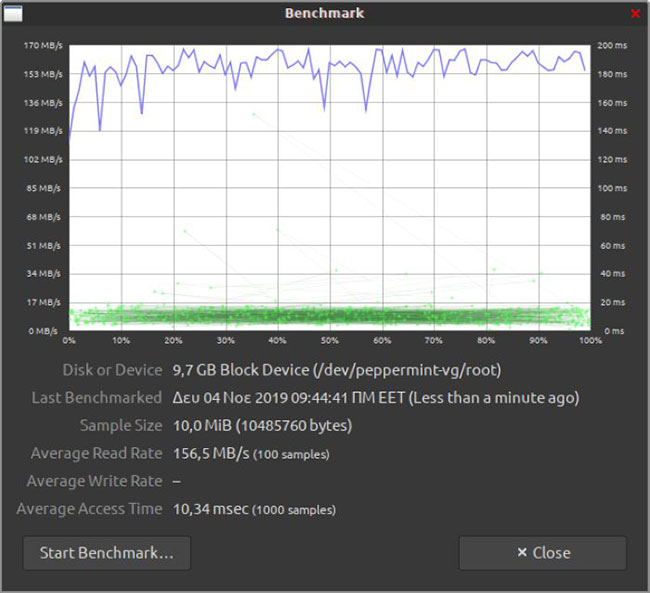
<p style="text-align: justify;">Tuy nhiên, thật không may, ứng dụng hoàn thành các phép đo lần lượt, vì nếu cố gắng đo nhiều thứ khác nhau đồng thời, điều đó sẽ ảnh hưởng đến hiệu suất của thiết bị lưu trữ. Nghĩa là nếu bạn nhấp vào các nút&nbsp;<strong>“Abort Benchmark”</strong>&nbsp;hoặc&nbsp;<strong>“Close”</strong>&nbsp;ở cuối cửa sổ trước khi chương trình hoàn tất quy trình, bạn sẽ có được cái nhìn tổng quan về chỉ số hiệu suất đầu tiên:&nbsp;<strong>Average Read Rate.</strong></p>

<p style="text-align: justify;">Để có cái nhìn toàn diện hơn về hiệu suất của thiết bị, bạn nên đợi hoặc, nếu thủ tục mất quá nhiều thời gian, hãy hủy bỏ nó, quay lại và giảm các giá trị xác định mức độ chi tiết của quy trình benchmark, sau đó khởi động lại quy trình.</p>

<p style="text-align: justify;"><img alt="Đừng trì hoãn việc hủy bỏ!" data-i="7" data-src="https://st.quantrimang.com/photos/image/2019/11/11/benchmark-cac-thiet-bi-luu-tru-voi-gnome-disk-utility-8.jpg" data-was-processed="true" height="593" src="https://st.quantrimang.com/photos/image/2019/11/11/benchmark-cac-thiet-bi-luu-tru-voi-gnome-disk-utility-8.jpg" width="650" /></p>

<p style="text-align: justify;">Bằng cách này, bạn sẽ nhận được cả 2 giá trị&nbsp;<strong>Average Access Time</strong>&nbsp;và<strong>&nbsp;Average Write Rate</strong>, nếu bạn đã bật tùy chọn để thực hiện benchmark việc ghi.</p>
		</div>
				<div id="author">
						<p>
				<strong>Nguồn tin:</strong>
				Quantrimang.com
			</p>
		</div>
	</div>
	<div id="footer" class="clearfix">
		<div id="url">
			<strong>URL của bản tin này: </strong><a href="https://www.nguoicodonvn2008.info/vi/news/savefile/kien-thuc-may-tinh/cach-benchmark-cac-thiet-bi-luu-tru-voi-gnome-disk-utility-1315.html" title="Cách benchmark các thiết bị lưu trữ với Gnome Disk Utility">https://www.nguoicodonvn2008.info/vi/news/savefile/kien-thuc-may-tinh/cach-benchmark-cac-thiet-bi-luu-tru-voi-gnome-disk-utility-1315.html</a>

		</div>
		<div class="clear"></div>
		<div class="copyright">
			&copy; .&#x3A; Nguoicodonvn2008.info - Cõi lòng người cô đơn &#x3A;.
		</div>
		<div id="contact">
			<a href="mailto:admin@nguoicodonvn2008.info">admin@nguoicodonvn2008.info</a>
		</div>
	</div>
</div>
        <div id="timeoutsess" class="chromeframe">
            Bạn đã không sử dụng Site, <a onclick="timeoutsesscancel();" href="https://www.nguoicodonvn2008.info/#">Bấm vào đây để duy trì trạng thái đăng nhập</a>. Thời gian chờ: <span id="secField"> 60 </span> giây
        </div>
        <div id="openidResult" class="nv-alert" style="display:none"></div>
        <div id="openidBt" data-result="" data-redirect=""></div>
		</script>
		<div class="car-top">
  <span><img src="https://www.nguoicodonvn2008.info/themes/default/images/car.png" alt=""></span>
</div>
<script src="https://www.nguoicodonvn2008.info/assets/js/jquery/jquery.min.js"></script>
<script>var nv_base_siteurl="/",nv_lang_data="vi",nv_lang_interface="vi",nv_name_variable="nv",nv_fc_variable="op",nv_lang_variable="language",nv_module_name="news",nv_func_name="savefile",nv_is_user=0, nv_my_ofs=-4,nv_my_abbr="EDT",nv_cookie_prefix="nv4c_e856T",nv_check_pass_mstime=1738000,nv_area_admin=0,nv_safemode=0,theme_responsive=0,nv_recaptcha_ver=2,nv_recaptcha_sitekey="",nv_recaptcha_type="image",XSSsanitize=1;</script>
<script src="https://www.nguoicodonvn2008.info/assets/js/language/vi.js"></script>
<script src="https://www.nguoicodonvn2008.info/assets/js/DOMPurify/purify3.js"></script>
<script src="https://www.nguoicodonvn2008.info/assets/js/global.js"></script>
<script src="https://www.nguoicodonvn2008.info/assets/js/site.js"></script>
<script src="https://www.nguoicodonvn2008.info/themes/default/js/news.js"></script>
<script src="https://www.nguoicodonvn2008.info/themes/default/js/main.js"></script>
<script src="https://www.nguoicodonvn2008.info/themes/default/js/custom.js"></script>
<script type="application/ld+json">
        {
            "@context": "https://schema.org",
            "@type": "Organization",
            "url": "https://www.nguoicodonvn2008.info",
            "logo": "https://www.nguoicodonvn2008.info/uploads/angel.gif"
        }
        </script>
<script src="https://www.nguoicodonvn2008.info/themes/default/js/bootstrap.min.js"></script>
<script type="text/javascript">
var $scrolltop = $('.car-top');
$scrolltop.on('click', function () {
    $('html,body').animate({
        scrollTop: 0
    }, 800);
    $(this).addClass("car-run");
    setTimeout(function(){ $scrolltop.removeClass('car-run');}, 1000);
    return false;
});
$(window).on('scroll', function ()
{ 
    if($(window).scrollTop() >= 200)
    {
        $scrolltop.addClass("show");
        $scrolltop.addClass("car-down");
    }
    else
    {
       $scrolltop.removeClass("show");
       setTimeout(function(){ $scrolltop.removeClass('car-down');}, 300);
    }
});
</script>
</body>
</html>