<!DOCTYPE html>
    <html lang="vi" xmlns="http://www.w3.org/1999/xhtml" prefix="og: http://ogp.me/ns#">
    <head>
<title>Cách bật tính năng Dynamic Transparency trên Ubuntu</title>
<meta name="description" content="Cách bật tính năng Dynamic Transparency trên Ubuntu - Savefile - Tin Tức -...">
<meta name="author" content=".: Nguoicodonvn2008.info - Cõi lòng người cô đơn :.">
<meta name="copyright" content=".: Nguoicodonvn2008.info - Cõi lòng người cô đơn :. [admin@nguoicodonvn2008.info]">
<meta name="robots" content="index, archive, follow, noodp">
<meta name="googlebot" content="index,archive,follow,noodp">
<meta name="msnbot" content="all,index,follow">
<meta name="generator" content="NukeViet v4.5">
<meta http-equiv="Content-Type" content="text/html; charset=utf-8">
<meta property="og:title" content="Cách bật tính năng Dynamic Transparency trên Ubuntu">
<meta property="og:type" content="website">
<meta property="og:description" content="Savefile - Tin Tức - https&#x3A;&#x002F;&#x002F;www.nguoicodonvn2008.info&#x002F;vi&#x002F;news&#x002F;savefile&#x002F;kien-thuc-may-tinh&#x002F;cach-bat-tinh-nang-dynamic-transparency-tren-ubuntu-103.html">
<meta property="og:site_name" content=".&#x3A; Nguoicodonvn2008.info - Cõi lòng người cô đơn &#x3A;.">
<meta property="og:url" content="https://www.nguoicodonvn2008.info/vi/news/savefile/kien-thuc-may-tinh/cach-bat-tinh-nang-dynamic-transparency-tren-ubuntu-103.html">
<link rel="shortcut icon" href="https://www.nguoicodonvn2008.info/favicon.ico">
<link rel="canonical" href="https://www.nguoicodonvn2008.info/vi/news/savefile/kien-thuc-may-tinh/cach-bat-tinh-nang-dynamic-transparency-tren-ubuntu-103.html">
<link rel="alternate" href="https://www.nguoicodonvn2008.info/vi/news/rss/" title="Tin Tức" type="application/rss+xml">
<link rel="alternate" href="https://www.nguoicodonvn2008.info/vi/news/rss/karaoke-dual/" title="Tin Tức - Karaoke Dual" type="application/rss+xml">
<link rel="alternate" href="https://www.nguoicodonvn2008.info/vi/news/rss/nhac-tre/" title="Tin Tức - Nhạc trẻ" type="application/rss+xml">
<link rel="alternate" href="https://www.nguoicodonvn2008.info/vi/news/rss/tru-tinh/" title="Tin Tức - Trữ tình" type="application/rss+xml">
<link rel="alternate" href="https://www.nguoicodonvn2008.info/vi/news/rss/nuoc-ngoai/" title="Tin Tức - Nước ngoài" type="application/rss+xml">
<link rel="alternate" href="https://www.nguoicodonvn2008.info/vi/news/rss/remix/" title="Tin Tức - Remix" type="application/rss+xml">
<link rel="alternate" href="https://www.nguoicodonvn2008.info/vi/news/rss/tam-su-tinh-yeu/" title="Tin Tức - Tâm sự tình yêu" type="application/rss+xml">
<link rel="alternate" href="https://www.nguoicodonvn2008.info/vi/news/rss/tho-suu-tam/" title="Tin Tức - Thơ sưu tầm" type="application/rss+xml">
<link rel="alternate" href="https://www.nguoicodonvn2008.info/vi/news/rss/cuoc-song/" title="Tin Tức - Cuộc sống" type="application/rss+xml">
<link rel="alternate" href="https://www.nguoicodonvn2008.info/vi/news/rss/phan-mem/" title="Tin Tức - Phần mềm" type="application/rss+xml">
<link rel="alternate" href="https://www.nguoicodonvn2008.info/vi/news/rss/kien-thuc-may-tinh/" title="Tin Tức - Kiến thức máy tính" type="application/rss+xml">
<link rel="alternate" href="https://www.nguoicodonvn2008.info/vi/news/rss/hoc-tap/" title="Tin Tức - Học tập" type="application/rss+xml">
<link rel="alternate" href="https://www.nguoicodonvn2008.info/vi/news/rss/tai-lieu/" title="Tin Tức - Tài liệu" type="application/rss+xml">
<link rel="alternate" href="https://www.nguoicodonvn2008.info/vi/news/rss/de-thi/" title="Tin Tức - Đề thi" type="application/rss+xml">
<link rel="preload" as="style" href="https://www.nguoicodonvn2008.info/assets/css/font-awesome.min.css" type="text/css">
<link rel="preload" as="style" href="https://www.nguoicodonvn2008.info/themes/default/css/bootstrap.non-responsive.css" type="text/css">
<link rel="preload" as="style" href="https://www.nguoicodonvn2008.info/themes/default/css/style.css" type="text/css">
<link rel="preload" as="style" href="https://www.nguoicodonvn2008.info/themes/default/css/style.non-responsive.css" type="text/css">
<link rel="preload" as="style" href="https://www.nguoicodonvn2008.info/themes/default/css/news.css" type="text/css">
<link rel="preload" as="style" href="https://www.nguoicodonvn2008.info/themes/default/css/custom.css" type="text/css">
<link rel="preload" as="script" href="https://www.nguoicodonvn2008.info/assets/js/jquery/jquery.min.js" type="text/javascript">
<link rel="preload" as="script" href="https://www.nguoicodonvn2008.info/assets/js/language/vi.js" type="text/javascript">
<link rel="preload" as="script" href="https://www.nguoicodonvn2008.info/assets/js/DOMPurify/purify3.js" type="text/javascript">
<link rel="preload" as="script" href="https://www.nguoicodonvn2008.info/assets/js/global.js" type="text/javascript">
<link rel="preload" as="script" href="https://www.nguoicodonvn2008.info/assets/js/site.js" type="text/javascript">
<link rel="preload" as="script" href="https://www.nguoicodonvn2008.info/themes/default/js/news.js" type="text/javascript">
<link rel="preload" as="script" href="https://www.nguoicodonvn2008.info/themes/default/js/main.js" type="text/javascript">
<link rel="preload" as="script" href="https://www.nguoicodonvn2008.info/themes/default/js/custom.js" type="text/javascript">
<link rel="preload" as="script" href="https://www.nguoicodonvn2008.info/themes/default/js/bootstrap.min.js" type="text/javascript">
<link rel="stylesheet" href="https://www.nguoicodonvn2008.info/assets/css/font-awesome.min.css">
<link rel="stylesheet" href="https://www.nguoicodonvn2008.info/themes/default/css/bootstrap.non-responsive.css">
<link rel="stylesheet" href="https://www.nguoicodonvn2008.info/themes/default/css/style.css">
<link rel="stylesheet" href="https://www.nguoicodonvn2008.info/themes/default/css/style.non-responsive.css">
<link rel="StyleSheet" href="https://www.nguoicodonvn2008.info/themes/default/css/news.css">
<link rel="stylesheet" href="https://www.nguoicodonvn2008.info/themes/default/css/custom.css">
<style type="text/css">
	body{background: #fff;}
</style>
    </head>
    <body>
<div id="print">
	<div id="hd_print">
		<h2 class="pull-left">.&#x3A; Nguoicodonvn2008.info - Cõi lòng người cô đơn &#x3A;.</h2>
		<p class="pull-right"><a title=".&#x3A; Nguoicodonvn2008.info - Cõi lòng người cô đơn &#x3A;." href="https://www.nguoicodonvn2008.info/">https://www.nguoicodonvn2008.info</a></p>
	</div>
	<div class="clear"></div>
	<hr />
	<div id="content">
		<h1>Cách bật tính năng Dynamic Transparency trên Ubuntu</h1>
		<ul class="list-inline">
			<li>Thứ hai - 17/06/2019 01:14</li>
			<li class="hidden-print txtrequired"><em class="fa fa-print">&nbsp;</em><a title="In ra" href="javascript:;" onclick="window.print()">In ra</a></li>
			<li class="hidden-print txtrequired"><em class="fa fa-power-off">&nbsp;</em><a title="Đóng cửa sổ này" href="javascript:;" onclick="window.close()">Đóng cửa sổ này</a></li>
		</ul>
		<div class="clear"></div>
		<div id="hometext">
		</div>
				<div class="imghome">
			<img alt="Cách bật tính năng Dynamic Transparency trên Ubuntu" src="https://st.quantrimang.com/photos/image/2019/06/14/bat-dynamic-transparency-tren-ubuntu-7.jpg" width="460" class="img-thumbnail" />
		</div>
		<div class="clear"></div>
		<div id="bodytext" class="clearfix">
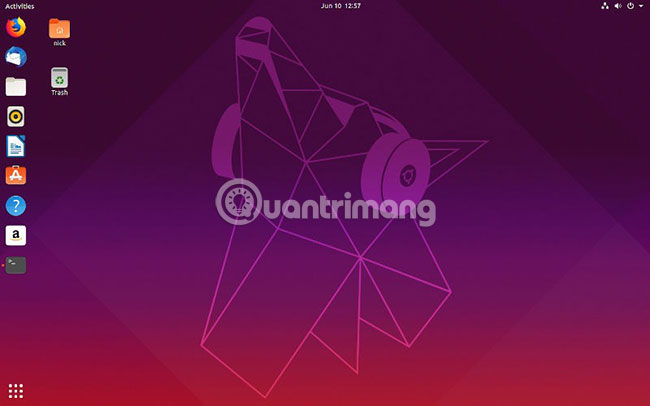
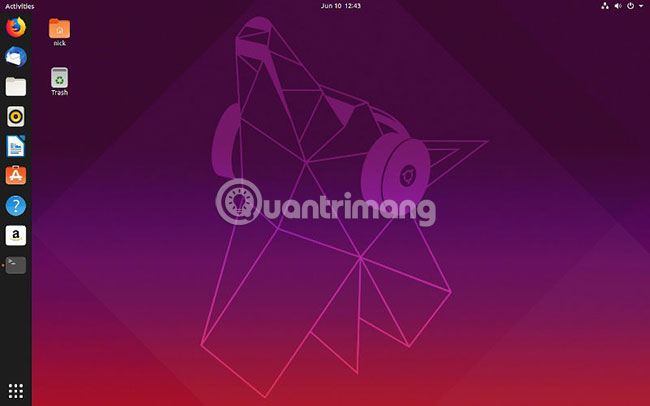
			<p>Với việc phát hành GNOME 3.22, các nhà phát triển đã loại bỏ tính năng Dynamic Transparency (trong suốt động) khỏi top bar. Trước đây, top bar của GNOME trên&nbsp;<a href="https://quantrimang.com/meo-va-thu-thuat-sau-khi-cai-dat-ubuntu-84487" title="Mẹo và thủ thuật sau khi cài đặt Ubuntu">Ubuntu</a>hầu như trong suốt, làm cho môi trường desktop, đặc biệt là trên các bản phân phối như Ubuntu, gọn gàng và ít lộn xộn hơn, khiến chúng được người dùng yêu thích. Rất tiếc là cho tới thời điểm hiện tại, vẫn chưa có bất kỳ kế hoạch cụ thể nào để đưa tính năng này trở lại.</p>

<p><img alt="Dynamic Transparency (trong suốt động) khỏi top bar" data-i="0" data-src="https://st.quantrimang.com/photos/image/2019/06/14/bat-dynamic-transparency-tren-ubuntu-1.jpg" height="281" src="https://st.quantrimang.com/photos/image/2019/06/14/bat-dynamic-transparency-tren-ubuntu-1.jpg" width="450" /></p>

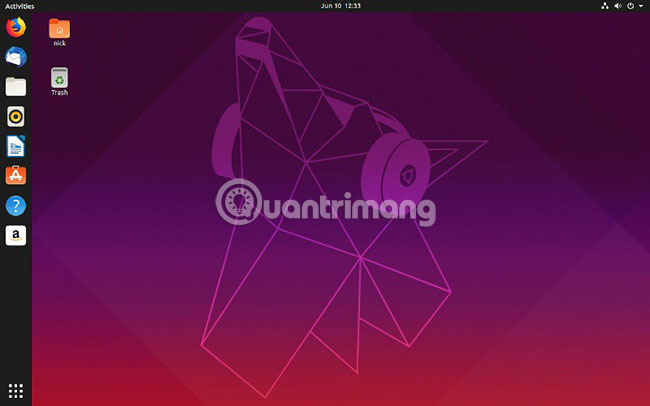
<p>Rất may, các nhà phát triển tiện ích mở rộng GNOME đã hành động để mang tính năng Dynamic Transparency quay trở lại. Vì vậy, việc có lại Dynamic Transparency trên Ubuntu 19.04 thật dễ dàng.</p>

<h2>Cài đặt tiện ích mở rộng Firefox</h2>

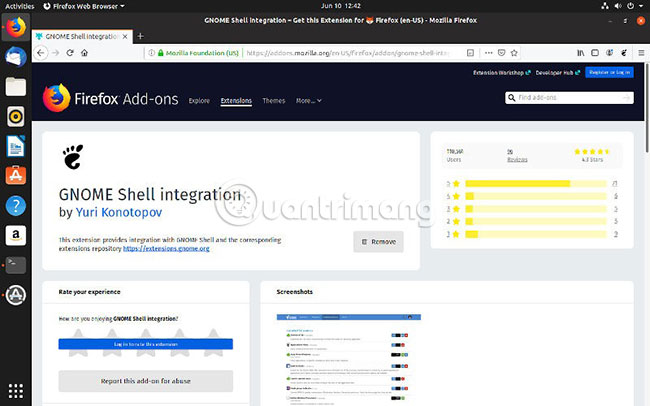
<p><img alt="Cài đặt tiện ích mở rộng Firefox" data-i="1" data-src="https://st.quantrimang.com/photos/image/2019/06/14/bat-dynamic-transparency-tren-ubuntu-2.jpg" height="281" src="https://st.quantrimang.com/photos/image/2019/06/14/bat-dynamic-transparency-tren-ubuntu-2.jpg" width="450" /></p>

<p>Để bắt đầu, bạn sẽ cần một gói cho phép tiện ích mở rộng Firefox hoạt động. Việc thiết lập có vẻ phức tạp, nhưng bạn sẽ chỉ phải thực hiện chúng một lần duy nhất. Bên cạnh đó, sự kết hợp giữa tiện ích mở rộng Firefox và gói này sẽ cho phép bạn tải xuống bất kỳ tiện ích mở rộng GNOME nào và kích hoạt nó ngay từ web.</p>

<p>Đầu tiên, hãy cài đặt gói.</p>

<pre id="pre0">
<code>sudo apt install chrome-gnome-shell</code></pre>

<p>Chuyển đến&nbsp;trang add-on GNOME Shell Integration của Firefox&nbsp;và thêm nó vào Firefox.</p>

<h2>Cài đặt tiện ích mở rộng GNOME</h2>

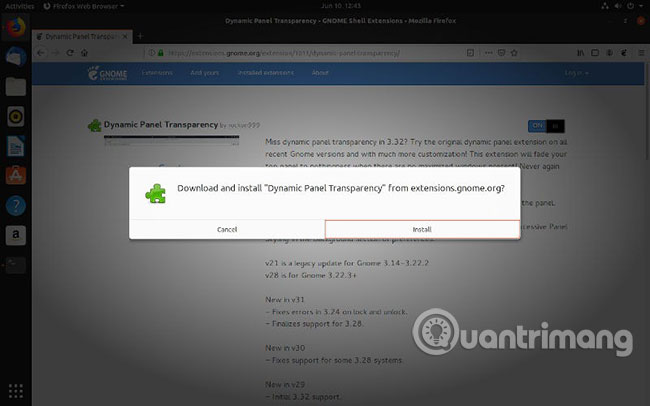
<p>Bạn đã sẵn sàng để cài đặt tiện ích mở rộng GNOME. Truy cập&nbsp;<a href="https://quantrimang.com/url?q=aHR0cHM6Ly9leHRlbnNpb25zLmdub21lLm9yZy9leHRlbnNpb24vMTAxMS9keW5hbWljLXBhbmVsLXRyYW5zcGFyZW5jeS8%3D" rel="nofollow noopener" target="_blank" title="Trang tiện ích mở rộng Dynamic Panel Transparency của GNOME">trang tiện ích mở rộng Dynamic Panel Transparency của GNOME</a>. Bạn sẽ thấy một công tắc bật tắt ở góc trên bên phải của trang. Hãy chuyển đổi nó để kích hoạt tính năng Dynamic Transparency trên hệ thống.</p>

<p><img alt="Chuyển đổi công tắc bật tắt ở góc trên bên phải của trang" data-i="2" data-src="https://st.quantrimang.com/photos/image/2019/06/14/bat-dynamic-transparency-tren-ubuntu-3.jpg" height="344" src="https://st.quantrimang.com/photos/image/2019/06/14/bat-dynamic-transparency-tren-ubuntu-3.jpg" width="550" /></p>

<p>Đợi vài giây để tải xuống và thiết lập tiện ích mở rộng. Sau khi thực hiện xong, hãy kiểm tra nó. Thu nhỏ tất cả các cửa sổ của bạn và xem xét desktop. Top panel (bảng điều khiển trên cùng) có bán trong suốt không? Nếu câu trả lời là có thì nghĩa là tiện ích mở rộng đang hoạt động. Hãy thử kéo một cửa sổ lên trên cùng. Nếu top panel bị mờ, thì mọi thứ đều hoạt động bình thường và bạn đã có tính năng Dynamic Transparency trên hệ thống.</p>

<p><img alt="Dynamic Transparency đã trở lại hệ thống" data-i="3" data-src="https://st.quantrimang.com/photos/image/2019/06/14/bat-dynamic-transparency-tren-ubuntu-4.jpg" height="344" src="https://st.quantrimang.com/photos/image/2019/06/14/bat-dynamic-transparency-tren-ubuntu-4.jpg" width="550" /></p>

<h2>Làm cho thanh Dock trong suốt</h2>

<p>Sau khi thấy desktop trông đẹp hơn nhiều với độ trong suốt của top panel, bạn có thể muốn làm điều tương tự với thanh dock. Đây thực sự không phải là một giải pháp siêu tiện lợi cho vấn đề này, nhưng nó chắc chắn không khó thực hiện. Đầu tiên, hãy cài đặt&nbsp;<strong>dconf</strong>&nbsp;để có thể chỉnh sửa cấu hình GNOME.</p>

<pre id="pre1">
<code>sudo apt install dconf-editor</code></pre>

<p>Sau đó, mở&nbsp;<strong>dconf-editor.</strong>&nbsp;Đây là một ứng dụng đồ họa và bạn có thể tìm kiếm nó. Ngay khi mở ra, bạn sẽ thấy một cảnh báo rằng bạn có thể dễ dàng làm hỏng mọi thứ. Hãy xác nhận để tiếp tục.</p>

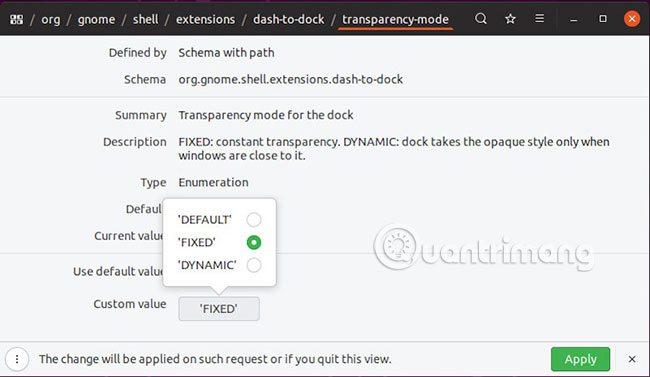
<p>Điều hướng qua menu bằng cách nhấp vào&nbsp;<strong>org &gt; gnome &gt; shell &gt; extensions &gt; dash-to-dock</strong>. Trong phần cài đặt dock của Ubuntu, cuộn xuống cho đến khi bạn thấy tùy chọn&nbsp;<strong>transparency-mode.</strong>&nbsp;Hãy chọn nó.</p>

<p><img alt="Chọn transparency-mode" data-i="4" data-src="https://st.quantrimang.com/photos/image/2019/06/14/bat-dynamic-transparency-tren-ubuntu-5.jpg" height="377" src="https://st.quantrimang.com/photos/image/2019/06/14/bat-dynamic-transparency-tren-ubuntu-5.jpg" width="650" /></p>

<p>Trên trang cài đặt, tắt&nbsp;<strong>Use default value</strong>. Hãy đặt giá trị tùy chỉnh thành&nbsp;<strong>FIXED</strong>&nbsp;và nhấn&nbsp;<strong>Apply.</strong></p>

<p><strong><img alt="Nhấn Apply" data-i="5" data-src="https://st.quantrimang.com/photos/image/2019/06/14/bat-dynamic-transparency-tren-ubuntu-6.jpg" height="320" src="https://st.quantrimang.com/photos/image/2019/06/14/bat-dynamic-transparency-tren-ubuntu-6.jpg" width="550" /></strong></p>

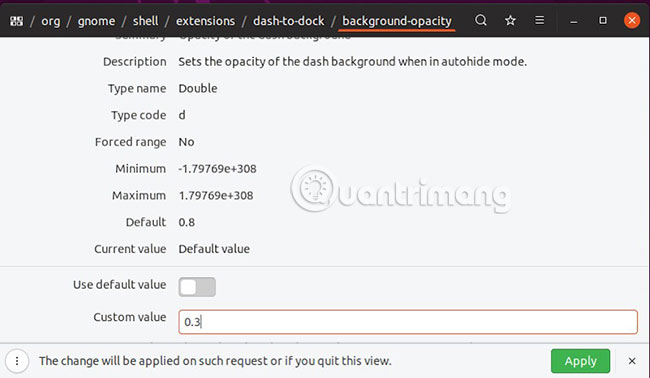
<p>Quay trở lại cài đặt&nbsp;<strong>dash-to-dock.</strong>&nbsp;Chọn&nbsp;<strong>background-opacity.</strong>&nbsp;Một lần nữa, vô hiệu hóa tùy chọn&nbsp;<strong>Use default value</strong>&nbsp;và đặt giá trị độ trong suốt bạn muốn.&nbsp;<strong>1.0</strong>&nbsp;là mờ.&nbsp;<strong>0.0</strong>&nbsp;là hoàn toàn trong suốt. Khi đã hoàn tất, hãy nhấn vào&nbsp;<strong>Apply.</strong></p>

<p><strong><img alt="Đặt giá trị cho độ trong suốt" data-i="6" data-src="https://st.quantrimang.com/photos/image/2019/06/14/bat-dynamic-transparency-tren-ubuntu-7.jpg" height="344" src="https://st.quantrimang.com/photos/image/2019/06/14/bat-dynamic-transparency-tren-ubuntu-7.jpg" width="550" /></strong></p>

<p>Mọi việc đã hoàn tất! Desktop của bạn bây giờ đã có lại tính năng Dynamic Transparency và bạn có thể điều chỉnh độ trong suốt của thanh dock theo ý muốn. Những phương pháp này sẽ hoạt động tốt trong một thời gian dài. Các nhà phát triển GNOME có thể đưa ra cách triển khai Dynamic Transparency theo cách riêng một lần nữa, nhưng tính năng này có lẽ sẽ không xuất hiện trên Ubuntu trong một thời gian nữa.</p>

<p>Chúc bạn thực hiện thành công!</p>
		</div>
				<div id="author">
						<p>
				<strong>Nguồn tin:</strong>
				Quantrimang.com
			</p>
		</div>
	</div>
	<div id="footer" class="clearfix">
		<div id="url">
			<strong>URL của bản tin này: </strong><a href="https://www.nguoicodonvn2008.info/vi/news/savefile/kien-thuc-may-tinh/cach-bat-tinh-nang-dynamic-transparency-tren-ubuntu-103.html" title="Cách bật tính năng Dynamic Transparency trên Ubuntu">https://www.nguoicodonvn2008.info/vi/news/savefile/kien-thuc-may-tinh/cach-bat-tinh-nang-dynamic-transparency-tren-ubuntu-103.html</a>

		</div>
		<div class="clear"></div>
		<div class="copyright">
			&copy; .&#x3A; Nguoicodonvn2008.info - Cõi lòng người cô đơn &#x3A;.
		</div>
		<div id="contact">
			<a href="mailto:admin@nguoicodonvn2008.info">admin@nguoicodonvn2008.info</a>
		</div>
	</div>
</div>
        <div id="timeoutsess" class="chromeframe">
            Bạn đã không sử dụng Site, <a onclick="timeoutsesscancel();" href="https://www.nguoicodonvn2008.info/#">Bấm vào đây để duy trì trạng thái đăng nhập</a>. Thời gian chờ: <span id="secField"> 60 </span> giây
        </div>
        <div id="openidResult" class="nv-alert" style="display:none"></div>
        <div id="openidBt" data-result="" data-redirect=""></div>
		</script>
		<div class="car-top">
  <span><img src="https://www.nguoicodonvn2008.info/themes/default/images/car.png" alt=""></span>
</div>
<script src="https://www.nguoicodonvn2008.info/assets/js/jquery/jquery.min.js"></script>
<script>var nv_base_siteurl="/",nv_lang_data="vi",nv_lang_interface="vi",nv_name_variable="nv",nv_fc_variable="op",nv_lang_variable="language",nv_module_name="news",nv_func_name="savefile",nv_is_user=0, nv_my_ofs=-4,nv_my_abbr="EDT",nv_cookie_prefix="nv4c_e856T",nv_check_pass_mstime=1738000,nv_area_admin=0,nv_safemode=0,theme_responsive=0,nv_recaptcha_ver=2,nv_recaptcha_sitekey="",nv_recaptcha_type="image",XSSsanitize=1;</script>
<script src="https://www.nguoicodonvn2008.info/assets/js/language/vi.js"></script>
<script src="https://www.nguoicodonvn2008.info/assets/js/DOMPurify/purify3.js"></script>
<script src="https://www.nguoicodonvn2008.info/assets/js/global.js"></script>
<script src="https://www.nguoicodonvn2008.info/assets/js/site.js"></script>
<script src="https://www.nguoicodonvn2008.info/themes/default/js/news.js"></script>
<script src="https://www.nguoicodonvn2008.info/themes/default/js/main.js"></script>
<script src="https://www.nguoicodonvn2008.info/themes/default/js/custom.js"></script>
<script type="application/ld+json">
        {
            "@context": "https://schema.org",
            "@type": "Organization",
            "url": "https://www.nguoicodonvn2008.info",
            "logo": "https://www.nguoicodonvn2008.info/uploads/angel.gif"
        }
        </script>
<script src="https://www.nguoicodonvn2008.info/themes/default/js/bootstrap.min.js"></script>
<script type="text/javascript">
var $scrolltop = $('.car-top');
$scrolltop.on('click', function () {
    $('html,body').animate({
        scrollTop: 0
    }, 800);
    $(this).addClass("car-run");
    setTimeout(function(){ $scrolltop.removeClass('car-run');}, 1000);
    return false;
});
$(window).on('scroll', function ()
{ 
    if($(window).scrollTop() >= 200)
    {
        $scrolltop.addClass("show");
        $scrolltop.addClass("car-down");
    }
    else
    {
       $scrolltop.removeClass("show");
       setTimeout(function(){ $scrolltop.removeClass('car-down');}, 300);
    }
});
</script>
</body>
</html>