<!DOCTYPE html>
    <html lang="vi" xmlns="http://www.w3.org/1999/xhtml" prefix="og: http://ogp.me/ns#">
    <head>
<title>Cách bật tính năng bảo vệ Core isolation trên Windows 10</title>
<meta name="description" content="Cách bật tính năng bảo vệ Core isolation trên Windows 10 - Savefile - Tin Tức -...">
<meta name="author" content=".: Nguoicodonvn2008.info - Cõi lòng người cô đơn :.">
<meta name="copyright" content=".: Nguoicodonvn2008.info - Cõi lòng người cô đơn :. [admin@nguoicodonvn2008.info]">
<meta name="robots" content="index, archive, follow, noodp">
<meta name="googlebot" content="index,archive,follow,noodp">
<meta name="msnbot" content="all,index,follow">
<meta name="generator" content="NukeViet v4.5">
<meta http-equiv="Content-Type" content="text/html; charset=utf-8">
<meta property="og:title" content="Cách bật tính năng bảo vệ Core isolation trên Windows 10">
<meta property="og:type" content="website">
<meta property="og:description" content="Savefile - Tin Tức - https&#x3A;&#x002F;&#x002F;www.nguoicodonvn2008.info&#x002F;vi&#x002F;news&#x002F;savefile&#x002F;kien-thuc-may-tinh&#x002F;cach-bat-tinh-nang-bao-ve-core-isolation-tren-windows-10-2613.html">
<meta property="og:site_name" content=".&#x3A; Nguoicodonvn2008.info - Cõi lòng người cô đơn &#x3A;.">
<meta property="og:url" content="https://www.nguoicodonvn2008.info/vi/news/savefile/kien-thuc-may-tinh/cach-bat-tinh-nang-bao-ve-core-isolation-tren-windows-10-2613.html">
<link rel="shortcut icon" href="https://www.nguoicodonvn2008.info/favicon.ico">
<link rel="canonical" href="https://www.nguoicodonvn2008.info/vi/news/savefile/kien-thuc-may-tinh/cach-bat-tinh-nang-bao-ve-core-isolation-tren-windows-10-2613.html">
<link rel="alternate" href="https://www.nguoicodonvn2008.info/vi/news/rss/" title="Tin Tức" type="application/rss+xml">
<link rel="alternate" href="https://www.nguoicodonvn2008.info/vi/news/rss/karaoke-dual/" title="Tin Tức - Karaoke Dual" type="application/rss+xml">
<link rel="alternate" href="https://www.nguoicodonvn2008.info/vi/news/rss/nhac-tre/" title="Tin Tức - Nhạc trẻ" type="application/rss+xml">
<link rel="alternate" href="https://www.nguoicodonvn2008.info/vi/news/rss/tru-tinh/" title="Tin Tức - Trữ tình" type="application/rss+xml">
<link rel="alternate" href="https://www.nguoicodonvn2008.info/vi/news/rss/nuoc-ngoai/" title="Tin Tức - Nước ngoài" type="application/rss+xml">
<link rel="alternate" href="https://www.nguoicodonvn2008.info/vi/news/rss/remix/" title="Tin Tức - Remix" type="application/rss+xml">
<link rel="alternate" href="https://www.nguoicodonvn2008.info/vi/news/rss/tam-su-tinh-yeu/" title="Tin Tức - Tâm sự tình yêu" type="application/rss+xml">
<link rel="alternate" href="https://www.nguoicodonvn2008.info/vi/news/rss/tho-suu-tam/" title="Tin Tức - Thơ sưu tầm" type="application/rss+xml">
<link rel="alternate" href="https://www.nguoicodonvn2008.info/vi/news/rss/cuoc-song/" title="Tin Tức - Cuộc sống" type="application/rss+xml">
<link rel="alternate" href="https://www.nguoicodonvn2008.info/vi/news/rss/phan-mem/" title="Tin Tức - Phần mềm" type="application/rss+xml">
<link rel="alternate" href="https://www.nguoicodonvn2008.info/vi/news/rss/kien-thuc-may-tinh/" title="Tin Tức - Kiến thức máy tính" type="application/rss+xml">
<link rel="alternate" href="https://www.nguoicodonvn2008.info/vi/news/rss/hoc-tap/" title="Tin Tức - Học tập" type="application/rss+xml">
<link rel="alternate" href="https://www.nguoicodonvn2008.info/vi/news/rss/tai-lieu/" title="Tin Tức - Tài liệu" type="application/rss+xml">
<link rel="alternate" href="https://www.nguoicodonvn2008.info/vi/news/rss/de-thi/" title="Tin Tức - Đề thi" type="application/rss+xml">
<link rel="preload" as="style" href="https://www.nguoicodonvn2008.info/assets/css/font-awesome.min.css" type="text/css">
<link rel="preload" as="style" href="https://www.nguoicodonvn2008.info/themes/default/css/bootstrap.non-responsive.css" type="text/css">
<link rel="preload" as="style" href="https://www.nguoicodonvn2008.info/themes/default/css/style.css" type="text/css">
<link rel="preload" as="style" href="https://www.nguoicodonvn2008.info/themes/default/css/style.non-responsive.css" type="text/css">
<link rel="preload" as="style" href="https://www.nguoicodonvn2008.info/themes/default/css/news.css" type="text/css">
<link rel="preload" as="style" href="https://www.nguoicodonvn2008.info/themes/default/css/custom.css" type="text/css">
<link rel="preload" as="script" href="https://www.nguoicodonvn2008.info/assets/js/jquery/jquery.min.js" type="text/javascript">
<link rel="preload" as="script" href="https://www.nguoicodonvn2008.info/assets/js/language/vi.js" type="text/javascript">
<link rel="preload" as="script" href="https://www.nguoicodonvn2008.info/assets/js/DOMPurify/purify3.js" type="text/javascript">
<link rel="preload" as="script" href="https://www.nguoicodonvn2008.info/assets/js/global.js" type="text/javascript">
<link rel="preload" as="script" href="https://www.nguoicodonvn2008.info/assets/js/site.js" type="text/javascript">
<link rel="preload" as="script" href="https://www.nguoicodonvn2008.info/themes/default/js/news.js" type="text/javascript">
<link rel="preload" as="script" href="https://www.nguoicodonvn2008.info/themes/default/js/main.js" type="text/javascript">
<link rel="preload" as="script" href="https://www.nguoicodonvn2008.info/themes/default/js/custom.js" type="text/javascript">
<link rel="preload" as="script" href="https://www.nguoicodonvn2008.info/themes/default/js/bootstrap.min.js" type="text/javascript">
<link rel="stylesheet" href="https://www.nguoicodonvn2008.info/assets/css/font-awesome.min.css">
<link rel="stylesheet" href="https://www.nguoicodonvn2008.info/themes/default/css/bootstrap.non-responsive.css">
<link rel="stylesheet" href="https://www.nguoicodonvn2008.info/themes/default/css/style.css">
<link rel="stylesheet" href="https://www.nguoicodonvn2008.info/themes/default/css/style.non-responsive.css">
<link rel="StyleSheet" href="https://www.nguoicodonvn2008.info/themes/default/css/news.css">
<link rel="stylesheet" href="https://www.nguoicodonvn2008.info/themes/default/css/custom.css">
<style type="text/css">
	body{background: #fff;}
</style>
    </head>
    <body>
<div id="print">
	<div id="hd_print">
		<h2 class="pull-left">.&#x3A; Nguoicodonvn2008.info - Cõi lòng người cô đơn &#x3A;.</h2>
		<p class="pull-right"><a title=".&#x3A; Nguoicodonvn2008.info - Cõi lòng người cô đơn &#x3A;." href="https://www.nguoicodonvn2008.info/">https://www.nguoicodonvn2008.info</a></p>
	</div>
	<div class="clear"></div>
	<hr />
	<div id="content">
		<h1>Cách bật tính năng bảo vệ Core isolation trên Windows 10</h1>
		<ul class="list-inline">
			<li>Thứ sáu - 28/08/2020 05:58</li>
			<li class="hidden-print txtrequired"><em class="fa fa-print">&nbsp;</em><a title="In ra" href="javascript:;" onclick="window.print()">In ra</a></li>
			<li class="hidden-print txtrequired"><em class="fa fa-power-off">&nbsp;</em><a title="Đóng cửa sổ này" href="javascript:;" onclick="window.close()">Đóng cửa sổ này</a></li>
		</ul>
		<div class="clear"></div>
		<div id="hometext">
		</div>
				<div class="imghome">
			<img alt="Cách bật tính năng bảo vệ Core isolation trên Windows 10" src="https://st.quantrimang.com/photos/image/2018/05/09/Core-isolation-Windows-10-April-2018-BIOS.jpg" width="460" class="img-thumbnail" />
		</div>
		<div class="clear"></div>
		<div id="bodytext" class="clearfix">
			<p style="text-align: justify;">Trong bài viết Windows Defender trên Windows 10, Quản trị mạng đã nhấn mạnh tới người dùng tính năng bảo vệ mới Core isolation, tăng khả năng an toàn cho hệ thống trước sự tấn công của virus hay malware.</p>

<p style="text-align: justify;">Tính năng này sử dụng công nghệ hóa ảo để tạo nên bức tường bảo mật chắc chắn, tránh được những cuộc tấn công từ những phần mềm hay chương trình độc hại. Vậy làm sao để sử dụng tính năng bảo mật Core isolation trên Windows 10?</p>

<div style="text-align: justify;">&nbsp;</div>

<h2 style="text-align: justify;">Đôi điều về tính năng Core isolation</h2>

<p style="text-align: justify;">Bản cập nhật Windows 10 Creators Update đã giới thiệu một trải nghiệm mới có tên là&nbsp;Windows Security&nbsp;để giúp bạn xem và kiểm soát các biện pháp bảo mật đã chọn dễ dàng hơn, cũng như hiểu rõ hơn về các tính năng bảo mật đã bảo vệ bạn trên thiết bị Windows 10.</p>

<p style="text-align: justify;">Bắt đầu với Windows 10 build 17093, trang&nbsp;<strong>Device security</strong>&nbsp;đã được thêm vào Windows Security để cung cấp cho bạn báo cáo trạng thái và quản lý các tính năng bảo mật được tích hợp trong thiết bị - bao gồm cả việc bật các tính năng để cung cấp những biện pháp bảo vệ nâng cao.</p>

<p style="text-align: justify;">Một tùy chọn bảo mật thiết bị là&nbsp;<strong>Core isolation</strong>, cung cấp các tính năng bảo mật dựa trên ảo hóa để tăng cường bảo vệ chống lại phần mềm độc hại và những cuộc tấn công khác, bằng cách cô lập các tiến trình máy tính khỏi hệ điều hành và thiết bị.</p>

<p style="text-align: justify;"><strong>Memory integrity</strong>&nbsp;là một tính năng của Core isolation. Bằng cách bật cài đặt Memory integrity, bạn có thể giúp ngăn mã độc hại truy cập vào các tiến trình bảo mật cao trong trường hợp bị tấn công.</p>

<p style="text-align: justify;">Memory integrity là một tính năng của Windows đảm bảo code chạy trong Windows kernel được thiết kế bảo mật và đáng tin cậy. Nó sử dụng ảo hóa phần cứng và&nbsp;<a href="https://quantrimang.com/tao-may-ao-bang-hyper-v-tren-windows-8-88948" title="Tạo máy ảo bằng Hyper-V trên Windows 8 và Windows 10">Hyper-V</a>&nbsp;để bảo vệ các tiến trình chế độ Windows kernel khỏi việc nhiễm và thực thi mã độc hại hoặc chưa được xác minh.</p>

<p style="text-align: justify;">Tính toàn vẹn của code chạy trên Windows được xác nhận bởi Memory integrity, giúp Windows có khả năng chống lại các cuộc tấn công từ phần mềm độc hại. Memory integrity là một ranh giới bảo mật mạnh mẽ giúp chặn nhiều loại phần mềm độc hại chạy trong môi trường Windows 10 và&nbsp;<a href="https://quantrimang.com/10-tinh-nang-tot-nhat-cua-windows-server-2016-145006" title="10 tính năng tốt nhất của Windows Server 2016">Windows Server 2016</a>.</p>

<figure data-inimage-loaded="true">
<div style="text-align: justify;"><a href="https://stats.adrealclick.com/url?q=aHR0cHM6Ly9tZXRhLnZuL21heS1raHUta2h1YW4tbWF5LXRpZXQtdHJ1bmctYzM1MDA%2FdXRtX3NvdXJjZT1pbi1pbWFnZSZ1dG1fbWVkaXVtPVFUTSZyZWY9aW4taW1hZ2UtUVRN&amp;bid=9813&amp;zid=421" rel="nofollow" target="_blank"><img alt="" data-i="0" height="100" loading="lazy" src="https://as.gamevui.com/data/image/2020/08/13/may-khu-khuan-640x100.png" width="640" /></a><br />
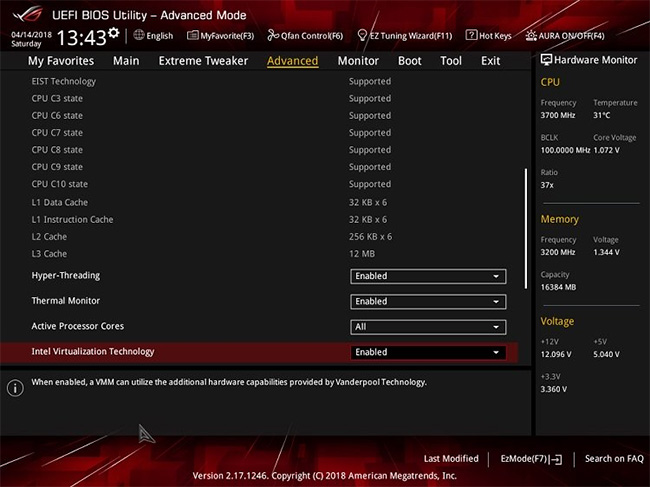
<img alt="Bắt buộc phải bật Virtualization cho CPU trong cài đặt firmware UEFI để tùy chọn Core isolation Memory integrity khả dụng." data-i="1" data-src="https://st.quantrimang.com/photos/image/2020/08/28/core-isolation-tren-windows-10.jpg" data-was-processed="true" height="487" src="https://st.quantrimang.com/photos/image/2020/08/28/core-isolation-tren-windows-10.jpg" width="650" /></div>

<figcaption>
<div style="text-align: justify;">Bắt buộc phải bật Virtualization cho CPU trong cài đặt firmware UEFI để tùy chọn Core isolation Memory integrity khả dụng.</div>
</figcaption>
</figure>

<div style="text-align: justify;">&nbsp;</div>

<h2 style="text-align: justify;">Cách kích hoạt Core isolation Windows 10&nbsp;</h2>

<p style="text-align: justify;"><strong>Bước 1:</strong></p>

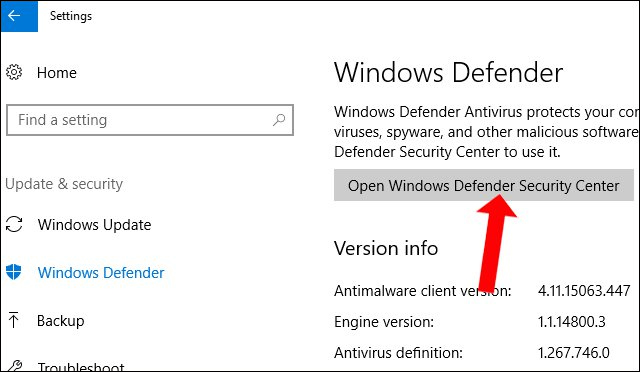
<p style="text-align: justify;">Trước hết, chúng ta cần truy cập vào Windows Defender Security Center bằng cách vào&nbsp;<strong>Settings &gt; Update &amp; Security</strong>, sau đó click vào&nbsp;<strong>Windows Security &gt; Open Windows Defender Security Center</strong>.</p>

<p style="text-align: justify;"><img alt="Truy cập Windows Defender" data-i="2" data-src="https://st.quantrimang.com/photos/image/2018/05/09/Core-isolation-Windows-10-April-2018-bao-mat.jpg" data-was-processed="true" height="372" src="https://st.quantrimang.com/photos/image/2018/05/09/Core-isolation-Windows-10-April-2018-bao-mat.jpg" width="640" /></p>

<p style="text-align: justify;"><strong>Bước 2:</strong></p>

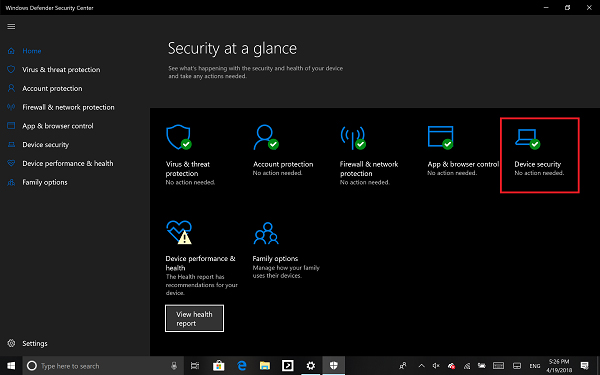
<p style="text-align: justify;">Trong giao diện Windows Defender Secutiry Center nhấn chọn vào mục&nbsp;<strong>Device security</strong>.</p>

<p style="text-align: justify;"><strong><img alt="Truy cập Device Security" data-i="3" data-src="https://st.quantrimang.com/photos/image/2018/05/09/Core-isolation-Windows-10-April-2018-Windows-Defender.jpg" data-was-processed="true" height="375" src="https://st.quantrimang.com/photos/image/2018/05/09/Core-isolation-Windows-10-April-2018-Windows-Defender.jpg" width="600" /></strong></p>

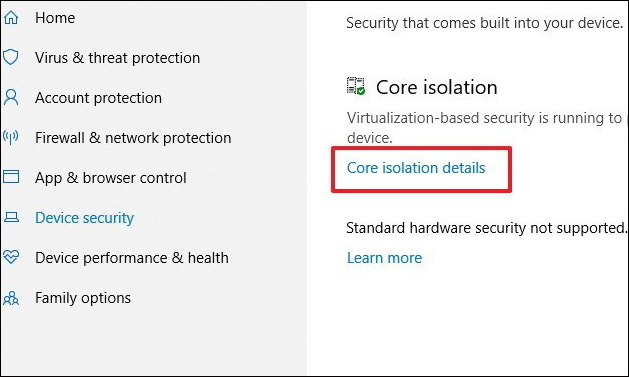
<p style="text-align: justify;">Sau đó trong giao diện mới nhấn vào tùy chọn&nbsp;<strong>Core isolation details</strong>.</p>

<p style="text-align: justify;"><img alt="Core isolation details." data-i="4" data-src="https://st.quantrimang.com/photos/image/2018/05/09/Core-isolation-Windows-10-April-2018-details.jpg" data-was-processed="true" height="377" src="https://st.quantrimang.com/photos/image/2018/05/09/Core-isolation-Windows-10-April-2018-details.jpg" width="629" /></p>

<p style="text-align: justify;"><strong>Bước 3:</strong></p>

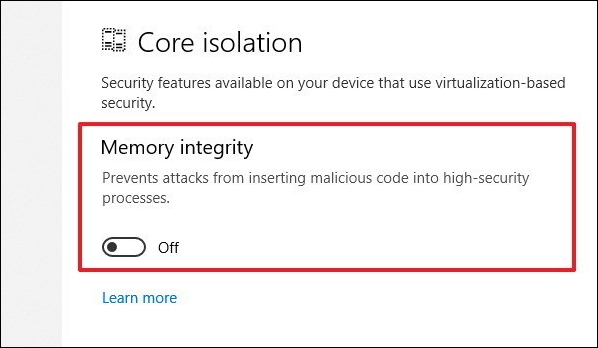
<p style="text-align: justify;">Sau đó tại tính năng&nbsp;<strong>Memory integrity</strong>, hãy chuyển sang&nbsp;<strong>chế độ On</strong>&nbsp;bằng cách gạt thanh ở bên dưới.</p>

<p style="text-align: justify;"><img alt="Memory integrity" data-i="5" data-src="https://st.quantrimang.com/photos/image/2018/05/09/Core-isolation-Windows-10-April-2018-Memory-integrity.jpg" data-was-processed="true" height="348" src="https://st.quantrimang.com/photos/image/2018/05/09/Core-isolation-Windows-10-April-2018-Memory-integrity.jpg" width="598" /></p>

<p style="text-align: justify;"><strong>Bước 4:</strong></p>

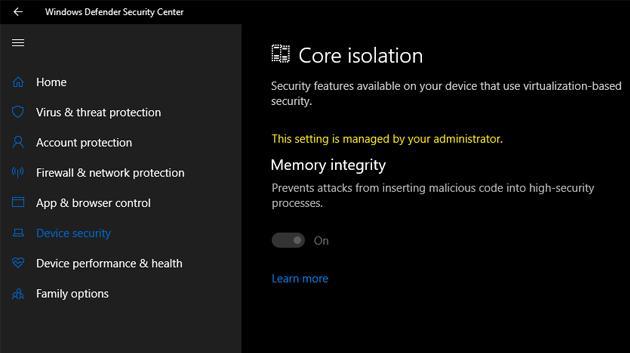
<p style="text-align: justify;">Sau khi bật xong tính năng này, hệ thống sẽ yêu cầu người dùng khởi động lại máy tính. Nếu bật tính năng này thành công thì máy tính sẽ không xuất hiện bất cứ thông báo nào. Như vậy, tính năng Core isolation đã được bật trên máy tính của bạn.</p>

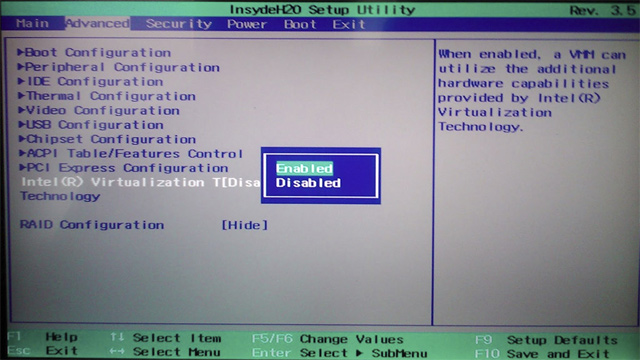
<p style="text-align: justify;"><strong>Lưu ý với bạn đọc</strong>, Core isolation sẽ được vận hành dựa trên công nghệ hóa ảo nên yêu cầu bộ vi xử lý máy tính cũng phải hỗ trợ ảo hóa. Chế độ ảo hóa trong BIOS hoặc UEFI cũng phải được bật. Truy cập vào BIOS trên máy tính rồi nhấn vào mục Advanced rồi tìm tới tùy chọn Virtualization hoặc Intel virtualization để chuyển sang chế độ Enable.</p>

<ul>
	<li style="text-align: justify;"><a href="https://quantrimang.com/huong-dan-vao-bios-tren-cac-dong-may-tinh-khac-nhau-117127" title="Hướng dẫn vào BIOS trên các dòng máy tính khác nhau">Hướng dẫn vào BIOS trên các dòng máy tính khác nhau</a></li>
</ul>

<p style="text-align: justify;"><img alt="Truy cập BIOS" data-i="6" data-src="https://st.quantrimang.com/photos/image/2018/05/09/Core-isolation-Windows-10-April-2018-BIOS.jpg" data-was-processed="true" height="360" src="https://st.quantrimang.com/photos/image/2018/05/09/Core-isolation-Windows-10-April-2018-BIOS.jpg" width="640" /></p>

<p style="text-align: justify;">Lưu ý với bạn đọc, trong quá trình bật tính năng Core isolation và khởi động lại gặp sự cố như hình dưới đây thì hãy sửa theo những bước dưới.</p>

<p style="text-align: justify;"><img alt="Lỗi kích hoạt " data-i="7" data-src="https://st.quantrimang.com/photos/image/2018/05/09/Core-isolation-Windows-10-April-2018-loi.jpg" data-was-processed="true" height="353" src="https://st.quantrimang.com/photos/image/2018/05/09/Core-isolation-Windows-10-April-2018-loi.jpg" width="630" /></p>

<p style="text-align: justify;">Nhấn tổ hợp phím&nbsp;<strong>Winfows + R</strong>&nbsp;để mở hộp thoại Run rồi nhập<strong>&nbsp;từ khóa regedit</strong>&nbsp;để truy cập Registry. Tiếp đó người dùng cần truy cập theo đường dẫn thư mục như dưới đây.</p>

<pre id="pre0">
<code>HKEY_LOCAL_MACHINE\SYSTEM\CurrentControlSet\Control\DeviceGuard\Scenarios\HypervisorEnforcedCodeIntegrity</code></pre>

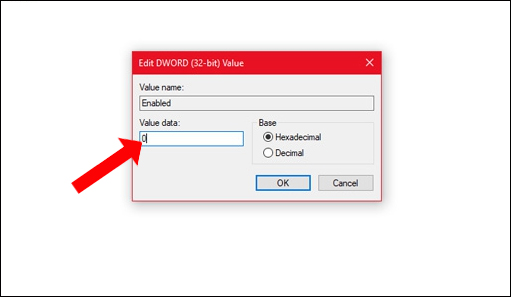
<p style="text-align: justify;">Sau đó, click đúp chuột vào&nbsp;<strong>Enabled</strong>&nbsp;để xuất hiện giao diện chỉnh sửa giá trị,&nbsp;<strong>nhập giá trị là 0</strong>.</p>

<p style="text-align: justify;"><img alt="Chỉnh sửa trong Registry " data-i="8" data-src="https://st.quantrimang.com/photos/image/2018/05/09/Core-isolation-Windows-10-April-2018-enable.jpg" data-was-processed="true" height="297" src="https://st.quantrimang.com/photos/image/2018/05/09/Core-isolation-Windows-10-April-2018-enable.jpg" width="511" /></p>

<p style="text-align: justify;">Như vậy, bạn đã kích hoạt tính năng Core isolation trong Windows Defender trên Windows 10. Trong trường hợp cài đặt và khởi động lại gặp lỗi, người dùng chỉ cần tùy chỉnh giá trị trong Registry Editor là xong.</p>
		</div>
				<div id="author">
						<p>
				<strong>Nguồn tin:</strong>
				Quantrimang.com
			</p>
		</div>
	</div>
	<div id="footer" class="clearfix">
		<div id="url">
			<strong>URL của bản tin này: </strong><a href="https://www.nguoicodonvn2008.info/vi/news/savefile/kien-thuc-may-tinh/cach-bat-tinh-nang-bao-ve-core-isolation-tren-windows-10-2613.html" title="Cách bật tính năng bảo vệ Core isolation trên Windows 10">https://www.nguoicodonvn2008.info/vi/news/savefile/kien-thuc-may-tinh/cach-bat-tinh-nang-bao-ve-core-isolation-tren-windows-10-2613.html</a>

		</div>
		<div class="clear"></div>
		<div class="copyright">
			&copy; .&#x3A; Nguoicodonvn2008.info - Cõi lòng người cô đơn &#x3A;.
		</div>
		<div id="contact">
			<a href="mailto:admin@nguoicodonvn2008.info">admin@nguoicodonvn2008.info</a>
		</div>
	</div>
</div>
        <div id="timeoutsess" class="chromeframe">
            Bạn đã không sử dụng Site, <a onclick="timeoutsesscancel();" href="https://www.nguoicodonvn2008.info/#">Bấm vào đây để duy trì trạng thái đăng nhập</a>. Thời gian chờ: <span id="secField"> 60 </span> giây
        </div>
        <div id="openidResult" class="nv-alert" style="display:none"></div>
        <div id="openidBt" data-result="" data-redirect=""></div>
		</script>
		<div class="car-top">
  <span><img src="https://www.nguoicodonvn2008.info/themes/default/images/car.png" alt=""></span>
</div>
<script src="https://www.nguoicodonvn2008.info/assets/js/jquery/jquery.min.js"></script>
<script>var nv_base_siteurl="/",nv_lang_data="vi",nv_lang_interface="vi",nv_name_variable="nv",nv_fc_variable="op",nv_lang_variable="language",nv_module_name="news",nv_func_name="savefile",nv_is_user=0, nv_my_ofs=-4,nv_my_abbr="EDT",nv_cookie_prefix="nv4c_e856T",nv_check_pass_mstime=1738000,nv_area_admin=0,nv_safemode=0,theme_responsive=0,nv_recaptcha_ver=2,nv_recaptcha_sitekey="",nv_recaptcha_type="image",XSSsanitize=1;</script>
<script src="https://www.nguoicodonvn2008.info/assets/js/language/vi.js"></script>
<script src="https://www.nguoicodonvn2008.info/assets/js/DOMPurify/purify3.js"></script>
<script src="https://www.nguoicodonvn2008.info/assets/js/global.js"></script>
<script src="https://www.nguoicodonvn2008.info/assets/js/site.js"></script>
<script src="https://www.nguoicodonvn2008.info/themes/default/js/news.js"></script>
<script src="https://www.nguoicodonvn2008.info/themes/default/js/main.js"></script>
<script src="https://www.nguoicodonvn2008.info/themes/default/js/custom.js"></script>
<script type="application/ld+json">
        {
            "@context": "https://schema.org",
            "@type": "Organization",
            "url": "https://www.nguoicodonvn2008.info",
            "logo": "https://www.nguoicodonvn2008.info/uploads/angel.gif"
        }
        </script>
<script src="https://www.nguoicodonvn2008.info/themes/default/js/bootstrap.min.js"></script>
<script type="text/javascript">
var $scrolltop = $('.car-top');
$scrolltop.on('click', function () {
    $('html,body').animate({
        scrollTop: 0
    }, 800);
    $(this).addClass("car-run");
    setTimeout(function(){ $scrolltop.removeClass('car-run');}, 1000);
    return false;
});
$(window).on('scroll', function ()
{ 
    if($(window).scrollTop() >= 200)
    {
        $scrolltop.addClass("show");
        $scrolltop.addClass("car-down");
    }
    else
    {
       $scrolltop.removeClass("show");
       setTimeout(function(){ $scrolltop.removeClass('car-down');}, 300);
    }
});
</script>
</body>
</html>