<!DOCTYPE html>
    <html lang="vi" xmlns="http://www.w3.org/1999/xhtml" prefix="og: http://ogp.me/ns#">
    <head>
<title>Cách bật&#x002F;tắt tính năng Aero Snap trong Windows 10</title>
<meta name="description" content="Cách bật&#x002F;tắt tính năng Aero Snap trong Windows 10 - Savefile - Tin Tức -...">
<meta name="author" content=".: Nguoicodonvn2008.info - Cõi lòng người cô đơn :.">
<meta name="copyright" content=".: Nguoicodonvn2008.info - Cõi lòng người cô đơn :. [admin@nguoicodonvn2008.info]">
<meta name="robots" content="index, archive, follow, noodp">
<meta name="googlebot" content="index,archive,follow,noodp">
<meta name="msnbot" content="all,index,follow">
<meta name="generator" content="NukeViet v4.5">
<meta http-equiv="Content-Type" content="text/html; charset=utf-8">
<meta property="og:title" content="Cách bật&#x002F;tắt tính năng Aero Snap trong Windows 10">
<meta property="og:type" content="website">
<meta property="og:description" content="Savefile - Tin Tức - https&#x3A;&#x002F;&#x002F;www.nguoicodonvn2008.info&#x002F;vi&#x002F;news&#x002F;savefile&#x002F;kien-thuc-may-tinh&#x002F;cach-bat-tat-tinh-nang-aero-snap-trong-windows-10-1499.html">
<meta property="og:site_name" content=".&#x3A; Nguoicodonvn2008.info - Cõi lòng người cô đơn &#x3A;.">
<meta property="og:url" content="https://www.nguoicodonvn2008.info/vi/news/savefile/kien-thuc-may-tinh/cach-bat-tat-tinh-nang-aero-snap-trong-windows-10-1499.html">
<link rel="shortcut icon" href="https://www.nguoicodonvn2008.info/favicon.ico">
<link rel="canonical" href="https://www.nguoicodonvn2008.info/vi/news/savefile/kien-thuc-may-tinh/cach-bat-tat-tinh-nang-aero-snap-trong-windows-10-1499.html">
<link rel="alternate" href="https://www.nguoicodonvn2008.info/vi/news/rss/" title="Tin Tức" type="application/rss+xml">
<link rel="alternate" href="https://www.nguoicodonvn2008.info/vi/news/rss/karaoke-dual/" title="Tin Tức - Karaoke Dual" type="application/rss+xml">
<link rel="alternate" href="https://www.nguoicodonvn2008.info/vi/news/rss/nhac-tre/" title="Tin Tức - Nhạc trẻ" type="application/rss+xml">
<link rel="alternate" href="https://www.nguoicodonvn2008.info/vi/news/rss/tru-tinh/" title="Tin Tức - Trữ tình" type="application/rss+xml">
<link rel="alternate" href="https://www.nguoicodonvn2008.info/vi/news/rss/nuoc-ngoai/" title="Tin Tức - Nước ngoài" type="application/rss+xml">
<link rel="alternate" href="https://www.nguoicodonvn2008.info/vi/news/rss/remix/" title="Tin Tức - Remix" type="application/rss+xml">
<link rel="alternate" href="https://www.nguoicodonvn2008.info/vi/news/rss/tam-su-tinh-yeu/" title="Tin Tức - Tâm sự tình yêu" type="application/rss+xml">
<link rel="alternate" href="https://www.nguoicodonvn2008.info/vi/news/rss/tho-suu-tam/" title="Tin Tức - Thơ sưu tầm" type="application/rss+xml">
<link rel="alternate" href="https://www.nguoicodonvn2008.info/vi/news/rss/cuoc-song/" title="Tin Tức - Cuộc sống" type="application/rss+xml">
<link rel="alternate" href="https://www.nguoicodonvn2008.info/vi/news/rss/phan-mem/" title="Tin Tức - Phần mềm" type="application/rss+xml">
<link rel="alternate" href="https://www.nguoicodonvn2008.info/vi/news/rss/kien-thuc-may-tinh/" title="Tin Tức - Kiến thức máy tính" type="application/rss+xml">
<link rel="alternate" href="https://www.nguoicodonvn2008.info/vi/news/rss/hoc-tap/" title="Tin Tức - Học tập" type="application/rss+xml">
<link rel="alternate" href="https://www.nguoicodonvn2008.info/vi/news/rss/tai-lieu/" title="Tin Tức - Tài liệu" type="application/rss+xml">
<link rel="alternate" href="https://www.nguoicodonvn2008.info/vi/news/rss/de-thi/" title="Tin Tức - Đề thi" type="application/rss+xml">
<link rel="preload" as="style" href="https://www.nguoicodonvn2008.info/assets/css/font-awesome.min.css" type="text/css">
<link rel="preload" as="style" href="https://www.nguoicodonvn2008.info/themes/default/css/bootstrap.non-responsive.css" type="text/css">
<link rel="preload" as="style" href="https://www.nguoicodonvn2008.info/themes/default/css/style.css" type="text/css">
<link rel="preload" as="style" href="https://www.nguoicodonvn2008.info/themes/default/css/style.non-responsive.css" type="text/css">
<link rel="preload" as="style" href="https://www.nguoicodonvn2008.info/themes/default/css/news.css" type="text/css">
<link rel="preload" as="style" href="https://www.nguoicodonvn2008.info/themes/default/css/custom.css" type="text/css">
<link rel="preload" as="script" href="https://www.nguoicodonvn2008.info/assets/js/jquery/jquery.min.js" type="text/javascript">
<link rel="preload" as="script" href="https://www.nguoicodonvn2008.info/assets/js/language/vi.js" type="text/javascript">
<link rel="preload" as="script" href="https://www.nguoicodonvn2008.info/assets/js/DOMPurify/purify3.js" type="text/javascript">
<link rel="preload" as="script" href="https://www.nguoicodonvn2008.info/assets/js/global.js" type="text/javascript">
<link rel="preload" as="script" href="https://www.nguoicodonvn2008.info/assets/js/site.js" type="text/javascript">
<link rel="preload" as="script" href="https://www.nguoicodonvn2008.info/themes/default/js/news.js" type="text/javascript">
<link rel="preload" as="script" href="https://www.nguoicodonvn2008.info/themes/default/js/main.js" type="text/javascript">
<link rel="preload" as="script" href="https://www.nguoicodonvn2008.info/themes/default/js/custom.js" type="text/javascript">
<link rel="preload" as="script" href="https://www.nguoicodonvn2008.info/themes/default/js/bootstrap.min.js" type="text/javascript">
<link rel="stylesheet" href="https://www.nguoicodonvn2008.info/assets/css/font-awesome.min.css">
<link rel="stylesheet" href="https://www.nguoicodonvn2008.info/themes/default/css/bootstrap.non-responsive.css">
<link rel="stylesheet" href="https://www.nguoicodonvn2008.info/themes/default/css/style.css">
<link rel="stylesheet" href="https://www.nguoicodonvn2008.info/themes/default/css/style.non-responsive.css">
<link rel="StyleSheet" href="https://www.nguoicodonvn2008.info/themes/default/css/news.css">
<link rel="stylesheet" href="https://www.nguoicodonvn2008.info/themes/default/css/custom.css">
<style type="text/css">
	body{background: #fff;}
</style>
    </head>
    <body>
<div id="print">
	<div id="hd_print">
		<h2 class="pull-left">.&#x3A; Nguoicodonvn2008.info - Cõi lòng người cô đơn &#x3A;.</h2>
		<p class="pull-right"><a title=".&#x3A; Nguoicodonvn2008.info - Cõi lòng người cô đơn &#x3A;." href="https://www.nguoicodonvn2008.info/">https://www.nguoicodonvn2008.info</a></p>
	</div>
	<div class="clear"></div>
	<hr />
	<div id="content">
		<h1>Cách bật&#x002F;tắt tính năng Aero Snap trong Windows 10</h1>
		<ul class="list-inline">
			<li>Thứ hai - 23/12/2019 19:31</li>
			<li class="hidden-print txtrequired"><em class="fa fa-print">&nbsp;</em><a title="In ra" href="javascript:;" onclick="window.print()">In ra</a></li>
			<li class="hidden-print txtrequired"><em class="fa fa-power-off">&nbsp;</em><a title="Đóng cửa sổ này" href="javascript:;" onclick="window.close()">Đóng cửa sổ này</a></li>
		</ul>
		<div class="clear"></div>
		<div id="hometext">
		</div>
				<div class="imghome">
			<img alt="Cách bật&#x002F;tắt tính năng Aero Snap trong Windows 10" src="https://st.quantrimang.com/photos/image/2019/12/23/bat-tat-tinh-nang-aero-snap-trong-windows-10-1.jpg" width="460" class="img-thumbnail" />
		</div>
		<div class="clear"></div>
		<div id="bodytext" class="clearfix">
			<p style="text-align: justify;">Màn hình có thể bị lộn xộn nếu bạn có nhiều cửa sổ ứng dụng đã mở. Tính năng Snap Windows (hay còn gọi là Aero Snap) bao gồm Snap Assistant và 2x2 snapping giúp bạn sắp xếp các cửa sổ đã mở này trên desktop.</p>

<p style="text-align: justify;">Hướng dẫn này sẽ chỉ cho bạn cách bật hoặc tắt tính năng Aero Snap mà không cần vô hiệu hóa những phím tắt để di chuyển hay thay đổi kích thước (snap) cửa sổ trong&nbsp;Windows 10.</p>

<p style="text-align: justify;">Các phím tắt bàn phím:</p>

<ul>
	<li style="text-align: justify;"><code>Win</code>+Mũi tên trái</li>
</ul>

<p style="text-align: justify;">Nhấn để di chuyển hay thay đổi kích thước cửa sổ hiện hoạt động ở nửa bên trái của màn hình. Nếu có nhiều màn hình, thì bạn có thể tiếp tục nhấn để di chuyển cửa sổ sang phía màn hình bên trái.</p>

<ul>
	<li style="text-align: justify;"><code>Win</code>+Mũi tên phải</li>
</ul>

<p style="text-align: justify;">Nhấn để di chuyển hay thay đổi kích thước cửa sổ hiện hoạt động ở nửa bên phải của màn hình. Nếu có nhiều màn hình, thì bạn có thể tiếp tục nhấn để di chuyển cửa sổ sang phía màn hình bên phải.</p>

<ul>
	<li style="text-align: justify;"><code>Win</code>+Mũi tên lên</li>
</ul>

<p style="text-align: justify;">Nếu cửa sổ không bị di chuyển hay thay đổi kích thước, thì kích thước của nó sẽ được tối đa hóa. Nếu cửa sổ bị kéo lệch sang một bên, thì cửa sổ sẽ được di chuyển xuống góc trên cùng của phía đó.</p>

<ul>
	<li style="text-align: justify;"><code>Win</code>+Mũi tên xuống</li>
</ul>

<p style="text-align: justify;">Nếu cửa sổ không bị di chuyển hay thay đổi kích thước, thì kích thước của nó sẽ được giảm tối đa. Nếu kích thước cửa sổ được tối đa hóa, lệnh sẽ khôi phục lại kích thước cũ. Nếu cửa sổ bị kéo sang một bên, thì lệnh sẽ kéo nó xuống góc dưới cùng của bên đó.</p>

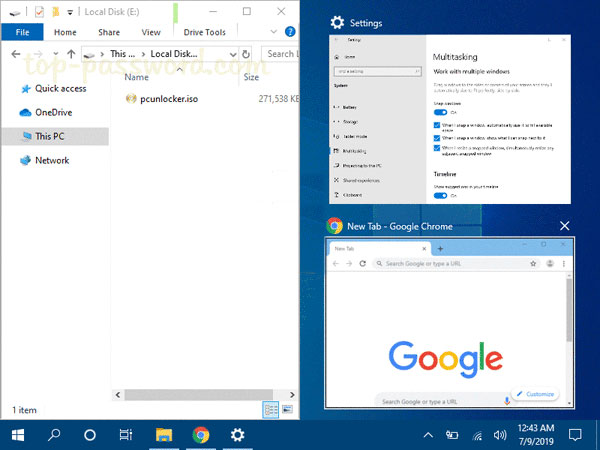
<p style="text-align: justify;">Đây là cách thực hiện:</p>

<p style="text-align: justify;"><img alt="Cách bật/tắt tính năng Aero Snap trong Windows 10" data-i="0" data-src="https://st.quantrimang.com/photos/image/2019/12/23/bat-tat-tinh-nang-aero-snap-trong-windows-10-1.jpg" data-was-processed="true" height="450" src="https://st.quantrimang.com/photos/image/2019/12/23/bat-tat-tinh-nang-aero-snap-trong-windows-10-1.jpg" width="600" /></p>

<p style="text-align: justify;"><strong>Chú ý</strong>: Các file .reg có thể tải xuống bên dưới sẽ sửa đổi giá trị chuỗi trong registry key bên dưới.</p>

<pre id="pre0">
<code>HKEY_CURRENT_USER\Control Panel\Desktop
 DockMoving REG_SZ
 0 = Disable 
 1 = Enable</code></pre>

<p style="text-align: justify;">1. Thực hiện bước 2 (để bật) hoặc bước 3 (để tắt) bên dưới cho những gì bạn muốn làm.</p>

<p style="text-align: justify;">2. Bật tính năng kéo để di chuyển hay thay đổi kích thước cửa sổ</p>

<p style="text-align: justify;">Đây là thiết lập mặc định.</p>

<p style="text-align: justify;">Tải xuống file này:<span style="color:rgb(142, 68, 173);"><strong>&nbsp;https://www.tenforums.com/attachments/tutorials/258378d1575842297-how-enable-disable-drag-snap-windows-windows-10-a-enable_drag_to_snap_windows.reg</strong></span>&nbsp;và chuyển đến bước 4 bên dưới.</p>

<p style="text-align: justify;">3. Vô hiệu hóa tính năng kéo để di chuyển hay thay đổi kích thước cửa sổ</p>

<p style="text-align: justify;">Tải xuống file này:&nbsp;<span style="color:rgb(192, 57, 43);"><strong>https://www.tenforums.com/attachments/tutorials/258377d1575842297-how-enable-disable-drag-snap-windows-windows-10-a-disable_drag_to_snap_windows.reg&nbsp;</strong></span>và chuyển đến bước 4 bên dưới.</p>

<p style="text-align: justify;">4. Lưu file .reg vào desktop.</p>

<p style="text-align: justify;">5. Nhấp đúp chuột vào file .reg đã tải xuống.</p>

<p style="text-align: justify;">6. Khi được nhắc, nhấn vào&nbsp;<strong>Run, Yes (UAC), Yes</strong>&nbsp;và&nbsp;<strong>OK</strong>&nbsp;để phê duyệt hợp nhất.</p>

<p style="text-align: justify;">7. Đăng xuất rồi đăng nhập một lần nữa hoặc khởi động lại máy tính để áp dụng thay đổi.</p>

<p style="text-align: justify;">8. Nếu thích, bạn có thể xóa file .reg đã tải xuống nếu muốn.</p>

<p style="text-align: justify;">Chúc bạn thực hiện thành công!</p>
		</div>
				<div id="author">
						<p>
				<strong>Nguồn tin:</strong>
				Quantrimang.com
			</p>
		</div>
	</div>
	<div id="footer" class="clearfix">
		<div id="url">
			<strong>URL của bản tin này: </strong><a href="https://www.nguoicodonvn2008.info/vi/news/savefile/kien-thuc-may-tinh/cach-bat-tat-tinh-nang-aero-snap-trong-windows-10-1499.html" title="Cách bật&#x002F;tắt tính năng Aero Snap trong Windows 10">https://www.nguoicodonvn2008.info/vi/news/savefile/kien-thuc-may-tinh/cach-bat-tat-tinh-nang-aero-snap-trong-windows-10-1499.html</a>

		</div>
		<div class="clear"></div>
		<div class="copyright">
			&copy; .&#x3A; Nguoicodonvn2008.info - Cõi lòng người cô đơn &#x3A;.
		</div>
		<div id="contact">
			<a href="mailto:admin@nguoicodonvn2008.info">admin@nguoicodonvn2008.info</a>
		</div>
	</div>
</div>
        <div id="timeoutsess" class="chromeframe">
            Bạn đã không sử dụng Site, <a onclick="timeoutsesscancel();" href="https://www.nguoicodonvn2008.info/#">Bấm vào đây để duy trì trạng thái đăng nhập</a>. Thời gian chờ: <span id="secField"> 60 </span> giây
        </div>
        <div id="openidResult" class="nv-alert" style="display:none"></div>
        <div id="openidBt" data-result="" data-redirect=""></div>
		</script>
		<div class="car-top">
  <span><img src="https://www.nguoicodonvn2008.info/themes/default/images/car.png" alt=""></span>
</div>
<div id="run_cronjobs" style="visibility:hidden;display:none;"><img alt="cron" src="/index.php?second=cronjobs&amp;p=d7SEkkMo" width="1" height="1" /></div>
<script src="https://www.nguoicodonvn2008.info/assets/js/jquery/jquery.min.js"></script>
<script>var nv_base_siteurl="/",nv_lang_data="vi",nv_lang_interface="vi",nv_name_variable="nv",nv_fc_variable="op",nv_lang_variable="language",nv_module_name="news",nv_func_name="savefile",nv_is_user=0, nv_my_ofs=-4,nv_my_abbr="EDT",nv_cookie_prefix="nv4c_e856T",nv_check_pass_mstime=1738000,nv_area_admin=0,nv_safemode=0,theme_responsive=0,nv_recaptcha_ver=2,nv_recaptcha_sitekey="",nv_recaptcha_type="image",XSSsanitize=1;</script>
<script src="https://www.nguoicodonvn2008.info/assets/js/language/vi.js"></script>
<script src="https://www.nguoicodonvn2008.info/assets/js/DOMPurify/purify3.js"></script>
<script src="https://www.nguoicodonvn2008.info/assets/js/global.js"></script>
<script src="https://www.nguoicodonvn2008.info/assets/js/site.js"></script>
<script src="https://www.nguoicodonvn2008.info/themes/default/js/news.js"></script>
<script src="https://www.nguoicodonvn2008.info/themes/default/js/main.js"></script>
<script src="https://www.nguoicodonvn2008.info/themes/default/js/custom.js"></script>
<script type="application/ld+json">
        {
            "@context": "https://schema.org",
            "@type": "Organization",
            "url": "https://www.nguoicodonvn2008.info",
            "logo": "https://www.nguoicodonvn2008.info/uploads/angel.gif"
        }
        </script>
<script src="https://www.nguoicodonvn2008.info/themes/default/js/bootstrap.min.js"></script>
<script type="text/javascript">
var $scrolltop = $('.car-top');
$scrolltop.on('click', function () {
    $('html,body').animate({
        scrollTop: 0
    }, 800);
    $(this).addClass("car-run");
    setTimeout(function(){ $scrolltop.removeClass('car-run');}, 1000);
    return false;
});
$(window).on('scroll', function ()
{ 
    if($(window).scrollTop() >= 200)
    {
        $scrolltop.addClass("show");
        $scrolltop.addClass("car-down");
    }
    else
    {
       $scrolltop.removeClass("show");
       setTimeout(function(){ $scrolltop.removeClass('car-down');}, 300);
    }
});
</script>
</body>
</html>