<!DOCTYPE html>
    <html lang="vi" xmlns="http://www.w3.org/1999/xhtml" prefix="og: http://ogp.me/ns#">
    <head>
<title>Cách bật&#x002F;tắt &quot;Make Taskbar Icons Easier to Touch&quot; khi vào Tablet Posture trên Windows 10</title>
<meta name="description" content="Cách bật&#x002F;tắt &quot;Make Taskbar Icons Easier to Touch&quot; khi vào Tablet Posture trên Windows 10 - Savefile - Tin Tức -...">
<meta name="author" content=".: Nguoicodonvn2008.info - Cõi lòng người cô đơn :.">
<meta name="copyright" content=".: Nguoicodonvn2008.info - Cõi lòng người cô đơn :. [admin@nguoicodonvn2008.info]">
<meta name="robots" content="index, archive, follow, noodp">
<meta name="googlebot" content="index,archive,follow,noodp">
<meta name="msnbot" content="all,index,follow">
<meta name="generator" content="NukeViet v4.5">
<meta http-equiv="Content-Type" content="text/html; charset=utf-8">
<meta property="og:title" content="Cách bật&#x002F;tắt &quot;Make Taskbar Icons Easier to Touch&quot; khi vào Tablet Posture trên Windows 10">
<meta property="og:type" content="website">
<meta property="og:description" content="Savefile - Tin Tức -...">
<meta property="og:site_name" content=".&#x3A; Nguoicodonvn2008.info - Cõi lòng người cô đơn &#x3A;.">
<meta property="og:url" content="https://www.nguoicodonvn2008.info/vi/news/savefile/kien-thuc-may-tinh/cach-bat-tat-make-taskbar-icons-easier-to-touch-khi-vao-tablet-posture-tren-windows-10-1910.html">
<link rel="shortcut icon" href="https://www.nguoicodonvn2008.info/favicon.ico">
<link rel="canonical" href="https://www.nguoicodonvn2008.info/vi/news/savefile/kien-thuc-may-tinh/cach-bat-tat-make-taskbar-icons-easier-to-touch-khi-vao-tablet-posture-tren-windows-10-1910.html">
<link rel="alternate" href="https://www.nguoicodonvn2008.info/vi/news/rss/" title="Tin Tức" type="application/rss+xml">
<link rel="alternate" href="https://www.nguoicodonvn2008.info/vi/news/rss/karaoke-dual/" title="Tin Tức - Karaoke Dual" type="application/rss+xml">
<link rel="alternate" href="https://www.nguoicodonvn2008.info/vi/news/rss/nhac-tre/" title="Tin Tức - Nhạc trẻ" type="application/rss+xml">
<link rel="alternate" href="https://www.nguoicodonvn2008.info/vi/news/rss/tru-tinh/" title="Tin Tức - Trữ tình" type="application/rss+xml">
<link rel="alternate" href="https://www.nguoicodonvn2008.info/vi/news/rss/nuoc-ngoai/" title="Tin Tức - Nước ngoài" type="application/rss+xml">
<link rel="alternate" href="https://www.nguoicodonvn2008.info/vi/news/rss/remix/" title="Tin Tức - Remix" type="application/rss+xml">
<link rel="alternate" href="https://www.nguoicodonvn2008.info/vi/news/rss/tam-su-tinh-yeu/" title="Tin Tức - Tâm sự tình yêu" type="application/rss+xml">
<link rel="alternate" href="https://www.nguoicodonvn2008.info/vi/news/rss/tho-suu-tam/" title="Tin Tức - Thơ sưu tầm" type="application/rss+xml">
<link rel="alternate" href="https://www.nguoicodonvn2008.info/vi/news/rss/cuoc-song/" title="Tin Tức - Cuộc sống" type="application/rss+xml">
<link rel="alternate" href="https://www.nguoicodonvn2008.info/vi/news/rss/phan-mem/" title="Tin Tức - Phần mềm" type="application/rss+xml">
<link rel="alternate" href="https://www.nguoicodonvn2008.info/vi/news/rss/kien-thuc-may-tinh/" title="Tin Tức - Kiến thức máy tính" type="application/rss+xml">
<link rel="alternate" href="https://www.nguoicodonvn2008.info/vi/news/rss/hoc-tap/" title="Tin Tức - Học tập" type="application/rss+xml">
<link rel="alternate" href="https://www.nguoicodonvn2008.info/vi/news/rss/tai-lieu/" title="Tin Tức - Tài liệu" type="application/rss+xml">
<link rel="alternate" href="https://www.nguoicodonvn2008.info/vi/news/rss/de-thi/" title="Tin Tức - Đề thi" type="application/rss+xml">
<link rel="preload" as="style" href="https://www.nguoicodonvn2008.info/assets/css/font-awesome.min.css" type="text/css">
<link rel="preload" as="style" href="https://www.nguoicodonvn2008.info/themes/default/css/bootstrap.non-responsive.css" type="text/css">
<link rel="preload" as="style" href="https://www.nguoicodonvn2008.info/themes/default/css/style.css" type="text/css">
<link rel="preload" as="style" href="https://www.nguoicodonvn2008.info/themes/default/css/style.non-responsive.css" type="text/css">
<link rel="preload" as="style" href="https://www.nguoicodonvn2008.info/themes/default/css/news.css" type="text/css">
<link rel="preload" as="style" href="https://www.nguoicodonvn2008.info/themes/default/css/custom.css" type="text/css">
<link rel="preload" as="script" href="https://www.nguoicodonvn2008.info/assets/js/jquery/jquery.min.js" type="text/javascript">
<link rel="preload" as="script" href="https://www.nguoicodonvn2008.info/assets/js/language/vi.js" type="text/javascript">
<link rel="preload" as="script" href="https://www.nguoicodonvn2008.info/assets/js/DOMPurify/purify3.js" type="text/javascript">
<link rel="preload" as="script" href="https://www.nguoicodonvn2008.info/assets/js/global.js" type="text/javascript">
<link rel="preload" as="script" href="https://www.nguoicodonvn2008.info/assets/js/site.js" type="text/javascript">
<link rel="preload" as="script" href="https://www.nguoicodonvn2008.info/themes/default/js/news.js" type="text/javascript">
<link rel="preload" as="script" href="https://www.nguoicodonvn2008.info/themes/default/js/main.js" type="text/javascript">
<link rel="preload" as="script" href="https://www.nguoicodonvn2008.info/themes/default/js/custom.js" type="text/javascript">
<link rel="preload" as="script" href="https://www.nguoicodonvn2008.info/themes/default/js/bootstrap.min.js" type="text/javascript">
<link rel="stylesheet" href="https://www.nguoicodonvn2008.info/assets/css/font-awesome.min.css">
<link rel="stylesheet" href="https://www.nguoicodonvn2008.info/themes/default/css/bootstrap.non-responsive.css">
<link rel="stylesheet" href="https://www.nguoicodonvn2008.info/themes/default/css/style.css">
<link rel="stylesheet" href="https://www.nguoicodonvn2008.info/themes/default/css/style.non-responsive.css">
<link rel="StyleSheet" href="https://www.nguoicodonvn2008.info/themes/default/css/news.css">
<link rel="stylesheet" href="https://www.nguoicodonvn2008.info/themes/default/css/custom.css">
<style type="text/css">
	body{background: #fff;}
</style>
    </head>
    <body>
<div id="print">
	<div id="hd_print">
		<h2 class="pull-left">.&#x3A; Nguoicodonvn2008.info - Cõi lòng người cô đơn &#x3A;.</h2>
		<p class="pull-right"><a title=".&#x3A; Nguoicodonvn2008.info - Cõi lòng người cô đơn &#x3A;." href="https://www.nguoicodonvn2008.info/">https://www.nguoicodonvn2008.info</a></p>
	</div>
	<div class="clear"></div>
	<hr />
	<div id="content">
		<h1>Cách bật&#x002F;tắt &quot;Make Taskbar Icons Easier to Touch&quot; khi vào Tablet Posture trên Windows 10</h1>
		<ul class="list-inline">
			<li>Thứ hai - 30/03/2020 01:07</li>
			<li class="hidden-print txtrequired"><em class="fa fa-print">&nbsp;</em><a title="In ra" href="javascript:;" onclick="window.print()">In ra</a></li>
			<li class="hidden-print txtrequired"><em class="fa fa-power-off">&nbsp;</em><a title="Đóng cửa sổ này" href="javascript:;" onclick="window.close()">Đóng cửa sổ này</a></li>
		</ul>
		<div class="clear"></div>
		<div id="hometext">
		</div>
				<div class="imghome">
			<img alt="Cách bật&#x002F;tắt &quot;Make Taskbar Icons Easier to Touch&quot; khi vào Tablet Posture trên Windows 10" src="https://st.quantrimang.com/photos/image/2020/03/27/bat-tat-make-taskbar-icons-easier-to-touch-1.jpg" width="460" class="img-thumbnail" />
		</div>
		<div class="clear"></div>
		<div id="bodytext" class="clearfix">
			<p style="text-align: justify;">Kể từ với Windows 10 build 19592, Microsoft bắt đầu tung ra trải nghiệm chế độ máy tính bảng mới cho các PC Convertible 2 trong 1, dưới dạng bản xem trước cho một số người dùng Windows Insider trong Fast ring.</p>

<h2 style="text-align: justify;">Trải nghiệm Tablet Mode mới cho PC Convertible 2 trong 1</h2>

<p style="text-align: justify;">Trải nghiệm này tách biệt với trải nghiệm&nbsp;Tablet Mode&nbsp;mà bạn đang sử dụng. Trải nghiệm mới này cho phép người dùng vào Tablet Posture để duy trì trải nghiệm desktop quen thuộc mà không bị gián đoạn, với một vài cải tiến cảm ứng chính:</p>

<ul>
	<li style="text-align: justify;">Các biểu tượng trên thanh tác vụ (taskbar) được đặt cách nhau</li>
	<li style="text-align: justify;">Hộp tìm kiếm trên thanh tác vụ được thu gọn vào chế độ biểu tượng</li>
	<li style="text-align: justify;">Bàn phím cảm ứng được tự động gọi khi bạn nhấn vào một trường văn bản</li>
	<li style="text-align: justify;">Các yếu tố trong File Explorer sẽ được cải thiện để giúp thoải mái tương tác khi sử dụng cảm ứng</li>
</ul>

<p style="text-align: justify;">Để giúp đảm bảo chất lượng, tính năng này sẽ được triển khai chậm, bắt đầu với một phần người dùng Insider chưa từng rời xa khỏi bàn phím trước đó hoặc cài đặt chế độ&nbsp;<strong>Tablet Mode</strong>&nbsp;được đặt thành&nbsp;<strong>Don’t ask me and don’t switch</strong>.</p>

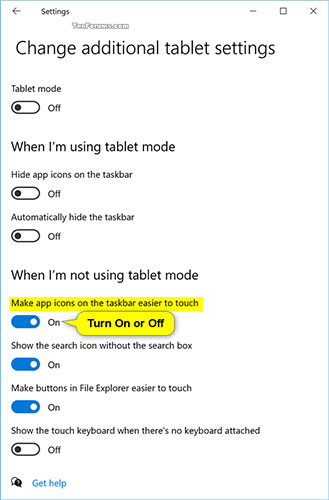
<p style="text-align: justify;">Bạn có thể bật hoặc tắt&nbsp;<strong>“Make taskbar icons easier to touch”</strong>&nbsp;khi vào Tablet Posture (ví dụ, gập PC Convertible 2 trong 1) mà không cần bật chế độ Tablet Mode.</p>

<p style="text-align: justify;">Khi được bật, các biểu tượng trên thanh tác vụ sẽ được đặt cách nhau nhiều hơn để dễ dàng chạm vào chúng trên màn hình cảm ứng.</p>

<p style="text-align: justify;">Hướng dẫn này sẽ chỉ cho bạn cách bật hoặc tắt&nbsp;<strong>&quot;Make Taskbar Icons Easier to Touch&quot;</strong>&nbsp;khi vào Tablet Posture trên&nbsp;Windows 10.</p>

<div style="text-align: justify;">&nbsp;</div>

<h2 style="text-align: justify;">Bật/Tắt &quot;Make Taskbar Icons Easier to Touch&quot; khi vào Tablet Posture trong Settings</h2>

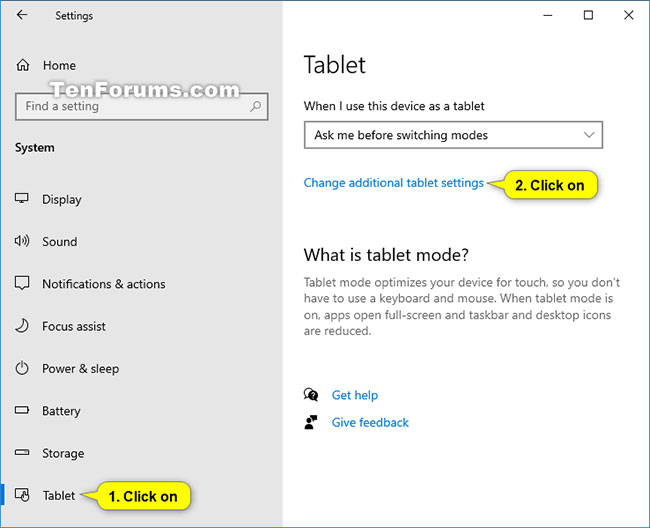
<p style="text-align: justify;">1. Mở&nbsp;<strong>Settings</strong>&nbsp;và nhấn vào biểu tượng&nbsp;<strong>System.</strong></p>

<p style="text-align: justify;">2. Nhấn vào&nbsp;<strong>System</strong>&nbsp;ở bên trái và chọn&nbsp;<strong>Change additional tablet settings</strong>&nbsp;ở bên phải.</p>

<figure>
<div style="text-align: justify;"><img alt="Chọn Change additional tablet settings" data-i="0" data-src="https://st.quantrimang.com/photos/image/2020/03/27/bat-tat-make-taskbar-icons-easier-to-touch-1.jpg" data-was-processed="true" height="528" src="https://st.quantrimang.com/photos/image/2020/03/27/bat-tat-make-taskbar-icons-easier-to-touch-1.jpg" width="650" /></div>

<figcaption>
<div style="text-align: justify;">Chọn Change additional tablet settings</div>
</figcaption>
</figure>

<p style="text-align: justify;">3. Bật (mặc định) hoặc tắt&nbsp;<strong>Make app icons on taskbar easier to touch</strong>&nbsp;trong&nbsp;<strong>When I&#039;m not using tablet mode</strong>.</p>

<figure>
<div style="text-align: justify;"><img alt="Bật (mặc định) hoặc tắt Make app icons on taskbar easier to touch trong When I&#039;m not using tablet mode" data-i="1" data-src="https://st.quantrimang.com/photos/image/2020/03/27/bat-tat-make-taskbar-icons-easier-to-touch-2.jpg" data-was-processed="true" height="500" src="https://st.quantrimang.com/photos/image/2020/03/27/bat-tat-make-taskbar-icons-easier-to-touch-2.jpg" width="329" /></div>

<figcaption>
<div style="text-align: justify;">Bật (mặc định) hoặc tắt Make app icons on taskbar easier to touch trong When I&#039;m not using tablet mode</div>
</figcaption>
</figure>

<p style="text-align: justify;">4. Bây giờ, bạn có thể đóng&nbsp;<strong>Settings</strong>&nbsp;nếu muốn.</p>
		</div>
				<div id="author">
						<p>
				<strong>Nguồn tin:</strong>
				Quantrimang.com
			</p>
		</div>
	</div>
	<div id="footer" class="clearfix">
		<div id="url">
			<strong>URL của bản tin này: </strong><a href="https://www.nguoicodonvn2008.info/vi/news/savefile/kien-thuc-may-tinh/cach-bat-tat-make-taskbar-icons-easier-to-touch-khi-vao-tablet-posture-tren-windows-10-1910.html" title="Cách bật&#x002F;tắt &quot;Make Taskbar Icons Easier to Touch&quot; khi vào Tablet Posture trên Windows 10">https://www.nguoicodonvn2008.info/vi/news/savefile/kien-thuc-may-tinh/cach-bat-tat-make-taskbar-icons-easier-to-touch-khi-vao-tablet-posture-tren-windows-10-1910.html</a>

		</div>
		<div class="clear"></div>
		<div class="copyright">
			&copy; .&#x3A; Nguoicodonvn2008.info - Cõi lòng người cô đơn &#x3A;.
		</div>
		<div id="contact">
			<a href="mailto:admin@nguoicodonvn2008.info">admin@nguoicodonvn2008.info</a>
		</div>
	</div>
</div>
        <div id="timeoutsess" class="chromeframe">
            Bạn đã không sử dụng Site, <a onclick="timeoutsesscancel();" href="https://www.nguoicodonvn2008.info/#">Bấm vào đây để duy trì trạng thái đăng nhập</a>. Thời gian chờ: <span id="secField"> 60 </span> giây
        </div>
        <div id="openidResult" class="nv-alert" style="display:none"></div>
        <div id="openidBt" data-result="" data-redirect=""></div>
		</script>
		<div class="car-top">
  <span><img src="https://www.nguoicodonvn2008.info/themes/default/images/car.png" alt=""></span>
</div>
<script src="https://www.nguoicodonvn2008.info/assets/js/jquery/jquery.min.js"></script>
<script>var nv_base_siteurl="/",nv_lang_data="vi",nv_lang_interface="vi",nv_name_variable="nv",nv_fc_variable="op",nv_lang_variable="language",nv_module_name="news",nv_func_name="savefile",nv_is_user=0, nv_my_ofs=-4,nv_my_abbr="EDT",nv_cookie_prefix="nv4c_e856T",nv_check_pass_mstime=1738000,nv_area_admin=0,nv_safemode=0,theme_responsive=0,nv_recaptcha_ver=2,nv_recaptcha_sitekey="",nv_recaptcha_type="image",XSSsanitize=1;</script>
<script src="https://www.nguoicodonvn2008.info/assets/js/language/vi.js"></script>
<script src="https://www.nguoicodonvn2008.info/assets/js/DOMPurify/purify3.js"></script>
<script src="https://www.nguoicodonvn2008.info/assets/js/global.js"></script>
<script src="https://www.nguoicodonvn2008.info/assets/js/site.js"></script>
<script src="https://www.nguoicodonvn2008.info/themes/default/js/news.js"></script>
<script src="https://www.nguoicodonvn2008.info/themes/default/js/main.js"></script>
<script src="https://www.nguoicodonvn2008.info/themes/default/js/custom.js"></script>
<script type="application/ld+json">
        {
            "@context": "https://schema.org",
            "@type": "Organization",
            "url": "https://www.nguoicodonvn2008.info",
            "logo": "https://www.nguoicodonvn2008.info/uploads/angel.gif"
        }
        </script>
<script src="https://www.nguoicodonvn2008.info/themes/default/js/bootstrap.min.js"></script>
<script type="text/javascript">
var $scrolltop = $('.car-top');
$scrolltop.on('click', function () {
    $('html,body').animate({
        scrollTop: 0
    }, 800);
    $(this).addClass("car-run");
    setTimeout(function(){ $scrolltop.removeClass('car-run');}, 1000);
    return false;
});
$(window).on('scroll', function ()
{ 
    if($(window).scrollTop() >= 200)
    {
        $scrolltop.addClass("show");
        $scrolltop.addClass("car-down");
    }
    else
    {
       $scrolltop.removeClass("show");
       setTimeout(function(){ $scrolltop.removeClass('car-down');}, 300);
    }
});
</script>
</body>
</html>