<!DOCTYPE html>
    <html lang="vi" xmlns="http://www.w3.org/1999/xhtml" prefix="og: http://ogp.me/ns#">
    <head>
<title>Cách bật sao lưu registry tự động trong Windows 10</title>
<meta name="description" content="Cách bật sao lưu registry tự động trong Windows 10 - Savefile - Tin Tức -...">
<meta name="author" content=".: Nguoicodonvn2008.info - Cõi lòng người cô đơn :.">
<meta name="copyright" content=".: Nguoicodonvn2008.info - Cõi lòng người cô đơn :. [admin@nguoicodonvn2008.info]">
<meta name="robots" content="index, archive, follow, noodp">
<meta name="googlebot" content="index,archive,follow,noodp">
<meta name="msnbot" content="all,index,follow">
<meta name="generator" content="NukeViet v4.5">
<meta http-equiv="Content-Type" content="text/html; charset=utf-8">
<meta property="og:title" content="Cách bật sao lưu registry tự động trong Windows 10">
<meta property="og:type" content="website">
<meta property="og:description" content="Savefile - Tin Tức - https&#x3A;&#x002F;&#x002F;www.nguoicodonvn2008.info&#x002F;vi&#x002F;news&#x002F;savefile&#x002F;kien-thuc-may-tinh&#x002F;cach-bat-sao-luu-registry-tu-dong-trong-windows-10-390.html">
<meta property="og:site_name" content=".&#x3A; Nguoicodonvn2008.info - Cõi lòng người cô đơn &#x3A;.">
<meta property="og:url" content="https://www.nguoicodonvn2008.info/vi/news/savefile/kien-thuc-may-tinh/cach-bat-sao-luu-registry-tu-dong-trong-windows-10-390.html">
<link rel="shortcut icon" href="https://www.nguoicodonvn2008.info/favicon.ico">
<link rel="canonical" href="https://www.nguoicodonvn2008.info/vi/news/savefile/kien-thuc-may-tinh/cach-bat-sao-luu-registry-tu-dong-trong-windows-10-390.html">
<link rel="alternate" href="https://www.nguoicodonvn2008.info/vi/news/rss/" title="Tin Tức" type="application/rss+xml">
<link rel="alternate" href="https://www.nguoicodonvn2008.info/vi/news/rss/karaoke-dual/" title="Tin Tức - Karaoke Dual" type="application/rss+xml">
<link rel="alternate" href="https://www.nguoicodonvn2008.info/vi/news/rss/nhac-tre/" title="Tin Tức - Nhạc trẻ" type="application/rss+xml">
<link rel="alternate" href="https://www.nguoicodonvn2008.info/vi/news/rss/tru-tinh/" title="Tin Tức - Trữ tình" type="application/rss+xml">
<link rel="alternate" href="https://www.nguoicodonvn2008.info/vi/news/rss/nuoc-ngoai/" title="Tin Tức - Nước ngoài" type="application/rss+xml">
<link rel="alternate" href="https://www.nguoicodonvn2008.info/vi/news/rss/remix/" title="Tin Tức - Remix" type="application/rss+xml">
<link rel="alternate" href="https://www.nguoicodonvn2008.info/vi/news/rss/tam-su-tinh-yeu/" title="Tin Tức - Tâm sự tình yêu" type="application/rss+xml">
<link rel="alternate" href="https://www.nguoicodonvn2008.info/vi/news/rss/tho-suu-tam/" title="Tin Tức - Thơ sưu tầm" type="application/rss+xml">
<link rel="alternate" href="https://www.nguoicodonvn2008.info/vi/news/rss/cuoc-song/" title="Tin Tức - Cuộc sống" type="application/rss+xml">
<link rel="alternate" href="https://www.nguoicodonvn2008.info/vi/news/rss/phan-mem/" title="Tin Tức - Phần mềm" type="application/rss+xml">
<link rel="alternate" href="https://www.nguoicodonvn2008.info/vi/news/rss/kien-thuc-may-tinh/" title="Tin Tức - Kiến thức máy tính" type="application/rss+xml">
<link rel="alternate" href="https://www.nguoicodonvn2008.info/vi/news/rss/hoc-tap/" title="Tin Tức - Học tập" type="application/rss+xml">
<link rel="alternate" href="https://www.nguoicodonvn2008.info/vi/news/rss/tai-lieu/" title="Tin Tức - Tài liệu" type="application/rss+xml">
<link rel="alternate" href="https://www.nguoicodonvn2008.info/vi/news/rss/de-thi/" title="Tin Tức - Đề thi" type="application/rss+xml">
<link rel="preload" as="style" href="https://www.nguoicodonvn2008.info/assets/css/font-awesome.min.css" type="text/css">
<link rel="preload" as="style" href="https://www.nguoicodonvn2008.info/themes/default/css/bootstrap.non-responsive.css" type="text/css">
<link rel="preload" as="style" href="https://www.nguoicodonvn2008.info/themes/default/css/style.css" type="text/css">
<link rel="preload" as="style" href="https://www.nguoicodonvn2008.info/themes/default/css/style.non-responsive.css" type="text/css">
<link rel="preload" as="style" href="https://www.nguoicodonvn2008.info/themes/default/css/news.css" type="text/css">
<link rel="preload" as="style" href="https://www.nguoicodonvn2008.info/themes/default/css/custom.css" type="text/css">
<link rel="preload" as="script" href="https://www.nguoicodonvn2008.info/assets/js/jquery/jquery.min.js" type="text/javascript">
<link rel="preload" as="script" href="https://www.nguoicodonvn2008.info/assets/js/language/vi.js" type="text/javascript">
<link rel="preload" as="script" href="https://www.nguoicodonvn2008.info/assets/js/DOMPurify/purify3.js" type="text/javascript">
<link rel="preload" as="script" href="https://www.nguoicodonvn2008.info/assets/js/global.js" type="text/javascript">
<link rel="preload" as="script" href="https://www.nguoicodonvn2008.info/assets/js/site.js" type="text/javascript">
<link rel="preload" as="script" href="https://www.nguoicodonvn2008.info/themes/default/js/news.js" type="text/javascript">
<link rel="preload" as="script" href="https://www.nguoicodonvn2008.info/themes/default/js/main.js" type="text/javascript">
<link rel="preload" as="script" href="https://www.nguoicodonvn2008.info/themes/default/js/custom.js" type="text/javascript">
<link rel="preload" as="script" href="https://www.nguoicodonvn2008.info/themes/default/js/bootstrap.min.js" type="text/javascript">
<link rel="stylesheet" href="https://www.nguoicodonvn2008.info/assets/css/font-awesome.min.css">
<link rel="stylesheet" href="https://www.nguoicodonvn2008.info/themes/default/css/bootstrap.non-responsive.css">
<link rel="stylesheet" href="https://www.nguoicodonvn2008.info/themes/default/css/style.css">
<link rel="stylesheet" href="https://www.nguoicodonvn2008.info/themes/default/css/style.non-responsive.css">
<link rel="StyleSheet" href="https://www.nguoicodonvn2008.info/themes/default/css/news.css">
<link rel="stylesheet" href="https://www.nguoicodonvn2008.info/themes/default/css/custom.css">
<style type="text/css">
	body{background: #fff;}
</style>
    </head>
    <body>
<div id="print">
	<div id="hd_print">
		<h2 class="pull-left">.&#x3A; Nguoicodonvn2008.info - Cõi lòng người cô đơn &#x3A;.</h2>
		<p class="pull-right"><a title=".&#x3A; Nguoicodonvn2008.info - Cõi lòng người cô đơn &#x3A;." href="https://www.nguoicodonvn2008.info/">https://www.nguoicodonvn2008.info</a></p>
	</div>
	<div class="clear"></div>
	<hr />
	<div id="content">
		<h1>Cách bật sao lưu registry tự động trong Windows 10</h1>
		<ul class="list-inline">
			<li>Chủ nhật - 07/07/2019 08:48</li>
			<li class="hidden-print txtrequired"><em class="fa fa-print">&nbsp;</em><a title="In ra" href="javascript:;" onclick="window.print()">In ra</a></li>
			<li class="hidden-print txtrequired"><em class="fa fa-power-off">&nbsp;</em><a title="Đóng cửa sổ này" href="javascript:;" onclick="window.close()">Đóng cửa sổ này</a></li>
		</ul>
		<div class="clear"></div>
		<div id="hometext">
		</div>
				<div class="imghome">
			<img alt="Cách bật sao lưu registry tự động trong Windows 10" src="https://st.quantrimang.com/photos/image/2019/07/02/sao-luu-registry-tu-dong-trong-wins-10-1.jpg" width="460" class="img-thumbnail" />
		</div>
		<div class="clear"></div>
		<div id="bodytext" class="clearfix">
			<p style="text-align: justify;">Microsoft đã từng tự động thực hiện việc&nbsp;sao lưu registry, nhưng tính năng này đã bị vô hiệu hóa lặng lẽ trong&nbsp;Windows 10. Nếu bạn muốn thường xuyên sao lưu registry vào thư mục&nbsp;<strong>RegBack,</strong>&nbsp;bạn sẽ phải bật thủ công tính năng sao lưu registry trong Windows 10.</p>

<p style="text-align: justify;">Windows 10 phiên bản 1803, 1809 và phiên bản mới nhất 1903 không tự động sao lưu registry. Việc thiếu bản sao lưu registry trong Windows 10 không phải là lỗi và điều đó nhằm giảm dung lượng ổ đĩa chung của hệ điều hành.</p>

<p style="text-align: justify;">Hiện tại, thư mục&nbsp;<strong>RegBack</strong>&nbsp;trống hoặc chứa nhiều registry mà không có bất kỳ nội dung nào. “Gã khổng lồ” Redmond khuyến nghị dùng sở hữu Windows 10 sử dụng điểm khôi phục hệ thống thay vì hệ thống sao lưu registry truyền thống, nhưng bạn vẫn có thể buộc hệ thống sử dụng chức năng sao lưu registry như cũ, nếu muốn.</p>

<p style="text-align: justify;">Trong bài viết này,&nbsp;<strong>Quantrimang.com</strong>&nbsp;sẽ hướng dẫn bạn các bước để tự động sao lưu registry vào thư mục RegBack (<strong>Windows\System32\config\RegBack</strong>) trên Windows 10.</p>

<h2 style="text-align: justify;">Cách bật tính năng sao lưu Registry tự động trong Windows 10</h2>

<p style="text-align: justify;">1. Mở&nbsp;menu Start.</p>

<p style="text-align: justify;">2. Tìm kiếm&nbsp;<strong>Registry Editor.</strong></p>

<p style="text-align: justify;">3. Duyệt đến đường dẫn sau:</p>

<pre id="pre0">
<code>HKLM\System\CurrentControlSet\Control\Session Manager\Configuration Manager\</code></pre>

<p style="text-align: justify;">4. Nhấp chuột phải vào khung bên phải.</p>

<p style="text-align: justify;">5. Chọn&nbsp;<strong>New &gt; DWORD (32-bit) Value</strong>.</p>

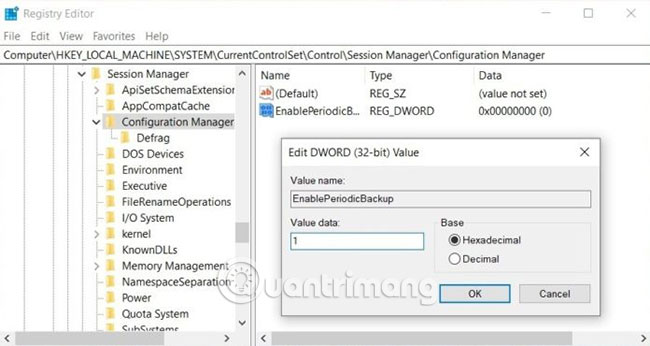
<p style="text-align: justify;">6. Nhập&nbsp;<strong>EnablePeriodicBackup</strong>&nbsp;vào trường&nbsp;<strong>Value Name.</strong></p>

<p style="text-align: justify;"><strong><img alt="Nhập EnablePeriodicBackup vào trường Value Name" data-i="0" data-src="https://st.quantrimang.com/photos/image/2019/07/02/sao-luu-registry-tu-dong-trong-wins-10-1.jpg" data-was-processed="true" height="293" src="https://st.quantrimang.com/photos/image/2019/07/02/sao-luu-registry-tu-dong-trong-wins-10-1.jpg" width="550" /></strong></p>

<p style="text-align: justify;">7. Nhấp đúp vào mục&nbsp;<strong>EnablePeriodicBackup.</strong></p>

<p style="text-align: justify;">8. Thay đổi giá trị thành&nbsp;<strong>1</strong>.</p>

<p style="text-align: justify;">9. Nhấp vào&nbsp;<strong>OK.</strong></p>

<p style="text-align: justify;">Sau khi chỉnh sửa&nbsp;Windows Registry, khởi động lại hệ thống để áp dụng các thay đổi.</p>

<p style="text-align: justify;">Điều quan trọng cần lưu ý là việc chỉnh sửa registry không đúng có thể gây ra sự cố và nhiều vấn đề khác. Nếu bạn thường chỉnh sửa registry trên PC Windows, bạn cũng nên duy trì&nbsp;điểm khôi phục hệ thống.</p>

<div style="text-align: justify;">&nbsp;</div>

<h2 style="text-align: justify;">Thay đổi đối với Windows Registry</h2>

<p style="text-align: justify;">Như đã đề cập, Microsoft xác nhận rằng việc thiếu bản sao lưu registry là hành động có chủ ý, nhằm làm giảm dung lượng ổ đĩa chung của Windows.</p>

<p style="text-align: justify;">Thay vì sao lưu, Microsoft khuyên người dùng nên duy trì các điểm khôi phục hệ thống trên Windows 10 và sử dụng nó để hoàn nguyên các thay đổi cho registry.</p>

<p style="text-align: justify;">Một Windows registry bị hỏng cũng có thể gây ra&nbsp;lỗi khởi động&nbsp;và các vấn đề nghiêm trọng khác. Trong trường hợp như vậy, điểm khôi phục hệ thống sẽ đáng tin cậy hơn tính năng sao lưu truyền thống.</p>

<p style="text-align: justify;">Chúc bạn thực hiện thành công!</p>
		</div>
				<div id="author">
						<p>
				<strong>Nguồn tin:</strong>
				Quantrimang.com
			</p>
		</div>
	</div>
	<div id="footer" class="clearfix">
		<div id="url">
			<strong>URL của bản tin này: </strong><a href="https://www.nguoicodonvn2008.info/vi/news/savefile/kien-thuc-may-tinh/cach-bat-sao-luu-registry-tu-dong-trong-windows-10-390.html" title="Cách bật sao lưu registry tự động trong Windows 10">https://www.nguoicodonvn2008.info/vi/news/savefile/kien-thuc-may-tinh/cach-bat-sao-luu-registry-tu-dong-trong-windows-10-390.html</a>

		</div>
		<div class="clear"></div>
		<div class="copyright">
			&copy; .&#x3A; Nguoicodonvn2008.info - Cõi lòng người cô đơn &#x3A;.
		</div>
		<div id="contact">
			<a href="mailto:admin@nguoicodonvn2008.info">admin@nguoicodonvn2008.info</a>
		</div>
	</div>
</div>
        <div id="timeoutsess" class="chromeframe">
            Bạn đã không sử dụng Site, <a onclick="timeoutsesscancel();" href="https://www.nguoicodonvn2008.info/#">Bấm vào đây để duy trì trạng thái đăng nhập</a>. Thời gian chờ: <span id="secField"> 60 </span> giây
        </div>
        <div id="openidResult" class="nv-alert" style="display:none"></div>
        <div id="openidBt" data-result="" data-redirect=""></div>
		</script>
		<div class="car-top">
  <span><img src="https://www.nguoicodonvn2008.info/themes/default/images/car.png" alt=""></span>
</div>
<script src="https://www.nguoicodonvn2008.info/assets/js/jquery/jquery.min.js"></script>
<script>var nv_base_siteurl="/",nv_lang_data="vi",nv_lang_interface="vi",nv_name_variable="nv",nv_fc_variable="op",nv_lang_variable="language",nv_module_name="news",nv_func_name="savefile",nv_is_user=0, nv_my_ofs=-4,nv_my_abbr="EDT",nv_cookie_prefix="nv4c_e856T",nv_check_pass_mstime=1738000,nv_area_admin=0,nv_safemode=0,theme_responsive=0,nv_recaptcha_ver=2,nv_recaptcha_sitekey="",nv_recaptcha_type="image",XSSsanitize=1;</script>
<script src="https://www.nguoicodonvn2008.info/assets/js/language/vi.js"></script>
<script src="https://www.nguoicodonvn2008.info/assets/js/DOMPurify/purify3.js"></script>
<script src="https://www.nguoicodonvn2008.info/assets/js/global.js"></script>
<script src="https://www.nguoicodonvn2008.info/assets/js/site.js"></script>
<script src="https://www.nguoicodonvn2008.info/themes/default/js/news.js"></script>
<script src="https://www.nguoicodonvn2008.info/themes/default/js/main.js"></script>
<script src="https://www.nguoicodonvn2008.info/themes/default/js/custom.js"></script>
<script type="application/ld+json">
        {
            "@context": "https://schema.org",
            "@type": "Organization",
            "url": "https://www.nguoicodonvn2008.info",
            "logo": "https://www.nguoicodonvn2008.info/uploads/angel.gif"
        }
        </script>
<script src="https://www.nguoicodonvn2008.info/themes/default/js/bootstrap.min.js"></script>
<script type="text/javascript">
var $scrolltop = $('.car-top');
$scrolltop.on('click', function () {
    $('html,body').animate({
        scrollTop: 0
    }, 800);
    $(this).addClass("car-run");
    setTimeout(function(){ $scrolltop.removeClass('car-run');}, 1000);
    return false;
});
$(window).on('scroll', function ()
{ 
    if($(window).scrollTop() >= 200)
    {
        $scrolltop.addClass("show");
        $scrolltop.addClass("car-down");
    }
    else
    {
       $scrolltop.removeClass("show");
       setTimeout(function(){ $scrolltop.removeClass('car-down');}, 300);
    }
});
</script>
</body>
</html>