<!DOCTYPE html>
    <html lang="vi" xmlns="http://www.w3.org/1999/xhtml" prefix="og: http://ogp.me/ns#">
    <head>
<title>Cách bật điều khiển Windows 11 bằng giọng nói &#40;tiếng Anh&#41;</title>
<meta name="description" content="Cách bật điều khiển Windows 11 bằng giọng nói &#40;tiếng Anh&#41; - Savefile - Tin Tức -...">
<meta name="author" content=".: Nguoicodonvn2008.info - Cõi lòng người cô đơn :.">
<meta name="copyright" content=".: Nguoicodonvn2008.info - Cõi lòng người cô đơn :. [admin@nguoicodonvn2008.info]">
<meta name="robots" content="index, archive, follow, noodp">
<meta name="googlebot" content="index,archive,follow,noodp">
<meta name="msnbot" content="all,index,follow">
<meta name="generator" content="NukeViet v4.5">
<meta http-equiv="Content-Type" content="text/html; charset=utf-8">
<meta property="og:title" content="Cách bật điều khiển Windows 11 bằng giọng nói &#40;tiếng Anh&#41;">
<meta property="og:type" content="website">
<meta property="og:description" content="Savefile - Tin Tức - https&#x3A;&#x002F;&#x002F;www.nguoicodonvn2008.info&#x002F;vi&#x002F;news&#x002F;savefile&#x002F;kien-thuc-may-tinh&#x002F;cach-bat-dieu-khien-windows-11-bang-giong-noi-tieng-anh-4873.html">
<meta property="og:site_name" content=".&#x3A; Nguoicodonvn2008.info - Cõi lòng người cô đơn &#x3A;.">
<meta property="og:url" content="https://www.nguoicodonvn2008.info/vi/news/savefile/kien-thuc-may-tinh/cach-bat-dieu-khien-windows-11-bang-giong-noi-tieng-anh-4873.html">
<link rel="shortcut icon" href="https://www.nguoicodonvn2008.info/favicon.ico">
<link rel="canonical" href="https://www.nguoicodonvn2008.info/vi/news/savefile/kien-thuc-may-tinh/cach-bat-dieu-khien-windows-11-bang-giong-noi-tieng-anh-4873.html">
<link rel="alternate" href="https://www.nguoicodonvn2008.info/vi/news/rss/" title="Tin Tức" type="application/rss+xml">
<link rel="alternate" href="https://www.nguoicodonvn2008.info/vi/news/rss/karaoke-dual/" title="Tin Tức - Karaoke Dual" type="application/rss+xml">
<link rel="alternate" href="https://www.nguoicodonvn2008.info/vi/news/rss/nhac-tre/" title="Tin Tức - Nhạc trẻ" type="application/rss+xml">
<link rel="alternate" href="https://www.nguoicodonvn2008.info/vi/news/rss/tru-tinh/" title="Tin Tức - Trữ tình" type="application/rss+xml">
<link rel="alternate" href="https://www.nguoicodonvn2008.info/vi/news/rss/nuoc-ngoai/" title="Tin Tức - Nước ngoài" type="application/rss+xml">
<link rel="alternate" href="https://www.nguoicodonvn2008.info/vi/news/rss/remix/" title="Tin Tức - Remix" type="application/rss+xml">
<link rel="alternate" href="https://www.nguoicodonvn2008.info/vi/news/rss/tam-su-tinh-yeu/" title="Tin Tức - Tâm sự tình yêu" type="application/rss+xml">
<link rel="alternate" href="https://www.nguoicodonvn2008.info/vi/news/rss/tho-suu-tam/" title="Tin Tức - Thơ sưu tầm" type="application/rss+xml">
<link rel="alternate" href="https://www.nguoicodonvn2008.info/vi/news/rss/cuoc-song/" title="Tin Tức - Cuộc sống" type="application/rss+xml">
<link rel="alternate" href="https://www.nguoicodonvn2008.info/vi/news/rss/phan-mem/" title="Tin Tức - Phần mềm" type="application/rss+xml">
<link rel="alternate" href="https://www.nguoicodonvn2008.info/vi/news/rss/kien-thuc-may-tinh/" title="Tin Tức - Kiến thức máy tính" type="application/rss+xml">
<link rel="alternate" href="https://www.nguoicodonvn2008.info/vi/news/rss/hoc-tap/" title="Tin Tức - Học tập" type="application/rss+xml">
<link rel="alternate" href="https://www.nguoicodonvn2008.info/vi/news/rss/tai-lieu/" title="Tin Tức - Tài liệu" type="application/rss+xml">
<link rel="alternate" href="https://www.nguoicodonvn2008.info/vi/news/rss/de-thi/" title="Tin Tức - Đề thi" type="application/rss+xml">
<link rel="preload" as="style" href="https://www.nguoicodonvn2008.info/assets/css/font-awesome.min.css" type="text/css">
<link rel="preload" as="style" href="https://www.nguoicodonvn2008.info/themes/default/css/bootstrap.non-responsive.css" type="text/css">
<link rel="preload" as="style" href="https://www.nguoicodonvn2008.info/themes/default/css/style.css" type="text/css">
<link rel="preload" as="style" href="https://www.nguoicodonvn2008.info/themes/default/css/style.non-responsive.css" type="text/css">
<link rel="preload" as="style" href="https://www.nguoicodonvn2008.info/themes/default/css/news.css" type="text/css">
<link rel="preload" as="style" href="https://www.nguoicodonvn2008.info/themes/default/css/custom.css" type="text/css">
<link rel="preload" as="script" href="https://www.nguoicodonvn2008.info/assets/js/jquery/jquery.min.js" type="text/javascript">
<link rel="preload" as="script" href="https://www.nguoicodonvn2008.info/assets/js/language/vi.js" type="text/javascript">
<link rel="preload" as="script" href="https://www.nguoicodonvn2008.info/assets/js/DOMPurify/purify3.js" type="text/javascript">
<link rel="preload" as="script" href="https://www.nguoicodonvn2008.info/assets/js/global.js" type="text/javascript">
<link rel="preload" as="script" href="https://www.nguoicodonvn2008.info/assets/js/site.js" type="text/javascript">
<link rel="preload" as="script" href="https://www.nguoicodonvn2008.info/themes/default/js/news.js" type="text/javascript">
<link rel="preload" as="script" href="https://www.nguoicodonvn2008.info/themes/default/js/main.js" type="text/javascript">
<link rel="preload" as="script" href="https://www.nguoicodonvn2008.info/themes/default/js/custom.js" type="text/javascript">
<link rel="preload" as="script" href="https://www.nguoicodonvn2008.info/themes/default/js/bootstrap.min.js" type="text/javascript">
<link rel="stylesheet" href="https://www.nguoicodonvn2008.info/assets/css/font-awesome.min.css">
<link rel="stylesheet" href="https://www.nguoicodonvn2008.info/themes/default/css/bootstrap.non-responsive.css">
<link rel="stylesheet" href="https://www.nguoicodonvn2008.info/themes/default/css/style.css">
<link rel="stylesheet" href="https://www.nguoicodonvn2008.info/themes/default/css/style.non-responsive.css">
<link rel="StyleSheet" href="https://www.nguoicodonvn2008.info/themes/default/css/news.css">
<link rel="stylesheet" href="https://www.nguoicodonvn2008.info/themes/default/css/custom.css">
<style type="text/css">
	body{background: #fff;}
</style>
    </head>
    <body>
<div id="print">
	<div id="hd_print">
		<h2 class="pull-left">.&#x3A; Nguoicodonvn2008.info - Cõi lòng người cô đơn &#x3A;.</h2>
		<p class="pull-right"><a title=".&#x3A; Nguoicodonvn2008.info - Cõi lòng người cô đơn &#x3A;." href="https://www.nguoicodonvn2008.info/">https://www.nguoicodonvn2008.info</a></p>
	</div>
	<div class="clear"></div>
	<hr />
	<div id="content">
		<h1>Cách bật điều khiển Windows 11 bằng giọng nói &#40;tiếng Anh&#41;</h1>
		<ul class="list-inline">
			<li>Thứ năm - 09/12/2021 23:57</li>
			<li class="hidden-print txtrequired"><em class="fa fa-print">&nbsp;</em><a title="In ra" href="javascript:;" onclick="window.print()">In ra</a></li>
			<li class="hidden-print txtrequired"><em class="fa fa-power-off">&nbsp;</em><a title="Đóng cửa sổ này" href="javascript:;" onclick="window.close()">Đóng cửa sổ này</a></li>
		</ul>
		<div class="clear"></div>
		<div id="hometext">
		</div>
				<div class="imghome">
			<img alt="Cách bật điều khiển Windows 11 bằng giọng nói &#40;tiếng Anh&#41;" src="https://st.quantrimang.com/photos/image/2021/12/09/cach-bat-dieu-khien-windows-11-bang-giong-noi-tieng-anh.jpg" width="460" class="img-thumbnail" />
		</div>
		<div class="clear"></div>
		<div id="bodytext" class="clearfix">
			<p style="text-align: justify;">Windows 11&nbsp;vừa có một tính năng mới mang tên &quot;Voice Access&quot; với khả năng cho phép người dùng điều khiển hệ điều hành bằng giọng nói và micro.</p>

<p style="text-align: justify;">Mặc dù Windows đã được Microsoft trang bị tính năng đọc chính tả qua micro nhưng khả năng sử dụng giọng nói của bạn để thực hiện các lệnh trên Windows đã bị giới hạn trong các ứng dụng cụ thể.</p>

<p style="text-align: justify;">Tuy nhiên, trong bản cập nhật Windows 11 build 22518 dành cho người dùng Insider kênh Dev mới được tung ra mọi thứ đã khác. Giờ đây, người dùng có thể sử dụng tính năng mới mang tên Voice Access để khởi động hoặc đóng ứng dụng, chuyển sang màn hình desktop, thu nhỏ và phóng to cửa sổ, chuyển đổi ứng dụng, chọn mục, cuộn, chỉnh sửa văn bản...</p>

<p style="text-align: justify;">Tạ thời điểm này, Voice Access chỉ hỗ trợ tiếng Anh - Mỹ. Bạn cần ra lệnh bằng tiếng Anh - Mỹ và cấu hình ngôn ngữ hiển thị sang tiếng Anh - Mỹ để tính năng hoạt động chính xác nhất.</p>

<h2 style="text-align: justify;">Cách bật điều khiển Windows 11 bằng giọng nói</h2>

<p style="text-align: justify;">Đầu tiên, để bật Voice Access thì bạn phải cài Windows 11 và tham gia kênh thử nghiệm Dev sau đó cập nhật buld 22518. Tiếp theo bạn thực hiện các bước sau:</p>

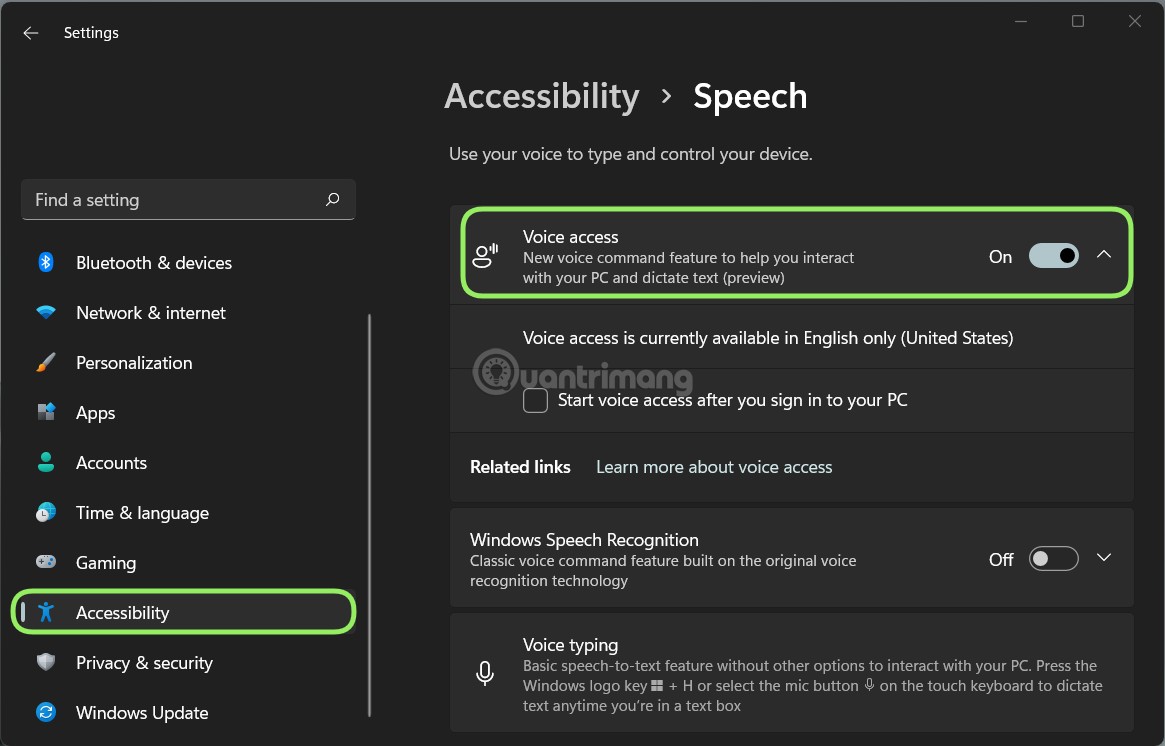
<p style="text-align: justify;"><strong>B1</strong>: Nhấn&nbsp;<strong>Win + I&nbsp;</strong>để mở&nbsp;<strong>Settings.</strong></p>

<p style="text-align: justify;"><strong>B2</strong>: Nhấn vào&nbsp;<strong>Accessibility.</strong></p>

<p style="text-align: justify;"><strong>B3</strong>: Nhấn vào&nbsp;<strong>Speech.</strong></p>

<p style="text-align: justify;"><strong>B4</strong>: Trong trang Speech tại mục&nbsp;<strong>Voice access</strong>&nbsp;bạn gạt công tắc từ Off sang On để kích hoạt.</p>

<p style="text-align: justify;"><img alt="Cách bật điều khiển Windows 11 bằng giọng nói" data-i="0" data-src="https://st.quantrimang.com/photos/image/2021/12/09/cach-bat-dieu-khien-windows-11-bang-giong-noi-tieng-anh.jpg" data-was-processed="true" height="746" src="https://st.quantrimang.com/photos/image/2021/12/09/cach-bat-dieu-khien-windows-11-bang-giong-noi-tieng-anh.jpg" width="1165" /></p>

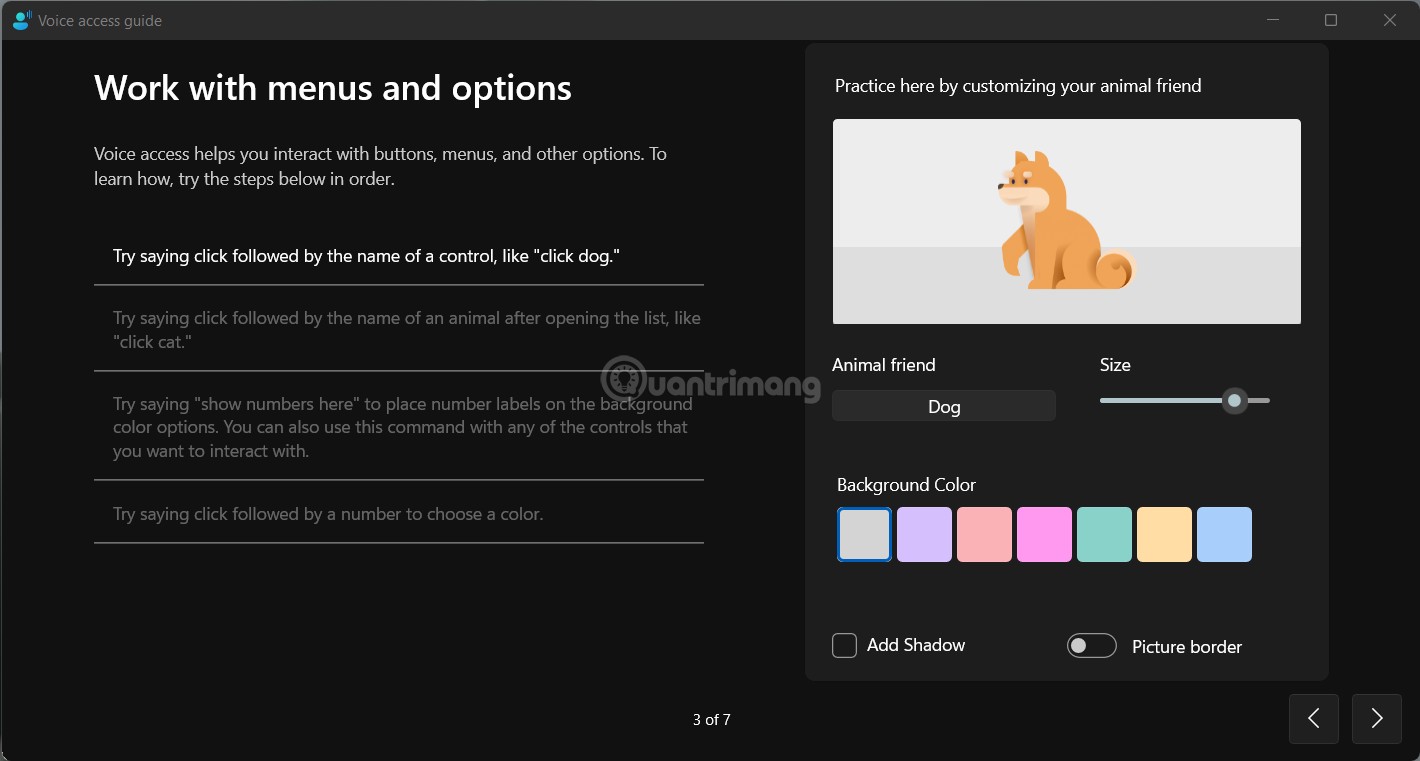
<p style="text-align: justify;">Sau khi kích hoạt, Windows 11 sẽ nhắc bạn tải xuống gói ngôn ngữ bổ trợ và cung cấp hướng dẫn tương tác giải thích cách sử dụng tính năng này.</p>

<figure>
<div style="text-align: justify;"><img alt="Hướng dẫn Voice access của Windows 11" data-i="1" data-src="https://st.quantrimang.com/photos/image/2021/12/09/cach-bat-dieu-khien-windows-11-bang-giong-noi-tieng-anh-1.jpg" data-was-processed="true" height="761" src="https://st.quantrimang.com/photos/image/2021/12/09/cach-bat-dieu-khien-windows-11-bang-giong-noi-tieng-anh-1.jpg" width="1420" /></div>

<figcaption>
<div style="text-align: justify;">Hướng dẫn Voice access của Windows 11</div>
</figcaption>
</figure>

<p style="text-align: justify;">Voice Access hỗ trợ hơn 80 lệnh giọng nói và cho phép người dùng Windows 11 đọc và sửa tài liệu trực tiếp thông qua micro. Bạn có thể tham khảo danh sách lệnh của Voice Access bằng cách truy cập link dưới đây:</p>

<ul>
	<li style="text-align: justify;">Danh sách lệnh Voice Access:</li>
</ul>

<div style="text-align: justify;"><span style="color:rgb(192, 57, 43);"><strong>https://sway.office.com/Q5JvoIGBI5glyoKw</strong></span></div>

<p style="text-align: justify;">Microsoft vẫn đang từng ngày hoàn thiện Windows 11 nên các bạn hãy cùng hy vọng rằng trong tương lai hệ điều hành mới của Microsoft sẽ ngày càng hữu ích hơn, tốt hơn.</p>
		</div>
				<div id="author">
						<p>
				<strong>Nguồn tin:</strong>
				Quantrimang.com
			</p>
		</div>
	</div>
	<div id="footer" class="clearfix">
		<div id="url">
			<strong>URL của bản tin này: </strong><a href="https://www.nguoicodonvn2008.info/vi/news/savefile/kien-thuc-may-tinh/cach-bat-dieu-khien-windows-11-bang-giong-noi-tieng-anh-4873.html" title="Cách bật điều khiển Windows 11 bằng giọng nói &#40;tiếng Anh&#41;">https://www.nguoicodonvn2008.info/vi/news/savefile/kien-thuc-may-tinh/cach-bat-dieu-khien-windows-11-bang-giong-noi-tieng-anh-4873.html</a>

		</div>
		<div class="clear"></div>
		<div class="copyright">
			&copy; .&#x3A; Nguoicodonvn2008.info - Cõi lòng người cô đơn &#x3A;.
		</div>
		<div id="contact">
			<a href="mailto:admin@nguoicodonvn2008.info">admin@nguoicodonvn2008.info</a>
		</div>
	</div>
</div>
        <div id="timeoutsess" class="chromeframe">
            Bạn đã không sử dụng Site, <a onclick="timeoutsesscancel();" href="https://www.nguoicodonvn2008.info/#">Bấm vào đây để duy trì trạng thái đăng nhập</a>. Thời gian chờ: <span id="secField"> 60 </span> giây
        </div>
        <div id="openidResult" class="nv-alert" style="display:none"></div>
        <div id="openidBt" data-result="" data-redirect=""></div>
		</script>
		<div class="car-top">
  <span><img src="https://www.nguoicodonvn2008.info/themes/default/images/car.png" alt=""></span>
</div>
<script src="https://www.nguoicodonvn2008.info/assets/js/jquery/jquery.min.js"></script>
<script>var nv_base_siteurl="/",nv_lang_data="vi",nv_lang_interface="vi",nv_name_variable="nv",nv_fc_variable="op",nv_lang_variable="language",nv_module_name="news",nv_func_name="savefile",nv_is_user=0, nv_my_ofs=-4,nv_my_abbr="EDT",nv_cookie_prefix="nv4c_e856T",nv_check_pass_mstime=1738000,nv_area_admin=0,nv_safemode=0,theme_responsive=0,nv_recaptcha_ver=2,nv_recaptcha_sitekey="",nv_recaptcha_type="image",XSSsanitize=1;</script>
<script src="https://www.nguoicodonvn2008.info/assets/js/language/vi.js"></script>
<script src="https://www.nguoicodonvn2008.info/assets/js/DOMPurify/purify3.js"></script>
<script src="https://www.nguoicodonvn2008.info/assets/js/global.js"></script>
<script src="https://www.nguoicodonvn2008.info/assets/js/site.js"></script>
<script src="https://www.nguoicodonvn2008.info/themes/default/js/news.js"></script>
<script src="https://www.nguoicodonvn2008.info/themes/default/js/main.js"></script>
<script src="https://www.nguoicodonvn2008.info/themes/default/js/custom.js"></script>
<script type="application/ld+json">
        {
            "@context": "https://schema.org",
            "@type": "Organization",
            "url": "https://www.nguoicodonvn2008.info",
            "logo": "https://www.nguoicodonvn2008.info/uploads/angel.gif"
        }
        </script>
<script src="https://www.nguoicodonvn2008.info/themes/default/js/bootstrap.min.js"></script>
<script type="text/javascript">
var $scrolltop = $('.car-top');
$scrolltop.on('click', function () {
    $('html,body').animate({
        scrollTop: 0
    }, 800);
    $(this).addClass("car-run");
    setTimeout(function(){ $scrolltop.removeClass('car-run');}, 1000);
    return false;
});
$(window).on('scroll', function ()
{ 
    if($(window).scrollTop() >= 200)
    {
        $scrolltop.addClass("show");
        $scrolltop.addClass("car-down");
    }
    else
    {
       $scrolltop.removeClass("show");
       setTimeout(function(){ $scrolltop.removeClass('car-down');}, 300);
    }
});
</script>
</body>
</html>