<!DOCTYPE html>
    <html lang="vi" xmlns="http://www.w3.org/1999/xhtml" prefix="og: http://ogp.me/ns#">
    <head>
<title>Cách bảo vệ file trong OneDrive bằng 2FA với Personal Vault</title>
<meta name="description" content="Cách bảo vệ file trong OneDrive bằng 2FA với Personal Vault - Savefile - Tin Tức -...">
<meta name="author" content=".: Nguoicodonvn2008.info - Cõi lòng người cô đơn :.">
<meta name="copyright" content=".: Nguoicodonvn2008.info - Cõi lòng người cô đơn :. [admin@nguoicodonvn2008.info]">
<meta name="robots" content="index, archive, follow, noodp">
<meta name="googlebot" content="index,archive,follow,noodp">
<meta name="msnbot" content="all,index,follow">
<meta name="generator" content="NukeViet v4.5">
<meta http-equiv="Content-Type" content="text/html; charset=utf-8">
<meta property="og:title" content="Cách bảo vệ file trong OneDrive bằng 2FA với Personal Vault">
<meta property="og:type" content="website">
<meta property="og:description" content="Savefile - Tin Tức - https&#x3A;&#x002F;&#x002F;www.nguoicodonvn2008.info&#x002F;vi&#x002F;news&#x002F;savefile&#x002F;kien-thuc-may-tinh&#x002F;cach-bao-ve-file-trong-onedrive-bang-2fa-voi-personal-vault-969.html">
<meta property="og:site_name" content=".&#x3A; Nguoicodonvn2008.info - Cõi lòng người cô đơn &#x3A;.">
<meta property="og:url" content="https://www.nguoicodonvn2008.info/vi/news/savefile/kien-thuc-may-tinh/cach-bao-ve-file-trong-onedrive-bang-2fa-voi-personal-vault-969.html">
<link rel="shortcut icon" href="https://www.nguoicodonvn2008.info/favicon.ico">
<link rel="canonical" href="https://www.nguoicodonvn2008.info/vi/news/savefile/kien-thuc-may-tinh/cach-bao-ve-file-trong-onedrive-bang-2fa-voi-personal-vault-969.html">
<link rel="alternate" href="https://www.nguoicodonvn2008.info/vi/news/rss/" title="Tin Tức" type="application/rss+xml">
<link rel="alternate" href="https://www.nguoicodonvn2008.info/vi/news/rss/karaoke-dual/" title="Tin Tức - Karaoke Dual" type="application/rss+xml">
<link rel="alternate" href="https://www.nguoicodonvn2008.info/vi/news/rss/nhac-tre/" title="Tin Tức - Nhạc trẻ" type="application/rss+xml">
<link rel="alternate" href="https://www.nguoicodonvn2008.info/vi/news/rss/tru-tinh/" title="Tin Tức - Trữ tình" type="application/rss+xml">
<link rel="alternate" href="https://www.nguoicodonvn2008.info/vi/news/rss/nuoc-ngoai/" title="Tin Tức - Nước ngoài" type="application/rss+xml">
<link rel="alternate" href="https://www.nguoicodonvn2008.info/vi/news/rss/remix/" title="Tin Tức - Remix" type="application/rss+xml">
<link rel="alternate" href="https://www.nguoicodonvn2008.info/vi/news/rss/tam-su-tinh-yeu/" title="Tin Tức - Tâm sự tình yêu" type="application/rss+xml">
<link rel="alternate" href="https://www.nguoicodonvn2008.info/vi/news/rss/tho-suu-tam/" title="Tin Tức - Thơ sưu tầm" type="application/rss+xml">
<link rel="alternate" href="https://www.nguoicodonvn2008.info/vi/news/rss/cuoc-song/" title="Tin Tức - Cuộc sống" type="application/rss+xml">
<link rel="alternate" href="https://www.nguoicodonvn2008.info/vi/news/rss/phan-mem/" title="Tin Tức - Phần mềm" type="application/rss+xml">
<link rel="alternate" href="https://www.nguoicodonvn2008.info/vi/news/rss/kien-thuc-may-tinh/" title="Tin Tức - Kiến thức máy tính" type="application/rss+xml">
<link rel="alternate" href="https://www.nguoicodonvn2008.info/vi/news/rss/hoc-tap/" title="Tin Tức - Học tập" type="application/rss+xml">
<link rel="alternate" href="https://www.nguoicodonvn2008.info/vi/news/rss/tai-lieu/" title="Tin Tức - Tài liệu" type="application/rss+xml">
<link rel="alternate" href="https://www.nguoicodonvn2008.info/vi/news/rss/de-thi/" title="Tin Tức - Đề thi" type="application/rss+xml">
<link rel="preload" as="style" href="https://www.nguoicodonvn2008.info/assets/css/font-awesome.min.css" type="text/css">
<link rel="preload" as="style" href="https://www.nguoicodonvn2008.info/themes/default/css/bootstrap.non-responsive.css" type="text/css">
<link rel="preload" as="style" href="https://www.nguoicodonvn2008.info/themes/default/css/style.css" type="text/css">
<link rel="preload" as="style" href="https://www.nguoicodonvn2008.info/themes/default/css/style.non-responsive.css" type="text/css">
<link rel="preload" as="style" href="https://www.nguoicodonvn2008.info/themes/default/css/news.css" type="text/css">
<link rel="preload" as="style" href="https://www.nguoicodonvn2008.info/themes/default/css/custom.css" type="text/css">
<link rel="preload" as="script" href="https://www.nguoicodonvn2008.info/assets/js/jquery/jquery.min.js" type="text/javascript">
<link rel="preload" as="script" href="https://www.nguoicodonvn2008.info/assets/js/language/vi.js" type="text/javascript">
<link rel="preload" as="script" href="https://www.nguoicodonvn2008.info/assets/js/DOMPurify/purify3.js" type="text/javascript">
<link rel="preload" as="script" href="https://www.nguoicodonvn2008.info/assets/js/global.js" type="text/javascript">
<link rel="preload" as="script" href="https://www.nguoicodonvn2008.info/assets/js/site.js" type="text/javascript">
<link rel="preload" as="script" href="https://www.nguoicodonvn2008.info/themes/default/js/news.js" type="text/javascript">
<link rel="preload" as="script" href="https://www.nguoicodonvn2008.info/themes/default/js/main.js" type="text/javascript">
<link rel="preload" as="script" href="https://www.nguoicodonvn2008.info/themes/default/js/custom.js" type="text/javascript">
<link rel="preload" as="script" href="https://www.nguoicodonvn2008.info/themes/default/js/bootstrap.min.js" type="text/javascript">
<link rel="stylesheet" href="https://www.nguoicodonvn2008.info/assets/css/font-awesome.min.css">
<link rel="stylesheet" href="https://www.nguoicodonvn2008.info/themes/default/css/bootstrap.non-responsive.css">
<link rel="stylesheet" href="https://www.nguoicodonvn2008.info/themes/default/css/style.css">
<link rel="stylesheet" href="https://www.nguoicodonvn2008.info/themes/default/css/style.non-responsive.css">
<link rel="StyleSheet" href="https://www.nguoicodonvn2008.info/themes/default/css/news.css">
<link rel="stylesheet" href="https://www.nguoicodonvn2008.info/themes/default/css/custom.css">
<style type="text/css">
	body{background: #fff;}
</style>
    </head>
    <body>
<div id="print">
	<div id="hd_print">
		<h2 class="pull-left">.&#x3A; Nguoicodonvn2008.info - Cõi lòng người cô đơn &#x3A;.</h2>
		<p class="pull-right"><a title=".&#x3A; Nguoicodonvn2008.info - Cõi lòng người cô đơn &#x3A;." href="https://www.nguoicodonvn2008.info/">https://www.nguoicodonvn2008.info</a></p>
	</div>
	<div class="clear"></div>
	<hr />
	<div id="content">
		<h1>Cách bảo vệ file trong OneDrive bằng 2FA với Personal Vault</h1>
		<ul class="list-inline">
			<li>Thứ hai - 16/09/2019 01:46</li>
			<li class="hidden-print txtrequired"><em class="fa fa-print">&nbsp;</em><a title="In ra" href="javascript:;" onclick="window.print()">In ra</a></li>
			<li class="hidden-print txtrequired"><em class="fa fa-power-off">&nbsp;</em><a title="Đóng cửa sổ này" href="javascript:;" onclick="window.close()">Đóng cửa sổ này</a></li>
		</ul>
		<div class="clear"></div>
		<div id="hometext">
		</div>
				<div class="imghome">
			<img alt="Cách bảo vệ file trong OneDrive bằng 2FA với Personal Vault" src="https://st.quantrimang.com/photos/image/2019/09/14/bao-ve-file-trong-onedrive-bang-2fa-voi-personal-vault-3.jpg" width="460" class="img-thumbnail" />
		</div>
		<div class="clear"></div>
		<div id="bodytext" class="clearfix">
			<p style="text-align: justify;">Microsoft cho phép bạn thêm một lớp bảo mật bổ sung đối với các tài liệu nhạy cảm được lưu trữ trên&nbsp;OneDrive. Tính năng Personal Vault bổ sung thêm một lớp bảo mật nâng cao cho các tài liệu được lưu trữ trong OneDrive. Trên&nbsp;Windows 10, nó đồng bộ các file thành phần được mã hóa BitLocker trên ổ cứng. Các file cũng được mã hóa trong khi “nghỉ ngơi” trong OneDrive và chuyển sang thiết bị của bạn.</p>

<p style="text-align: justify;">Bạn vẫn cần thông tin đăng nhập thông thường để đăng nhập vào OneDrive, nhưng thư mục Personal Vault cũng yêu cầu khả năng xác thực mạnh hoặc bước xác minh thứ hai để truy cập.</p>

<p style="text-align: justify;"><strong>Lưu ý</strong>: Bạn có thể chưa thấy tính năng này. Đầu năm nay, Microsoft đã công bố tính năng Personal Vault. Tính năng này bắt đầu được tung ra ở những khu vực hạn chế vào ngày 25 tháng 6. Nhưng giờ thì nó bắt đầu đến được với nhiều người dùng hơn. Personal Vault đã xuất hiện ở tất cả các khu vực trên toàn thế giới vào ngày 6 tháng 9 năm 2019 và dự kiến ​​sẽ có sẵn cho tất cả mọi người vào tháng 10 năm 2019, theo ông Seth Patton, đại diện của Microsoft.</p>

<h2 style="text-align: justify;">Sử dụng Personal Vault trong Microsoft OneDrive</h2>

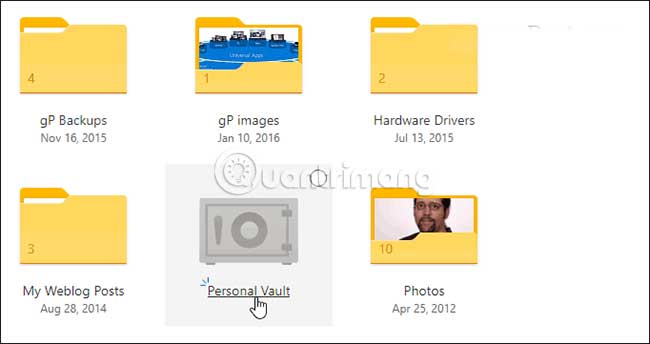
<p style="text-align: justify;">Trên web, hãy đăng nhập vào tài khoản OneDrive và tìm thư mục&nbsp;<strong>Personal Vault</strong>&nbsp;mới, rồi nhấp vào nó. Sau đó, bạn sẽ cần phải đăng nhập vào tài khoản Microsoft của mình và thiết lập chế độ xác minh thứ hai. Đối với bước thứ hai, bạn có thể sử dụng dấu vân tay, khuôn mặt với&nbsp;Windows Hello, mã PIN hay code được gửi qua email hoặc SMS. Và trên thiết bị di động, thư mục có thể được mở khóa bằng ứng dụng Microsoft Authenticator.</p>

<p style="text-align: justify;"><img alt="Sử dụng Personal Vault trong Microsoft OneDrive" data-i="0" data-src="https://st.quantrimang.com/photos/image/2019/09/14/bao-ve-file-trong-onedrive-bang-2fa-voi-personal-vault-1.jpg" data-was-processed="true" height="344" src="https://st.quantrimang.com/photos/image/2019/09/14/bao-ve-file-trong-onedrive-bang-2fa-voi-personal-vault-1.jpg" width="650" /></p>

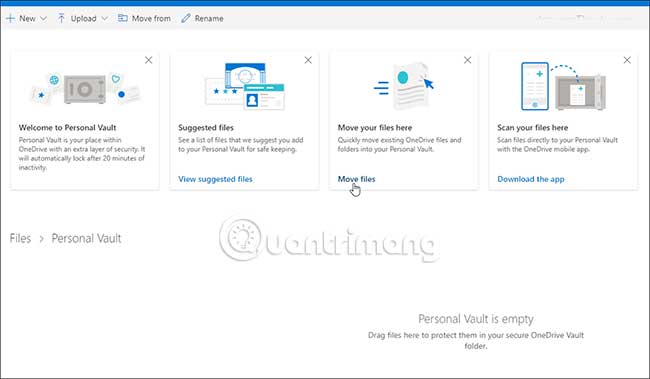
<p style="text-align: justify;">Sử dụng thư mục Personal Vault khá đơn giản. Nó hoạt động như mọi thư mục khác mà bạn có trong OneDrive. Sự khác biệt là lớp bảo mật thứ hai. Khi mở nó, bạn sẽ tìm thấy một vài lời nhắc về việc sử dụng, bao gồm cả các file được đề xuất, trong đó OneDrive cung cấp cho bạn một danh sách các file trong OneDrive mà bạn có thể muốn thêm vào Vault. Tùy chọn&nbsp;<strong>“Move files here”</strong>&nbsp;cho phép bạn chỉ cần kéo và thả các file vào Vault. Với&nbsp;<strong>“Scan your files”</strong>, bạn có thể sử dụng ứng dụng OneDrive trên thiết bị di động để quét trực tiếp các tài liệu vào Vault.</p>

<p style="text-align: justify;"><img alt="Sử dụng thư mục Personal Vault khá đơn giản" data-i="1" data-src="https://st.quantrimang.com/photos/image/2019/09/14/bao-ve-file-trong-onedrive-bang-2fa-voi-personal-vault-2.jpg" data-was-processed="true" height="379" src="https://st.quantrimang.com/photos/image/2019/09/14/bao-ve-file-trong-onedrive-bang-2fa-voi-personal-vault-2.jpg" width="650" /></p>

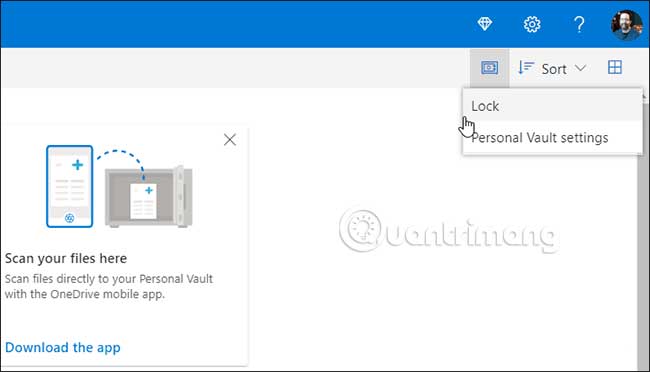
<p style="text-align: justify;">Bạn có thể khóa Personal Vault bằng cách nhấp vào biểu tượng&nbsp;<strong>Options</strong>&nbsp;ở góc trên bên phải và chọn&nbsp;<strong>Lock.</strong>&nbsp;Ở đó, bạn cũng có thể vào và sửa đổi một số cài đặt như thay đổi cách bạn đăng nhập vào Personal Vault và thậm chí vô hiệu hóa nó.</p>

<p style="text-align: justify;"><img alt="Bạn cũng có thể vào và sửa đổi một số cài đặt" data-i="2" data-src="https://st.quantrimang.com/photos/image/2019/09/14/bao-ve-file-trong-onedrive-bang-2fa-voi-personal-vault-3.jpg" data-was-processed="true" height="372" src="https://st.quantrimang.com/photos/image/2019/09/14/bao-ve-file-trong-onedrive-bang-2fa-voi-personal-vault-3.jpg" width="650" /></p>

<h2 style="text-align: justify;">Personal Vault trong File Explorer trên Windows 10</h2>

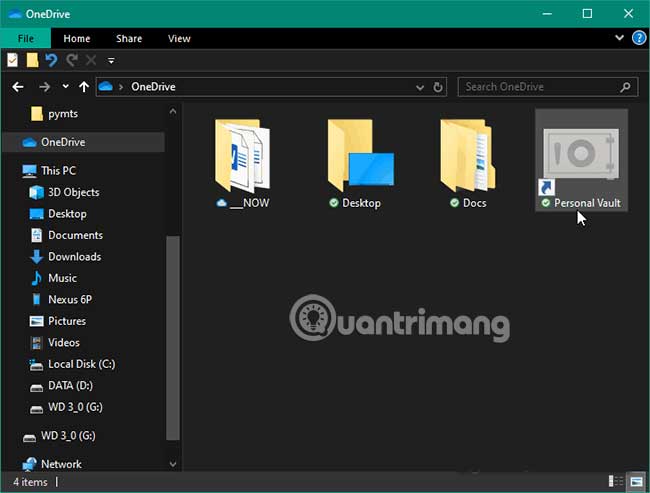
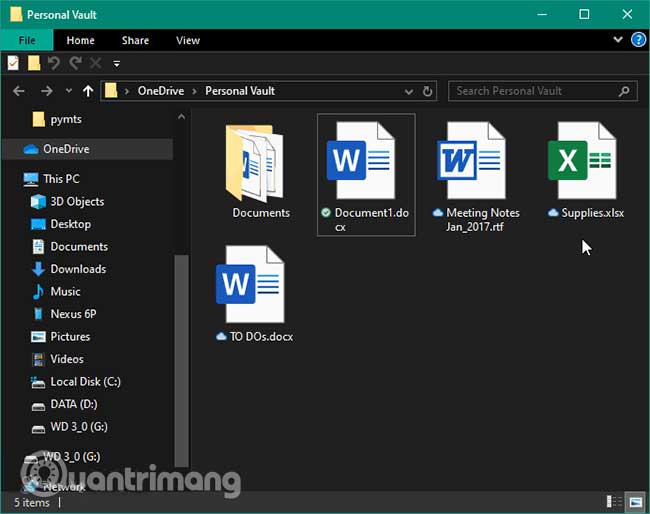
<p style="text-align: justify;">Trên desktop Windows 10, bạn sẽ tìm thấy Personal Vault trong thư mục&nbsp;<strong>OneDrive</strong>&nbsp;thuộc&nbsp;<strong>File Explorer.</strong></p>

<p style="text-align: justify;"><strong><img alt="Trên desktop Windows 10, bạn sẽ tìm thấy Personal Vault trong thư mục OneDrive thuộc File Explorer" data-i="3" data-src="https://st.quantrimang.com/photos/image/2019/09/14/bao-ve-file-trong-onedrive-bang-2fa-voi-personal-vault-4.jpg" data-was-processed="true" height="493" src="https://st.quantrimang.com/photos/image/2019/09/14/bao-ve-file-trong-onedrive-bang-2fa-voi-personal-vault-4.jpg" width="650" /></strong></p>

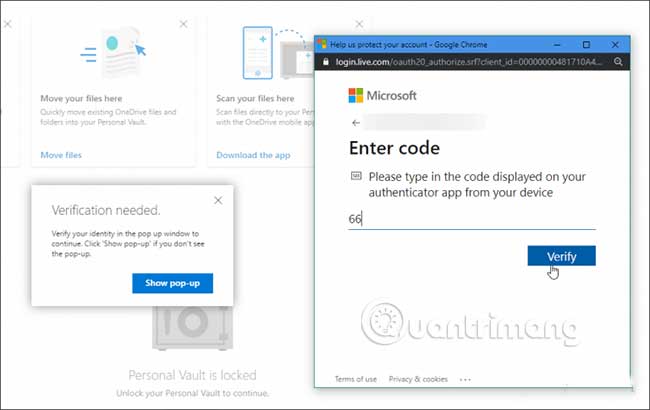
<p style="text-align: justify;">Để mở khóa, bạn sẽ cần hình thức xác thực thứ hai đã thiết lập trước đó. Sau khi mở khóa, bạn có thể sử dụng các file như bình thường.</p>

<p style="text-align: justify;"><img alt="Để mở khóa, bạn sẽ cần hình thức xác thực thứ hai đã thiết lập trước đó" data-i="4" data-src="https://st.quantrimang.com/photos/image/2019/09/14/bao-ve-file-trong-onedrive-bang-2fa-voi-personal-vault-5.jpg" data-was-processed="true" height="514" src="https://st.quantrimang.com/photos/image/2019/09/14/bao-ve-file-trong-onedrive-bang-2fa-voi-personal-vault-5.jpg" width="650" /></p>

<div style="text-align: justify;">&nbsp;</div>

<h2 style="text-align: justify;">Personal Vault cho OneDrive trên thiết bị di động</h2>

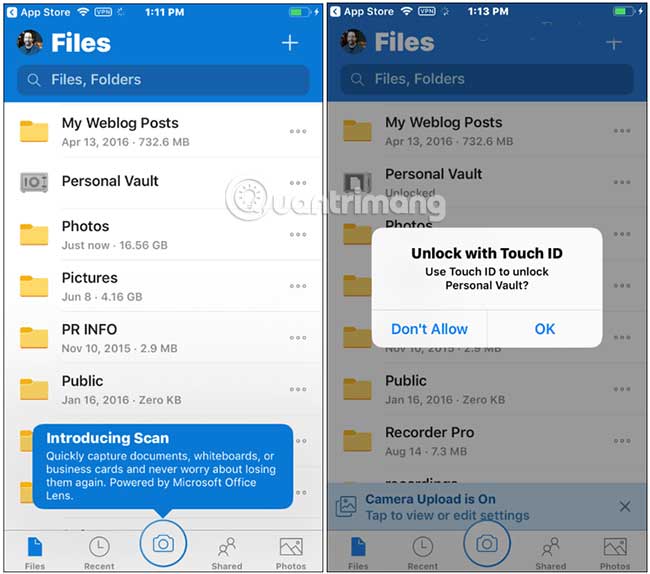
<p style="text-align: justify;">Trên thiết bị iPhone hoặc Android, bạn sẽ cần cài đặt ứng dụng OneDrive. Một lần nữa, bạn sẽ tìm thấy thư mục Personal Vault trong OneDrive. Sau đó, trên điện thoại, bạn có thể sử dụng trình đọc dấu vân tay hoặc một phương pháp xác thực yếu tố thứ hai khác để mở khóa và sử dụng các file. Cần lưu ý rằng ứng dụng yêu cầu bạn tạo mã PIN ngoài dấu vân tay.</p>

<p style="text-align: justify;"><img alt="Personal Vault cho OneDrive trên thiết bị di động" data-i="5" data-src="https://st.quantrimang.com/photos/image/2019/09/14/bao-ve-file-trong-onedrive-bang-2fa-voi-personal-vault-6.jpg" data-was-processed="true" height="574" src="https://st.quantrimang.com/photos/image/2019/09/14/bao-ve-file-trong-onedrive-bang-2fa-voi-personal-vault-6.jpg" width="650" /></p>

<h2 style="text-align: justify;">Tự động khóa Personal Vault</h2>

<p style="text-align: justify;">Lưu ý rằng Personal Vault sẽ tự động khóa sau 20 phút không hoạt động trên desktop và sau 3 phút trên điện thoại theo mặc định. Nhưng bạn có thể thay đổi thời gian tự động khóa thông qua cài đặt. Bạn cũng có thể thiết lập nó để tự động khóa khi thoát.</p>

<p style="text-align: justify;"><img alt="Tự động khóa Personal Vault" data-i="6" data-src="https://st.quantrimang.com/photos/image/2019/09/14/bao-ve-file-trong-onedrive-bang-2fa-voi-personal-vault-7.jpg" data-was-processed="true" height="410" src="https://st.quantrimang.com/photos/image/2019/09/14/bao-ve-file-trong-onedrive-bang-2fa-voi-personal-vault-7.jpg" width="650" /></p>

<p style="text-align: justify;">Nhìn chung, đây là lớp bảo mật bổ sung đáng hoan nghênh cho các file được lưu trữ và đồng bộ qua OneDrive. Nếu bạn đã do dự về việc lưu trữ các file nhạy cảm trên đám mây, thì đây là một tính năng tuyệt vời. Microsoft lưu ý rằng tất cả các file được lưu trữ trong OneDrive và những file trong Personal Vault đều được mã hóa khi ở trong phần mềm đám mây của Microsoft và khi chuyển sang thiết bị của bạn.</p>

<p style="text-align: justify;">Nhưng để đảm bảo sự bảo vệ tốt hơn nữa trên các thiết bị di động, bạn nên bật mã hóa cục bộ cho iOS hoặc Android. Điều này sẽ giữ cho dữ liệu được bảo vệ ngay cả khi máy tính xách tay hoặc điện thoại của bạn bị mất, bị đánh cắp hoặc ai đó có quyền truy cập vào nó.</p>

<p style="text-align: justify;">Chúc bạn thực hiện thành công!</p>
		</div>
				<div id="author">
						<p>
				<strong>Nguồn tin:</strong>
				Quantrimang.com
			</p>
		</div>
	</div>
	<div id="footer" class="clearfix">
		<div id="url">
			<strong>URL của bản tin này: </strong><a href="https://www.nguoicodonvn2008.info/vi/news/savefile/kien-thuc-may-tinh/cach-bao-ve-file-trong-onedrive-bang-2fa-voi-personal-vault-969.html" title="Cách bảo vệ file trong OneDrive bằng 2FA với Personal Vault">https://www.nguoicodonvn2008.info/vi/news/savefile/kien-thuc-may-tinh/cach-bao-ve-file-trong-onedrive-bang-2fa-voi-personal-vault-969.html</a>

		</div>
		<div class="clear"></div>
		<div class="copyright">
			&copy; .&#x3A; Nguoicodonvn2008.info - Cõi lòng người cô đơn &#x3A;.
		</div>
		<div id="contact">
			<a href="mailto:admin@nguoicodonvn2008.info">admin@nguoicodonvn2008.info</a>
		</div>
	</div>
</div>
        <div id="timeoutsess" class="chromeframe">
            Bạn đã không sử dụng Site, <a onclick="timeoutsesscancel();" href="https://www.nguoicodonvn2008.info/#">Bấm vào đây để duy trì trạng thái đăng nhập</a>. Thời gian chờ: <span id="secField"> 60 </span> giây
        </div>
        <div id="openidResult" class="nv-alert" style="display:none"></div>
        <div id="openidBt" data-result="" data-redirect=""></div>
		</script>
		<div class="car-top">
  <span><img src="https://www.nguoicodonvn2008.info/themes/default/images/car.png" alt=""></span>
</div>
<div id="run_cronjobs" style="visibility:hidden;display:none;"><img alt="cron" src="/index.php?second=cronjobs&amp;p=a2LLz048" width="1" height="1" /></div>
<script src="https://www.nguoicodonvn2008.info/assets/js/jquery/jquery.min.js"></script>
<script>var nv_base_siteurl="/",nv_lang_data="vi",nv_lang_interface="vi",nv_name_variable="nv",nv_fc_variable="op",nv_lang_variable="language",nv_module_name="news",nv_func_name="savefile",nv_is_user=0, nv_my_ofs=-4,nv_my_abbr="EDT",nv_cookie_prefix="nv4c_e856T",nv_check_pass_mstime=1738000,nv_area_admin=0,nv_safemode=0,theme_responsive=0,nv_recaptcha_ver=2,nv_recaptcha_sitekey="",nv_recaptcha_type="image",XSSsanitize=1;</script>
<script src="https://www.nguoicodonvn2008.info/assets/js/language/vi.js"></script>
<script src="https://www.nguoicodonvn2008.info/assets/js/DOMPurify/purify3.js"></script>
<script src="https://www.nguoicodonvn2008.info/assets/js/global.js"></script>
<script src="https://www.nguoicodonvn2008.info/assets/js/site.js"></script>
<script src="https://www.nguoicodonvn2008.info/themes/default/js/news.js"></script>
<script src="https://www.nguoicodonvn2008.info/themes/default/js/main.js"></script>
<script src="https://www.nguoicodonvn2008.info/themes/default/js/custom.js"></script>
<script type="application/ld+json">
        {
            "@context": "https://schema.org",
            "@type": "Organization",
            "url": "https://www.nguoicodonvn2008.info",
            "logo": "https://www.nguoicodonvn2008.info/uploads/angel.gif"
        }
        </script>
<script src="https://www.nguoicodonvn2008.info/themes/default/js/bootstrap.min.js"></script>
<script type="text/javascript">
var $scrolltop = $('.car-top');
$scrolltop.on('click', function () {
    $('html,body').animate({
        scrollTop: 0
    }, 800);
    $(this).addClass("car-run");
    setTimeout(function(){ $scrolltop.removeClass('car-run');}, 1000);
    return false;
});
$(window).on('scroll', function ()
{ 
    if($(window).scrollTop() >= 200)
    {
        $scrolltop.addClass("show");
        $scrolltop.addClass("car-down");
    }
    else
    {
       $scrolltop.removeClass("show");
       setTimeout(function(){ $scrolltop.removeClass('car-down');}, 300);
    }
});
</script>
</body>
</html>