<!DOCTYPE html>
    <html lang="vi" xmlns="http://www.w3.org/1999/xhtml" prefix="og: http://ogp.me/ns#">
    <head>
<title>Các template cây phả hệ miễn phí tốt nhất cho Microsoft Word và Excel</title>
<meta name="description" content="Các template cây phả hệ miễn phí tốt nhất cho Microsoft Word và Excel - Savefile - Tin Tức -...">
<meta name="author" content=".: Nguoicodonvn2008.info - Cõi lòng người cô đơn :.">
<meta name="copyright" content=".: Nguoicodonvn2008.info - Cõi lòng người cô đơn :. [admin@nguoicodonvn2008.info]">
<meta name="robots" content="index, archive, follow, noodp">
<meta name="googlebot" content="index,archive,follow,noodp">
<meta name="msnbot" content="all,index,follow">
<meta name="generator" content="NukeViet v4.5">
<meta http-equiv="Content-Type" content="text/html; charset=utf-8">
<meta property="og:title" content="Các template cây phả hệ miễn phí tốt nhất cho Microsoft Word và Excel">
<meta property="og:type" content="website">
<meta property="og:description" content="Savefile - Tin Tức -...">
<meta property="og:site_name" content=".&#x3A; Nguoicodonvn2008.info - Cõi lòng người cô đơn &#x3A;.">
<meta property="og:url" content="https://www.nguoicodonvn2008.info/vi/news/savefile/kien-thuc-may-tinh/cac-template-cay-pha-he-mien-phi-tot-nhat-cho-microsoft-word-va-excel-10009.html">
<link rel="shortcut icon" href="https://www.nguoicodonvn2008.info/favicon.ico">
<link rel="canonical" href="https://www.nguoicodonvn2008.info/vi/news/savefile/kien-thuc-may-tinh/cac-template-cay-pha-he-mien-phi-tot-nhat-cho-microsoft-word-va-excel-10009.html">
<link rel="alternate" href="https://www.nguoicodonvn2008.info/vi/news/rss/" title="Tin Tức" type="application/rss+xml">
<link rel="alternate" href="https://www.nguoicodonvn2008.info/vi/news/rss/karaoke-dual/" title="Tin Tức - Karaoke Dual" type="application/rss+xml">
<link rel="alternate" href="https://www.nguoicodonvn2008.info/vi/news/rss/nhac-tre/" title="Tin Tức - Nhạc trẻ" type="application/rss+xml">
<link rel="alternate" href="https://www.nguoicodonvn2008.info/vi/news/rss/tru-tinh/" title="Tin Tức - Trữ tình" type="application/rss+xml">
<link rel="alternate" href="https://www.nguoicodonvn2008.info/vi/news/rss/nuoc-ngoai/" title="Tin Tức - Nước ngoài" type="application/rss+xml">
<link rel="alternate" href="https://www.nguoicodonvn2008.info/vi/news/rss/remix/" title="Tin Tức - Remix" type="application/rss+xml">
<link rel="alternate" href="https://www.nguoicodonvn2008.info/vi/news/rss/tam-su-tinh-yeu/" title="Tin Tức - Tâm sự tình yêu" type="application/rss+xml">
<link rel="alternate" href="https://www.nguoicodonvn2008.info/vi/news/rss/tho-suu-tam/" title="Tin Tức - Thơ sưu tầm" type="application/rss+xml">
<link rel="alternate" href="https://www.nguoicodonvn2008.info/vi/news/rss/cuoc-song/" title="Tin Tức - Cuộc sống" type="application/rss+xml">
<link rel="alternate" href="https://www.nguoicodonvn2008.info/vi/news/rss/phan-mem/" title="Tin Tức - Phần mềm" type="application/rss+xml">
<link rel="alternate" href="https://www.nguoicodonvn2008.info/vi/news/rss/kien-thuc-may-tinh/" title="Tin Tức - Kiến thức máy tính" type="application/rss+xml">
<link rel="alternate" href="https://www.nguoicodonvn2008.info/vi/news/rss/hoc-tap/" title="Tin Tức - Học tập" type="application/rss+xml">
<link rel="alternate" href="https://www.nguoicodonvn2008.info/vi/news/rss/tai-lieu/" title="Tin Tức - Tài liệu" type="application/rss+xml">
<link rel="alternate" href="https://www.nguoicodonvn2008.info/vi/news/rss/de-thi/" title="Tin Tức - Đề thi" type="application/rss+xml">
<link rel="preload" as="style" href="https://www.nguoicodonvn2008.info/assets/css/font-awesome.min.css" type="text/css">
<link rel="preload" as="style" href="https://www.nguoicodonvn2008.info/themes/default/css/bootstrap.non-responsive.css" type="text/css">
<link rel="preload" as="style" href="https://www.nguoicodonvn2008.info/themes/default/css/style.css" type="text/css">
<link rel="preload" as="style" href="https://www.nguoicodonvn2008.info/themes/default/css/style.non-responsive.css" type="text/css">
<link rel="preload" as="style" href="https://www.nguoicodonvn2008.info/themes/default/css/news.css" type="text/css">
<link rel="preload" as="style" href="https://www.nguoicodonvn2008.info/themes/default/css/custom.css" type="text/css">
<link rel="preload" as="script" href="https://www.nguoicodonvn2008.info/assets/js/jquery/jquery.min.js" type="text/javascript">
<link rel="preload" as="script" href="https://www.nguoicodonvn2008.info/assets/js/language/vi.js" type="text/javascript">
<link rel="preload" as="script" href="https://www.nguoicodonvn2008.info/assets/js/DOMPurify/purify3.js" type="text/javascript">
<link rel="preload" as="script" href="https://www.nguoicodonvn2008.info/assets/js/global.js" type="text/javascript">
<link rel="preload" as="script" href="https://www.nguoicodonvn2008.info/assets/js/site.js" type="text/javascript">
<link rel="preload" as="script" href="https://www.nguoicodonvn2008.info/themes/default/js/news.js" type="text/javascript">
<link rel="preload" as="script" href="https://www.nguoicodonvn2008.info/themes/default/js/main.js" type="text/javascript">
<link rel="preload" as="script" href="https://www.nguoicodonvn2008.info/themes/default/js/custom.js" type="text/javascript">
<link rel="preload" as="script" href="https://www.nguoicodonvn2008.info/themes/default/js/bootstrap.min.js" type="text/javascript">
<link rel="stylesheet" href="https://www.nguoicodonvn2008.info/assets/css/font-awesome.min.css">
<link rel="stylesheet" href="https://www.nguoicodonvn2008.info/themes/default/css/bootstrap.non-responsive.css">
<link rel="stylesheet" href="https://www.nguoicodonvn2008.info/themes/default/css/style.css">
<link rel="stylesheet" href="https://www.nguoicodonvn2008.info/themes/default/css/style.non-responsive.css">
<link rel="StyleSheet" href="https://www.nguoicodonvn2008.info/themes/default/css/news.css">
<link rel="stylesheet" href="https://www.nguoicodonvn2008.info/themes/default/css/custom.css">
<style type="text/css">
	body{background: #fff;}
</style>
    </head>
    <body>
<div id="print">
	<div id="hd_print">
		<h2 class="pull-left">.&#x3A; Nguoicodonvn2008.info - Cõi lòng người cô đơn &#x3A;.</h2>
		<p class="pull-right"><a title=".&#x3A; Nguoicodonvn2008.info - Cõi lòng người cô đơn &#x3A;." href="https://www.nguoicodonvn2008.info/">https://www.nguoicodonvn2008.info</a></p>
	</div>
	<div class="clear"></div>
	<hr />
	<div id="content">
		<h1>Các template cây phả hệ miễn phí tốt nhất cho Microsoft Word và Excel</h1>
		<ul class="list-inline">
			<li>Thứ ba - 18/03/2025 23:56</li>
			<li class="hidden-print txtrequired"><em class="fa fa-print">&nbsp;</em><a title="In ra" href="javascript:;" onclick="window.print()">In ra</a></li>
			<li class="hidden-print txtrequired"><em class="fa fa-power-off">&nbsp;</em><a title="Đóng cửa sổ này" href="javascript:;" onclick="window.close()">Đóng cửa sổ này</a></li>
		</ul>
		<div class="clear"></div>
		<div id="hometext">
		</div>
				<div class="imghome">
			<img alt="Các template cây phả hệ miễn phí tốt nhất cho Microsoft Word và Excel" src="https://st.quantrimang.com/photos/image/2025/03/19/template-cay-pha-he-cho-microsoft-word-excel-9.jpg" width="460" class="img-thumbnail" />
		</div>
		<div class="clear"></div>
		<div id="bodytext" class="clearfix">
			<p style="text-align: justify;">Tạo cây phả hệ là một cách tuyệt vời để hiểu về di sản và lưu giữ lịch sử gia đình cho các thế hệ tương lai. Nếu bạn không biết cách tạo cây phả hệ từ đầu, các template Microsoft Word và Excel này có thể giúp bạn.</p>

<h2 style="text-align: justify;">8. Công cụ tạo cây phả hệ 3 thế hệ</h2>

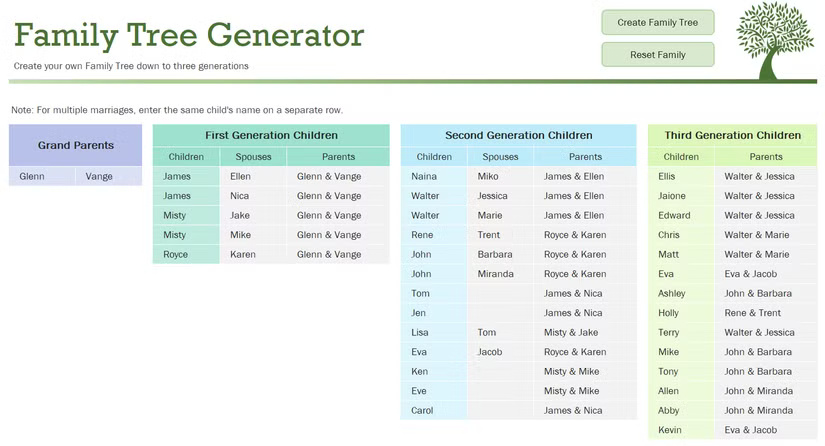
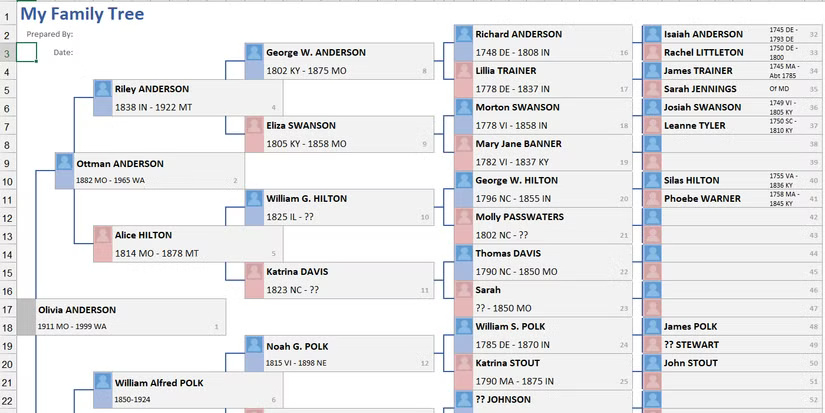
<p style="text-align: justify;">Cây phả hệ 3 thế hệ được tập trung vì nó giúp bạn làm nổi bật các mối quan hệ có tác động lớn nhất và dễ theo dõi. Thư viện template tích hợp của&nbsp;Microsoft Excel&nbsp;có một template có thể dễ dàng tạo cây phả hệ sau khi bạn nhập thông tin về các thành viên trong gia đình vào bảng&nbsp;<strong>Family Members</strong>.</p>

<figure>
<div style="text-align: justify;"><img alt="Công cụ tạo cây phả hệ trong Microsoft Excel." data-i="0" data-src="https://st.quantrimang.com/photos/image/2025/03/19/template-cay-pha-he-cho-microsoft-word-excel-1.jpg" data-was-processed="true" height="446" src="https://st.quantrimang.com/photos/image/2025/03/19/template-cay-pha-he-cho-microsoft-word-excel-1.jpg" width="825" /></div>

<figcaption>
<div style="text-align: justify;">Công cụ tạo cây phả hệ trong Microsoft Excel.</div>
</figcaption>
</figure>

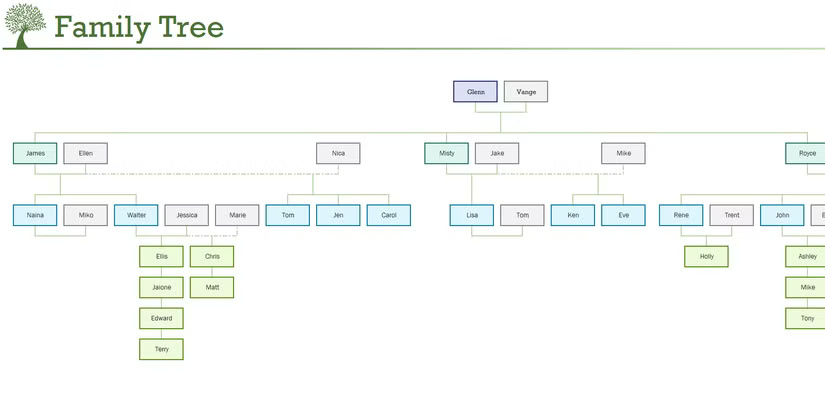
<p style="text-align: justify;">Bạn bắt đầu với ông bà, sau đó là cha mẹ, chú, dì, anh chị em ruột và anh chị em họ của mình. Sau đó, bạn có thể xem&nbsp;<a data-google-interstitial="false" data-google-vignette="false" href="https://quantrimang.com/cong-nghe/template-cay-pha-he-cho-microsoft-word-excel-208069#">&nbsp;toàn</a>&nbsp;bộ cây phả hệ trong nháy mắt bằng biểu đồ phả hệ có trong bảng&nbsp;<strong>Family Tree</strong>.</p>

<figure>
<div style="text-align: justify;"><img alt="Bảng Family Tree của công cụ tạo cây phả hệ trong Microsoft Excel." data-adbro-processed="true" data-i="1" data-src="https://st.quantrimang.com/photos/image/2025/03/19/template-cay-pha-he-cho-microsoft-word-excel-2.jpg" data-was-processed="true" height="413" src="https://st.quantrimang.com/photos/image/2025/03/19/template-cay-pha-he-cho-microsoft-word-excel-2.jpg" width="825" /></div>

<figcaption>
<div style="text-align: justify;">Bảng Family Tree của công cụ tạo cây phả hệ trong Microsoft Excel.</div>
</figcaption>
</figure>

<p style="text-align: justify;"><strong>Lưu ý</strong>: Để tải xuống, hãy mở Excel, nhấp vào&nbsp;<strong>File &gt; Home &gt; More templates</strong>&nbsp;và tìm kiếm&nbsp;<strong>Family Tree Generator</strong>.</p>

<h2 style="text-align: justify;">7.&nbsp;Template cây phả hệ 4 thế hệ</h2>

<div style="text-align: justify;"><span style="color:rgb(192, 57, 43);"><strong>https://templatearchive.com/family-tree/</strong></span></div>

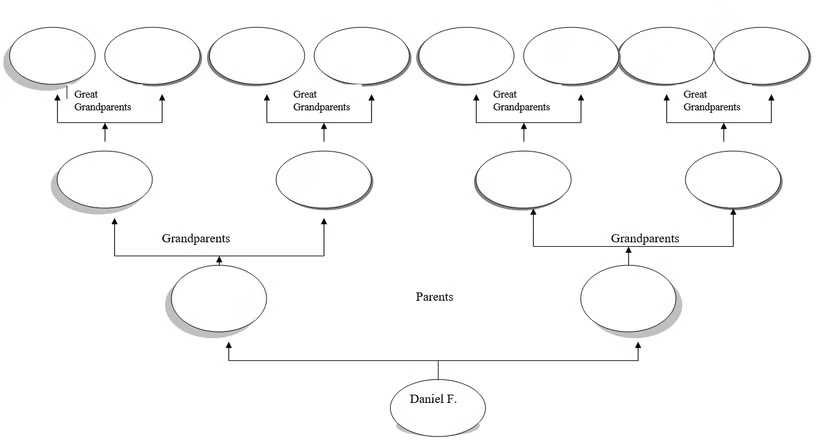
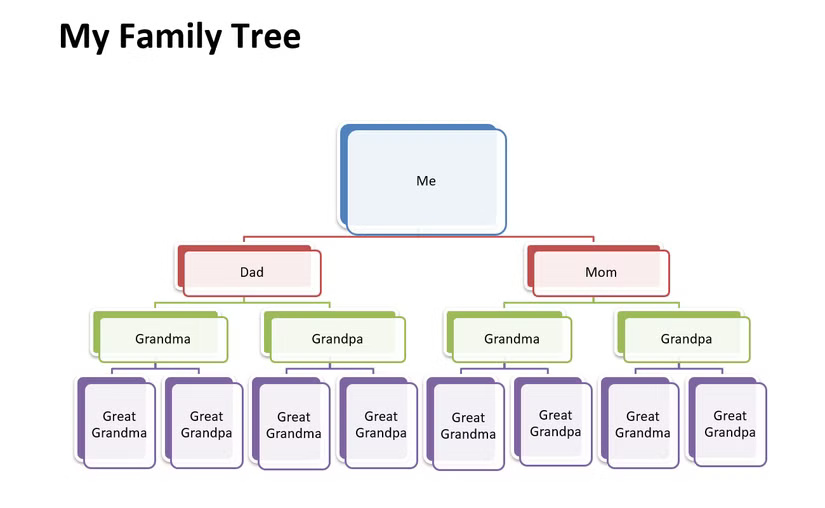
<p style="text-align: justify;">Template cây phả hệ 4 thế hệ tiến xa hơn cây phả hệ 3 thế hệ bằng cách bao gồm cả ông bà cố. Nó cung cấp chế độ xem theo chiều ngang được cấu trúc gọn gàng cho 4 thế hệ thành viên trong gia đình, kết thúc bằng bạn.</p>

<figure>
<div style="text-align: justify;"><img alt="Template cây phả hệ 4 thế hệ cho Microsoft Word." data-i="2" data-src="https://st.quantrimang.com/photos/image/2025/03/19/template-cay-pha-he-cho-microsoft-word-excel-3.jpg" data-was-processed="true" height="444" src="https://st.quantrimang.com/photos/image/2025/03/19/template-cay-pha-he-cho-microsoft-word-excel-3.jpg" width="825" /></div>

<figcaption>
<div style="text-align: justify;">Template cây phả hệ 4 thế hệ cho Microsoft Word.</div>
</figcaption>
</figure>

<p style="text-align: justify;">Bạn chỉ cần viết tên các thành viên trong gia đình vào hộp văn bản hình bầu dục. Nếu cần thêm nhiều người hơn, bạn có thể sử dụng các tính năng chỉnh sửa đơn giản trong Word để sao chép và dán các trường, cũng như dòng kết nối.</p>

<p style="text-align: justify;"><strong>Lưu ý</strong>: Đối với các template từ TemplateArchive, sau khi bạn vào liên kết, hãy cuộn xuống và tìm tên template. Trong trường hợp này, đó sẽ là&nbsp;<strong>Family Tree Template 14</strong>.</p>

<h2 style="text-align: justify;">6.&nbsp;Template cây phả hệ 6 thế hệ</h2>

<div style="text-align: justify;"><span style="color:rgb(192, 57, 43);"><strong>https://www.vertex42.com/Files/download2/themed.php?file=family-tree-6-generations.xlsx</strong></span></div>

<p style="text-align: justify;">Nếu bạn muốn ghi lại nhiều hơn về cây phả hệ của mình, hãy xem template cây phả hệ 6 thế hệ. Ngoài việc cấu trúc gọn gàng cây phả hệ của bạn, nó còn có chỗ để thêm tên, ngày tháng và nhiều thông tin khác.</p>

<figure>
<div style="text-align: justify;"><img alt="Template cây phả hệ 6 thế hệ cho Microsoft Excel." data-i="3" data-src="https://st.quantrimang.com/photos/image/2025/03/19/template-cay-pha-he-cho-microsoft-word-excel-4.jpg" data-was-processed="true" height="413" src="https://st.quantrimang.com/photos/image/2025/03/19/template-cay-pha-he-cho-microsoft-word-excel-4.jpg" width="825" /></div>

<figcaption>
<div style="text-align: justify;">Template cây phả hệ 6 thế hệ cho Microsoft Excel.</div>
</figcaption>
</figure>

<p style="text-align: justify;">Template có 2 tab - tab&nbsp;<strong>FamilyTree 6gen</strong>&nbsp;cho 6 thế hệ và tab&nbsp;<strong>FamilyTree 7gen</strong>&nbsp;cho 7 thế hệ. Trong tab&nbsp;<strong>Example</strong>, bạn sẽ thấy một template hướng dẫn bạn cách nhập dữ liệu cho cây phả hệ của mình.</p>

<p style="text-align: justify;">Thêm một phần thưởng, bạn có thể thêm một bức ảnh nhỏ bên cạnh mỗi thành viên trong gia đình. Mặc dù hình ảnh sẽ xuất hiện rất nhỏ trên trang tính Excel, nhưng đây là một tùy chọn tuyệt vời nếu bạn định in cây phả hệ của mình.</p>

<h2 style="text-align: justify;">5.&nbsp;Template cây phả hệ chi tiết cho trẻ em</h2>

<div style="text-align: justify;"><span style="color:rgb(231, 76, 60);"><strong>https://www.template.net/editable/6204/detailed-family-tree-for-kids</strong></span></div>

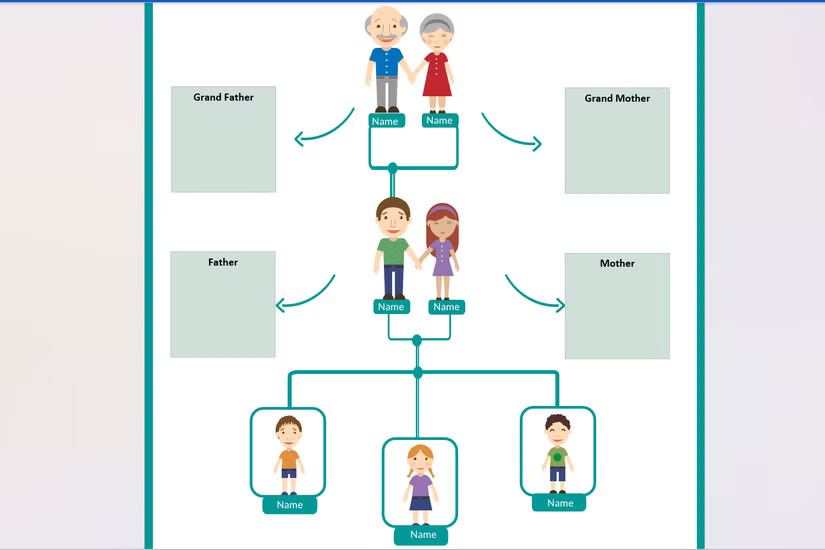
<p style="text-align: justify;">Template 3 thế hệ đơn giản này rất tuyệt nếu con bạn có một dự án ở trường hoặc nếu bạn chỉ muốn cùng nhau thực hiện một hoạt động vui vẻ ở nhà. Template này có chỗ cho ông bà, cha mẹ và hai anh chị em. Nó có hình đại diện hoạt ảnh đẹp mắt cho từng thế hệ và bạn có thể dễ dàng hoán đổi đồ họa nếu muốn cá nhân hóa cây phả hệ bằng hình ảnh của các thành viên gia đình thực sự.</p>

<figure>
<div style="text-align: justify;"><img alt="Template cây phả hệ chi tiết cho trẻ em trong Microsoft Word" data-i="4" data-src="https://st.quantrimang.com/photos/image/2025/03/19/template-cay-pha-he-cho-microsoft-word-excel-5.jpg" data-was-processed="true" height="550" src="https://st.quantrimang.com/photos/image/2025/03/19/template-cay-pha-he-cho-microsoft-word-excel-5.jpg" width="825" /></div>

<figcaption>
<div style="text-align: justify;">Template cây phả hệ chi tiết cho trẻ em trong Microsoft Word</div>
</figcaption>
</figure>

<h2 style="text-align: justify;">4.&nbsp;Template cây phả hệ 12 thành viên</h2>

<div style="text-align: justify;"><br />
<span style="color:rgb(192, 57, 43);"><strong>https://templatelab.com/family-tree-templates/</strong></span></div>

<p style="text-align: justify;">Đây là một template khác dành cho trẻ em có thiết kế cây táo với 12 ô cho các thành viên gia đình. Với một quả táo gọn gàng cho mỗi người, bạn có thể nhập tên của mọi người hoặc sử dụng các khoảng trống để thay thế cho ảnh. Nó đủ lớn để theo dõi các mối quan hệ gia đình qua nhiều thế hệ trong khi vẫn giữ mọi thứ được sắp xếp theo một bố cục hấp dẫn.</p>

<figure>
<div style="text-align: justify;"><img alt="Template cây phả hệ 12 thành viên cho Microsoft Word" data-i="5" data-src="https://st.quantrimang.com/photos/image/2025/03/19/template-cay-pha-he-cho-microsoft-word-excel-6.jpg" data-was-processed="true" height="625" src="https://st.quantrimang.com/photos/image/2025/03/19/template-cay-pha-he-cho-microsoft-word-excel-6.jpg" width="825" /></div>

<figcaption>
<div style="text-align: justify;">Template cây phả hệ 12 thành viên cho Microsoft Word</div>
</figcaption>
</figure>

<h2 style="text-align: justify;">3.&nbsp;Template cây phả hệ 15 thành viên<br />
<span style="color:rgb(192, 57, 43);"><strong>https://templatearchive.com/family-tree/</strong></span>​​​​​​</h2>

<p style="text-align: justify;">Template cây phả hệ 15 thành viên này dành cho&nbsp;Microsoft Word&nbsp;rất phù hợp với trẻ em và người lớn. Nó có giao diện đẹp, giản dị nhưng đầy màu sắc mà trẻ lớn có thể thích. Bạn có thể dễ dàng nhập tên của mọi người và bao gồm các chi tiết bổ sung như ngày sinh và địa điểm.</p>

<figure>
<div style="text-align: justify;"><img alt="Template cây phả hệ 15 thành viên dành cho Microsoft Word" data-i="6" data-src="https://st.quantrimang.com/photos/image/2025/03/19/template-cay-pha-he-cho-microsoft-word-excel-7.jpg" data-was-processed="true" height="508" src="https://st.quantrimang.com/photos/image/2025/03/19/template-cay-pha-he-cho-microsoft-word-excel-7.jpg" width="825" /></div>

<figcaption>
<div style="text-align: justify;">Template cây phả hệ 15 thành viên dành cho Microsoft Word</div>
</figcaption>
</figure>

<p style="text-align: justify;">Đối với các thành viên gia đình bổ sung, bạn có thể sáng tạo với Microsoft Word và thêm nhiều ô hơn bằng tính năng SmartArt Text. Chỉ cần nhấp vào biểu đồ và khi cửa sổ mở ra, hãy sử dụng dấu cộng để thêm một ô tên khác. Bạn cũng có thể sử dụng mũi tên để sắp xếp lại các ô và di chuyển những thành viên gia đình đến đúng vị trí.</p>

<h2 style="text-align: justify;">2.&nbsp;Template cây phả hệ 20 thành viên<br />
<span style="color:rgb(231, 76, 60);"><strong>https://templatelab.com/family-tree-templates/</strong></span>​​​​​</h2>

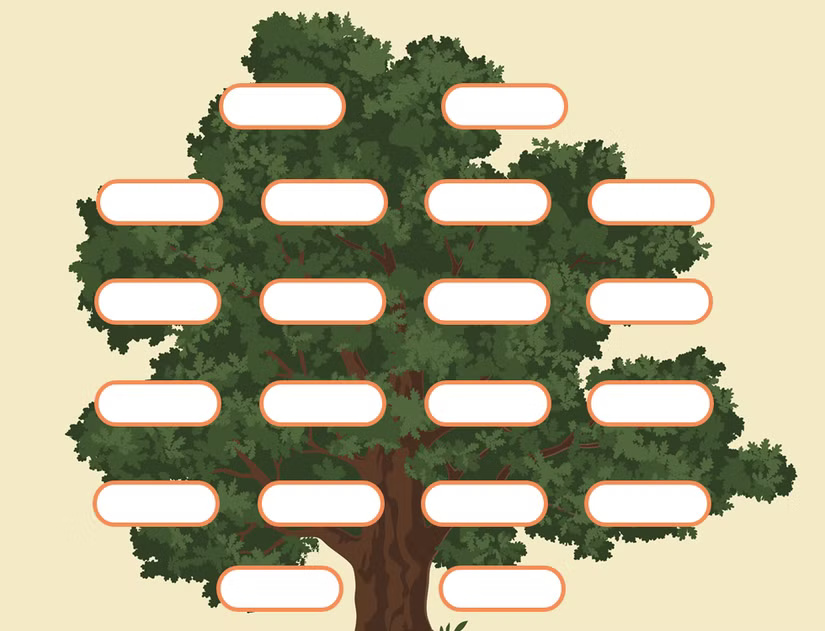
<p style="text-align: justify;">Template cây phả hệ đặc biệt này có các ô cho 20 thành viên gia đình nếu gia tộc của bạn lớn hơn một chút. Với nhiều tên như vậy để đưa vào, cây phả hệ này cho phép bạn tạo phả hệ chi tiết hơn lên đến 6 thế hệ. Ngoài ra, template cây phả hệ này được thiết kế nhiều hơn cho tên viết hơn là ảnh.</p>

<figure>
<div style="text-align: justify;"><img alt="Template cây phả hệ 20 thành viên cho Microsoft Word" data-i="7" data-src="https://st.quantrimang.com/photos/image/2025/03/19/template-cay-pha-he-cho-microsoft-word-excel-8.jpg" data-was-processed="true" height="631" src="https://st.quantrimang.com/photos/image/2025/03/19/template-cay-pha-he-cho-microsoft-word-excel-8.jpg" width="825" /></div>

<figcaption>
<div style="text-align: justify;">Template cây phả hệ 20 thành viên cho Microsoft Word</div>
</figcaption>
</figure>

<h2 style="text-align: justify;">1.&nbsp;<a data-error="true" href="https://quantrimang.com/url?u=aHR0cHM6Ly90ZW1wbGF0ZWxhYi5jb20vZmFtaWx5LXRyZWUtdGVtcGxhdGVzLw%3D%3D" rel="nofollow noopener" target="_blank">Cây phả hệ đám cưới</a></h2>

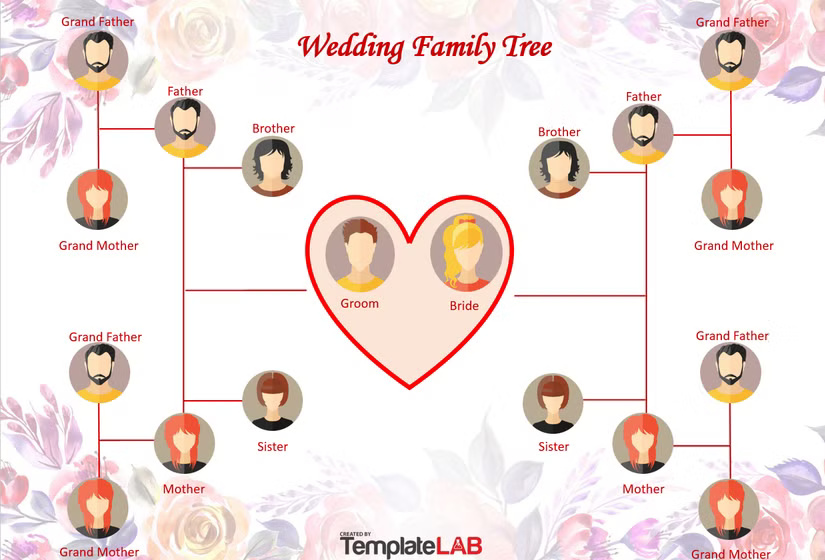
<p style="text-align: justify;">​​​​​​​​Cây phả hệ đám cưới kỷ niệm sự kết hợp của hai gia đình. Đây là vật lưu niệm có ý nghĩa mà bạn có thể trưng bày tại tiệc cưới, đưa vào album ảnh cưới hoặc sử dụng để dạy trẻ em về dòng dõi của chúng. Template cây phả hệ đám cưới bao gồm các ô dành cho những thành viên gia đình có nhiều khả năng sẽ tham dự lễ cưới - bạn và ông bà, cha mẹ và anh chị em của bạn đời.</p>

<figure>
<div style="text-align: justify;"><img alt="Template cây phả hệ đám cưới cho Microsoft Word" data-i="8" data-src="https://st.quantrimang.com/photos/image/2025/03/19/template-cay-pha-he-cho-microsoft-word-excel-9.jpg" data-was-processed="true" height="560" src="https://st.quantrimang.com/photos/image/2025/03/19/template-cay-pha-he-cho-microsoft-word-excel-9.jpg" width="825" /></div>

<figcaption>
<div style="text-align: justify;">Template cây phả hệ đám cưới cho Microsoft Word</div>
</figcaption>
</figure>

<p style="text-align: justify;">Từ gia đình nhỏ đến gia đình lớn, có một template cây phả hệ trong danh sách này chính xác là những gì bạn cần. Và vì việc tìm hiểu thêm về di sản của mình có thể vừa mang tính thông tin vừa thú vị nên loại dự án này sẽ giúp bạn và con bạn thư giãn khi cùng nhau thực hiện.</p>

<div style="text-align: justify;">&nbsp;</div>
		</div>
				<div id="author">
						<p>
				<strong>Nguồn tin:</strong>
				Quantrimang.com:
			</p>
		</div>
	</div>
	<div id="footer" class="clearfix">
		<div id="url">
			<strong>URL của bản tin này: </strong><a href="https://www.nguoicodonvn2008.info/vi/news/savefile/kien-thuc-may-tinh/cac-template-cay-pha-he-mien-phi-tot-nhat-cho-microsoft-word-va-excel-10009.html" title="Các template cây phả hệ miễn phí tốt nhất cho Microsoft Word và Excel">https://www.nguoicodonvn2008.info/vi/news/savefile/kien-thuc-may-tinh/cac-template-cay-pha-he-mien-phi-tot-nhat-cho-microsoft-word-va-excel-10009.html</a>

		</div>
		<div class="clear"></div>
		<div class="copyright">
			&copy; .&#x3A; Nguoicodonvn2008.info - Cõi lòng người cô đơn &#x3A;.
		</div>
		<div id="contact">
			<a href="mailto:admin@nguoicodonvn2008.info">admin@nguoicodonvn2008.info</a>
		</div>
	</div>
</div>
        <div id="timeoutsess" class="chromeframe">
            Bạn đã không sử dụng Site, <a onclick="timeoutsesscancel();" href="https://www.nguoicodonvn2008.info/#">Bấm vào đây để duy trì trạng thái đăng nhập</a>. Thời gian chờ: <span id="secField"> 60 </span> giây
        </div>
        <div id="openidResult" class="nv-alert" style="display:none"></div>
        <div id="openidBt" data-result="" data-redirect=""></div>
		</script>
		<div class="car-top">
  <span><img src="https://www.nguoicodonvn2008.info/themes/default/images/car.png" alt=""></span>
</div>
<script src="https://www.nguoicodonvn2008.info/assets/js/jquery/jquery.min.js"></script>
<script>var nv_base_siteurl="/",nv_lang_data="vi",nv_lang_interface="vi",nv_name_variable="nv",nv_fc_variable="op",nv_lang_variable="language",nv_module_name="news",nv_func_name="savefile",nv_is_user=0, nv_my_ofs=-4,nv_my_abbr="EDT",nv_cookie_prefix="nv4c_e856T",nv_check_pass_mstime=1738000,nv_area_admin=0,nv_safemode=0,theme_responsive=0,nv_recaptcha_ver=2,nv_recaptcha_sitekey="",nv_recaptcha_type="image",XSSsanitize=1;</script>
<script src="https://www.nguoicodonvn2008.info/assets/js/language/vi.js"></script>
<script src="https://www.nguoicodonvn2008.info/assets/js/DOMPurify/purify3.js"></script>
<script src="https://www.nguoicodonvn2008.info/assets/js/global.js"></script>
<script src="https://www.nguoicodonvn2008.info/assets/js/site.js"></script>
<script src="https://www.nguoicodonvn2008.info/themes/default/js/news.js"></script>
<script src="https://www.nguoicodonvn2008.info/themes/default/js/main.js"></script>
<script src="https://www.nguoicodonvn2008.info/themes/default/js/custom.js"></script>
<script type="application/ld+json">
        {
            "@context": "https://schema.org",
            "@type": "Organization",
            "url": "https://www.nguoicodonvn2008.info",
            "logo": "https://www.nguoicodonvn2008.info/uploads/angel.gif"
        }
        </script>
<script src="https://www.nguoicodonvn2008.info/themes/default/js/bootstrap.min.js"></script>
<script type="text/javascript">
var $scrolltop = $('.car-top');
$scrolltop.on('click', function () {
    $('html,body').animate({
        scrollTop: 0
    }, 800);
    $(this).addClass("car-run");
    setTimeout(function(){ $scrolltop.removeClass('car-run');}, 1000);
    return false;
});
$(window).on('scroll', function ()
{ 
    if($(window).scrollTop() >= 200)
    {
        $scrolltop.addClass("show");
        $scrolltop.addClass("car-down");
    }
    else
    {
       $scrolltop.removeClass("show");
       setTimeout(function(){ $scrolltop.removeClass('car-down');}, 300);
    }
});
</script>
</body>
</html>