<!DOCTYPE html>
    <html lang="vi" xmlns="http://www.w3.org/1999/xhtml" prefix="og: http://ogp.me/ns#">
    <head>
<title>&quot;Bash&quot; trong Linux nghĩa là gì?</title>
<meta name="description" content="&quot;Bash&quot; trong Linux nghĩa là gì? - Savefile - Tin Tức - https&#x3A;&#x002F;&#x002F;www.nguoicodonvn2008.info&#x002F;vi&#x002F;news&#x002F;savefile&#x002F;kien-thuc-may-tinh&#x002F;bash-trong-linux-nghia-la-gi-3433.html">
<meta name="author" content=".: Nguoicodonvn2008.info - Cõi lòng người cô đơn :.">
<meta name="copyright" content=".: Nguoicodonvn2008.info - Cõi lòng người cô đơn :. [admin@nguoicodonvn2008.info]">
<meta name="robots" content="index, archive, follow, noodp">
<meta name="googlebot" content="index,archive,follow,noodp">
<meta name="msnbot" content="all,index,follow">
<meta name="generator" content="NukeViet v4.5">
<meta http-equiv="Content-Type" content="text/html; charset=utf-8">
<meta property="og:title" content="&quot;Bash&quot; trong Linux nghĩa là gì?">
<meta property="og:type" content="website">
<meta property="og:description" content="Savefile - Tin Tức - https&#x3A;&#x002F;&#x002F;www.nguoicodonvn2008.info&#x002F;vi&#x002F;news&#x002F;savefile&#x002F;kien-thuc-may-tinh&#x002F;bash-trong-linux-nghia-la-gi-3433.html">
<meta property="og:site_name" content=".&#x3A; Nguoicodonvn2008.info - Cõi lòng người cô đơn &#x3A;.">
<meta property="og:url" content="https://www.nguoicodonvn2008.info/vi/news/savefile/kien-thuc-may-tinh/bash-trong-linux-nghia-la-gi-3433.html">
<link rel="shortcut icon" href="https://www.nguoicodonvn2008.info/favicon.ico">
<link rel="canonical" href="https://www.nguoicodonvn2008.info/vi/news/savefile/kien-thuc-may-tinh/bash-trong-linux-nghia-la-gi-3433.html">
<link rel="alternate" href="https://www.nguoicodonvn2008.info/vi/news/rss/" title="Tin Tức" type="application/rss+xml">
<link rel="alternate" href="https://www.nguoicodonvn2008.info/vi/news/rss/karaoke-dual/" title="Tin Tức - Karaoke Dual" type="application/rss+xml">
<link rel="alternate" href="https://www.nguoicodonvn2008.info/vi/news/rss/nhac-tre/" title="Tin Tức - Nhạc trẻ" type="application/rss+xml">
<link rel="alternate" href="https://www.nguoicodonvn2008.info/vi/news/rss/tru-tinh/" title="Tin Tức - Trữ tình" type="application/rss+xml">
<link rel="alternate" href="https://www.nguoicodonvn2008.info/vi/news/rss/nuoc-ngoai/" title="Tin Tức - Nước ngoài" type="application/rss+xml">
<link rel="alternate" href="https://www.nguoicodonvn2008.info/vi/news/rss/remix/" title="Tin Tức - Remix" type="application/rss+xml">
<link rel="alternate" href="https://www.nguoicodonvn2008.info/vi/news/rss/tam-su-tinh-yeu/" title="Tin Tức - Tâm sự tình yêu" type="application/rss+xml">
<link rel="alternate" href="https://www.nguoicodonvn2008.info/vi/news/rss/tho-suu-tam/" title="Tin Tức - Thơ sưu tầm" type="application/rss+xml">
<link rel="alternate" href="https://www.nguoicodonvn2008.info/vi/news/rss/cuoc-song/" title="Tin Tức - Cuộc sống" type="application/rss+xml">
<link rel="alternate" href="https://www.nguoicodonvn2008.info/vi/news/rss/phan-mem/" title="Tin Tức - Phần mềm" type="application/rss+xml">
<link rel="alternate" href="https://www.nguoicodonvn2008.info/vi/news/rss/kien-thuc-may-tinh/" title="Tin Tức - Kiến thức máy tính" type="application/rss+xml">
<link rel="alternate" href="https://www.nguoicodonvn2008.info/vi/news/rss/hoc-tap/" title="Tin Tức - Học tập" type="application/rss+xml">
<link rel="alternate" href="https://www.nguoicodonvn2008.info/vi/news/rss/tai-lieu/" title="Tin Tức - Tài liệu" type="application/rss+xml">
<link rel="alternate" href="https://www.nguoicodonvn2008.info/vi/news/rss/de-thi/" title="Tin Tức - Đề thi" type="application/rss+xml">
<link rel="preload" as="style" href="https://www.nguoicodonvn2008.info/assets/css/font-awesome.min.css" type="text/css">
<link rel="preload" as="style" href="https://www.nguoicodonvn2008.info/themes/default/css/bootstrap.non-responsive.css" type="text/css">
<link rel="preload" as="style" href="https://www.nguoicodonvn2008.info/themes/default/css/style.css" type="text/css">
<link rel="preload" as="style" href="https://www.nguoicodonvn2008.info/themes/default/css/style.non-responsive.css" type="text/css">
<link rel="preload" as="style" href="https://www.nguoicodonvn2008.info/themes/default/css/news.css" type="text/css">
<link rel="preload" as="style" href="https://www.nguoicodonvn2008.info/themes/default/css/custom.css" type="text/css">
<link rel="preload" as="script" href="https://www.nguoicodonvn2008.info/assets/js/jquery/jquery.min.js" type="text/javascript">
<link rel="preload" as="script" href="https://www.nguoicodonvn2008.info/assets/js/language/vi.js" type="text/javascript">
<link rel="preload" as="script" href="https://www.nguoicodonvn2008.info/assets/js/DOMPurify/purify3.js" type="text/javascript">
<link rel="preload" as="script" href="https://www.nguoicodonvn2008.info/assets/js/global.js" type="text/javascript">
<link rel="preload" as="script" href="https://www.nguoicodonvn2008.info/assets/js/site.js" type="text/javascript">
<link rel="preload" as="script" href="https://www.nguoicodonvn2008.info/themes/default/js/news.js" type="text/javascript">
<link rel="preload" as="script" href="https://www.nguoicodonvn2008.info/themes/default/js/main.js" type="text/javascript">
<link rel="preload" as="script" href="https://www.nguoicodonvn2008.info/themes/default/js/custom.js" type="text/javascript">
<link rel="preload" as="script" href="https://www.nguoicodonvn2008.info/themes/default/js/bootstrap.min.js" type="text/javascript">
<link rel="stylesheet" href="https://www.nguoicodonvn2008.info/assets/css/font-awesome.min.css">
<link rel="stylesheet" href="https://www.nguoicodonvn2008.info/themes/default/css/bootstrap.non-responsive.css">
<link rel="stylesheet" href="https://www.nguoicodonvn2008.info/themes/default/css/style.css">
<link rel="stylesheet" href="https://www.nguoicodonvn2008.info/themes/default/css/style.non-responsive.css">
<link rel="StyleSheet" href="https://www.nguoicodonvn2008.info/themes/default/css/news.css">
<link rel="stylesheet" href="https://www.nguoicodonvn2008.info/themes/default/css/custom.css">
<style type="text/css">
	body{background: #fff;}
</style>
    </head>
    <body>
<div id="print">
	<div id="hd_print">
		<h2 class="pull-left">.&#x3A; Nguoicodonvn2008.info - Cõi lòng người cô đơn &#x3A;.</h2>
		<p class="pull-right"><a title=".&#x3A; Nguoicodonvn2008.info - Cõi lòng người cô đơn &#x3A;." href="https://www.nguoicodonvn2008.info/">https://www.nguoicodonvn2008.info</a></p>
	</div>
	<div class="clear"></div>
	<hr />
	<div id="content">
		<h1>&quot;Bash&quot; trong Linux nghĩa là gì?</h1>
		<ul class="list-inline">
			<li>Chủ nhật - 10/01/2021 23:50</li>
			<li class="hidden-print txtrequired"><em class="fa fa-print">&nbsp;</em><a title="In ra" href="javascript:;" onclick="window.print()">In ra</a></li>
			<li class="hidden-print txtrequired"><em class="fa fa-power-off">&nbsp;</em><a title="Đóng cửa sổ này" href="javascript:;" onclick="window.close()">Đóng cửa sổ này</a></li>
		</ul>
		<div class="clear"></div>
		<div id="hometext">
		</div>
				<div class="imghome">
			<img alt="&quot;Bash&quot; trong Linux nghĩa là gì?" src="https://st.quantrimang.com/photos/image/2021/01/02/bash-co-nghia-la-gi-trong-linux2.jpg" width="460" class="img-thumbnail" />
		</div>
		<div class="clear"></div>
		<div id="bodytext" class="clearfix">
			<p style="text-align: justify;">Nếu từng sử dụng Linux trong một thời gian dài, chắc chắn bạn đã không ít lần nhìn thấy từ “Bash” xuất hiện ở đâu đó, có thể là trên các diễn đàn và những bài báo. Đôi khi nó có vẻ giống như một từ đồng nghĩa với thiết bị đầu cuối, nhưng Bash và trình giả lập thiết bị đầu cuối chắc chắn là hai khía cạnh khác nhau. Vậy Bash chính xác là gì trong Linux? Trong bài viết ngắn này, hãy cùng Quantrimang khám phá ý nghĩa của Bash, nó có chức năng gì và bạn có thể sử dụng nó ra sao.</p>

<h2 style="text-align: justify;">Định nghĩa của Bash trong Linux</h2>

<p style="text-align: justify;"><strong>Bash</strong>&nbsp;trong Linux trên thực tế là từ viết tắt của&nbsp;<strong>B</strong>ourne-<strong>A</strong>gain&nbsp;<strong>S</strong>Hell, một cách chơi chữ liên quan đến Stephen Bourne - tên gọi của người sáng tạo ra GNU này. Bản beta đầu tiên của Bash được phát hành vào năm 1989 và cho đến thời điểm viết bài, nó đã sang tới phiên bản 5.1, với bản cập nhật gần nhất vừa được ra mắt tháng 12 năm 2020.</p>

<p style="text-align: justify;">Bash là một trong những ngôn ngữ shell phổ biến nhất, được biết đến với sự kết hợp của các khả năng mạnh mẽ và hệ thống lệnh thân thiện với người dùng.</p>

<div style="text-align: justify;">&nbsp;</div>

<p style="text-align: justify;">Cụ thể hơn, trong Bash có sự tổng hòa của các tính năng nổi trội từ&nbsp;C Shell&nbsp;(csh), Korn Shell (ksh) và tuân thủ các thông số kỹ thuật shell POSTIX 2. Nó mang đến một giao diện dòng lệnh (CLI) để làm việc trên các hệ thống *nix, do đó dần trở thành một trong những shell phổ biến nhất được sử dụng trên các hệ thống Linux.</p>

<p style="text-align: justify;">Tuy nhiên, Bash không chỉ hoạt động trên Linux, mà cũng có sẵn trên macOS và BSD. Đặc biệt, bạn có thể sử dụng nó trên Windows thông qua tiện ích&nbsp;Windows Subsystem for Linux.</p>

<p style="text-align: justify;">Nhưng suy cho cùng, để thực sự định nghĩa được khái niệm Bash, chúng ta phải hiểu shell là gì.</p>

<p style="text-align: justify;">Shell là một ứng dụng chấp nhận dữ liệu đầu vào từ người dùng và thực hiện một hành động để phản hồi, đồng thời giao tiếp với nhân (kernel) để thực thi các hành động tương ứng. Theo cách này, shell có thể được ví như một &quot;lớp vỏ&quot; xung quanh hạt nhân.</p>

<p style="text-align: justify;">Trong khi shell khởi tạo nhiều ứng dụng khác nhau thông qua các lệnh, chúng cũng thường sở hữu những tính năng tương tác.</p>

<div style="text-align: justify;">&nbsp;</div>

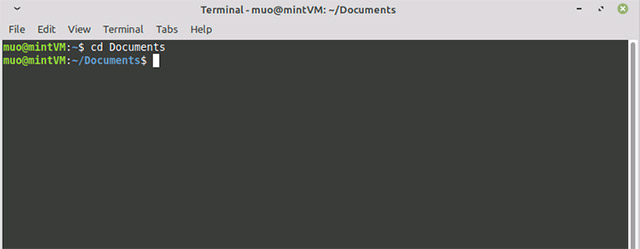
<p style="text-align: justify;">Ví dụ: khi bạn mở một thiết bị đầu cuối Linux và nhấn nút mũi tên lên để truy xuất lệnh được phát hành cuối cùng, đó là một chức năng của ứng dụng Bash.&nbsp;Lệnh&nbsp;<strong>cd</strong>&nbsp;để thay đổi thư mục cũng là một lệnh Bash rất phổ biến.</p>

<figure>
<div style="text-align: justify;"><img alt="Lệnh cd" data-i="0" data-src="https://st.quantrimang.com/photos/image/2021/01/02/bash-co-nghia-la-gi-trong-linux1.jpg" data-was-processed="true" height="249" src="https://st.quantrimang.com/photos/image/2021/01/02/bash-co-nghia-la-gi-trong-linux1.jpg" width="640" /></div>

<figcaption>
<div style="text-align: justify;">Lệnh cd</div>
</figcaption>
</figure>

<p style="text-align: justify;">Ngoài vai trò là một ứng dụng tương tác, Bash còn là một ngôn ngữ kịch bản (scripting language). Hệ điều hành Linux của bạn trên thực tế sử dụng rất nhiều tập lệnh Bash trong quá trình khởi động để bắt đầu các quy trình khác nhau.</p>

<h2 style="text-align: justify;">Bạn có thể sử dụng Bash như thế nào?</h2>

<p style="text-align: justify;">Trên thực tế, bạn đang dùng đến Bash bất cứ khi nào sử dụng thiết bị đầu cuối trong hầu hết mọi hệ thống Linux.</p>

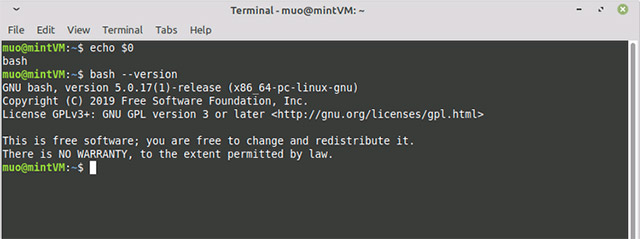
<p style="text-align: justify;">Nếu chưa rõ, bạn có thể xác nhận điều đó bằng lệnh sau đây. Lệnh này sẽ trả về tên của shell đang được sử dụng:</p>

<pre id="pre0">
<code>echo $0</code></pre>

<p style="text-align: justify;">Kết quả là bạn sẽ chỉ nhận được từ bash trả về. Sau đó, bạn có thể kiểm tra phiên bản Bash đang sử dụng bằng lệnh này:</p>

<pre id="pre1">
<code>bash --version</code></pre>

<p style="text-align: justify;">Màn hình của bạn sẽ trông như sau:</p>

<figure>
<div style="text-align: justify;"><img alt="Kết quả sau khi chạy lệnh" data-i="1" data-src="https://st.quantrimang.com/photos/image/2021/01/02/bash-co-nghia-la-gi-trong-linux2.jpg" data-was-processed="true" height="239" src="https://st.quantrimang.com/photos/image/2021/01/02/bash-co-nghia-la-gi-trong-linux2.jpg" width="640" /></div>

<figcaption>
<div style="text-align: justify;">Kết quả sau khi chạy lệnh</div>
</figcaption>
</figure>

<p style="text-align: justify;">Tuy nhiên, việc đưa ra các lệnh đơn trong thiết bị đầu cuối chỉ là bước khởi đầu cho việc sử dụng Bash.</p>

<p style="text-align: justify;">Giống như những tập lệnh mà hệ điều hành sử dụng, bạn có thể học cách viết các tập lệnh Bash để tự động hóa các quy trình trên PC Linux mà mình thường làm theo cách thủ công. Một Bash scripter lành nghề có thể sở hữu các script tự động hóa hàng trăm nhiệm vụ mỗi ngày!</p>

<h2 style="text-align: justify;">Vậy làm thế nào bạn có thể học sử dụng Bash?</h2>

<p style="text-align: justify;">Câu trả lời rất đơn giản: Bằng cách thực hành viết scripts, theo cách của riêng bạn hoặc được hướng dẫn, chẳng hạn như tham gia vào một khóa học Bash trực tuyến.</p>

<p style="text-align: justify;">Đối với các game thủ, các bạn cũng có thể học bằng cách chơi trò chơi Bash. Chẳng hạn như&nbsp;Bashcrawl, một trình thu thập dữ liệu dungeon dựa trên văn bản buộc bạn phải học và nhớ lại các lệnh Bash để tiến triển trong trò chơi.</p>
		</div>
				<div id="author">
						<p>
				<strong>Nguồn tin:</strong>
				Quantrimang.com
			</p>
		</div>
	</div>
	<div id="footer" class="clearfix">
		<div id="url">
			<strong>URL của bản tin này: </strong><a href="https://www.nguoicodonvn2008.info/vi/news/savefile/kien-thuc-may-tinh/bash-trong-linux-nghia-la-gi-3433.html" title="&quot;Bash&quot; trong Linux nghĩa là gì?">https://www.nguoicodonvn2008.info/vi/news/savefile/kien-thuc-may-tinh/bash-trong-linux-nghia-la-gi-3433.html</a>

		</div>
		<div class="clear"></div>
		<div class="copyright">
			&copy; .&#x3A; Nguoicodonvn2008.info - Cõi lòng người cô đơn &#x3A;.
		</div>
		<div id="contact">
			<a href="mailto:admin@nguoicodonvn2008.info">admin@nguoicodonvn2008.info</a>
		</div>
	</div>
</div>
        <div id="timeoutsess" class="chromeframe">
            Bạn đã không sử dụng Site, <a onclick="timeoutsesscancel();" href="https://www.nguoicodonvn2008.info/#">Bấm vào đây để duy trì trạng thái đăng nhập</a>. Thời gian chờ: <span id="secField"> 60 </span> giây
        </div>
        <div id="openidResult" class="nv-alert" style="display:none"></div>
        <div id="openidBt" data-result="" data-redirect=""></div>
		</script>
		<div class="car-top">
  <span><img src="https://www.nguoicodonvn2008.info/themes/default/images/car.png" alt=""></span>
</div>
<div id="run_cronjobs" style="visibility:hidden;display:none;"><img alt="cron" src="/index.php?second=cronjobs&amp;p=c8538EEp" width="1" height="1" /></div>
<script src="https://www.nguoicodonvn2008.info/assets/js/jquery/jquery.min.js"></script>
<script>var nv_base_siteurl="/",nv_lang_data="vi",nv_lang_interface="vi",nv_name_variable="nv",nv_fc_variable="op",nv_lang_variable="language",nv_module_name="news",nv_func_name="savefile",nv_is_user=0, nv_my_ofs=-4,nv_my_abbr="EDT",nv_cookie_prefix="nv4c_e856T",nv_check_pass_mstime=1738000,nv_area_admin=0,nv_safemode=0,theme_responsive=0,nv_recaptcha_ver=2,nv_recaptcha_sitekey="",nv_recaptcha_type="image",XSSsanitize=1;</script>
<script src="https://www.nguoicodonvn2008.info/assets/js/language/vi.js"></script>
<script src="https://www.nguoicodonvn2008.info/assets/js/DOMPurify/purify3.js"></script>
<script src="https://www.nguoicodonvn2008.info/assets/js/global.js"></script>
<script src="https://www.nguoicodonvn2008.info/assets/js/site.js"></script>
<script src="https://www.nguoicodonvn2008.info/themes/default/js/news.js"></script>
<script src="https://www.nguoicodonvn2008.info/themes/default/js/main.js"></script>
<script src="https://www.nguoicodonvn2008.info/themes/default/js/custom.js"></script>
<script type="application/ld+json">
        {
            "@context": "https://schema.org",
            "@type": "Organization",
            "url": "https://www.nguoicodonvn2008.info",
            "logo": "https://www.nguoicodonvn2008.info/uploads/angel.gif"
        }
        </script>
<script src="https://www.nguoicodonvn2008.info/themes/default/js/bootstrap.min.js"></script>
<script type="text/javascript">
var $scrolltop = $('.car-top');
$scrolltop.on('click', function () {
    $('html,body').animate({
        scrollTop: 0
    }, 800);
    $(this).addClass("car-run");
    setTimeout(function(){ $scrolltop.removeClass('car-run');}, 1000);
    return false;
});
$(window).on('scroll', function ()
{ 
    if($(window).scrollTop() >= 200)
    {
        $scrolltop.addClass("show");
        $scrolltop.addClass("car-down");
    }
    else
    {
       $scrolltop.removeClass("show");
       setTimeout(function(){ $scrolltop.removeClass('car-down');}, 300);
    }
});
</script>
</body>
</html>