<!DOCTYPE html>
    <html lang="vi" xmlns="http://www.w3.org/1999/xhtml" prefix="og: http://ogp.me/ns#">
    <head>
<title>Bài 18&#x3A; Tạo menu xổ xuống trong Bootstrap 5</title>
<meta name="description" content="Bài 18&#x3A; Tạo menu xổ xuống trong Bootstrap 5 - Savefile - Tin Tức -...">
<meta name="author" content=".: Nguoicodonvn2008.info - Cõi lòng người cô đơn :.">
<meta name="copyright" content=".: Nguoicodonvn2008.info - Cõi lòng người cô đơn :. [admin@nguoicodonvn2008.info]">
<meta name="robots" content="index, archive, follow, noodp">
<meta name="googlebot" content="index,archive,follow,noodp">
<meta name="msnbot" content="all,index,follow">
<meta name="generator" content="NukeViet v4.5">
<meta http-equiv="Content-Type" content="text/html; charset=utf-8">
<meta property="og:title" content="Bài 18&#x3A; Tạo menu xổ xuống trong Bootstrap 5">
<meta property="og:type" content="website">
<meta property="og:description" content="Savefile - Tin Tức - https&#x3A;&#x002F;&#x002F;www.nguoicodonvn2008.info&#x002F;vi&#x002F;news&#x002F;savefile&#x002F;kien-thuc-may-tinh&#x002F;bai-18-tao-menu-xo-xuong-trong-bootstrap-5-6405.html">
<meta property="og:site_name" content=".&#x3A; Nguoicodonvn2008.info - Cõi lòng người cô đơn &#x3A;.">
<meta property="og:url" content="https://www.nguoicodonvn2008.info/vi/news/savefile/kien-thuc-may-tinh/bai-18-tao-menu-xo-xuong-trong-bootstrap-5-6405.html">
<link rel="shortcut icon" href="https://www.nguoicodonvn2008.info/favicon.ico">
<link rel="canonical" href="https://www.nguoicodonvn2008.info/vi/news/savefile/kien-thuc-may-tinh/bai-18-tao-menu-xo-xuong-trong-bootstrap-5-6405.html">
<link rel="alternate" href="https://www.nguoicodonvn2008.info/vi/news/rss/" title="Tin Tức" type="application/rss+xml">
<link rel="alternate" href="https://www.nguoicodonvn2008.info/vi/news/rss/karaoke-dual/" title="Tin Tức - Karaoke Dual" type="application/rss+xml">
<link rel="alternate" href="https://www.nguoicodonvn2008.info/vi/news/rss/nhac-tre/" title="Tin Tức - Nhạc trẻ" type="application/rss+xml">
<link rel="alternate" href="https://www.nguoicodonvn2008.info/vi/news/rss/tru-tinh/" title="Tin Tức - Trữ tình" type="application/rss+xml">
<link rel="alternate" href="https://www.nguoicodonvn2008.info/vi/news/rss/nuoc-ngoai/" title="Tin Tức - Nước ngoài" type="application/rss+xml">
<link rel="alternate" href="https://www.nguoicodonvn2008.info/vi/news/rss/remix/" title="Tin Tức - Remix" type="application/rss+xml">
<link rel="alternate" href="https://www.nguoicodonvn2008.info/vi/news/rss/tam-su-tinh-yeu/" title="Tin Tức - Tâm sự tình yêu" type="application/rss+xml">
<link rel="alternate" href="https://www.nguoicodonvn2008.info/vi/news/rss/tho-suu-tam/" title="Tin Tức - Thơ sưu tầm" type="application/rss+xml">
<link rel="alternate" href="https://www.nguoicodonvn2008.info/vi/news/rss/cuoc-song/" title="Tin Tức - Cuộc sống" type="application/rss+xml">
<link rel="alternate" href="https://www.nguoicodonvn2008.info/vi/news/rss/phan-mem/" title="Tin Tức - Phần mềm" type="application/rss+xml">
<link rel="alternate" href="https://www.nguoicodonvn2008.info/vi/news/rss/kien-thuc-may-tinh/" title="Tin Tức - Kiến thức máy tính" type="application/rss+xml">
<link rel="alternate" href="https://www.nguoicodonvn2008.info/vi/news/rss/hoc-tap/" title="Tin Tức - Học tập" type="application/rss+xml">
<link rel="alternate" href="https://www.nguoicodonvn2008.info/vi/news/rss/tai-lieu/" title="Tin Tức - Tài liệu" type="application/rss+xml">
<link rel="alternate" href="https://www.nguoicodonvn2008.info/vi/news/rss/de-thi/" title="Tin Tức - Đề thi" type="application/rss+xml">
<link rel="preload" as="style" href="https://www.nguoicodonvn2008.info/assets/css/font-awesome.min.css" type="text/css">
<link rel="preload" as="style" href="https://www.nguoicodonvn2008.info/themes/default/css/bootstrap.non-responsive.css" type="text/css">
<link rel="preload" as="style" href="https://www.nguoicodonvn2008.info/themes/default/css/style.css" type="text/css">
<link rel="preload" as="style" href="https://www.nguoicodonvn2008.info/themes/default/css/style.non-responsive.css" type="text/css">
<link rel="preload" as="style" href="https://www.nguoicodonvn2008.info/themes/default/css/news.css" type="text/css">
<link rel="preload" as="style" href="https://www.nguoicodonvn2008.info/themes/default/css/custom.css" type="text/css">
<link rel="preload" as="script" href="https://www.nguoicodonvn2008.info/assets/js/jquery/jquery.min.js" type="text/javascript">
<link rel="preload" as="script" href="https://www.nguoicodonvn2008.info/assets/js/language/vi.js" type="text/javascript">
<link rel="preload" as="script" href="https://www.nguoicodonvn2008.info/assets/js/DOMPurify/purify3.js" type="text/javascript">
<link rel="preload" as="script" href="https://www.nguoicodonvn2008.info/assets/js/global.js" type="text/javascript">
<link rel="preload" as="script" href="https://www.nguoicodonvn2008.info/assets/js/site.js" type="text/javascript">
<link rel="preload" as="script" href="https://www.nguoicodonvn2008.info/themes/default/js/news.js" type="text/javascript">
<link rel="preload" as="script" href="https://www.nguoicodonvn2008.info/themes/default/js/main.js" type="text/javascript">
<link rel="preload" as="script" href="https://www.nguoicodonvn2008.info/themes/default/js/custom.js" type="text/javascript">
<link rel="preload" as="script" href="https://www.nguoicodonvn2008.info/themes/default/js/bootstrap.min.js" type="text/javascript">
<link rel="stylesheet" href="https://www.nguoicodonvn2008.info/assets/css/font-awesome.min.css">
<link rel="stylesheet" href="https://www.nguoicodonvn2008.info/themes/default/css/bootstrap.non-responsive.css">
<link rel="stylesheet" href="https://www.nguoicodonvn2008.info/themes/default/css/style.css">
<link rel="stylesheet" href="https://www.nguoicodonvn2008.info/themes/default/css/style.non-responsive.css">
<link rel="StyleSheet" href="https://www.nguoicodonvn2008.info/themes/default/css/news.css">
<link rel="stylesheet" href="https://www.nguoicodonvn2008.info/themes/default/css/custom.css">
<style type="text/css">
	body{background: #fff;}
</style>
    </head>
    <body>
<div id="print">
	<div id="hd_print">
		<h2 class="pull-left">.&#x3A; Nguoicodonvn2008.info - Cõi lòng người cô đơn &#x3A;.</h2>
		<p class="pull-right"><a title=".&#x3A; Nguoicodonvn2008.info - Cõi lòng người cô đơn &#x3A;." href="https://www.nguoicodonvn2008.info/">https://www.nguoicodonvn2008.info</a></p>
	</div>
	<div class="clear"></div>
	<hr />
	<div id="content">
		<h1>Bài 18&#x3A; Tạo menu xổ xuống trong Bootstrap 5</h1>
		<ul class="list-inline">
			<li>Thứ sáu - 02/12/2022 23:16</li>
			<li class="hidden-print txtrequired"><em class="fa fa-print">&nbsp;</em><a title="In ra" href="javascript:;" onclick="window.print()">In ra</a></li>
			<li class="hidden-print txtrequired"><em class="fa fa-power-off">&nbsp;</em><a title="Đóng cửa sổ này" href="javascript:;" onclick="window.close()">Đóng cửa sổ này</a></li>
		</ul>
		<div class="clear"></div>
		<div id="hometext">
		</div>
				<div class="imghome">
			<img alt="Bài 18&#x3A; Tạo menu xổ xuống trong Bootstrap 5" src="https://st.quantrimang.com/photos/image/2022/12/02/bootstrap-nested-menu-2.jpg" width="460" class="img-thumbnail" />
		</div>
		<div class="clear"></div>
		<div id="bodytext" class="clearfix">
			<p style="text-align: justify;"><strong>Dropdown&nbsp;</strong>hay&nbsp;<strong>tạo menu xổ xuống trong</strong>&nbsp;<strong>Bootstrap 5</strong>&nbsp;là một tính năng thú vị bạn không nên bỏ qua. Dưới đây là&nbsp;<strong>cách dùng Dropdown trong Bootstrap 5</strong>.</p>

<h2 style="text-align: justify;">Tạo menu xổ xuống cơ bản</h2>

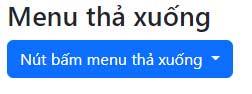
<p style="text-align: justify;">Một menu dropdown hay đổ xuống là một menu có thể chuyển đổi, cho phép người dùng chọn một giá trị từ danh sách xác định trước. Về cơ bản, nó sẽ như sau:</p>

<pre id="pre0" style="text-align: justify;">
&lt;div class=&quot;dropdown&quot;&gt;
&lt;button type=&quot;button&quot; class=&quot;btn btn-primary dropdown-toggle&quot; data-bs-toggle=&quot;dropdown&quot;&gt;
Dropdown button
&lt;/button&gt;
&lt;ul class=&quot;dropdown-menu&quot;&gt;
&lt;li&gt;&lt;a class=&quot;dropdown-item&quot; href=&quot;#&quot;&gt;Link 1&lt;/a&gt;&lt;/li&gt;
&lt;li&gt;&lt;a class=&quot;dropdown-item&quot; href=&quot;#&quot;&gt;Link 2&lt;/a&gt;&lt;/li&gt;
&lt;li&gt;&lt;a class=&quot;dropdown-item&quot; href=&quot;#&quot;&gt;Link 3&lt;/a&gt;&lt;/li&gt;
&lt;/ul&gt;
&lt;/div&gt;</pre>

<p style="text-align: justify;"><strong>Giải thích chi tiết:</strong></p>

<p style="text-align: justify;">Class&nbsp;<code>.dropdown</code>&nbsp;biểu thị menu thả xuống.</p>

<p style="text-align: justify;">Để mở menu này, dùng một nút bấm hoặc link chứa thuộc tính class&nbsp;<code>.dropdown-toggle</code>&nbsp;và&nbsp;<code>data-bs-toggle=&quot;dropdown&quot;</code>.</p>

<p style="text-align: justify;">Thêm class&nbsp;<code>.dropdown-menu</code>&nbsp;vào thành phần &lt;div&gt; để tạo một menu thả xuống thực sự. Sau đó thêm class&nbsp;<code>.dropdown-item</code>&nbsp;vào từng nhân tố (link hoặc nút bấm) bên trong menu dropdown.</p>

<p style="text-align: justify;"><strong>Ví dụ:</strong></p>

<pre id="pre1" style="text-align: justify;">
&lt;!DOCTYPE html&gt;
&lt;html lang=&quot;en&quot;&gt;
&lt;head&gt;
  &lt;title&gt;Bootstrap Example&lt;/title&gt;
  &lt;meta charset=&quot;utf-8&quot;&gt;
  &lt;meta name=&quot;viewport&quot; content=&quot;width=device-width, initial-scale=1&quot;&gt;
  &lt;link href=&quot;https://cdn.jsdelivr.net/npm/bootstrap@5.2.3/dist/css/bootstrap.min.css&quot; rel=&quot;stylesheet&quot;&gt;
  &lt;script src=&quot;https://cdn.jsdelivr.net/npm/bootstrap@5.2.3/dist/js/bootstrap.bundle.min.js&quot;&gt;&lt;/script&gt;
&lt;/head&gt;
&lt;body&gt;

&lt;div class=&quot;container mt-3&quot;&gt;
  &lt;h2&gt;Menu thả xuống&lt;/h2&gt;                                    
  &lt;div class=&quot;dropdown&quot;&gt;
    &lt;button type=&quot;button&quot; class=&quot;btn btn-primary dropdown-toggle&quot; data-bs-toggle=&quot;dropdown&quot;&gt;
      Nút bấm menu thả xuống
    &lt;/button&gt;
    &lt;ul class=&quot;dropdown-menu&quot;&gt;
      &lt;li&gt;&lt;a class=&quot;dropdown-item&quot; href=&quot;#&quot;&gt;Link 1&lt;/a&gt;&lt;/li&gt;
      &lt;li&gt;&lt;a class=&quot;dropdown-item&quot; href=&quot;#&quot;&gt;Link 2&lt;/a&gt;&lt;/li&gt;
      &lt;li&gt;&lt;a class=&quot;dropdown-item&quot; href=&quot;#&quot;&gt;Link 3&lt;/a&gt;&lt;/li&gt;
    &lt;/ul&gt;
  &lt;/div&gt;
&lt;/div&gt;

&lt;/body&gt;
&lt;/html&gt;
</pre>

<p style="text-align: justify;"><img alt="Nút bấm menu thả xuống" data-i="0" data-src="https://st.quantrimang.com/photos/image/2022/12/02/Bootstrap-dropdown-button.jpg" data-was-processed="true" height="94" src="https://st.quantrimang.com/photos/image/2022/12/02/Bootstrap-dropdown-button.jpg" width="252" /></p>

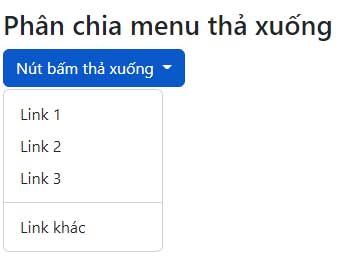
<h2 style="text-align: justify;">Phân chia menu thả xuống</h2>

<p style="text-align: justify;">Class .dropdown-divider được dùng để tách các liên kết bên trong menu thả xuống bằng một đường viền mỏng nằm ngang:</p>

<pre id="pre2" style="text-align: justify;">
&lt;li&gt;&lt;hr class=&quot;dropdown-divider&quot;&gt;&lt;/hr&gt;&lt;/li&gt;</pre>

<p style="text-align: justify;">Ví dụ:</p>

<pre id="pre3" style="text-align: justify;">
&lt;!DOCTYPE html&gt;
&lt;html lang=&quot;en&quot;&gt;
&lt;head&gt;
  &lt;title&gt;Bootstrap Example&lt;/title&gt;
  &lt;meta charset=&quot;utf-8&quot;&gt;
  &lt;meta name=&quot;viewport&quot; content=&quot;width=device-width, initial-scale=1&quot;&gt;
  &lt;link href=&quot;https://cdn.jsdelivr.net/npm/bootstrap@5.2.3/dist/css/bootstrap.min.css&quot; rel=&quot;stylesheet&quot;&gt;
  &lt;script src=&quot;https://cdn.jsdelivr.net/npm/bootstrap@5.2.3/dist/js/bootstrap.bundle.min.js&quot;&gt;&lt;/script&gt;
&lt;/head&gt;
&lt;body&gt;

&lt;div class=&quot;container mt-3&quot;&gt;
  &lt;h2&gt;Phân chia menu thả xuống&lt;/h2&gt;

  &lt;div class=&quot;dropdown&quot;&gt;
    &lt;button type=&quot;button&quot; class=&quot;btn btn-primary dropdown-toggle&quot; data-bs-toggle=&quot;dropdown&quot;&gt;
  Nút bấm thả xuống
    &lt;/button&gt;
    &lt;ul class=&quot;dropdown-menu&quot;&gt;
      &lt;li&gt;&lt;a class=&quot;dropdown-item&quot; href=&quot;#&quot;&gt;Link 1&lt;/a&gt;&lt;/li&gt;
      &lt;li&gt;&lt;a class=&quot;dropdown-item&quot; href=&quot;#&quot;&gt;Link 2&lt;/a&gt;&lt;/li&gt;
      &lt;li&gt;&lt;a class=&quot;dropdown-item&quot; href=&quot;#&quot;&gt;Link 3&lt;/a&gt;&lt;/li&gt;
      &lt;li&gt;&lt;hr class=&quot;dropdown-divider&quot;&gt;&lt;/li&gt;
      &lt;li&gt;&lt;a class=&quot;dropdown-item&quot; href=&quot;#&quot;&gt;Link khác&lt;/a&gt;&lt;/li&gt;
    &lt;/ul&gt;
  &lt;/div&gt;
&lt;/div&gt;

&lt;/body&gt;
&lt;/html&gt;

</pre>

<p style="text-align: justify;"><img alt="Phân chia menu thả xuống trong Bootstrap" data-i="1" data-src="https://st.quantrimang.com/photos/image/2022/12/02/boostrap-menu-divide.jpg" data-was-processed="true" height="263" src="https://st.quantrimang.com/photos/image/2022/12/02/boostrap-menu-divide.jpg" width="341" /></p>

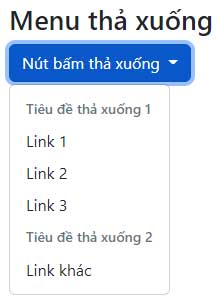
<h2 style="text-align: justify;">Header menu thả xuống</h2>

<p style="text-align: justify;">Class&nbsp;<code>.dropdown-header</code>&nbsp;được dùng để thêm các header vào bên trong menu thả xuống:</p>

<pre id="pre4" style="text-align: justify;">
&lt;li&gt;&lt;h5 class=&quot;dropdown-header&quot;&gt;Dropdown header 1&lt;/h5&gt;&lt;/li&gt;</pre>

<p style="text-align: justify;">Ví dụ:</p>

<pre id="pre5" style="text-align: justify;">
&lt;!DOCTYPE html&gt;
&lt;html lang=&quot;en&quot;&gt;
&lt;head&gt;
  &lt;title&gt;Bootstrap Example&lt;/title&gt;
  &lt;meta charset=&quot;utf-8&quot;&gt;
  &lt;meta name=&quot;viewport&quot; content=&quot;width=device-width, initial-scale=1&quot;&gt;
  &lt;link href=&quot;https://cdn.jsdelivr.net/npm/bootstrap@5.2.3/dist/css/bootstrap.min.css&quot; rel=&quot;stylesheet&quot;&gt;
  &lt;script src=&quot;https://cdn.jsdelivr.net/npm/bootstrap@5.2.3/dist/js/bootstrap.bundle.min.js&quot;&gt;&lt;/script&gt;
&lt;/head&gt;
&lt;body&gt;

&lt;div class=&quot;container mt-3&quot;&gt;
  &lt;h2&gt;Menu thả xuống&lt;/h2&gt;

  &lt;div class=&quot;dropdown&quot;&gt;
    &lt;button type=&quot;button&quot; class=&quot;btn btn-primary dropdown-toggle&quot; data-bs-toggle=&quot;dropdown&quot;&gt;
     Nút bấm thả xuống
    &lt;/button&gt;
    &lt;ul class=&quot;dropdown-menu&quot;&gt;
      &lt;li&gt;&lt;h5 class=&quot;dropdown-header&quot;&gt;Tiêu đề thả xuống 1&lt;/h5&gt;&lt;/li&gt;
      &lt;li&gt;&lt;a class=&quot;dropdown-item&quot; href=&quot;#&quot;&gt;Link 1&lt;/a&gt;&lt;/li&gt;
      &lt;li&gt;&lt;a class=&quot;dropdown-item&quot; href=&quot;#&quot;&gt;Link 2&lt;/a&gt;&lt;/li&gt;
      &lt;li&gt;&lt;a class=&quot;dropdown-item&quot; href=&quot;#&quot;&gt;Link 3&lt;/a&gt;&lt;/li&gt;
      &lt;li&gt;&lt;h5 class=&quot;dropdown-header&quot;&gt;Tiêu đề thả xuống 2&lt;/h5&gt;&lt;/li&gt;
      &lt;li&gt;&lt;a class=&quot;dropdown-item&quot; href=&quot;#&quot;&gt;Link khác&lt;/a&gt;&lt;/li&gt;
    &lt;/ul&gt;
  &lt;/div&gt;
&lt;/div&gt;

&lt;/body&gt;
&lt;/html&gt;
</pre>

<p style="text-align: justify;"><img alt="Tiêu đề menu thả xuống trong Bootstrap 5" data-i="2" data-src="https://st.quantrimang.com/photos/image/2022/12/02/bootstrap-menu-header.jpg" data-was-processed="true" height="300" src="https://st.quantrimang.com/photos/image/2022/12/02/bootstrap-menu-header.jpg" width="218" /></p>

<h2 style="text-align: justify;">Các mục bị vô hiệu hóa và hoạt động</h2>

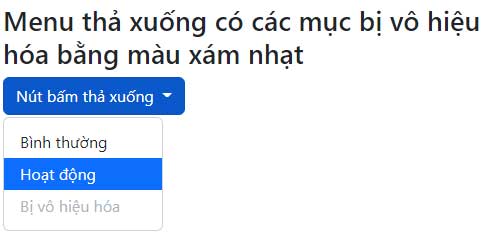
<p style="text-align: justify;">Highlight một mục thả xuống cụ thể bằng class&nbsp;<code>.active</code>&nbsp;(thêm màu nền màu xanh dương).</p>

<p style="text-align: justify;">Để vô hiệu hóa một mục trong menu thả xuống, dùng class&nbsp;<code>.disabled</code>&nbsp;(có màu text màu xám nhạt và không có hiệu ứng trỏ chuột):</p>

<pre id="pre6" style="text-align: justify;">
&lt;li&gt;&lt;a class=&quot;dropdown-item&quot; href=&quot;#&quot;&gt;Normal&lt;/a&gt;&lt;/li&gt;
&lt;li&gt;&lt;a class=&quot;dropdown-item active&quot; href=&quot;#&quot;&gt;Active&lt;/a&gt;&lt;/li&gt;
&lt;li&gt;&lt;a class=&quot;dropdown-item disabled&quot; href=&quot;#&quot;&gt;Disabled&lt;/a&gt;&lt;/li&gt;</pre>

<p style="text-align: justify;">Ví dụ:</p>

<pre id="pre7" style="text-align: justify;">
&lt;!DOCTYPE html&gt;
&lt;html lang=&quot;en&quot;&gt;
&lt;head&gt;
  &lt;title&gt;Bootstrap Example&lt;/title&gt;
  &lt;meta charset=&quot;utf-8&quot;&gt;
  &lt;meta name=&quot;viewport&quot; content=&quot;width=device-width, initial-scale=1&quot;&gt;
  &lt;link href=&quot;https://cdn.jsdelivr.net/npm/bootstrap@5.2.3/dist/css/bootstrap.min.css&quot; rel=&quot;stylesheet&quot;&gt;
  &lt;script src=&quot;https://cdn.jsdelivr.net/npm/bootstrap@5.2.3/dist/js/bootstrap.bundle.min.js&quot;&gt;&lt;/script&gt;
&lt;/head&gt;
&lt;body&gt;

&lt;div class=&quot;container mt-3&quot;&gt;
  &lt;h2&gt;Menu thả xuống có các mục bị vô hiệu hóa bằng màu xám nhạt&lt;/h2&gt;
  &lt;div class=&quot;dropdown&quot;&gt;
    &lt;button type=&quot;button&quot; class=&quot;btn btn-primary dropdown-toggle&quot; data-bs-toggle=&quot;dropdown&quot;&gt;
     Nút bấm thả xuống
    &lt;/button&gt;
    &lt;ul class=&quot;dropdown-menu&quot;&gt;
      &lt;li&gt;&lt;a class=&quot;dropdown-item&quot; href=&quot;#&quot;&gt;Bình thường&lt;/a&gt;&lt;/li&gt;
      &lt;li&gt;&lt;a class=&quot;dropdown-item active&quot; href=&quot;#&quot;&gt;Hoạt động&lt;/a&gt;&lt;/li&gt;
      &lt;li&gt;&lt;a class=&quot;dropdown-item disabled&quot; href=&quot;#&quot;&gt;Bị vô hiệu hóa&lt;/a&gt;&lt;/li&gt;
  &lt;/div&gt;
&lt;/div&gt;

&lt;/body&gt;
&lt;/html&gt;
</pre>

<p style="text-align: justify;"><img alt="Menu thả xuống có nút bấm bị vô hiệu hóa" data-i="3" data-src="https://st.quantrimang.com/photos/image/2022/12/02/boostrap-menu-tha-xuong-4.jpg" data-was-processed="true" height="251" src="https://st.quantrimang.com/photos/image/2022/12/02/boostrap-menu-tha-xuong-4.jpg" width="485" /></p>

<h2 style="text-align: justify;">Vị trí thả xuống</h2>

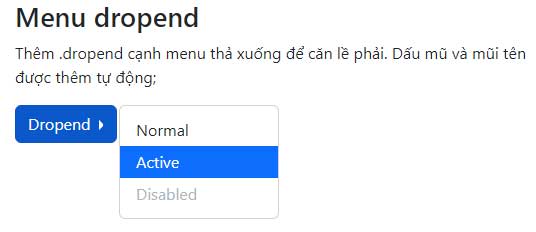
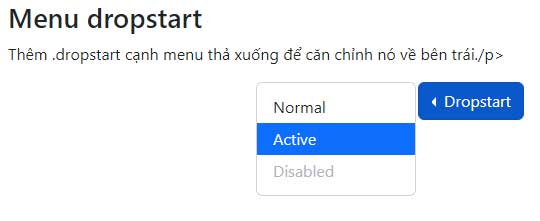
<p style="text-align: justify;">Bạn cũng có thể tạo một menu &quot;dropend&quot; (thả xuống ở bên phải hoặc &quot;dropstart&quot; (thả xuống ở bên trái) bằng cách thêm class .dropend hoặc .dropstart vào nguyên tố thả xuống. Lưu ý, dấu mũ/mũi tên được thêm tự động.</p>

<p style="text-align: justify;">Thả sang bên phải:</p>

<pre id="pre8" style="text-align: justify;">
&lt;div class=&quot;dropdown dropend&quot;&gt;</pre>

<p style="text-align: justify;">Thả sang bên trái:</p>

<pre id="pre9" style="text-align: justify;">
&lt;div class=&quot;dropdown dropstart&quot;&gt;</pre>

<p style="text-align: justify;">Ví dụ:</p>

<p style="text-align: justify;"><strong>Menu dropend:</strong></p>

<pre id="pre10" style="text-align: justify;">
&lt;!DOCTYPE html&gt;
&lt;html lang=&quot;en&quot;&gt;
&lt;head&gt;
  &lt;title&gt;Bootstrap Example&lt;/title&gt;
  &lt;meta charset=&quot;utf-8&quot;&gt;
  &lt;meta name=&quot;viewport&quot; content=&quot;width=device-width, initial-scale=1&quot;&gt;
  &lt;link href=&quot;https://cdn.jsdelivr.net/npm/bootstrap@5.2.3/dist/css/bootstrap.min.css&quot; rel=&quot;stylesheet&quot;&gt;
  &lt;script src=&quot;https://cdn.jsdelivr.net/npm/bootstrap@5.2.3/dist/js/bootstrap.bundle.min.js&quot;&gt;&lt;/script&gt;
&lt;/head&gt;
&lt;body&gt;

&lt;div class=&quot;container mt-3&quot;&gt;
  &lt;h2&gt;Menu dropend&lt;/h2&gt;
  &lt;p&gt;Thêm .dropend cạnh menu thả xuống để căn lề phải. Dấu mũ và mũi tên được thêm tự động;&lt;/p&gt;

  &lt;div class=&quot;dropdown dropend&quot;&gt;
    &lt;button type=&quot;button&quot; class=&quot;btn btn-primary dropdown-toggle&quot; data-bs-toggle=&quot;dropdown&quot;&gt;
      Dropend
    &lt;/button&gt;
    &lt;ul class=&quot;dropdown-menu&quot;&gt;
      &lt;li&gt;&lt;a class=&quot;dropdown-item&quot; href=&quot;#&quot;&gt;Normal&lt;/a&gt;&lt;/li&gt;
      &lt;li&gt;&lt;a class=&quot;dropdown-item active&quot; href=&quot;#&quot;&gt;Active&lt;/a&gt;&lt;/li&gt;
      &lt;li&gt;&lt;a class=&quot;dropdown-item disabled&quot; href=&quot;#&quot;&gt;Disabled&lt;/a&gt;&lt;/li&gt;
    &lt;/ul&gt;
  &lt;/div&gt;
&lt;/div&gt;

&lt;/body&gt;
&lt;/html&gt;
</pre>

<p style="text-align: justify;"><img alt="Menu Dropend bằng Bootstrap" data-i="4" data-src="https://st.quantrimang.com/photos/image/2022/12/02/Boostraap-dropend-menu.jpg" data-was-processed="true" height="232" src="https://st.quantrimang.com/photos/image/2022/12/02/Boostraap-dropend-menu.jpg" width="536" /></p>

<p style="text-align: justify;"><strong>Menu dropstart:</strong></p>

<pre id="pre11" style="text-align: justify;">
&lt;!DOCTYPE html&gt;
&lt;html lang=&quot;en&quot;&gt;
&lt;head&gt;
  &lt;title&gt;Bootstrap Example&lt;/title&gt;
  &lt;meta charset=&quot;utf-8&quot;&gt;
  &lt;meta name=&quot;viewport&quot; content=&quot;width=device-width, initial-scale=1&quot;&gt;
  &lt;link href=&quot;https://cdn.jsdelivr.net/npm/bootstrap@5.2.3/dist/css/bootstrap.min.css&quot; rel=&quot;stylesheet&quot;&gt;
  &lt;script src=&quot;https://cdn.jsdelivr.net/npm/bootstrap@5.2.3/dist/js/bootstrap.bundle.min.js&quot;&gt;&lt;/script&gt;
&lt;/head&gt;
&lt;body&gt;

&lt;div class=&quot;container mt-3&quot;&gt;
  &lt;h2&gt;Menu dropstart&lt;/h2&gt;
  &lt;p&gt;Thêm .dropstart cạnh menu thả xuống để căn chỉnh nó về bên trái./p&gt;

  &lt;div class=&quot;dropdown dropstart text-end&quot;&gt;
    &lt;button type=&quot;button&quot; class=&quot;btn btn-primary dropdown-toggle&quot; data-bs-toggle=&quot;dropdown&quot;&gt;
      Dropstart
    &lt;/button&gt;
    &lt;ul class=&quot;dropdown-menu&quot;&gt;
      &lt;li&gt;&lt;a class=&quot;dropdown-item&quot; href=&quot;#&quot;&gt;Normal&lt;/a&gt;&lt;/li&gt;
      &lt;li&gt;&lt;a class=&quot;dropdown-item active&quot; href=&quot;#&quot;&gt;Active&lt;/a&gt;&lt;/li&gt;
      &lt;li&gt;&lt;a class=&quot;dropdown-item disabled&quot; href=&quot;#&quot;&gt;Disabled&lt;/a&gt;&lt;/li&gt;
    &lt;/ul&gt;
  &lt;/div&gt;
&lt;/div&gt;

&lt;/body&gt;
&lt;/html&gt;
</pre>

<p style="text-align: justify;"><img alt="Menu dropstart" data-i="5" data-src="https://st.quantrimang.com/photos/image/2022/12/02/Boostraap-dropstart-menu.jpg" data-was-processed="true" height="221" src="https://st.quantrimang.com/photos/image/2022/12/02/Boostraap-dropstart-menu.jpg" width="540" /></p>

<h2 style="text-align: justify;">Bên phải menu thả xuống</h2>

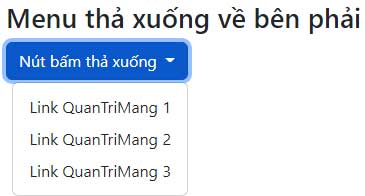
<p style="text-align: justify;">Để căn chỉnh menu thả xuống ở bên phải, thêm class&nbsp;<code>.dropdown-menu-end</code>&nbsp;vào thành phần này kèm&nbsp;<code>.dropdown-menu</code>:</p>

<pre id="pre12" style="text-align: justify;">
&lt;div class=&quot;dropdown-menu dropdown-menu-end&quot;&gt;</pre>

<p style="text-align: justify;">Ví dụ:</p>

<pre id="pre13" style="text-align: justify;">
&lt;!DOCTYPE html&gt;
&lt;html lang=&quot;en&quot;&gt;
&lt;head&gt;
  &lt;title&gt;Bootstrap Example&lt;/title&gt;
  &lt;meta charset=&quot;utf-8&quot;&gt;
  &lt;meta name=&quot;viewport&quot; content=&quot;width=device-width, initial-scale=1&quot;&gt;
  &lt;link href=&quot;https://cdn.jsdelivr.net/npm/bootstrap@5.2.3/dist/css/bootstrap.min.css&quot; rel=&quot;stylesheet&quot;&gt;
  &lt;script src=&quot;https://cdn.jsdelivr.net/npm/bootstrap@5.2.3/dist/js/bootstrap.bundle.min.js&quot;&gt;&lt;/script&gt;
&lt;/head&gt;
&lt;body&gt;

&lt;div class=&quot;container mt-3&quot;&gt;
  &lt;h2&gt;Menu thả xuống về bên phải&lt;/h2&gt;                                   
  &lt;div class=&quot;dropdown dropdown-menu-end&quot;&gt;
    &lt;button type=&quot;button&quot; class=&quot;btn btn-primary dropdown-toggle&quot; data-bs-toggle=&quot;dropdown&quot;&gt;
     Nút bấm thả xuống
    &lt;/button&gt;
    &lt;ul class=&quot;dropdown-menu&quot;&gt;
      &lt;li&gt;&lt;a class=&quot;dropdown-item&quot; href=&quot;#&quot;&gt;Link QuanTriMang 1&lt;/a&gt;&lt;/li&gt;
      &lt;li&gt;&lt;a class=&quot;dropdown-item&quot; href=&quot;#&quot;&gt;Link QuanTriMang 2&lt;/a&gt;&lt;/li&gt;
      &lt;li&gt;&lt;a class=&quot;dropdown-item&quot; href=&quot;#&quot;&gt;Link QuanTriMang 3&lt;/a&gt;&lt;/li&gt;
    &lt;/ul&gt;
  &lt;/div&gt;
&lt;/div&gt;

&lt;/body&gt;
&lt;/html&gt;
</pre>

<p style="text-align: justify;"><img alt="Menu nút bấm thả xuống về bên phải" data-i="6" data-src="https://st.quantrimang.com/photos/image/2022/12/02/boostrap-menu-button.jpg" data-was-processed="true" height="196" src="https://st.quantrimang.com/photos/image/2022/12/02/boostrap-menu-button.jpg" width="365" /></p>

<h2 style="text-align: justify;">Dropup</h2>

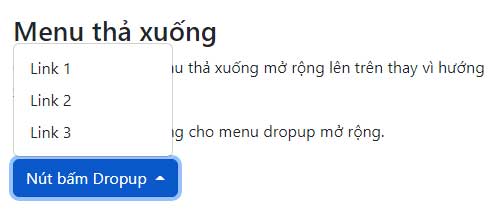
<p style="text-align: justify;">Nếu muốn menu thả xuống mở rộng lên phía trên thay vì thả xuống, thay đổi nhân tố<strong>&nbsp;&lt;div&gt;</strong>&nbsp;với&nbsp;<strong>class=”dropdown”&nbsp;</strong>sang “dropup”<strong>: &lt;div class=&quot;dropup&quot;&gt;:</strong></p>

<pre id="pre14" style="text-align: justify;">
&lt;div class=&quot;dropup&quot;&gt;</pre>

<p style="text-align: justify;">Ví dụ:</p>

<pre id="pre15" style="text-align: justify;">
&lt;!DOCTYPE html&gt;
&lt;html lang=&quot;en&quot;&gt;
&lt;head&gt;
  &lt;title&gt;Bootstrap Example&lt;/title&gt;
  &lt;meta charset=&quot;utf-8&quot;&gt;
  &lt;meta name=&quot;viewport&quot; content=&quot;width=device-width, initial-scale=1&quot;&gt;
  &lt;link href=&quot;https://cdn.jsdelivr.net/npm/bootstrap@5.2.3/dist/css/bootstrap.min.css&quot; rel=&quot;stylesheet&quot;&gt;
  &lt;script src=&quot;https://cdn.jsdelivr.net/npm/bootstrap@5.2.3/dist/js/bootstrap.bundle.min.js&quot;&gt;&lt;/script&gt;
&lt;/head&gt;
&lt;body&gt;

&lt;div class=&quot;container mt-3&quot;&gt;
  &lt;h2&gt;Menu thả xuống&lt;/h2&gt;
  &lt;p&gt;Class .dropup làm menu thả xuống mở rộng lên trên thay vì hướng xuống dưới:&lt;/p&gt;
  &lt;p&gt;Lưu ý, phải có chỗ trống cho menu dropup mở rộng.
  &lt;div class=&quot;dropup&quot;&gt;
    &lt;button type=&quot;button&quot; class=&quot;btn btn-primary dropdown-toggle&quot; data-bs-toggle=&quot;dropdown&quot;&gt;
      Nút bấm Dropup
    &lt;/button&gt;
    &lt;ul class=&quot;dropdown-menu&quot;&gt;
      &lt;li&gt;&lt;a class=&quot;dropdown-item&quot; href=&quot;#&quot;&gt;Link 1&lt;/a&gt;&lt;/li&gt;
      &lt;li&gt;&lt;a class=&quot;dropdown-item&quot; href=&quot;#&quot;&gt;Link 2&lt;/a&gt;&lt;/li&gt;
      &lt;li&gt;&lt;a class=&quot;dropdown-item&quot; href=&quot;#&quot;&gt;Link 3&lt;/a&gt;&lt;/li&gt;
    &lt;/ul&gt;
  &lt;/div&gt;
&lt;/div&gt;

&lt;/body&gt;
&lt;/html&gt;
</pre>

<p style="text-align: justify;"><img alt="Menu dropup trên Bootstrap" data-i="7" data-src="https://st.quantrimang.com/photos/image/2022/12/02/bootstrap-menu-dropup.jpg" data-was-processed="true" height="222" src="https://st.quantrimang.com/photos/image/2022/12/02/bootstrap-menu-dropup.jpg" width="502" /></p>

<h2 style="text-align: justify;">Text thả xuống</h2>

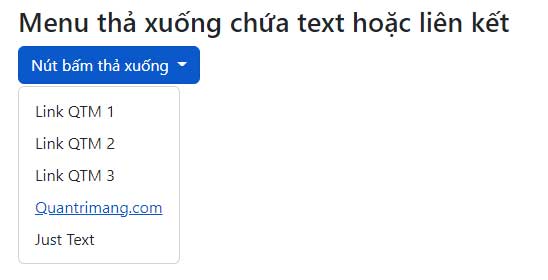
<p style="text-align: justify;">Class&nbsp;<code>.dropdown-item-text</code>&nbsp;được dùng để thêm văn bản thuần tuyes vào môt mục thả xuống hoặc sử dụng các liên kết cho kiểu link mặc định:</p>

<pre id="pre16" style="text-align: justify;">
&lt;ul class=&quot;dropdown-menu&quot;&gt;
&lt;li&gt;&lt;a class=&quot;dropdown-item&quot; href=&quot;#&quot;&gt;Link 1&lt;/a&gt;&lt;/li&gt;
&lt;li&gt;&lt;a class=&quot;dropdown-item&quot; href=&quot;#&quot;&gt;Link 2&lt;/a&gt;&lt;/li&gt;
&lt;li&gt;&lt;a class=&quot;dropdown-item&quot; href=&quot;#&quot;&gt;Link 3&lt;/a&gt;&lt;/li&gt;
&lt;li&gt;&lt;a class=&quot;dropdown-item-text&quot; href=&quot;#&quot;&gt;Text Link&lt;/a&gt;&lt;/li&gt;
&lt;li&gt;&lt;span class=&quot;dropdown-item-text&quot;&gt;Just Text&lt;/span&gt;&lt;/li&gt;
&lt;/ul&gt;&lt;ul class=&quot;dropdown-menu&quot;&gt;
&lt;li&gt;&lt;a class=&quot;dropdown-item&quot; href=&quot;#&quot;&gt;Link 1&lt;/a&gt;&lt;/li&gt;
&lt;li&gt;&lt;a class=&quot;dropdown-item&quot; href=&quot;#&quot;&gt;Link 2&lt;/a&gt;&lt;/li&gt;
&lt;li&gt;&lt;a class=&quot;dropdown-item&quot; href=&quot;#&quot;&gt;Link 3&lt;/a&gt;&lt;/li&gt;
&lt;li&gt;&lt;a class=&quot;dropdown-item-text&quot; href=&quot;#&quot;&gt;Text Link&lt;/a&gt;&lt;/li&gt;
&lt;li&gt;&lt;span class=&quot;dropdown-item-text&quot;&gt;Just Text&lt;/span&gt;&lt;/li&gt;
&lt;/ul&gt;</pre>

<p style="text-align: justify;">Ví dụ:</p>

<pre id="pre17" style="text-align: justify;">
&lt;!DOCTYPE html&gt;
&lt;html lang=&quot;en&quot;&gt;
&lt;head&gt;
  &lt;title&gt;Bootstrap Example&lt;/title&gt;
  &lt;meta charset=&quot;utf-8&quot;&gt;
  &lt;meta name=&quot;viewport&quot; content=&quot;width=device-width, initial-scale=1&quot;&gt;
  &lt;link href=&quot;https://cdn.jsdelivr.net/npm/bootstrap@5.2.3/dist/css/bootstrap.min.css&quot; rel=&quot;stylesheet&quot;&gt;
  &lt;script src=&quot;https://cdn.jsdelivr.net/npm/bootstrap@5.2.3/dist/js/bootstrap.bundle.min.js&quot;&gt;&lt;/script&gt;
&lt;/head&gt;
&lt;body&gt;

&lt;div class=&quot;container mt-3&quot;&gt;
  &lt;h2&gt;Menu thả xuống chứa text hoặc liên kết&lt;/h2&gt;

  &lt;div class=&quot;dropdown&quot;&gt;
    &lt;button type=&quot;button&quot; class=&quot;btn btn-primary dropdown-toggle&quot; data-bs-toggle=&quot;dropdown&quot;&gt;
      Nút bấm thả xuống
    &lt;/button&gt;
    &lt;ul class=&quot;dropdown-menu&quot;&gt;
      &lt;li&gt;&lt;a class=&quot;dropdown-item&quot; href=&quot;#&quot;&gt;Link QTM 1&lt;/a&gt;&lt;/li&gt;
      &lt;li&gt;&lt;a class=&quot;dropdown-item&quot; href=&quot;#&quot;&gt;Link QTM 2&lt;/a&gt;&lt;/li&gt;
      &lt;li&gt;&lt;a class=&quot;dropdown-item&quot; href=&quot;#&quot;&gt;Link QTM 3&lt;/a&gt;&lt;/li&gt;
      &lt;li&gt;&lt;a class=&quot;dropdown-item-text&quot; href=&quot;#&quot;&gt;Quantrimang.com&lt;/a&gt;&lt;/li&gt;
      &lt;li&gt;&lt;span class=&quot;dropdown-item-text&quot;&gt;Just Text&lt;/span&gt;&lt;/li&gt;
    &lt;/ul&gt;
  &lt;/div&gt;
&lt;/div&gt;

&lt;/body&gt;
&lt;/html&gt;
</pre>

<p style="text-align: justify;"><img alt="Menu thả xuống trên Bootstrap 5 chứa link" data-i="8" data-src="https://st.quantrimang.com/photos/image/2022/12/02/bootstrap-menu-ch-a-text.jpg" data-was-processed="true" height="280" src="https://st.quantrimang.com/photos/image/2022/12/02/bootstrap-menu-ch-a-text.jpg" width="548" /></p>

<h2 style="text-align: justify;">Nhóm các nút với menu thả xuống</h2>

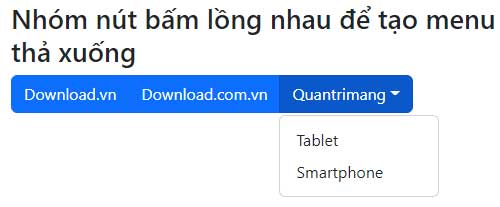
<p style="text-align: justify;">Code cơ bản như sau:</p>

<pre id="pre18" style="text-align: justify;">
&lt;div class=&quot;btn-group&quot;&gt;
&lt;button type=&quot;button&quot; class=&quot;btn btn-primary&quot;&gt;Apple&lt;/button&gt;
&lt;button type=&quot;button&quot; class=&quot;btn btn-primary&quot;&gt;Samsung&lt;/button&gt;
&lt;div class=&quot;btn-group&quot;&gt;
&lt;button type=&quot;button&quot; class=&quot;btn btn-primary dropdown-toggle&quot; data-bs-toggle=&quot;dropdown&quot;&gt;Sony&lt;/button&gt;
&lt;ul class=&quot;dropdown-menu&quot;&gt;
&lt;li&gt;&lt;a class=&quot;dropdown-item&quot; href=&quot;#&quot;&gt;Tablet&lt;/a&gt;&lt;/li&gt;
&lt;li&gt;&lt;a class=&quot;dropdown-item&quot; href=&quot;#&quot;&gt;Smartphone&lt;/a&gt;&lt;/li&gt;
&lt;/ul&gt;
&lt;/div&gt;
&lt;/div&gt;</pre>

<p style="text-align: justify;">Ví dụ:</p>

<pre id="pre19" style="text-align: justify;">
&lt;!DOCTYPE html&gt;
&lt;html lang=&quot;en&quot;&gt;
&lt;head&gt;
  &lt;title&gt;Bootstrap Example&lt;/title&gt;
  &lt;meta charset=&quot;utf-8&quot;&gt;
  &lt;meta name=&quot;viewport&quot; content=&quot;width=device-width, initial-scale=1&quot;&gt;
  &lt;link href=&quot;https://cdn.jsdelivr.net/npm/bootstrap@5.2.3/dist/css/bootstrap.min.css&quot; rel=&quot;stylesheet&quot;&gt;
  &lt;script src=&quot;https://cdn.jsdelivr.net/npm/bootstrap@5.2.3/dist/js/bootstrap.bundle.min.js&quot;&gt;&lt;/script&gt;
&lt;/head&gt;
&lt;body&gt;

&lt;div class=&quot;container mt-3&quot;&gt;
  &lt;h2&gt;Nhóm nút bấm lồng nhau để tạo menu thả xuống&lt;/h2&gt;
  &lt;div class=&quot;btn-group&quot;&gt;
    &lt;button type=&quot;button&quot; class=&quot;btn btn-primary&quot;&gt;Download.vn&lt;/button&gt;
    &lt;button type=&quot;button&quot; class=&quot;btn btn-primary&quot;&gt;Download.com.vn&lt;/button&gt;
    &lt;div class=&quot;btn-group&quot;&gt;
      &lt;button type=&quot;button&quot; class=&quot;btn btn-primary dropdown-toggle&quot; data-bs-toggle=&quot;dropdown&quot;&gt;Quantrimang&lt;/button&gt;
      &lt;ul class=&quot;dropdown-menu&quot;&gt;
        &lt;li&gt;&lt;a class=&quot;dropdown-item&quot; href=&quot;#&quot;&gt;Tablet&lt;/a&gt;&lt;/li&gt;
        &lt;li&gt;&lt;a class=&quot;dropdown-item&quot; href=&quot;#&quot;&gt;Smartphone&lt;/a&gt;&lt;/li&gt;
      &lt;/ul&gt;
    &lt;/div&gt;
  &lt;/div&gt;
&lt;/div&gt;

&lt;/body&gt;
&lt;/html&gt;
</pre>

<p style="text-align: justify;"><img alt="Nhóm các nút bấm lồng nhau" data-i="9" data-src="https://st.quantrimang.com/photos/image/2022/12/02/boostrap-menu-nest-button.jpg" data-was-processed="true" height="207" src="https://st.quantrimang.com/photos/image/2022/12/02/boostrap-menu-nest-button.jpg" width="500" /></p>

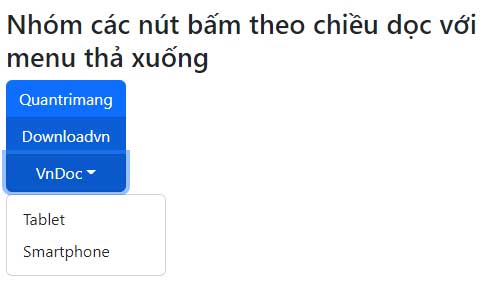
<h2 style="text-align: justify;">Nhóm nút bấm theo chiều dọc với menu thả xuống</h2>

<p style="text-align: justify;">Code cơ bản:</p>

<pre id="pre20" style="text-align: justify;">
&lt;div class=&quot;btn-group-vertical&quot;&gt;
&lt;button type=&quot;button&quot; class=&quot;btn btn-primary&quot;&gt;Apple&lt;/button&gt;
&lt;button type=&quot;button&quot; class=&quot;btn btn-primary&quot;&gt;Samsung&lt;/button&gt;
&lt;div class=&quot;btn-group&quot;&gt;
&lt;button type=&quot;button&quot; class=&quot;btn btn-primary dropdown-toggle&quot; data-bs-toggle=&quot;dropdown&quot;&gt;Sony&lt;/button&gt;
&lt;ul class=&quot;dropdown-menu&quot;&gt;
&lt;li&gt;&lt;a class=&quot;dropdown-item&quot; href=&quot;#&quot;&gt;Tablet&lt;/a&gt;&lt;/li&gt;
&lt;li&gt;&lt;a class=&quot;dropdown-item&quot; href=&quot;#&quot;&gt;Smartphone&lt;/a&gt;&lt;/li&gt;
&lt;/ul&gt;
&lt;/div&gt;
&lt;/div&gt;</pre>

<p style="text-align: justify;">Ví dụ:</p>

<pre id="pre21" style="text-align: justify;">
&lt;!DOCTYPE html&gt;
&lt;html lang=&quot;en&quot;&gt;
&lt;head&gt;
  &lt;title&gt;Bootstrap Example&lt;/title&gt;
  &lt;meta charset=&quot;utf-8&quot;&gt;
  &lt;meta name=&quot;viewport&quot; content=&quot;width=device-width, initial-scale=1&quot;&gt;
  &lt;link href=&quot;https://cdn.jsdelivr.net/npm/bootstrap@5.2.3/dist/css/bootstrap.min.css&quot; rel=&quot;stylesheet&quot;&gt;
  &lt;script src=&quot;https://cdn.jsdelivr.net/npm/bootstrap@5.2.3/dist/js/bootstrap.bundle.min.js&quot;&gt;&lt;/script&gt;
&lt;/head&gt;
&lt;body&gt;

&lt;div class=&quot;container mt-3&quot;&gt;
  &lt;h2&gt;Nhóm các nút bấm theo chiều dọc với menu thả xuống&lt;/h2&gt;
  &lt;div class=&quot;btn-group-vertical&quot;&gt;
    &lt;button type=&quot;button&quot; class=&quot;btn btn-primary&quot;&gt;Quantrimang&lt;/button&gt;
    &lt;button type=&quot;button&quot; class=&quot;btn btn-primary&quot;&gt;Downloadvn&lt;/button&gt;
    &lt;div class=&quot;btn-group&quot;&gt;
      &lt;button type=&quot;button&quot; class=&quot;btn btn-primary dropdown-toggle&quot; data-bs-toggle=&quot;dropdown&quot;&gt;VnDoc&lt;/button&gt;
      &lt;ul class=&quot;dropdown-menu&quot;&gt;
        &lt;li&gt;&lt;a class=&quot;dropdown-item&quot; href=&quot;#&quot;&gt;Tablet&lt;/a&gt;&lt;/li&gt;
        &lt;li&gt;&lt;a class=&quot;dropdown-item&quot; href=&quot;#&quot;&gt;Smartphone&lt;/a&gt;&lt;/li&gt;
      &lt;/ul&gt;
    &lt;/div&gt;
  &lt;/div&gt;
&lt;/div&gt;

&lt;/body&gt;
&lt;/html&gt;
</pre>

<p style="text-align: justify;"><img alt="Nút bấm theo chiều dọc với menu thả xuống" data-i="10" data-src="https://st.quantrimang.com/photos/image/2022/12/02/bootstrap-nested-menu-2.jpg" data-was-processed="true" height="286" src="https://st.quantrimang.com/photos/image/2022/12/02/bootstrap-nested-menu-2.jpg" width="485" /></p>

<p style="text-align: justify;">Trên đây là cách tạo menu thả xuống bằng Bootstrap 5. Như bạn thấy thực hiện chúng không quá khó nếu chịu khó tìm hiểu một chút. Chúc các bạn thành công!</p>
		</div>
				<div id="author">
						<p>
				<strong>Nguồn tin:</strong>
				Quantrimang.com
			</p>
		</div>
	</div>
	<div id="footer" class="clearfix">
		<div id="url">
			<strong>URL của bản tin này: </strong><a href="https://www.nguoicodonvn2008.info/vi/news/savefile/kien-thuc-may-tinh/bai-18-tao-menu-xo-xuong-trong-bootstrap-5-6405.html" title="Bài 18&#x3A; Tạo menu xổ xuống trong Bootstrap 5">https://www.nguoicodonvn2008.info/vi/news/savefile/kien-thuc-may-tinh/bai-18-tao-menu-xo-xuong-trong-bootstrap-5-6405.html</a>

		</div>
		<div class="clear"></div>
		<div class="copyright">
			&copy; .&#x3A; Nguoicodonvn2008.info - Cõi lòng người cô đơn &#x3A;.
		</div>
		<div id="contact">
			<a href="mailto:admin@nguoicodonvn2008.info">admin@nguoicodonvn2008.info</a>
		</div>
	</div>
</div>
        <div id="timeoutsess" class="chromeframe">
            Bạn đã không sử dụng Site, <a onclick="timeoutsesscancel();" href="https://www.nguoicodonvn2008.info/#">Bấm vào đây để duy trì trạng thái đăng nhập</a>. Thời gian chờ: <span id="secField"> 60 </span> giây
        </div>
        <div id="openidResult" class="nv-alert" style="display:none"></div>
        <div id="openidBt" data-result="" data-redirect=""></div>
		</script>
		<div class="car-top">
  <span><img src="https://www.nguoicodonvn2008.info/themes/default/images/car.png" alt=""></span>
</div>
<script src="https://www.nguoicodonvn2008.info/assets/js/jquery/jquery.min.js"></script>
<script>var nv_base_siteurl="/",nv_lang_data="vi",nv_lang_interface="vi",nv_name_variable="nv",nv_fc_variable="op",nv_lang_variable="language",nv_module_name="news",nv_func_name="savefile",nv_is_user=0, nv_my_ofs=-4,nv_my_abbr="EDT",nv_cookie_prefix="nv4c_e856T",nv_check_pass_mstime=1738000,nv_area_admin=0,nv_safemode=0,theme_responsive=0,nv_recaptcha_ver=2,nv_recaptcha_sitekey="",nv_recaptcha_type="image",XSSsanitize=1;</script>
<script src="https://www.nguoicodonvn2008.info/assets/js/language/vi.js"></script>
<script src="https://www.nguoicodonvn2008.info/assets/js/DOMPurify/purify3.js"></script>
<script src="https://www.nguoicodonvn2008.info/assets/js/global.js"></script>
<script src="https://www.nguoicodonvn2008.info/assets/js/site.js"></script>
<script src="https://www.nguoicodonvn2008.info/themes/default/js/news.js"></script>
<script src="https://www.nguoicodonvn2008.info/themes/default/js/main.js"></script>
<script src="https://www.nguoicodonvn2008.info/themes/default/js/custom.js"></script>
<script type="application/ld+json">
        {
            "@context": "https://schema.org",
            "@type": "Organization",
            "url": "https://www.nguoicodonvn2008.info",
            "logo": "https://www.nguoicodonvn2008.info/uploads/angel.gif"
        }
        </script>
<script src="https://www.nguoicodonvn2008.info/themes/default/js/bootstrap.min.js"></script>
<script type="text/javascript">
var $scrolltop = $('.car-top');
$scrolltop.on('click', function () {
    $('html,body').animate({
        scrollTop: 0
    }, 800);
    $(this).addClass("car-run");
    setTimeout(function(){ $scrolltop.removeClass('car-run');}, 1000);
    return false;
});
$(window).on('scroll', function ()
{ 
    if($(window).scrollTop() >= 200)
    {
        $scrolltop.addClass("show");
        $scrolltop.addClass("car-down");
    }
    else
    {
       $scrolltop.removeClass("show");
       setTimeout(function(){ $scrolltop.removeClass('car-down');}, 300);
    }
});
</script>
</body>
</html>