<!DOCTYPE html>
    <html lang="vi" xmlns="http://www.w3.org/1999/xhtml" prefix="og: http://ogp.me/ns#">
    <head>
<title>8 ứng dụng dành riêng cho Mac bạn sẽ không tìm thấy trên Windows</title>
<meta name="description" content="8 ứng dụng dành riêng cho Mac bạn sẽ không tìm thấy trên Windows - Savefile - Tin Tức -...">
<meta name="author" content=".: Nguoicodonvn2008.info - Cõi lòng người cô đơn :.">
<meta name="copyright" content=".: Nguoicodonvn2008.info - Cõi lòng người cô đơn :. [admin@nguoicodonvn2008.info]">
<meta name="robots" content="index, archive, follow, noodp">
<meta name="googlebot" content="index,archive,follow,noodp">
<meta name="msnbot" content="all,index,follow">
<meta name="generator" content="NukeViet v4.5">
<meta http-equiv="Content-Type" content="text/html; charset=utf-8">
<meta property="og:title" content="8 ứng dụng dành riêng cho Mac bạn sẽ không tìm thấy trên Windows">
<meta property="og:type" content="website">
<meta property="og:description" content="Savefile - Tin Tức - https&#x3A;&#x002F;&#x002F;www.nguoicodonvn2008.info&#x002F;vi&#x002F;news&#x002F;savefile&#x002F;kien-thuc-may-tinh&#x002F;8-ung-dung-danh-rieng-cho-mac-ban-se-khong-tim-thay-tren-windows-9277.html">
<meta property="og:site_name" content=".&#x3A; Nguoicodonvn2008.info - Cõi lòng người cô đơn &#x3A;.">
<meta property="og:url" content="https://www.nguoicodonvn2008.info/vi/news/savefile/kien-thuc-may-tinh/8-ung-dung-danh-rieng-cho-mac-ban-se-khong-tim-thay-tren-windows-9277.html">
<link rel="shortcut icon" href="https://www.nguoicodonvn2008.info/favicon.ico">
<link rel="canonical" href="https://www.nguoicodonvn2008.info/vi/news/savefile/kien-thuc-may-tinh/8-ung-dung-danh-rieng-cho-mac-ban-se-khong-tim-thay-tren-windows-9277.html">
<link rel="alternate" href="https://www.nguoicodonvn2008.info/vi/news/rss/" title="Tin Tức" type="application/rss+xml">
<link rel="alternate" href="https://www.nguoicodonvn2008.info/vi/news/rss/karaoke-dual/" title="Tin Tức - Karaoke Dual" type="application/rss+xml">
<link rel="alternate" href="https://www.nguoicodonvn2008.info/vi/news/rss/nhac-tre/" title="Tin Tức - Nhạc trẻ" type="application/rss+xml">
<link rel="alternate" href="https://www.nguoicodonvn2008.info/vi/news/rss/tru-tinh/" title="Tin Tức - Trữ tình" type="application/rss+xml">
<link rel="alternate" href="https://www.nguoicodonvn2008.info/vi/news/rss/nuoc-ngoai/" title="Tin Tức - Nước ngoài" type="application/rss+xml">
<link rel="alternate" href="https://www.nguoicodonvn2008.info/vi/news/rss/remix/" title="Tin Tức - Remix" type="application/rss+xml">
<link rel="alternate" href="https://www.nguoicodonvn2008.info/vi/news/rss/tam-su-tinh-yeu/" title="Tin Tức - Tâm sự tình yêu" type="application/rss+xml">
<link rel="alternate" href="https://www.nguoicodonvn2008.info/vi/news/rss/tho-suu-tam/" title="Tin Tức - Thơ sưu tầm" type="application/rss+xml">
<link rel="alternate" href="https://www.nguoicodonvn2008.info/vi/news/rss/cuoc-song/" title="Tin Tức - Cuộc sống" type="application/rss+xml">
<link rel="alternate" href="https://www.nguoicodonvn2008.info/vi/news/rss/phan-mem/" title="Tin Tức - Phần mềm" type="application/rss+xml">
<link rel="alternate" href="https://www.nguoicodonvn2008.info/vi/news/rss/kien-thuc-may-tinh/" title="Tin Tức - Kiến thức máy tính" type="application/rss+xml">
<link rel="alternate" href="https://www.nguoicodonvn2008.info/vi/news/rss/hoc-tap/" title="Tin Tức - Học tập" type="application/rss+xml">
<link rel="alternate" href="https://www.nguoicodonvn2008.info/vi/news/rss/tai-lieu/" title="Tin Tức - Tài liệu" type="application/rss+xml">
<link rel="alternate" href="https://www.nguoicodonvn2008.info/vi/news/rss/de-thi/" title="Tin Tức - Đề thi" type="application/rss+xml">
<link rel="preload" as="style" href="https://www.nguoicodonvn2008.info/assets/css/font-awesome.min.css" type="text/css">
<link rel="preload" as="style" href="https://www.nguoicodonvn2008.info/themes/default/css/bootstrap.non-responsive.css" type="text/css">
<link rel="preload" as="style" href="https://www.nguoicodonvn2008.info/themes/default/css/style.css" type="text/css">
<link rel="preload" as="style" href="https://www.nguoicodonvn2008.info/themes/default/css/style.non-responsive.css" type="text/css">
<link rel="preload" as="style" href="https://www.nguoicodonvn2008.info/themes/default/css/news.css" type="text/css">
<link rel="preload" as="style" href="https://www.nguoicodonvn2008.info/themes/default/css/custom.css" type="text/css">
<link rel="preload" as="script" href="https://www.nguoicodonvn2008.info/assets/js/jquery/jquery.min.js" type="text/javascript">
<link rel="preload" as="script" href="https://www.nguoicodonvn2008.info/assets/js/language/vi.js" type="text/javascript">
<link rel="preload" as="script" href="https://www.nguoicodonvn2008.info/assets/js/DOMPurify/purify3.js" type="text/javascript">
<link rel="preload" as="script" href="https://www.nguoicodonvn2008.info/assets/js/global.js" type="text/javascript">
<link rel="preload" as="script" href="https://www.nguoicodonvn2008.info/assets/js/site.js" type="text/javascript">
<link rel="preload" as="script" href="https://www.nguoicodonvn2008.info/themes/default/js/news.js" type="text/javascript">
<link rel="preload" as="script" href="https://www.nguoicodonvn2008.info/themes/default/js/main.js" type="text/javascript">
<link rel="preload" as="script" href="https://www.nguoicodonvn2008.info/themes/default/js/custom.js" type="text/javascript">
<link rel="preload" as="script" href="https://www.nguoicodonvn2008.info/themes/default/js/bootstrap.min.js" type="text/javascript">
<link rel="stylesheet" href="https://www.nguoicodonvn2008.info/assets/css/font-awesome.min.css">
<link rel="stylesheet" href="https://www.nguoicodonvn2008.info/themes/default/css/bootstrap.non-responsive.css">
<link rel="stylesheet" href="https://www.nguoicodonvn2008.info/themes/default/css/style.css">
<link rel="stylesheet" href="https://www.nguoicodonvn2008.info/themes/default/css/style.non-responsive.css">
<link rel="StyleSheet" href="https://www.nguoicodonvn2008.info/themes/default/css/news.css">
<link rel="stylesheet" href="https://www.nguoicodonvn2008.info/themes/default/css/custom.css">
<style type="text/css">
	body{background: #fff;}
</style>
    </head>
    <body>
<div id="print">
	<div id="hd_print">
		<h2 class="pull-left">.&#x3A; Nguoicodonvn2008.info - Cõi lòng người cô đơn &#x3A;.</h2>
		<p class="pull-right"><a title=".&#x3A; Nguoicodonvn2008.info - Cõi lòng người cô đơn &#x3A;." href="https://www.nguoicodonvn2008.info/">https://www.nguoicodonvn2008.info</a></p>
	</div>
	<div class="clear"></div>
	<hr />
	<div id="content">
		<h1>8 ứng dụng dành riêng cho Mac bạn sẽ không tìm thấy trên Windows</h1>
		<ul class="list-inline">
			<li>Thứ sáu - 01/11/2024 23:33</li>
			<li class="hidden-print txtrequired"><em class="fa fa-print">&nbsp;</em><a title="In ra" href="javascript:;" onclick="window.print()">In ra</a></li>
			<li class="hidden-print txtrequired"><em class="fa fa-power-off">&nbsp;</em><a title="Đóng cửa sổ này" href="javascript:;" onclick="window.close()">Đóng cửa sổ này</a></li>
		</ul>
		<div class="clear"></div>
		<div id="hometext">
		</div>
				<div class="imghome">
			<img alt="8 ứng dụng dành riêng cho Mac bạn sẽ không tìm thấy trên Windows" src="https://st.quantrimang.com/photos/image/2024/11/02/ung-dung-danh-rieng-cho-mac-1.jpg" width="460" class="img-thumbnail" />
		</div>
		<div class="clear"></div>
		<div id="bodytext" class="clearfix">
			<p>Hầu hết các ứng dụng chính thống có sẵn cho máy Mac cũng có sẵn cho PC chạy Windows. Tuy nhiên, bạn sẽ không thấy tất cả các ứng dụng macOS trên Windows và ngược lại. Nhưng nếu bạn đang sử dụng Windows, đây là một loạt các ứng dụng dành riêng cho máy Mac mà bạn sẽ bỏ lỡ.</p>

<h2>1.&nbsp;<a data-type="internal" href="https://quantrimang.com/download/safari-184666" title="Safari">Safari</a></h2>

<figure><img alt="" data-i="0" data-src="https://st.quantrimang.com/photos/image/2024/11/02/ung-dung-danh-rieng-cho-mac-1.jpg" data-was-processed="true" height="1031" src="https://st.quantrimang.com/photos/image/2024/11/02/ung-dung-danh-rieng-cho-mac-1.jpg" width="1650" /></figure>
<iframe allow="autoplay" allowtransparency="true" aria-label="Advertisement" data-google-container-id="a!2" data-google-query-id="CJG207DbvIkDFZ3JFgUdOh4EUQ" data-load-complete="true" frameborder="0" height="174" hspace="0" id="aswift_1" marginheight="0" marginwidth="0" name="aswift_1" sandbox="allow-scripts allow-same-origin allow-forms allow-presentation allow-popups" scrolling="no" tabindex="0" title="Advertisement" vspace="0" width="694"></iframe>

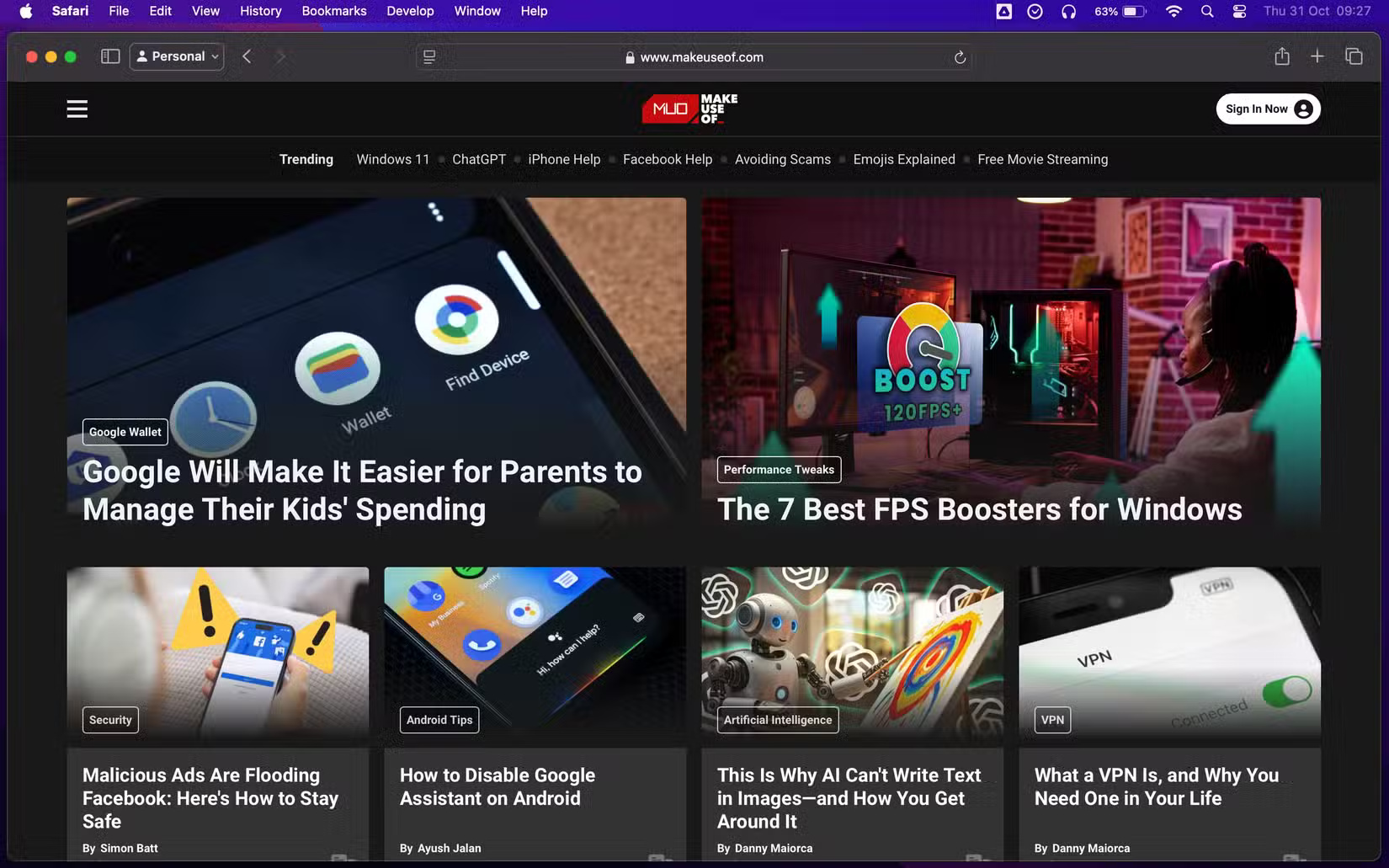
<p>Safari là một trong những ứng dụng Mac dễ nhận biết nhất và chỉ dành riêng cho các thiết bị Apple. Ứng dụng này từng có sẵn cho PC chạy Windows cách đây hơn một thập kỷ, nhưng ngày nay, bạn sẽ không tìm thấy Safari trên Windows hoặc bất kỳ nền tảng của bên thứ ba nào như Linux hoặc Android.</p>

<p>Trình duyệt gốc của Apple có giao diện đẹp mắt, hợp lý với các tính năng được thiết kế riêng cho macOS, khiến nó trở thành một trong những trình duyệt tốt nhất cho máy Mac. Safari nổi tiếng với hiệu quả và được tối ưu hóa để hoạt động liền mạch với hệ sinh thái của Apple, cung cấp khả năng tích hợp mượt mà với các ứng dụng và dịch vụ khác của Apple.</p>

<p>Ngoài các tính năng của ứng dụng, bạn còn có thể điều chỉnh một số cài đặt Safari để cải thiện trải nghiệm duyệt web trên máy Mac của mình.</p>

<h2>2. Preview</h2>

<figure><img alt="Đọc PDF trên máy Mac bằng Preview" data-adbro-processed="true" data-i="1" data-src="https://st.quantrimang.com/photos/image/2024/11/02/ung-dung-danh-rieng-cho-mac-2.jpg" data-was-processed="true" height="1031" src="https://st.quantrimang.com/photos/image/2024/11/02/ung-dung-danh-rieng-cho-mac-2.jpg" width="1650" />
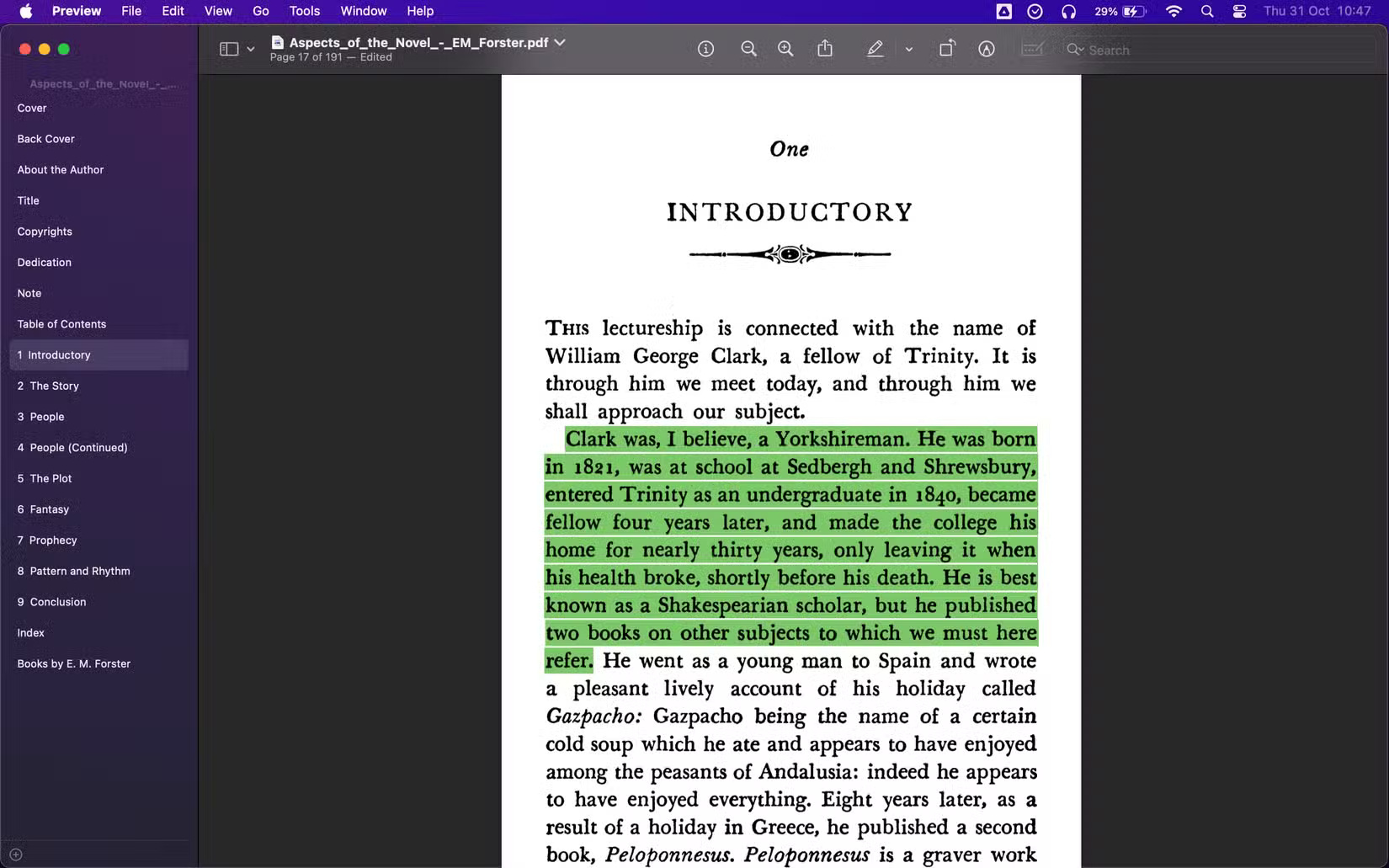
<figcaption>Đọc PDF trên máy Mac bằng Preview</figcaption>
</figure>
<iframe allow="autoplay" allowtransparency="true" aria-label="Advertisement" data-google-container-id="a!3" data-google-query-id="COaU1bDbvIkDFY0xewcdJJs4ig" data-load-complete="true" frameborder="0" height="174" hspace="0" id="aswift_2" marginheight="0" marginwidth="0" name="aswift_2" sandbox="allow-scripts allow-same-origin allow-forms allow-presentation allow-popups" scrolling="no" tabindex="0" title="Advertisement" vspace="0" width="694"></iframe>

<p>Ứng dụng Preview của Apple là một ứng dụng vô giá khác mà bạn không tìm thấy trên Windows. Preview là ứng dụng macOS tích hợp để xem và chỉnh sửa&nbsp;<a data-type="internal" href="https://quantrimang.com/cong-nghe/tim-hieu-ve-dinh-dang-pdf-118417" title="File PDF là gì? Đọc file PDF như thế nào?">PDF</a>&nbsp;và hình ảnh. Với Preview, bạn có thể chú thích PDF, kết hợp PDF và đánh dấu trang.</p>

<p>Bạn thậm chí có thể sử dụng Preview để thêm chữ ký vào PDF, chỉnh sửa ảnh chụp màn hình, v.v... Preview có đủ tính năng để người dùng Mac không cần ứng dụng của bên thứ ba như&nbsp;<a data-type="internal" href="https://quantrimang.com/download/adobe-reader-dc-178210" title="Adobe Reader DC (Acrobat Reader)">&nbsp;Adobe Reader</a>&nbsp;để xem file PDF.</p>

<h2>3. Final Cut Pro</h2>

<figure><img alt="Chỉnh sửa video bằng Final Cut Pro trên máy Mac" data-i="2" data-src="https://st.quantrimang.com/photos/image/2024/11/02/ung-dung-danh-rieng-cho-mac-3.jpg" data-was-processed="true" height="1031" src="https://st.quantrimang.com/photos/image/2024/11/02/ung-dung-danh-rieng-cho-mac-3.jpg" width="1650" />
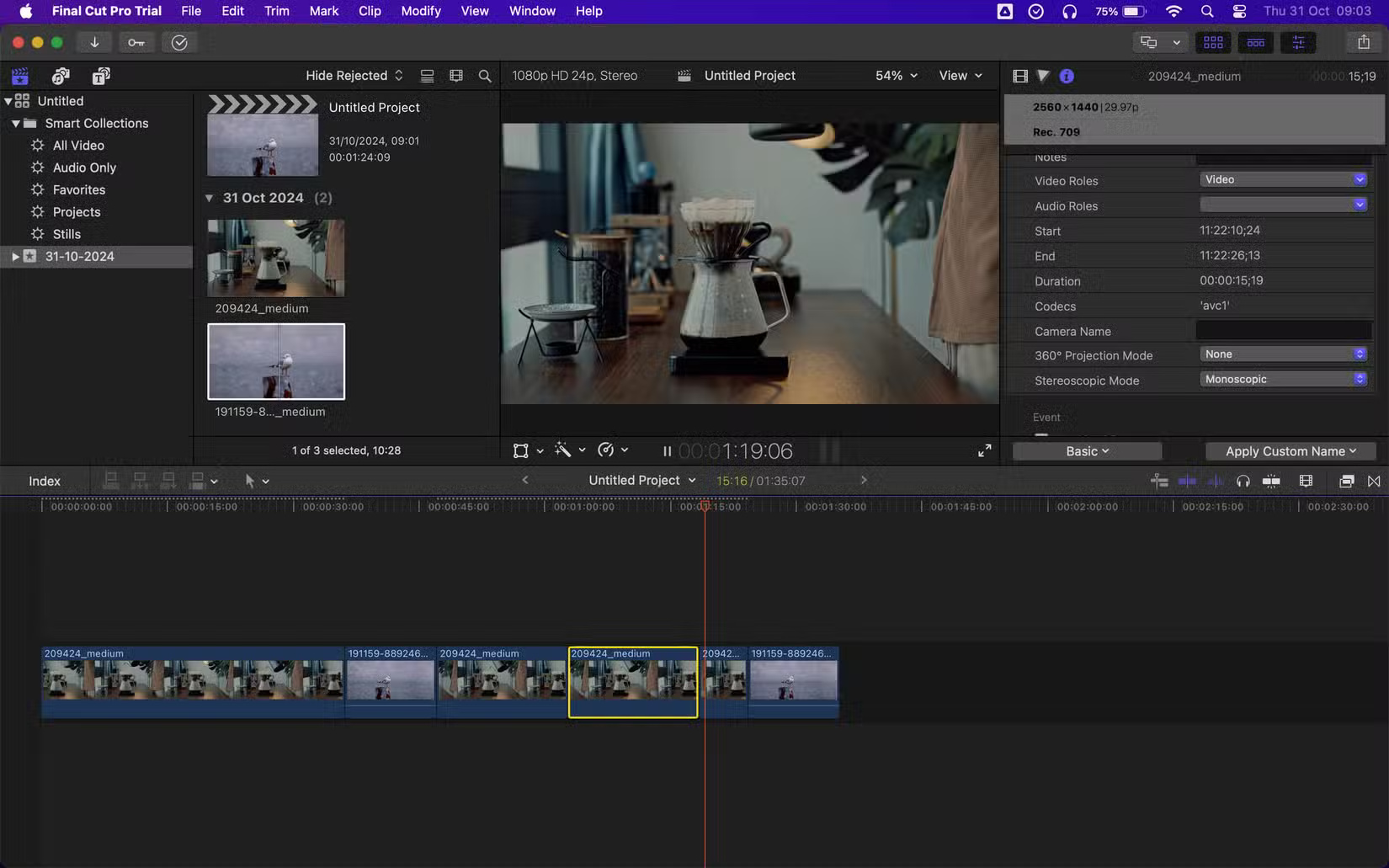
<figcaption>Chỉnh sửa video bằng Final Cut Pro trên máy Mac</figcaption>
</figure>

<p>Final Cut Pro nổi bật là ứng dụng chỉnh sửa video mạnh mẽ, chuyên nghiệp dành riêng cho macOS. Ứng dụng này có giao diện trực quan và các tính năng chỉnh sửa mạnh mẽ, vì vậy không có gì ngạc nhiên khi những nhà làm phim, biên tập viên video và người sáng tạo nội dung sử dụng ứng dụng này để chỉnh sửa video trên macOS.</p>

<p>Mặc dù Final Cut Pro chỉ dành riêng cho macOS kể từ khi ra mắt, Apple đã ra mắt phiên bản iPadOS của ứng dụng này vào năm 2023. Microsoft không cung cấp bất kỳ ứng dụng nào tương tự, vì vậy người dùng Windows phải dựa vào các ứng dụng của bên thứ ba như&nbsp;<a data-type="internal" href="https://quantrimang.com/cong-nghe/so-sanh-adobe-premiere-pro-va-davinci-resolve-187193" title="Adobe Premiere Pro hay DaVinci Resolve là trình chỉnh sửa tối ưu hơn?">Adobe Premiere Pro</a>&nbsp;để chỉnh sửa video.</p>
<iframe allow="autoplay" allowtransparency="true" aria-label="Advertisement" data-google-container-id="a!4" data-google-query-id="CP7w1LDbvIkDFcHKTAIdXf8mWA" data-load-complete="true" frameborder="0" height="174" hspace="0" id="aswift_3" marginheight="0" marginwidth="0" name="aswift_3" sandbox="allow-scripts allow-same-origin allow-forms allow-presentation allow-popups" scrolling="no" tabindex="0" title="Advertisement" vspace="0" width="694"></iframe>

<ul>
	<li><a href="https://quantrimang.com/url?u=aHR0cHM6Ly9hcHBzLmFwcGxlLmNvbS91cy9hcHAvZmluYWwtY3V0LXByby9pZDQyNDM4OTkzMw%3D%3D" rel="nofollow noopener" target="_blank">Tải Final Cut Pro</a>&nbsp;(299,99 USD, có bản dùng thử miễn phí)</li>
</ul>

<h2>4. Logic Pro</h2>

<figure><img alt="Làm việc trên một dự án trong Logic Pro trên máy Mac" data-i="3" data-src="https://st.quantrimang.com/photos/image/2024/11/02/ung-dung-danh-rieng-cho-mac-4.jpg" data-was-processed="true" height="1031" src="https://st.quantrimang.com/photos/image/2024/11/02/ung-dung-danh-rieng-cho-mac-4.jpg" width="1650" />
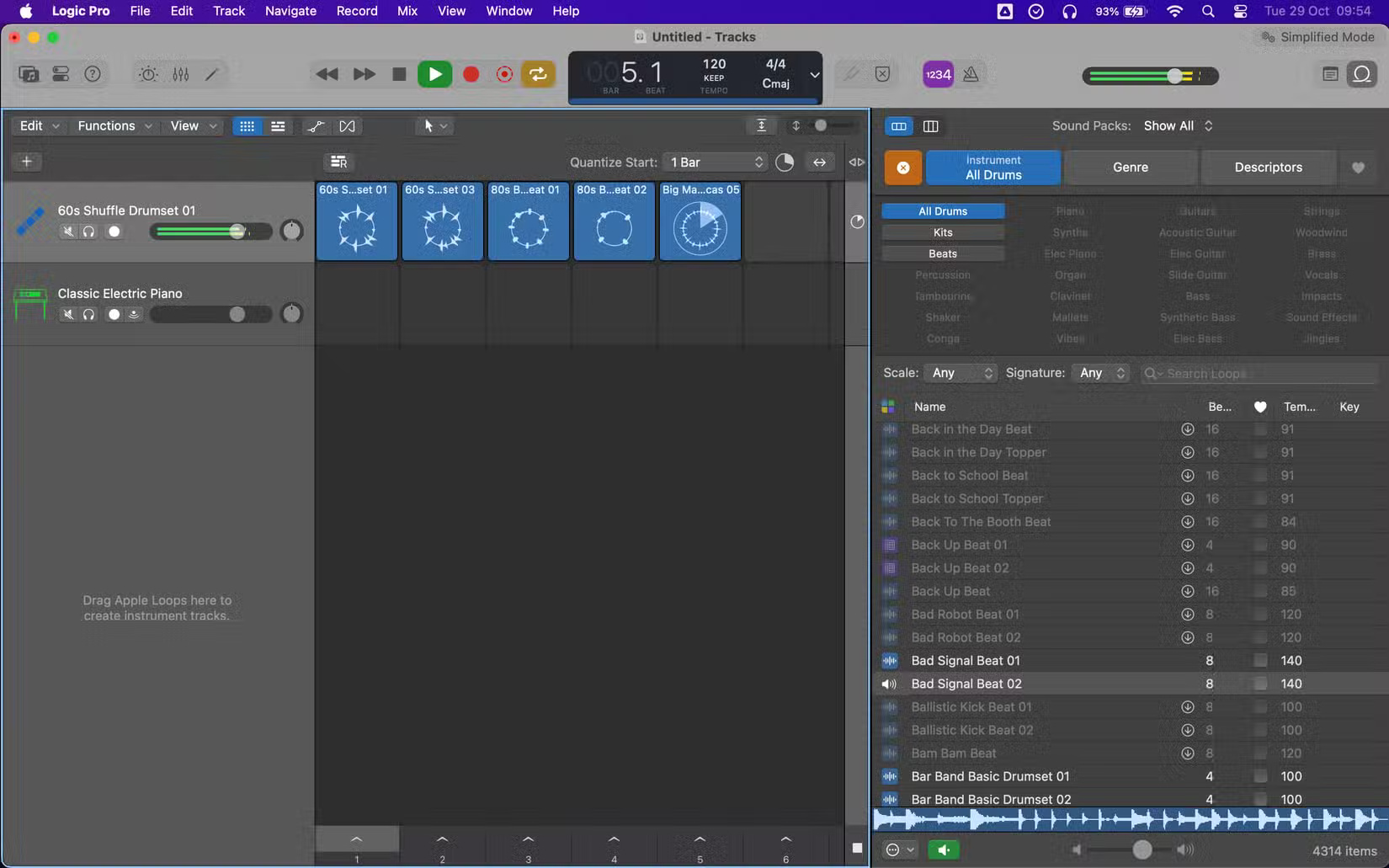
<figcaption>Làm việc trên một dự án trong Logic Pro trên máy Mac</figcaption>
</figure>

<p>Nếu tham gia sản xuất nhạc, có lẽ bạn đã thấy Logic Pro được đề xuất là một trong những phần mềm ghi âm tốt nhất dành cho nhạc sĩ. Là một trong những máy trạm âm thanh kỹ thuật số tốt nhất, Logic Pro cung cấp nhiều công cụ mạnh mẽ để sản xuất nhạc, bao gồm ghi âm, chỉnh sửa và mix nhạc, giúp nó trở thành công cụ đắc lực cho bất kỳ ai trong lĩnh vực sản xuất nhạc.</p>

<p>Điểm mạnh của Logic Pro nằm ở thư viện âm thanh, vòng lặp và nhạc cụ tích hợp sâu rộng, cho phép người dùng tạo nhạc chất lượng cao mà không cần đến các plugin của bên thứ ba. Trên thực tế, bạn có thể tạo toàn bộ bản nhạc chỉ bằng các sample Logic Pro miễn phí.</p>

<ul>
	<li>Tải Logic Pro&nbsp;(199,99 USD, có bản dùng thử miễn phí)</li>
</ul>
<span style="color:rgb(192, 57, 43);"><strong>https://apps.apple.com/us/app/logic-pro/id634148309</strong></span>

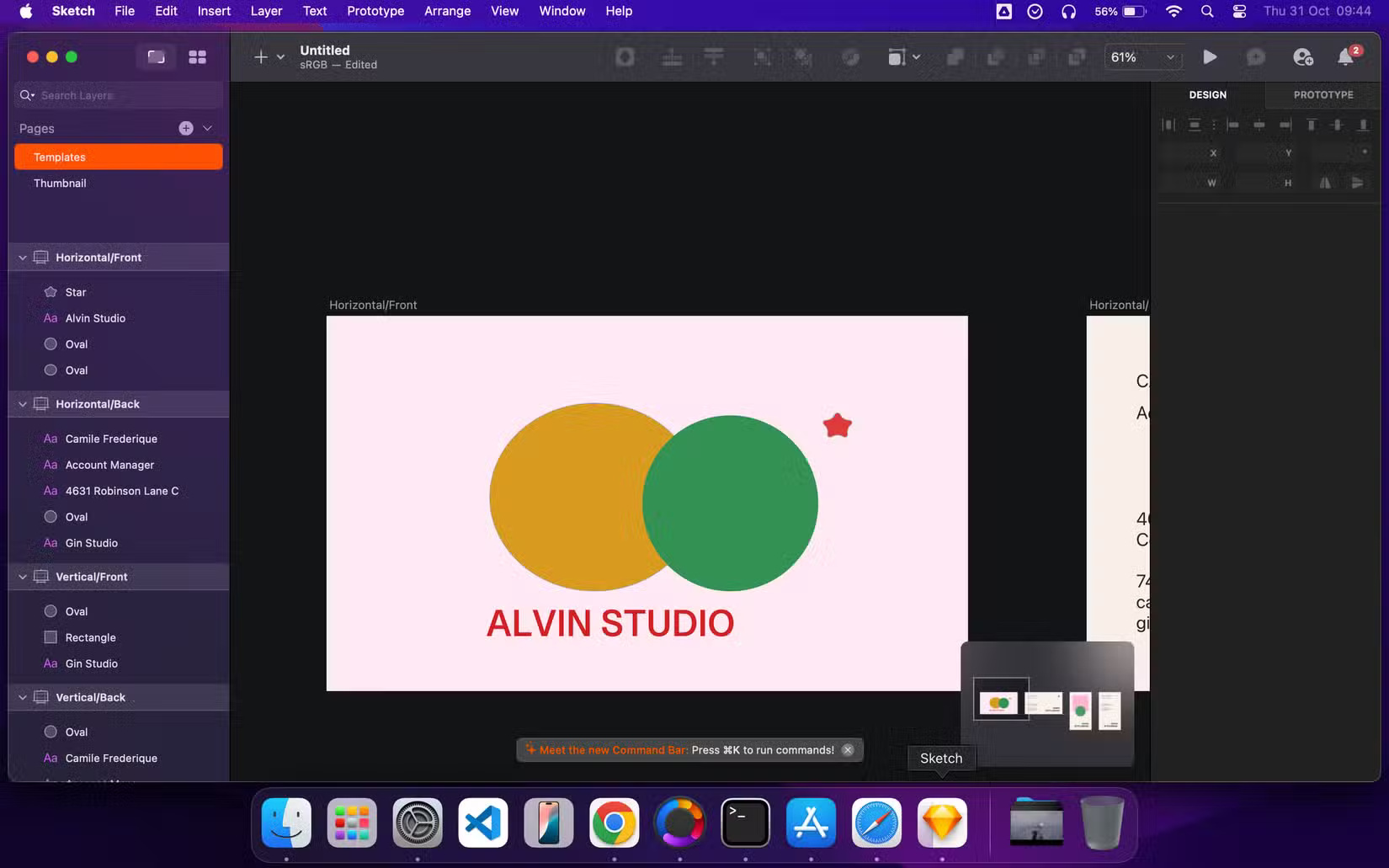
<h2>5. Sketch</h2>

<figure><img alt="Tạo thiết kế trong Sketch" data-i="4" data-src="https://st.quantrimang.com/photos/image/2024/11/02/ung-dung-danh-rieng-cho-mac-5.jpg" data-was-processed="true" height="1031" src="https://st.quantrimang.com/photos/image/2024/11/02/ung-dung-danh-rieng-cho-mac-5.jpg" width="1650" />
<figcaption>Tạo thiết kế trong Sketch</figcaption>
</figure>
&nbsp;

<p>Sketch là ứng dụng macOS gốc để thiết kế và tạo nguyên mẫu. Điểm mạnh chính của Sketch đến từ thiết kế tập trung và các tính năng được thiết kế riêng cho giao diện người dùng, trải nghiệm người dùng và thiết kế sản phẩm kỹ thuật số. Một điểm mạnh cốt lõi khác là tập trung hoàn toàn vào thiết kế, khiến nó trở nên hoàn hảo cho các nhà thiết kế.</p>

<ul>
	<li>Tải Sketch&nbsp;(14 USD/tháng, có bản dùng thử miễn phí)</li>
</ul>
<span style="color:rgb(192, 57, 43);"><strong>https://apps.apple.com/us/app/sketch/id1667260533</strong></span>

<h2>6. Keynote</h2>

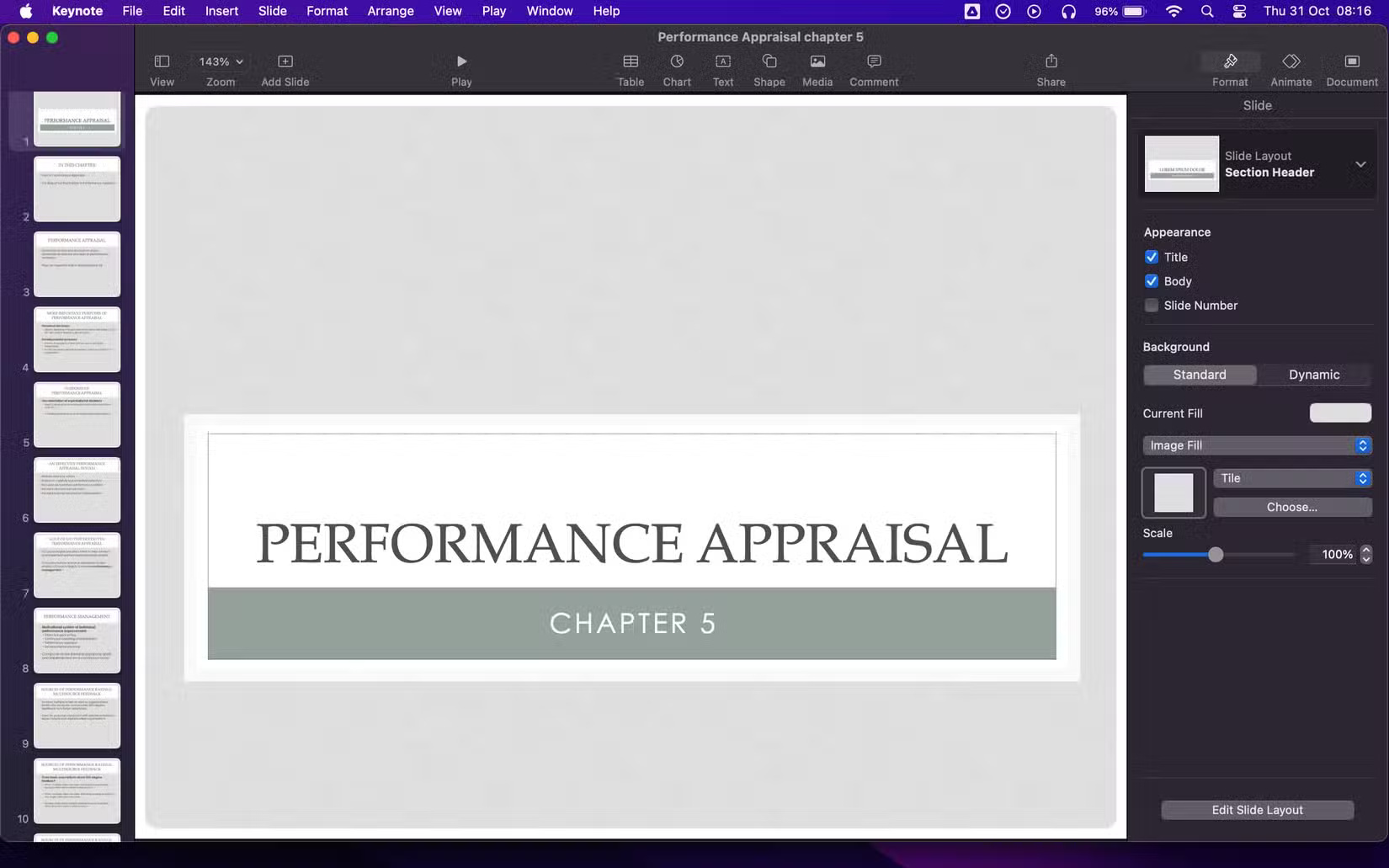
<figure><img alt="Xem bài thuyết trình trong Keynote" data-i="5" data-src="https://st.quantrimang.com/photos/image/2024/11/02/ung-dung-danh-rieng-cho-mac-6.jpg" data-was-processed="true" height="1031" src="https://st.quantrimang.com/photos/image/2024/11/02/ung-dung-danh-rieng-cho-mac-6.jpg" width="1650" />
<figcaption>Xem bài thuyết trình trong Keynote</figcaption>
</figure>

<p>Keynote là phần mềm thuyết trình của Apple, một phần của bộ ứng dụng iWork. Là một&nbsp;giải pháp thay thế cho Microsoft PowerPointt, Keynote cho phép bạn dễ dàng tạo các bài thuyết trình đẹp mắt bằng các công cụ có sẵn và hơn 40 theme do Apple thiết kế.</p>

<p>Bạn có thể thêm văn bản, bảng, biểu đồ, video, hình dạng, v.v... Keynote cũng cho phép bạn thêm hoạt ảnh và hiệu ứng chuyển tiếp để có các bài thuyết trình mượt mà. Bên cạnh Keynote, các ứng dụng iWork khác như Numbers và Pages cũng miễn phí và độc quyền trên macOS.</p>

<ul>
	<li>Tải Keynote&nbsp;(Miễn phí)</li>
</ul>
<span style="color:rgb(192, 57, 43);"><strong>https://apps.apple.com/us/app/keynote/id409183694</strong></span>

<h2>7. Xcode</h2>

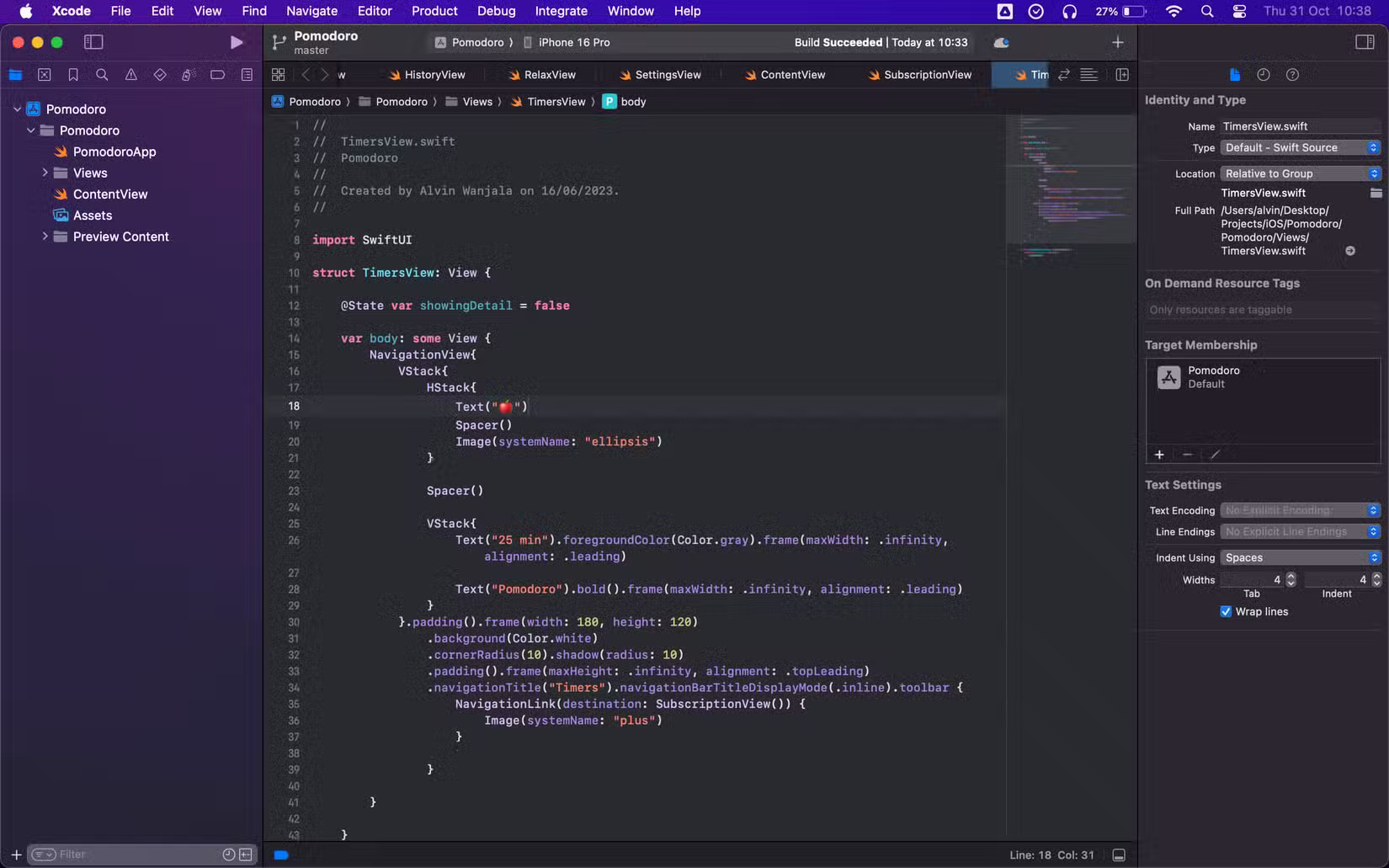
<figure><img alt="Lập trình trên máy Mac bằng Xcode IDE" data-i="6" data-src="https://st.quantrimang.com/photos/image/2024/11/02/ung-dung-danh-rieng-cho-mac-7.jpg" data-was-processed="true" height="1031" src="https://st.quantrimang.com/photos/image/2024/11/02/ung-dung-danh-rieng-cho-mac-7.jpg" width="1650" />
<figcaption>Lập trình trên máy Mac bằng Xcode IDE</figcaption>
</figure>

<p>Xcode là môi trường phát triển tích hợp (IDE) chính thức của Apple dành cho các nhà phát triển. Nó cung cấp một bộ công cụ toàn diện được tối ưu hóa liền mạch để xây dựng các ứng dụng trong hệ sinh thái của Apple.</p>

<p>Xcode độc ​​quyền trên máy Mac, biến macOS trở thành nền tảng hoàn hảo để phát triển các ứng dụng iOS, macOS, watchOS và tvOS.</p>

<ul>
	<li>Tải Xcode&nbsp;(Miễn phí)</li>
</ul>
<span style="color:rgb(192, 57, 43);"><strong>https://apps.apple.com/us/app/xcode/id497799835</strong></span>

<h2>8. Pixelmator Pro</h2>

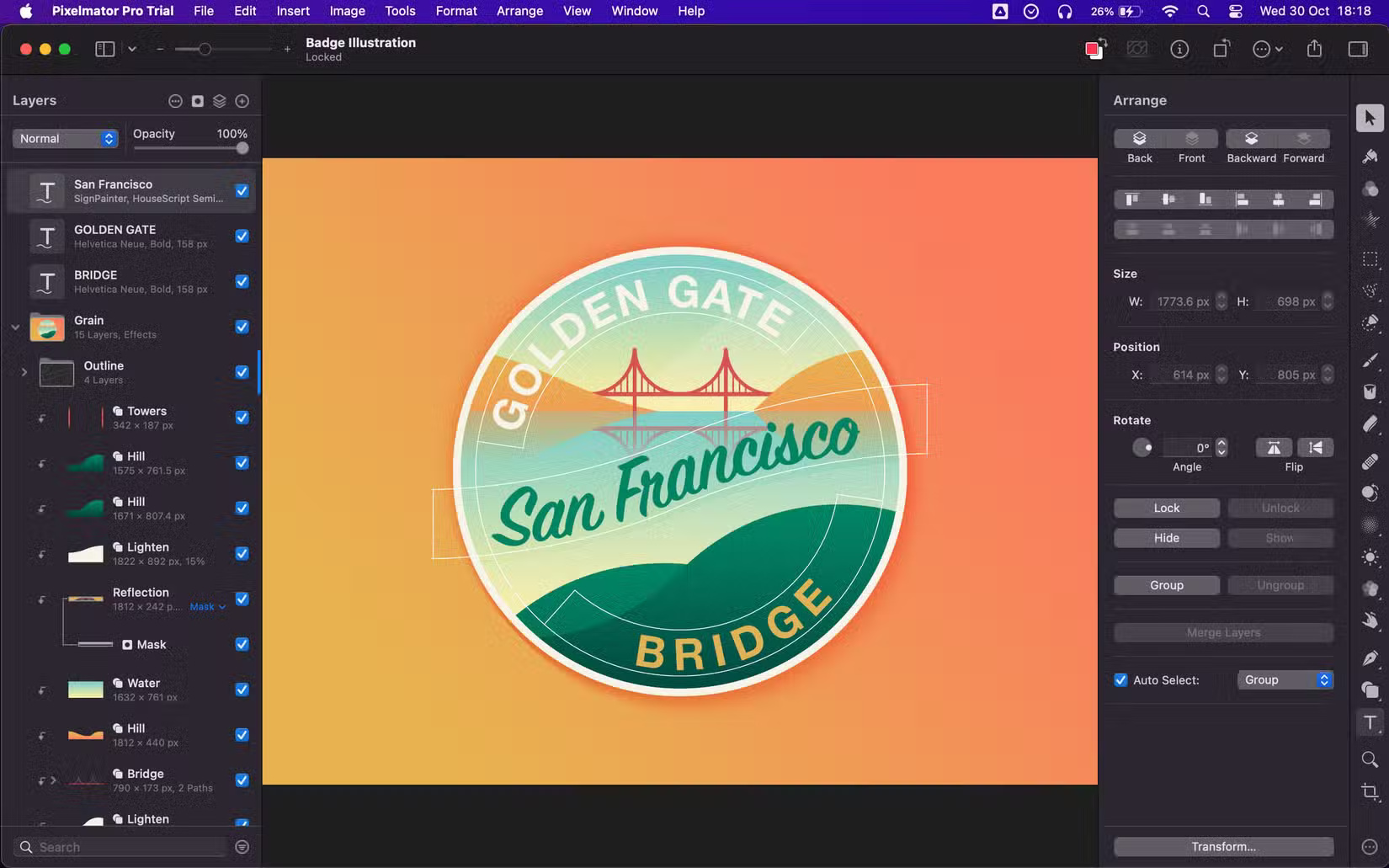
<figure><img alt="Tạo hình minh họa trong Pixelmator Pro" data-i="7" data-src="https://st.quantrimang.com/photos/image/2024/11/02/ung-dung-danh-rieng-cho-mac-8.jpg" data-was-processed="true" height="1031" src="https://st.quantrimang.com/photos/image/2024/11/02/ung-dung-danh-rieng-cho-mac-8.jpg" width="1650" />
<figcaption>Tạo hình minh họa trong Pixelmator Pro</figcaption>
</figure>

<p>Cuối cùng trong danh sách là Pixelmator Pro, đây là ứng dụng độc quyền để chỉnh sửa hình ảnh, tạo tranh vẽ và hình minh họa. Ứng dụng này có các tính năng mạnh mẽ để chỉnh sửa hình ảnh, bao gồm cả điều chỉnh màu sắc chi tiết. Đối với đồ họa vector, ứng dụng này có bộ công cụ vector đầy đủ và hỗ trợ nhiều định dạng khác nhau, bao gồm Adobe Illustrator và Illustrator EPS.</p>

<ul>
	<li>Tải Pixelmator Pro&nbsp;(49,99 USD, có bản dùng thử miễn phí)</li>
</ul>
<span style="color:rgb(192, 57, 43);"><strong>https://apps.apple.com/us/app/pixelmator-pro/id1289583905</strong></span>

<p>Nếu bạn đang cân nhắc từ bỏ máy Mac để chuyển sang PC chạy Windows, bạn nên biết mình sẽ bỏ lỡ điều gì. Một trong những nhược điểm chính là bạn sẽ không còn có thể sử dụng các ứng dụng dành riêng cho máy Mac này nữa. Nhưng danh sách này không đầy đủ; vẫn còn nhiều ứng dụng dành riêng cho máy Mac khác.</p>
		</div>
				<div id="author">
						<p>
				<strong>Tác giả:</strong>
				<a href="https://www.nguoicodonvn2008.info/vi/news/author/admin/">admin</a>
			</p>
		</div>
	</div>
	<div id="footer" class="clearfix">
		<div id="url">
			<strong>URL của bản tin này: </strong><a href="https://www.nguoicodonvn2008.info/vi/news/savefile/kien-thuc-may-tinh/8-ung-dung-danh-rieng-cho-mac-ban-se-khong-tim-thay-tren-windows-9277.html" title="8 ứng dụng dành riêng cho Mac bạn sẽ không tìm thấy trên Windows">https://www.nguoicodonvn2008.info/vi/news/savefile/kien-thuc-may-tinh/8-ung-dung-danh-rieng-cho-mac-ban-se-khong-tim-thay-tren-windows-9277.html</a>

		</div>
		<div class="clear"></div>
		<div class="copyright">
			&copy; .&#x3A; Nguoicodonvn2008.info - Cõi lòng người cô đơn &#x3A;.
		</div>
		<div id="contact">
			<a href="mailto:admin@nguoicodonvn2008.info">admin@nguoicodonvn2008.info</a>
		</div>
	</div>
</div>
        <div id="timeoutsess" class="chromeframe">
            Bạn đã không sử dụng Site, <a onclick="timeoutsesscancel();" href="https://www.nguoicodonvn2008.info/#">Bấm vào đây để duy trì trạng thái đăng nhập</a>. Thời gian chờ: <span id="secField"> 60 </span> giây
        </div>
        <div id="openidResult" class="nv-alert" style="display:none"></div>
        <div id="openidBt" data-result="" data-redirect=""></div>
		</script>
		<div class="car-top">
  <span><img src="https://www.nguoicodonvn2008.info/themes/default/images/car.png" alt=""></span>
</div>
<div id="run_cronjobs" style="visibility:hidden;display:none;"><img alt="cron" src="/index.php?second=cronjobs&amp;p=g58ic17T" width="1" height="1" /></div>
<script src="https://www.nguoicodonvn2008.info/assets/js/jquery/jquery.min.js"></script>
<script>var nv_base_siteurl="/",nv_lang_data="vi",nv_lang_interface="vi",nv_name_variable="nv",nv_fc_variable="op",nv_lang_variable="language",nv_module_name="news",nv_func_name="savefile",nv_is_user=0, nv_my_ofs=-4,nv_my_abbr="EDT",nv_cookie_prefix="nv4c_e856T",nv_check_pass_mstime=1738000,nv_area_admin=0,nv_safemode=0,theme_responsive=0,nv_recaptcha_ver=2,nv_recaptcha_sitekey="",nv_recaptcha_type="image",XSSsanitize=1;</script>
<script src="https://www.nguoicodonvn2008.info/assets/js/language/vi.js"></script>
<script src="https://www.nguoicodonvn2008.info/assets/js/DOMPurify/purify3.js"></script>
<script src="https://www.nguoicodonvn2008.info/assets/js/global.js"></script>
<script src="https://www.nguoicodonvn2008.info/assets/js/site.js"></script>
<script src="https://www.nguoicodonvn2008.info/themes/default/js/news.js"></script>
<script src="https://www.nguoicodonvn2008.info/themes/default/js/main.js"></script>
<script src="https://www.nguoicodonvn2008.info/themes/default/js/custom.js"></script>
<script type="application/ld+json">
        {
            "@context": "https://schema.org",
            "@type": "Organization",
            "url": "https://www.nguoicodonvn2008.info",
            "logo": "https://www.nguoicodonvn2008.info/uploads/angel.gif"
        }
        </script>
<script src="https://www.nguoicodonvn2008.info/themes/default/js/bootstrap.min.js"></script>
<script type="text/javascript">
var $scrolltop = $('.car-top');
$scrolltop.on('click', function () {
    $('html,body').animate({
        scrollTop: 0
    }, 800);
    $(this).addClass("car-run");
    setTimeout(function(){ $scrolltop.removeClass('car-run');}, 1000);
    return false;
});
$(window).on('scroll', function ()
{ 
    if($(window).scrollTop() >= 200)
    {
        $scrolltop.addClass("show");
        $scrolltop.addClass("car-down");
    }
    else
    {
       $scrolltop.removeClass("show");
       setTimeout(function(){ $scrolltop.removeClass('car-down');}, 300);
    }
});
</script>
</body>
</html>