<!DOCTYPE html>
    <html lang="vi" xmlns="http://www.w3.org/1999/xhtml" prefix="og: http://ogp.me/ns#">
    <head>
<title>6 thao tác sai cơ bản khi làm việc trên Excel</title>
<meta name="description" content="6 thao tác sai cơ bản khi làm việc trên Excel - Savefile - Tin Tức -...">
<meta name="author" content=".: Nguoicodonvn2008.info - Cõi lòng người cô đơn :.">
<meta name="copyright" content=".: Nguoicodonvn2008.info - Cõi lòng người cô đơn :. [admin@nguoicodonvn2008.info]">
<meta name="robots" content="index, archive, follow, noodp">
<meta name="googlebot" content="index,archive,follow,noodp">
<meta name="msnbot" content="all,index,follow">
<meta name="generator" content="NukeViet v4.5">
<meta http-equiv="Content-Type" content="text/html; charset=utf-8">
<meta property="og:title" content="6 thao tác sai cơ bản khi làm việc trên Excel">
<meta property="og:type" content="website">
<meta property="og:description" content="Savefile - Tin Tức - https&#x3A;&#x002F;&#x002F;www.nguoicodonvn2008.info&#x002F;vi&#x002F;news&#x002F;savefile&#x002F;kien-thuc-may-tinh&#x002F;6-thao-tac-sai-co-ban-khi-lam-viec-tren-excel-8505.html">
<meta property="og:site_name" content=".&#x3A; Nguoicodonvn2008.info - Cõi lòng người cô đơn &#x3A;.">
<meta property="og:url" content="https://www.nguoicodonvn2008.info/vi/news/savefile/kien-thuc-may-tinh/6-thao-tac-sai-co-ban-khi-lam-viec-tren-excel-8505.html">
<link rel="shortcut icon" href="https://www.nguoicodonvn2008.info/favicon.ico">
<link rel="canonical" href="https://www.nguoicodonvn2008.info/vi/news/savefile/kien-thuc-may-tinh/6-thao-tac-sai-co-ban-khi-lam-viec-tren-excel-8505.html">
<link rel="alternate" href="https://www.nguoicodonvn2008.info/vi/news/rss/" title="Tin Tức" type="application/rss+xml">
<link rel="alternate" href="https://www.nguoicodonvn2008.info/vi/news/rss/karaoke-dual/" title="Tin Tức - Karaoke Dual" type="application/rss+xml">
<link rel="alternate" href="https://www.nguoicodonvn2008.info/vi/news/rss/nhac-tre/" title="Tin Tức - Nhạc trẻ" type="application/rss+xml">
<link rel="alternate" href="https://www.nguoicodonvn2008.info/vi/news/rss/tru-tinh/" title="Tin Tức - Trữ tình" type="application/rss+xml">
<link rel="alternate" href="https://www.nguoicodonvn2008.info/vi/news/rss/nuoc-ngoai/" title="Tin Tức - Nước ngoài" type="application/rss+xml">
<link rel="alternate" href="https://www.nguoicodonvn2008.info/vi/news/rss/remix/" title="Tin Tức - Remix" type="application/rss+xml">
<link rel="alternate" href="https://www.nguoicodonvn2008.info/vi/news/rss/tam-su-tinh-yeu/" title="Tin Tức - Tâm sự tình yêu" type="application/rss+xml">
<link rel="alternate" href="https://www.nguoicodonvn2008.info/vi/news/rss/tho-suu-tam/" title="Tin Tức - Thơ sưu tầm" type="application/rss+xml">
<link rel="alternate" href="https://www.nguoicodonvn2008.info/vi/news/rss/cuoc-song/" title="Tin Tức - Cuộc sống" type="application/rss+xml">
<link rel="alternate" href="https://www.nguoicodonvn2008.info/vi/news/rss/phan-mem/" title="Tin Tức - Phần mềm" type="application/rss+xml">
<link rel="alternate" href="https://www.nguoicodonvn2008.info/vi/news/rss/kien-thuc-may-tinh/" title="Tin Tức - Kiến thức máy tính" type="application/rss+xml">
<link rel="alternate" href="https://www.nguoicodonvn2008.info/vi/news/rss/hoc-tap/" title="Tin Tức - Học tập" type="application/rss+xml">
<link rel="alternate" href="https://www.nguoicodonvn2008.info/vi/news/rss/tai-lieu/" title="Tin Tức - Tài liệu" type="application/rss+xml">
<link rel="alternate" href="https://www.nguoicodonvn2008.info/vi/news/rss/de-thi/" title="Tin Tức - Đề thi" type="application/rss+xml">
<link rel="preload" as="style" href="https://www.nguoicodonvn2008.info/assets/css/font-awesome.min.css" type="text/css">
<link rel="preload" as="style" href="https://www.nguoicodonvn2008.info/themes/default/css/bootstrap.non-responsive.css" type="text/css">
<link rel="preload" as="style" href="https://www.nguoicodonvn2008.info/themes/default/css/style.css" type="text/css">
<link rel="preload" as="style" href="https://www.nguoicodonvn2008.info/themes/default/css/style.non-responsive.css" type="text/css">
<link rel="preload" as="style" href="https://www.nguoicodonvn2008.info/themes/default/css/news.css" type="text/css">
<link rel="preload" as="style" href="https://www.nguoicodonvn2008.info/themes/default/css/custom.css" type="text/css">
<link rel="preload" as="script" href="https://www.nguoicodonvn2008.info/assets/js/jquery/jquery.min.js" type="text/javascript">
<link rel="preload" as="script" href="https://www.nguoicodonvn2008.info/assets/js/language/vi.js" type="text/javascript">
<link rel="preload" as="script" href="https://www.nguoicodonvn2008.info/assets/js/DOMPurify/purify3.js" type="text/javascript">
<link rel="preload" as="script" href="https://www.nguoicodonvn2008.info/assets/js/global.js" type="text/javascript">
<link rel="preload" as="script" href="https://www.nguoicodonvn2008.info/assets/js/site.js" type="text/javascript">
<link rel="preload" as="script" href="https://www.nguoicodonvn2008.info/themes/default/js/news.js" type="text/javascript">
<link rel="preload" as="script" href="https://www.nguoicodonvn2008.info/themes/default/js/main.js" type="text/javascript">
<link rel="preload" as="script" href="https://www.nguoicodonvn2008.info/themes/default/js/custom.js" type="text/javascript">
<link rel="preload" as="script" href="https://www.nguoicodonvn2008.info/themes/default/js/bootstrap.min.js" type="text/javascript">
<link rel="stylesheet" href="https://www.nguoicodonvn2008.info/assets/css/font-awesome.min.css">
<link rel="stylesheet" href="https://www.nguoicodonvn2008.info/themes/default/css/bootstrap.non-responsive.css">
<link rel="stylesheet" href="https://www.nguoicodonvn2008.info/themes/default/css/style.css">
<link rel="stylesheet" href="https://www.nguoicodonvn2008.info/themes/default/css/style.non-responsive.css">
<link rel="StyleSheet" href="https://www.nguoicodonvn2008.info/themes/default/css/news.css">
<link rel="stylesheet" href="https://www.nguoicodonvn2008.info/themes/default/css/custom.css">
<style type="text/css">
	body{background: #fff;}
</style>
    </head>
    <body>
<div id="print">
	<div id="hd_print">
		<h2 class="pull-left">.&#x3A; Nguoicodonvn2008.info - Cõi lòng người cô đơn &#x3A;.</h2>
		<p class="pull-right"><a title=".&#x3A; Nguoicodonvn2008.info - Cõi lòng người cô đơn &#x3A;." href="https://www.nguoicodonvn2008.info/">https://www.nguoicodonvn2008.info</a></p>
	</div>
	<div class="clear"></div>
	<hr />
	<div id="content">
		<h1>6 thao tác sai cơ bản khi làm việc trên Excel</h1>
		<ul class="list-inline">
			<li>Thứ hai - 17/06/2024 23:41</li>
			<li class="hidden-print txtrequired"><em class="fa fa-print">&nbsp;</em><a title="In ra" href="javascript:;" onclick="window.print()">In ra</a></li>
			<li class="hidden-print txtrequired"><em class="fa fa-power-off">&nbsp;</em><a title="Đóng cửa sổ này" href="javascript:;" onclick="window.close()">Đóng cửa sổ này</a></li>
		</ul>
		<div class="clear"></div>
		<div id="hometext">
		</div>
				<div class="imghome">
			<img alt="6 thao tác sai cơ bản khi làm việc trên Excel" src="https://st.quantrimang.com/photos/image/2024/06/14/loi-sai-trong-excek-co-ban-1.jpg" width="460" class="img-thumbnail" />
		</div>
		<div class="clear"></div>
		<div id="bodytext" class="clearfix">
			<p style="text-align: justify;">Giống như làm việc với Word thì với Excel bạn cũng có thể thực hiện những thao tác sai cơ bản mà không hề hay biết. Mặc dù những thao tác sai đó có hoặc không ảnh hưởng tới dữ liệu trong bảng nhưng khiến bạn thực hiện chậm hơn, hay không thể hiện sự chuyên nghiệp khi làm việc với bảng Excel. Dưới đây là tổng hợp 6 thao tác cơ bản khi chúng ta làm việc trên Excel.</p>

<h2 style="text-align: justify;">&nbsp;</h2>

<h2 id="mcetoc_1i0i4i2832e" style="text-align: justify;">Gộp ô trong Excel</h2>

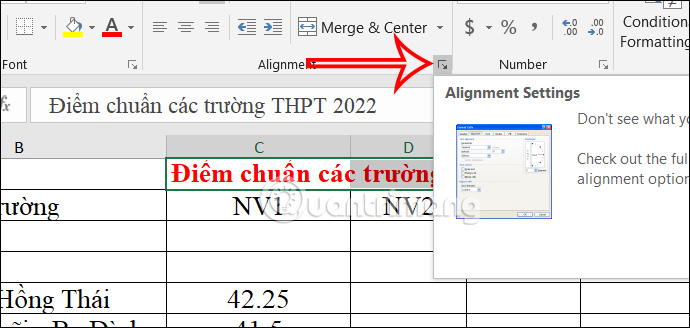
<p style="text-align: justify;">Gộp ô trong Excel&nbsp;là thao tác cơ bản và thường xuyên thực hiện khi làm việc với Excel. Nhưng một số trường hợp việc gộp ô trong Excel gây ảnh hưởng tới việc sử dụng hàm Excel khi cần có sự sự nhất quán giữa hàng và cột.</p>

<p style="text-align: justify;">Vì vậy thay vì gộp ô thì bạn nên căn chỉnh nội dung ở giữa trong ô. Chúng ta sẽ<strong>&nbsp;bôi đen tất cả những ô mà bạn muốn hợp nhất</strong>, rồi nhấn vào&nbsp;<strong>biểu tượng mũi tên tại tại nhóm Alignment</strong>.</p>

<p style="text-align: justify;"><img alt="Chỉnh ô trong Excel" data-i="0" data-src="https://st.quantrimang.com/photos/image/2024/06/14/loi-sai-trong-excek-co-ban-1.jpg" data-was-processed="true" height="285" src="https://st.quantrimang.com/photos/image/2024/06/14/loi-sai-trong-excek-co-ban-1.jpg" width="600" /></p>

<p style="text-align: justify;">Tiếp đến bạn&nbsp;<strong>nhấn vào tab Alignment</strong>&nbsp;rồi nhìn xuống bên dưới&nbsp;<strong>mục Horizontal&nbsp;</strong>bạn chọn&nbsp;<strong>Center Across Selection</strong>&nbsp;để căn giữa nội dung.</p>

<div style="text-align: justify;">&nbsp;</div>

<p style="text-align: justify;"><img alt="Căn giữa nội dung trong ô Excel" data-i="1" data-src="https://st.quantrimang.com/photos/image/2024/06/14/loi-sai-trong-excek-co-ban-2.jpg" data-was-processed="true" height="485" src="https://st.quantrimang.com/photos/image/2024/06/14/loi-sai-trong-excek-co-ban-2.jpg" width="550" /></p>

<p style="text-align: justify;">Ngay sau đó bạn sẽ thấy nội dung được căn giữa mà không cần phải gộp ô.</p>

<p style="text-align: justify;"><img alt="Chỉnh nội dung ở giữa trong ô Excel" data-i="2" data-src="https://st.quantrimang.com/photos/image/2024/06/14/loi-sai-trong-excek-co-ban-3.jpg" data-was-processed="true" height="286" src="https://st.quantrimang.com/photos/image/2024/06/14/loi-sai-trong-excek-co-ban-3.jpg" width="547" /></p>

<h2 id="mcetoc_1i0i4i2832f" style="text-align: justify;">Tạo bảng Excel thủ công</h2>

<p style="text-align: justify;">Tạo bảng Excel thủ công không phải là thao tác chuyên nghiệp của một người làm việc với Excel. Vì vậy chúng ta cần phải sử dụng đúng chuẩn định dạng tạo bảng Excel trong tùy chọn Format as Table.</p>

<div style="text-align: justify;"><br />
<img alt="Tạo bảng trong Excel " data-adbro-processed="true" data-i="3" data-src="https://st.quantrimang.com/photos/image/2024/06/14/loi-sai-trong-excek-co-ban-4.jpg" data-was-processed="true" height="445" src="https://st.quantrimang.com/photos/image/2024/06/14/loi-sai-trong-excek-co-ban-4.jpg" width="500" /></div>

<h2 id="mcetoc_1i0i4i2832g" style="text-align: justify;">Để trống hàng và cột đầu tiên</h2>

<p style="text-align: justify;">Không nên để trống cột và hàng đầu tiên trong bảng dữ liệu vì có thể gây là những lỗi khác khi in, do Excel tự động thêm viền trang vào dữ liệu. Hoặc khi bạn sử dụng tính năng lọc dữ liệu thì việc để trống hàng hoặc cột đầu tiên sẽ ảnh hưởng tới kết quả lọc.</p>

<p style="text-align: justify;">Vì thế bạn cần phải xóa cột và hàng trống trong bảng dữ liệu để sử dụng công thức hay những định dạng khác không bị báo lỗi.</p>

<div style="text-align: justify;">&nbsp;</div>

<h2 id="mcetoc_1i0i4i2832h" style="text-align: justify;">Gõ số thứ tự trong Excel thủ công</h2>

<p style="text-align: justify;">Gõ số thứ tự trong Excel thủ công không phải là cách làm hay và chuyên nghiệp. Tính năng AutoFill trong Excel sẽ tự đồng điền số thứ tự mà bạn không cần phải nhập thủ công.</p>

<div style="text-align: justify;">&nbsp;</div>

<h2 id="mcetoc_1i0i4i2832i" style="text-align: justify;">Sử dụng sai tham chiếu trong Excel</h2>

<p style="text-align: justify;">Có 3 loại tham chiếu trong Excel và bạn phải hiểu rõ từng loại tham chiếu là gì để sử dụng phù hợp.</p>

<p style="text-align: justify;">Tham chiếu tương đối trong Excel dùng khi bạn cần lặp lại phép tính trên nhiều hàng hoặc cột. Khi được sao chép công thức qua nhiều ô, nó thay đổi dựa trên vị trí tương đối của hàng và cột. Chẳng hạn bạn copy công thức = A1 + B1 từ dòng 1 xuống dòng 2 thì công thức trở thành A2 + B2.</p>

<p style="text-align: justify;">Tham chiếu tuyệt đối trong Excel sẽ không làm thay đổi công thức trong hàng hoặc cột, khi chúng ta sao chép công thức và áp dụng cho những hàng hoặc cột khác. Tham chiếu tuyệt đối được chỉ định trong công thức bằng cách thêm vào dấu ($) đứng trước tham chiếu cột, tham chiếu dòng hoặc cả hai.</p>

<p style="text-align: justify;">Tham chiếu hỗn hợp là chỉ một phần là tham chiếu cố định, còn lại sẽ là tham chiếu tương đối trong cùng 1 giá trị.</p>

<h2 id="mcetoc_1i0i4i2832j" style="text-align: justify;">Không khóa ô Excel khi chia sẻ</h2>

<p style="text-align: justify;">Khi bạn chia sẻ trang tính Excel với người khác thì có thể họ sẽ thay đổi dữ liệu trong bảng tính. Vì thế bạn cần phải khóa ô và xác thực dữ liệu trong Excel.</p>

<div style="text-align: justify;">&nbsp;</div>

<p style="text-align: justify;"><img alt="Khóa nội dung trong Excel " data-i="4" data-src="https://st.quantrimang.com/photos/image/2024/06/14/loi-sai-trong-excek-co-ban-5.jpg" data-was-processed="true" height="361" src="https://st.quantrimang.com/photos/image/2024/06/14/loi-sai-trong-excek-co-ban-5.jpg" width="400" /></p>

<p style="text-align: justify;">Chúng ta có thể đặt điều kiện nhập dữ liệu trong 1 khoảng nào đó hoặc tạo thông báo nếu ai nhập dữ liệu.</p>

<div style="text-align: justify;">&nbsp;</div>
		</div>
				<div id="author">
						<p>
				<strong>Nguồn tin:</strong>
				Quantrimang.com:
			</p>
		</div>
	</div>
	<div id="footer" class="clearfix">
		<div id="url">
			<strong>URL của bản tin này: </strong><a href="https://www.nguoicodonvn2008.info/vi/news/savefile/kien-thuc-may-tinh/6-thao-tac-sai-co-ban-khi-lam-viec-tren-excel-8505.html" title="6 thao tác sai cơ bản khi làm việc trên Excel">https://www.nguoicodonvn2008.info/vi/news/savefile/kien-thuc-may-tinh/6-thao-tac-sai-co-ban-khi-lam-viec-tren-excel-8505.html</a>

		</div>
		<div class="clear"></div>
		<div class="copyright">
			&copy; .&#x3A; Nguoicodonvn2008.info - Cõi lòng người cô đơn &#x3A;.
		</div>
		<div id="contact">
			<a href="mailto:admin@nguoicodonvn2008.info">admin@nguoicodonvn2008.info</a>
		</div>
	</div>
</div>
        <div id="timeoutsess" class="chromeframe">
            Bạn đã không sử dụng Site, <a onclick="timeoutsesscancel();" href="https://www.nguoicodonvn2008.info/#">Bấm vào đây để duy trì trạng thái đăng nhập</a>. Thời gian chờ: <span id="secField"> 60 </span> giây
        </div>
        <div id="openidResult" class="nv-alert" style="display:none"></div>
        <div id="openidBt" data-result="" data-redirect=""></div>
		</script>
		<div class="car-top">
  <span><img src="https://www.nguoicodonvn2008.info/themes/default/images/car.png" alt=""></span>
</div>
<script src="https://www.nguoicodonvn2008.info/assets/js/jquery/jquery.min.js"></script>
<script>var nv_base_siteurl="/",nv_lang_data="vi",nv_lang_interface="vi",nv_name_variable="nv",nv_fc_variable="op",nv_lang_variable="language",nv_module_name="news",nv_func_name="savefile",nv_is_user=0, nv_my_ofs=-5,nv_my_abbr="EST",nv_cookie_prefix="nv4c_e856T",nv_check_pass_mstime=1738000,nv_area_admin=0,nv_safemode=0,theme_responsive=0,nv_recaptcha_ver=2,nv_recaptcha_sitekey="",nv_recaptcha_type="image",XSSsanitize=1;</script>
<script src="https://www.nguoicodonvn2008.info/assets/js/language/vi.js"></script>
<script src="https://www.nguoicodonvn2008.info/assets/js/DOMPurify/purify3.js"></script>
<script src="https://www.nguoicodonvn2008.info/assets/js/global.js"></script>
<script src="https://www.nguoicodonvn2008.info/assets/js/site.js"></script>
<script src="https://www.nguoicodonvn2008.info/themes/default/js/news.js"></script>
<script src="https://www.nguoicodonvn2008.info/themes/default/js/main.js"></script>
<script src="https://www.nguoicodonvn2008.info/themes/default/js/custom.js"></script>
<script type="application/ld+json">
        {
            "@context": "https://schema.org",
            "@type": "Organization",
            "url": "https://www.nguoicodonvn2008.info",
            "logo": "https://www.nguoicodonvn2008.info/uploads/angel.gif"
        }
        </script>
<script src="https://www.nguoicodonvn2008.info/themes/default/js/bootstrap.min.js"></script>
<script type="text/javascript">
var $scrolltop = $('.car-top');
$scrolltop.on('click', function () {
    $('html,body').animate({
        scrollTop: 0
    }, 800);
    $(this).addClass("car-run");
    setTimeout(function(){ $scrolltop.removeClass('car-run');}, 1000);
    return false;
});
$(window).on('scroll', function ()
{ 
    if($(window).scrollTop() >= 200)
    {
        $scrolltop.addClass("show");
        $scrolltop.addClass("car-down");
    }
    else
    {
       $scrolltop.removeClass("show");
       setTimeout(function(){ $scrolltop.removeClass('car-down');}, 300);
    }
});
</script>
</body>
</html>