<!DOCTYPE html>
    <html lang="vi" xmlns="http://www.w3.org/1999/xhtml" prefix="og: http://ogp.me/ns#">
    <head>
<title>6 lệnh cấp quyền Linux các admin cần biết</title>
<meta name="description" content="6 lệnh cấp quyền Linux các admin cần biết - Savefile - Tin Tức -...">
<meta name="author" content=".: Nguoicodonvn2008.info - Cõi lòng người cô đơn :.">
<meta name="copyright" content=".: Nguoicodonvn2008.info - Cõi lòng người cô đơn :. [admin@nguoicodonvn2008.info]">
<meta name="robots" content="index, archive, follow, noodp">
<meta name="googlebot" content="index,archive,follow,noodp">
<meta name="msnbot" content="all,index,follow">
<meta name="generator" content="NukeViet v4.5">
<meta http-equiv="Content-Type" content="text/html; charset=utf-8">
<meta property="og:title" content="6 lệnh cấp quyền Linux các admin cần biết">
<meta property="og:type" content="website">
<meta property="og:description" content="Savefile - Tin Tức - https&#x3A;&#x002F;&#x002F;www.nguoicodonvn2008.info&#x002F;vi&#x002F;news&#x002F;savefile&#x002F;kien-thuc-may-tinh&#x002F;6-lenh-cap-quyen-linux-cac-admin-can-biet-11539.html">
<meta property="og:site_name" content=".&#x3A; Nguoicodonvn2008.info - Cõi lòng người cô đơn &#x3A;.">
<meta property="og:url" content="https://www.nguoicodonvn2008.info/vi/news/savefile/kien-thuc-may-tinh/6-lenh-cap-quyen-linux-cac-admin-can-biet-11539.html">
<link rel="shortcut icon" href="https://www.nguoicodonvn2008.info/favicon.ico">
<link rel="canonical" href="https://www.nguoicodonvn2008.info/vi/news/savefile/kien-thuc-may-tinh/6-lenh-cap-quyen-linux-cac-admin-can-biet-11539.html">
<link rel="alternate" href="https://www.nguoicodonvn2008.info/vi/news/rss/" title="Tin Tức" type="application/rss+xml">
<link rel="alternate" href="https://www.nguoicodonvn2008.info/vi/news/rss/karaoke-dual/" title="Tin Tức - Karaoke Dual" type="application/rss+xml">
<link rel="alternate" href="https://www.nguoicodonvn2008.info/vi/news/rss/nhac-tre/" title="Tin Tức - Nhạc trẻ" type="application/rss+xml">
<link rel="alternate" href="https://www.nguoicodonvn2008.info/vi/news/rss/tru-tinh/" title="Tin Tức - Trữ tình" type="application/rss+xml">
<link rel="alternate" href="https://www.nguoicodonvn2008.info/vi/news/rss/nuoc-ngoai/" title="Tin Tức - Nước ngoài" type="application/rss+xml">
<link rel="alternate" href="https://www.nguoicodonvn2008.info/vi/news/rss/remix/" title="Tin Tức - Remix" type="application/rss+xml">
<link rel="alternate" href="https://www.nguoicodonvn2008.info/vi/news/rss/tam-su-tinh-yeu/" title="Tin Tức - Tâm sự tình yêu" type="application/rss+xml">
<link rel="alternate" href="https://www.nguoicodonvn2008.info/vi/news/rss/tho-suu-tam/" title="Tin Tức - Thơ sưu tầm" type="application/rss+xml">
<link rel="alternate" href="https://www.nguoicodonvn2008.info/vi/news/rss/cuoc-song/" title="Tin Tức - Cuộc sống" type="application/rss+xml">
<link rel="alternate" href="https://www.nguoicodonvn2008.info/vi/news/rss/phan-mem/" title="Tin Tức - Phần mềm" type="application/rss+xml">
<link rel="alternate" href="https://www.nguoicodonvn2008.info/vi/news/rss/kien-thuc-may-tinh/" title="Tin Tức - Kiến thức máy tính" type="application/rss+xml">
<link rel="alternate" href="https://www.nguoicodonvn2008.info/vi/news/rss/hoc-tap/" title="Tin Tức - Học tập" type="application/rss+xml">
<link rel="alternate" href="https://www.nguoicodonvn2008.info/vi/news/rss/tai-lieu/" title="Tin Tức - Tài liệu" type="application/rss+xml">
<link rel="alternate" href="https://www.nguoicodonvn2008.info/vi/news/rss/de-thi/" title="Tin Tức - Đề thi" type="application/rss+xml">
<link rel="preload" as="style" href="https://www.nguoicodonvn2008.info/assets/css/font-awesome.min.css" type="text/css">
<link rel="preload" as="style" href="https://www.nguoicodonvn2008.info/themes/default/css/bootstrap.non-responsive.css" type="text/css">
<link rel="preload" as="style" href="https://www.nguoicodonvn2008.info/themes/default/css/style.css" type="text/css">
<link rel="preload" as="style" href="https://www.nguoicodonvn2008.info/themes/default/css/style.non-responsive.css" type="text/css">
<link rel="preload" as="style" href="https://www.nguoicodonvn2008.info/themes/default/css/news.css" type="text/css">
<link rel="preload" as="style" href="https://www.nguoicodonvn2008.info/themes/default/css/custom.css" type="text/css">
<link rel="preload" as="script" href="https://www.nguoicodonvn2008.info/assets/js/jquery/jquery.min.js" type="text/javascript">
<link rel="preload" as="script" href="https://www.nguoicodonvn2008.info/assets/js/language/vi.js" type="text/javascript">
<link rel="preload" as="script" href="https://www.nguoicodonvn2008.info/assets/js/DOMPurify/purify3.js" type="text/javascript">
<link rel="preload" as="script" href="https://www.nguoicodonvn2008.info/assets/js/global.js" type="text/javascript">
<link rel="preload" as="script" href="https://www.nguoicodonvn2008.info/assets/js/site.js" type="text/javascript">
<link rel="preload" as="script" href="https://www.nguoicodonvn2008.info/themes/default/js/news.js" type="text/javascript">
<link rel="preload" as="script" href="https://www.nguoicodonvn2008.info/themes/default/js/main.js" type="text/javascript">
<link rel="preload" as="script" href="https://www.nguoicodonvn2008.info/themes/default/js/custom.js" type="text/javascript">
<link rel="preload" as="script" href="https://www.nguoicodonvn2008.info/themes/default/js/bootstrap.min.js" type="text/javascript">
<link rel="stylesheet" href="https://www.nguoicodonvn2008.info/assets/css/font-awesome.min.css">
<link rel="stylesheet" href="https://www.nguoicodonvn2008.info/themes/default/css/bootstrap.non-responsive.css">
<link rel="stylesheet" href="https://www.nguoicodonvn2008.info/themes/default/css/style.css">
<link rel="stylesheet" href="https://www.nguoicodonvn2008.info/themes/default/css/style.non-responsive.css">
<link rel="StyleSheet" href="https://www.nguoicodonvn2008.info/themes/default/css/news.css">
<link rel="stylesheet" href="https://www.nguoicodonvn2008.info/themes/default/css/custom.css">
<style type="text/css">
	body{background: #fff;}
</style>
    </head>
    <body>
<div id="print">
	<div id="hd_print">
		<h2 class="pull-left">.&#x3A; Nguoicodonvn2008.info - Cõi lòng người cô đơn &#x3A;.</h2>
		<p class="pull-right"><a title=".&#x3A; Nguoicodonvn2008.info - Cõi lòng người cô đơn &#x3A;." href="https://www.nguoicodonvn2008.info/">https://www.nguoicodonvn2008.info</a></p>
	</div>
	<div class="clear"></div>
	<hr />
	<div id="content">
		<h1>6 lệnh cấp quyền Linux các admin cần biết</h1>
		<ul class="list-inline">
			<li>Thứ năm - 06/11/2025 21:21</li>
			<li class="hidden-print txtrequired"><em class="fa fa-print">&nbsp;</em><a title="In ra" href="javascript:;" onclick="window.print()">In ra</a></li>
			<li class="hidden-print txtrequired"><em class="fa fa-power-off">&nbsp;</em><a title="Đóng cửa sổ này" href="javascript:;" onclick="window.close()">Đóng cửa sổ này</a></li>
		</ul>
		<div class="clear"></div>
		<div id="hometext">
		</div>
				<div class="imghome">
			<img alt="6 lệnh cấp quyền Linux các admin cần biết" src="https://st.quantrimang.com/photos/image/2025/11/06/lenh-cap-quyen-linux-admin-can-biet-6.jpg" width="460" class="img-thumbnail" />
		</div>
		<div class="clear"></div>
		<div id="bodytext" class="clearfix">
			<p style="text-align: justify;">Một khi đã nắm vững cách Linux xử lý các file - ai có thể đọc, ghi hoặc thực thi - bạn sẽ trở thành một quản trị viên Linux thực thụ. Bạn cần thành thạo một số lệnh cấp quyền trên terminal Linux và dưới đây là những lệnh terminal hàng đầu mà bạn nên ghi nhớ.</p>

<div style="text-align: justify;">&nbsp;</div>

<h2 style="text-align: justify;">chmod</h2>

<h3 style="text-align: justify;">Kiểm soát ai có thể đọc, ghi hoặc thực thi file</h3>

<figure>
<div style="text-align: justify;"><img alt="" data-adbro-processed="true" data-i="0" data-src="https://st.quantrimang.com/photos/image/2025/11/06/lenh-cap-quyen-linux-admin-can-biet-1.jpg" data-was-processed="true" height="837" src="https://st.quantrimang.com/photos/image/2025/11/06/lenh-cap-quyen-linux-admin-can-biet-1.jpg" width="1500" /></div>
</figure>

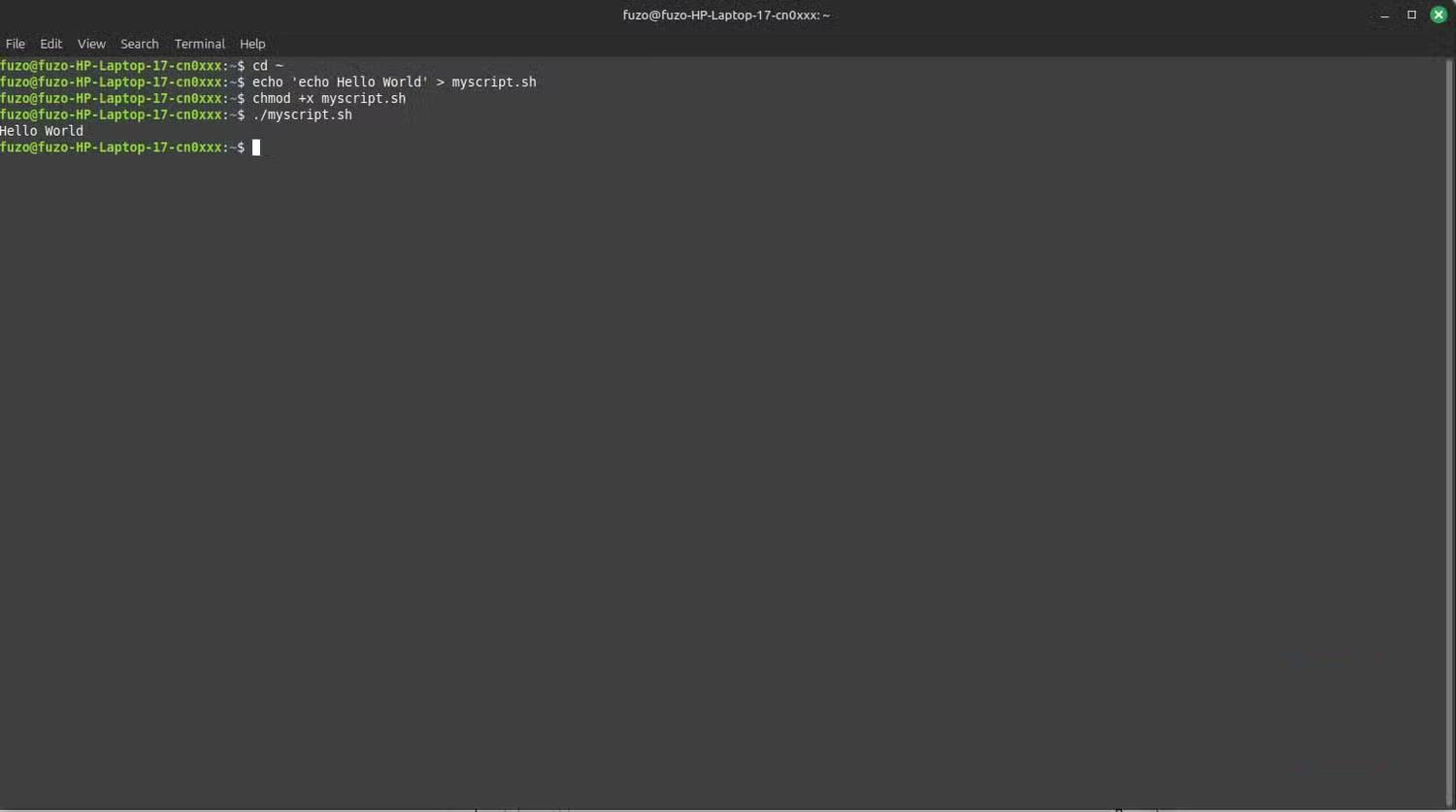
<p style="text-align: justify;">Sau khi biết lý do tại sao một script nào đó không chạy, hãy bắt đầu sử dụng lệnh &quot;chmod&quot; thường xuyên hơn. Tất cả các file Linux đều có cấp độ quyền đọc (r), ghi (w) và thực thi (x). Nếu bạn chạy lệnh&nbsp;<strong>chmod +x</strong>&nbsp;theo sau là tên script, hệ thống sẽ thực thi file như một chương trình.</p>

<p style="text-align: justify;"><strong>chmod</strong>&nbsp;cũng cho phép bạn thay đổi quyền bằng số. Lệnh&nbsp;<strong>chmod 755 filename</strong>&nbsp;cấp cho chủ sở hữu toàn quyền truy cập (rwx) và mọi người khác đều có thể đọc và thực thi (r-x). Sau khi bạn gặp thông báo &quot;Permission denied&quot; đầu tiên, chạy lệnh này có thể trở thành thói quen.</p>

<h2 style="text-align: justify;">chown</h2>

<h3 style="text-align: justify;">Giữ quyền sở hữu file như quản trị viên</h3>

<figure>
<div style="text-align: justify;"><img alt="Xem quyền sở hữu file bằng lệnh chown" data-i="1" data-src="https://st.quantrimang.com/photos/image/2025/11/06/lenh-cap-quyen-linux-admin-can-biet-2.jpg" data-was-processed="true" height="455" src="https://st.quantrimang.com/photos/image/2025/11/06/lenh-cap-quyen-linux-admin-can-biet-2.jpg" width="825" /></div>

<figcaption>
<div style="text-align: justify;">Xem quyền sở hữu file bằng lệnh chown</div>
</figcaption>
</figure>

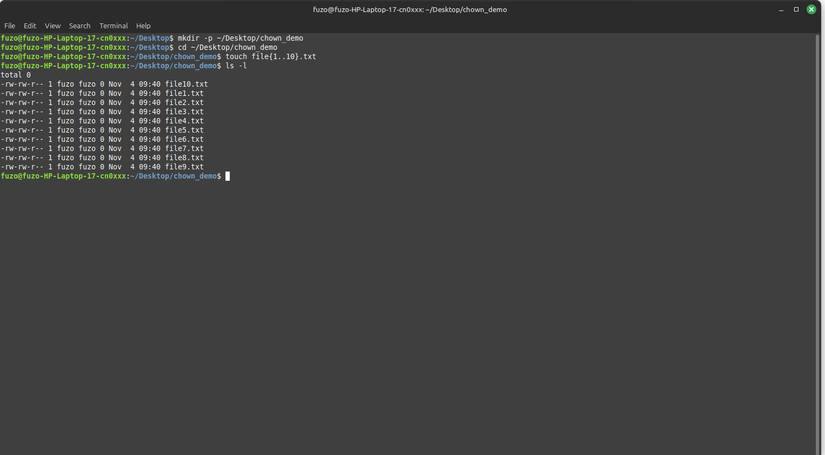
<p style="text-align: justify;">&quot;chown&quot; là lệnh cứu cánh khi bạn sao chép file giữa các ổ và không thể truy cập chúng sau đó. Nó ảnh hưởng trực tiếp đến quyền truy cập bằng cách thay đổi quyền sở hữu file hoặc thư mục. Định dạng cơ bản là:&nbsp;<strong>sudo chown user:group filename</strong>.</p>

<p style="text-align: justify;">Bạn sẽ cần lệnh này sau khi di chuyển dữ liệu quan trọng của hệ thống hoặc khôi phục bản sao lưu. Ví dụ, khi cần máy chủ web (Apache) đọc một thư mục, hãy sử dụng lệnh&nbsp;<strong>sudo chown -R www-data:www-data /path/to/project</strong>, trong đó&nbsp;<strong>www-data</strong>&nbsp;là tên người dùng và nhóm dành riêng cho máy chủ web Apache.</p>

<h2 style="text-align: justify;">umask</h2>

<h3 style="text-align: justify;">Thiết lập quyền mặc định cho file mới</h3>

<figure>
<div style="text-align: justify;"><img alt="Sử dụng umask để xác định cách các file mới kế thừa quyền truy cập" data-i="2" data-src="https://st.quantrimang.com/photos/image/2025/11/06/lenh-cap-quyen-linux-admin-can-biet-3.jpg" data-was-processed="true" height="451" src="https://st.quantrimang.com/photos/image/2025/11/06/lenh-cap-quyen-linux-admin-can-biet-3.jpg" width="825" /></div>

<figcaption>
<div style="text-align: justify;">Sử dụng umask để xác định cách các file mới kế thừa quyền truy cập</div>
</figcaption>
</figure>

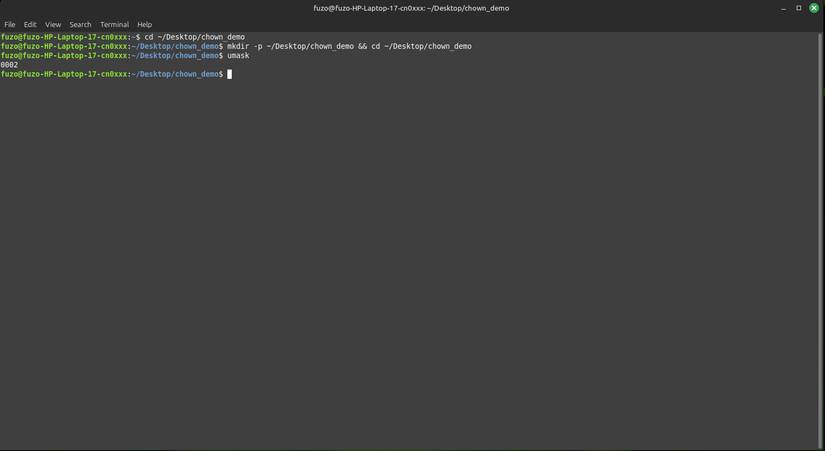
<p style="text-align: justify;">Trên Linux,&nbsp;umask&nbsp;xác định cách các file và thư mục mới kế thừa quyền truy cập. Linux sử dụng giá trị umask hiện tại của bạn để xác định quyền nào cần che dấu (xóa) khỏi quyền cơ sở. Lệnh umask cho phép bạn xem hoặc thay đổi cài đặt này cho phiên làm việc hiện tại.</p>

<p style="text-align: justify;">Giá trị mặc định phổ biến của umask là&nbsp;<strong>0022</strong>, và nó sẽ xóa quyền ghi khỏi &quot;nhóm&quot; và &quot;người dùng khác&quot;. Bạn có thể nhập&nbsp;<strong>umask</strong>&nbsp;để xem giá trị hiện tại của mình và một lệnh như&nbsp;<strong>umask 0027</strong>&nbsp;sẽ thay đổi giá trị đó cho phiên làm việc hiện tại. Cài đặt này giúp các file mới an toàn hơn, thường chặn quyền truy cập của người dùng khác hoặc bất kỳ ai ngoài nhóm của bạn.</p>

<h2 style="text-align: justify;">sudoers</h2>

<h3 style="text-align: justify;">Cấp hoặc hạn chế quyền admin an toàn</h3>

<figure>
<div style="text-align: justify;"><img alt="Kiểm tra chính xác những lệnh nào người dùng của bạn có thể chạy bằng sudo" data-i="3" data-src="https://st.quantrimang.com/photos/image/2025/11/06/lenh-cap-quyen-linux-admin-can-biet-4.jpg" data-was-processed="true" height="402" src="https://st.quantrimang.com/photos/image/2025/11/06/lenh-cap-quyen-linux-admin-can-biet-4.jpg" width="825" /></div>

<figcaption>
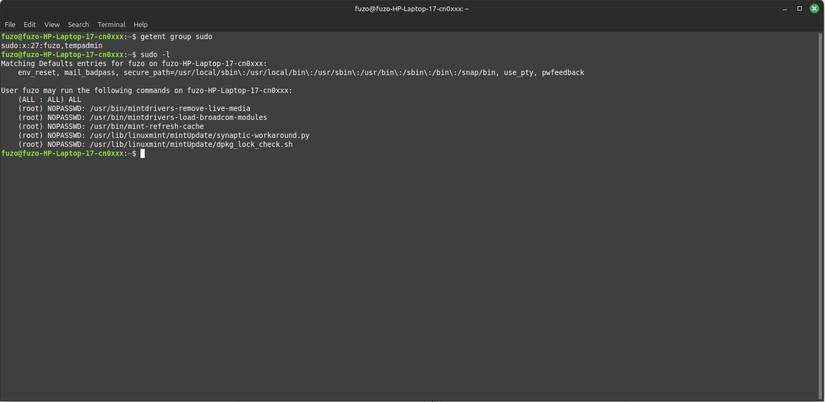
<div style="text-align: justify;">Kiểm tra chính xác những lệnh nào người dùng của bạn có thể chạy bằng sudo</div>
</figcaption>
</figure>

<p style="text-align: justify;">Nhiều người có thể cho rằng bạn chỉ trở thành quản trị viên Linux thực thụ sau khi chỉnh sửa thành công file sudoers. File&nbsp;<strong>/etc/sudoers</strong>&nbsp;xác định ai có quyền sudo và những lệnh nào họ có thể chạy. Theo nguyên tắc, hãy luôn chỉnh sửa file này bằng sudo visudo để tránh các lỗi cú pháp có thể khiến bạn bị khóa.</p>

<p style="text-align: justify;">Trên&nbsp;Linux Mint, nếu cần cấp quyền admin cho người dùng khác, hãy sử dụng lệnh&nbsp;<strong>sudo usermod -aG sudo username</strong>. Cách này gọn gàng và an toàn hơn nhiều so với việc chỉnh sửa file thủ công, mặc dù bạn có thể cần các quyền lệnh cụ thể cho những thiết lập nâng cao.</p>

<h2 style="text-align: justify;">groups</h2>

<h3 style="text-align: justify;">Xem bạn thuộc nhóm truy cập nào</h3>

<figure>
<div style="text-align: justify;"><img alt="Sử dụng lệnh groups cho nhiều người dùng" data-i="4" data-src="https://st.quantrimang.com/photos/image/2025/11/06/lenh-cap-quyen-linux-admin-can-biet-5.jpg" data-was-processed="true" height="402" src="https://st.quantrimang.com/photos/image/2025/11/06/lenh-cap-quyen-linux-admin-can-biet-5.jpg" width="825" /></div>

<figcaption>
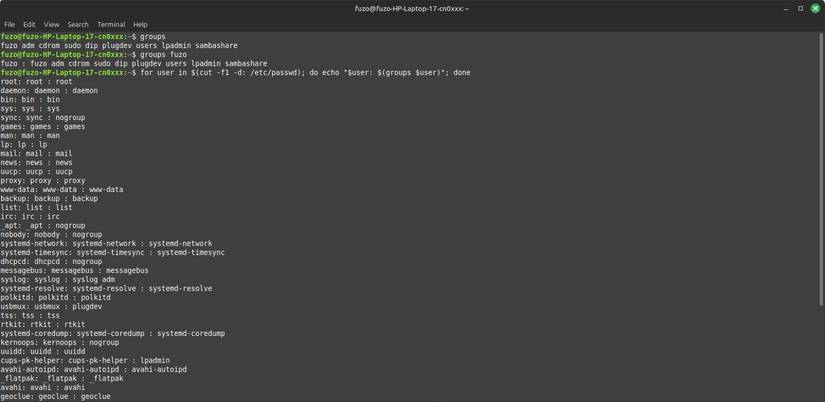
<div style="text-align: justify;">Sử dụng lệnh groups cho nhiều người dùng</div>
</figcaption>
</figure>

<p style="text-align: justify;">Nhóm trên Linux xác định những gì bạn có thể truy cập và cho bạn biết mình thuộc nhóm nào trong hệ thống phân cấp. Ví dụ, nếu bạn chạy lệnh&nbsp;<strong>groups afam</strong>, nó có thể trả về&nbsp;<strong>afam sudo adm lp</strong>, cho thấy bạn là người dùng có quyền admin và có quyền truy cập vào máy in.</p>

<p style="text-align: justify;">Việc chạy lệnh&nbsp;<strong>sudo usermod -aG project afam</strong>&nbsp;có thể tạo ra sự khác biệt lớn nếu bạn tham gia một dự án mới. Nó cho phép bạn chạy các script và chỉnh sửa file cùng với đồng đội mà không cần sudo cho mỗi lệnh.</p>

<h2 style="text-align: justify;">id</h2>

<h3 style="text-align: justify;">Xác định danh tính của bạn với hệ thống</h3>

<figure>
<div style="text-align: justify;"><img alt="Sử dụng lệnh id để hiển thị ID số và cách sử dụng cơ bản" data-i="5" data-src="https://st.quantrimang.com/photos/image/2025/11/06/lenh-cap-quyen-linux-admin-can-biet-6.jpg" data-was-processed="true" height="402" src="https://st.quantrimang.com/photos/image/2025/11/06/lenh-cap-quyen-linux-admin-can-biet-6.jpg" width="825" /></div>

<figcaption>
<div style="text-align: justify;">Sử dụng lệnh id để hiển thị ID số và cách sử dụng cơ bản</div>
</figcaption>
</figure>

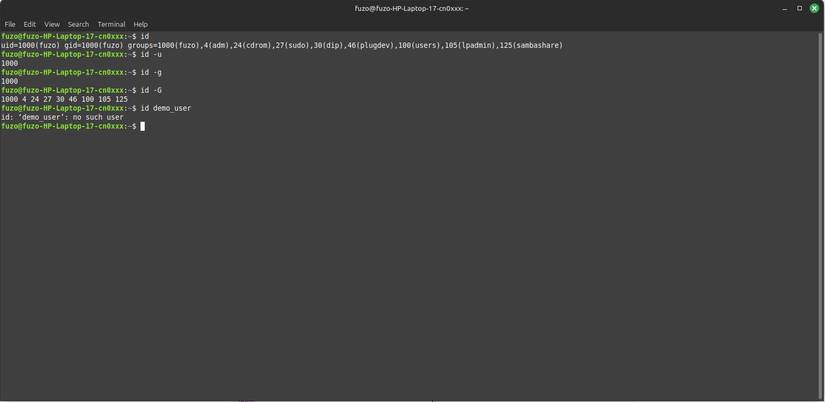
<p style="text-align: justify;">Lệnh id cho bạn biết mình là ai đối với hệ thống, điều này cần thiết trước khi bạn sửa quyền. Chỉ cần chạy lệnh id, bạn sẽ thấy ID người dùng (UID), ID nhóm (GID) và liệt kê tất cả các nhóm bạn thuộc về. Mặc dù lệnh này không trực tiếp gắn nhãn loại người dùng của bạn, nhưng UID có thể suy ra bạn thuộc loại nào trong 4 loại người dùng Linux chính.</p>

<p style="text-align: justify;">Hãy dựa vào lệnh này khi cần gỡ lỗi các sự cố truy cập. Vì vậy, nếu một thư mục chia sẻ nào đó không mở được, bạn có thể sử dụng id để xem người dùng của mình có khớp với chủ sở hữu hay nhóm không, xác nhận xem sự cố &quot;quyền bị từ chối&quot; là do danh tính hay quyền.</p>

<div style="text-align: justify;">&nbsp;</div>
		</div>
				<div id="author">
						<p>
				<strong>Nguồn tin:</strong>
				Quantrimang.com::
			</p>
		</div>
	</div>
	<div id="footer" class="clearfix">
		<div id="url">
			<strong>URL của bản tin này: </strong><a href="https://www.nguoicodonvn2008.info/vi/news/savefile/kien-thuc-may-tinh/6-lenh-cap-quyen-linux-cac-admin-can-biet-11539.html" title="6 lệnh cấp quyền Linux các admin cần biết">https://www.nguoicodonvn2008.info/vi/news/savefile/kien-thuc-may-tinh/6-lenh-cap-quyen-linux-cac-admin-can-biet-11539.html</a>

		</div>
		<div class="clear"></div>
		<div class="copyright">
			&copy; .&#x3A; Nguoicodonvn2008.info - Cõi lòng người cô đơn &#x3A;.
		</div>
		<div id="contact">
			<a href="mailto:admin@nguoicodonvn2008.info">admin@nguoicodonvn2008.info</a>
		</div>
	</div>
</div>
        <div id="timeoutsess" class="chromeframe">
            Bạn đã không sử dụng Site, <a onclick="timeoutsesscancel();" href="https://www.nguoicodonvn2008.info/#">Bấm vào đây để duy trì trạng thái đăng nhập</a>. Thời gian chờ: <span id="secField"> 60 </span> giây
        </div>
        <div id="openidResult" class="nv-alert" style="display:none"></div>
        <div id="openidBt" data-result="" data-redirect=""></div>
		</script>
		<div class="car-top">
  <span><img src="https://www.nguoicodonvn2008.info/themes/default/images/car.png" alt=""></span>
</div>
<script src="https://www.nguoicodonvn2008.info/assets/js/jquery/jquery.min.js"></script>
<script>var nv_base_siteurl="/",nv_lang_data="vi",nv_lang_interface="vi",nv_name_variable="nv",nv_fc_variable="op",nv_lang_variable="language",nv_module_name="news",nv_func_name="savefile",nv_is_user=0, nv_my_ofs=-4,nv_my_abbr="EDT",nv_cookie_prefix="nv4c_e856T",nv_check_pass_mstime=1738000,nv_area_admin=0,nv_safemode=0,theme_responsive=0,nv_recaptcha_ver=2,nv_recaptcha_sitekey="",nv_recaptcha_type="image",XSSsanitize=1;</script>
<script src="https://www.nguoicodonvn2008.info/assets/js/language/vi.js"></script>
<script src="https://www.nguoicodonvn2008.info/assets/js/DOMPurify/purify3.js"></script>
<script src="https://www.nguoicodonvn2008.info/assets/js/global.js"></script>
<script src="https://www.nguoicodonvn2008.info/assets/js/site.js"></script>
<script src="https://www.nguoicodonvn2008.info/themes/default/js/news.js"></script>
<script src="https://www.nguoicodonvn2008.info/themes/default/js/main.js"></script>
<script src="https://www.nguoicodonvn2008.info/themes/default/js/custom.js"></script>
<script type="application/ld+json">
        {
            "@context": "https://schema.org",
            "@type": "Organization",
            "url": "https://www.nguoicodonvn2008.info",
            "logo": "https://www.nguoicodonvn2008.info/uploads/angel.gif"
        }
        </script>
<script src="https://www.nguoicodonvn2008.info/themes/default/js/bootstrap.min.js"></script>
<script type="text/javascript">
var $scrolltop = $('.car-top');
$scrolltop.on('click', function () {
    $('html,body').animate({
        scrollTop: 0
    }, 800);
    $(this).addClass("car-run");
    setTimeout(function(){ $scrolltop.removeClass('car-run');}, 1000);
    return false;
});
$(window).on('scroll', function ()
{ 
    if($(window).scrollTop() >= 200)
    {
        $scrolltop.addClass("show");
        $scrolltop.addClass("car-down");
    }
    else
    {
       $scrolltop.removeClass("show");
       setTimeout(function(){ $scrolltop.removeClass('car-down');}, 300);
    }
});
</script>
</body>
</html>