<!DOCTYPE html>
    <html lang="vi" xmlns="http://www.w3.org/1999/xhtml" prefix="og: http://ogp.me/ns#">
    <head>
<title>5 Windows service ẩn đang âm thầm ngốn CPU</title>
<meta name="description" content="5 Windows service ẩn đang âm thầm ngốn CPU - Savefile - Tin Tức -...">
<meta name="author" content=".: Nguoicodonvn2008.info - Cõi lòng người cô đơn :.">
<meta name="copyright" content=".: Nguoicodonvn2008.info - Cõi lòng người cô đơn :. [admin@nguoicodonvn2008.info]">
<meta name="robots" content="index, archive, follow, noodp">
<meta name="googlebot" content="index,archive,follow,noodp">
<meta name="msnbot" content="all,index,follow">
<meta name="generator" content="NukeViet v4.5">
<meta http-equiv="Content-Type" content="text/html; charset=utf-8">
<meta property="og:title" content="5 Windows service ẩn đang âm thầm ngốn CPU">
<meta property="og:type" content="website">
<meta property="og:description" content="Savefile - Tin Tức - https&#x3A;&#x002F;&#x002F;www.nguoicodonvn2008.info&#x002F;vi&#x002F;news&#x002F;savefile&#x002F;kien-thuc-may-tinh&#x002F;5-windows-service-an-dang-am-tham-ngon-cpu-10453.html">
<meta property="og:site_name" content=".&#x3A; Nguoicodonvn2008.info - Cõi lòng người cô đơn &#x3A;.">
<meta property="og:url" content="https://www.nguoicodonvn2008.info/vi/news/savefile/kien-thuc-may-tinh/5-windows-service-an-dang-am-tham-ngon-cpu-10453.html">
<link rel="shortcut icon" href="https://www.nguoicodonvn2008.info/favicon.ico">
<link rel="canonical" href="https://www.nguoicodonvn2008.info/vi/news/savefile/kien-thuc-may-tinh/5-windows-service-an-dang-am-tham-ngon-cpu-10453.html">
<link rel="alternate" href="https://www.nguoicodonvn2008.info/vi/news/rss/" title="Tin Tức" type="application/rss+xml">
<link rel="alternate" href="https://www.nguoicodonvn2008.info/vi/news/rss/karaoke-dual/" title="Tin Tức - Karaoke Dual" type="application/rss+xml">
<link rel="alternate" href="https://www.nguoicodonvn2008.info/vi/news/rss/nhac-tre/" title="Tin Tức - Nhạc trẻ" type="application/rss+xml">
<link rel="alternate" href="https://www.nguoicodonvn2008.info/vi/news/rss/tru-tinh/" title="Tin Tức - Trữ tình" type="application/rss+xml">
<link rel="alternate" href="https://www.nguoicodonvn2008.info/vi/news/rss/nuoc-ngoai/" title="Tin Tức - Nước ngoài" type="application/rss+xml">
<link rel="alternate" href="https://www.nguoicodonvn2008.info/vi/news/rss/remix/" title="Tin Tức - Remix" type="application/rss+xml">
<link rel="alternate" href="https://www.nguoicodonvn2008.info/vi/news/rss/tam-su-tinh-yeu/" title="Tin Tức - Tâm sự tình yêu" type="application/rss+xml">
<link rel="alternate" href="https://www.nguoicodonvn2008.info/vi/news/rss/tho-suu-tam/" title="Tin Tức - Thơ sưu tầm" type="application/rss+xml">
<link rel="alternate" href="https://www.nguoicodonvn2008.info/vi/news/rss/cuoc-song/" title="Tin Tức - Cuộc sống" type="application/rss+xml">
<link rel="alternate" href="https://www.nguoicodonvn2008.info/vi/news/rss/phan-mem/" title="Tin Tức - Phần mềm" type="application/rss+xml">
<link rel="alternate" href="https://www.nguoicodonvn2008.info/vi/news/rss/kien-thuc-may-tinh/" title="Tin Tức - Kiến thức máy tính" type="application/rss+xml">
<link rel="alternate" href="https://www.nguoicodonvn2008.info/vi/news/rss/hoc-tap/" title="Tin Tức - Học tập" type="application/rss+xml">
<link rel="alternate" href="https://www.nguoicodonvn2008.info/vi/news/rss/tai-lieu/" title="Tin Tức - Tài liệu" type="application/rss+xml">
<link rel="alternate" href="https://www.nguoicodonvn2008.info/vi/news/rss/de-thi/" title="Tin Tức - Đề thi" type="application/rss+xml">
<link rel="preload" as="style" href="https://www.nguoicodonvn2008.info/assets/css/font-awesome.min.css" type="text/css">
<link rel="preload" as="style" href="https://www.nguoicodonvn2008.info/themes/default/css/bootstrap.non-responsive.css" type="text/css">
<link rel="preload" as="style" href="https://www.nguoicodonvn2008.info/themes/default/css/style.css" type="text/css">
<link rel="preload" as="style" href="https://www.nguoicodonvn2008.info/themes/default/css/style.non-responsive.css" type="text/css">
<link rel="preload" as="style" href="https://www.nguoicodonvn2008.info/themes/default/css/news.css" type="text/css">
<link rel="preload" as="style" href="https://www.nguoicodonvn2008.info/themes/default/css/custom.css" type="text/css">
<link rel="preload" as="script" href="https://www.nguoicodonvn2008.info/assets/js/jquery/jquery.min.js" type="text/javascript">
<link rel="preload" as="script" href="https://www.nguoicodonvn2008.info/assets/js/language/vi.js" type="text/javascript">
<link rel="preload" as="script" href="https://www.nguoicodonvn2008.info/assets/js/DOMPurify/purify3.js" type="text/javascript">
<link rel="preload" as="script" href="https://www.nguoicodonvn2008.info/assets/js/global.js" type="text/javascript">
<link rel="preload" as="script" href="https://www.nguoicodonvn2008.info/assets/js/site.js" type="text/javascript">
<link rel="preload" as="script" href="https://www.nguoicodonvn2008.info/themes/default/js/news.js" type="text/javascript">
<link rel="preload" as="script" href="https://www.nguoicodonvn2008.info/themes/default/js/main.js" type="text/javascript">
<link rel="preload" as="script" href="https://www.nguoicodonvn2008.info/themes/default/js/custom.js" type="text/javascript">
<link rel="preload" as="script" href="https://www.nguoicodonvn2008.info/themes/default/js/bootstrap.min.js" type="text/javascript">
<link rel="stylesheet" href="https://www.nguoicodonvn2008.info/assets/css/font-awesome.min.css">
<link rel="stylesheet" href="https://www.nguoicodonvn2008.info/themes/default/css/bootstrap.non-responsive.css">
<link rel="stylesheet" href="https://www.nguoicodonvn2008.info/themes/default/css/style.css">
<link rel="stylesheet" href="https://www.nguoicodonvn2008.info/themes/default/css/style.non-responsive.css">
<link rel="StyleSheet" href="https://www.nguoicodonvn2008.info/themes/default/css/news.css">
<link rel="stylesheet" href="https://www.nguoicodonvn2008.info/themes/default/css/custom.css">
<style type="text/css">
	body{background: #fff;}
</style>
    </head>
    <body>
<div id="print">
	<div id="hd_print">
		<h2 class="pull-left">.&#x3A; Nguoicodonvn2008.info - Cõi lòng người cô đơn &#x3A;.</h2>
		<p class="pull-right"><a title=".&#x3A; Nguoicodonvn2008.info - Cõi lòng người cô đơn &#x3A;." href="https://www.nguoicodonvn2008.info/">https://www.nguoicodonvn2008.info</a></p>
	</div>
	<div class="clear"></div>
	<hr />
	<div id="content">
		<h1>5 Windows service ẩn đang âm thầm ngốn CPU</h1>
		<ul class="list-inline">
			<li>Thứ năm - 29/05/2025 01:25</li>
			<li class="hidden-print txtrequired"><em class="fa fa-print">&nbsp;</em><a title="In ra" href="javascript:;" onclick="window.print()">In ra</a></li>
			<li class="hidden-print txtrequired"><em class="fa fa-power-off">&nbsp;</em><a title="Đóng cửa sổ này" href="javascript:;" onclick="window.close()">Đóng cửa sổ này</a></li>
		</ul>
		<div class="clear"></div>
		<div id="hometext">
		</div>
				<div class="imghome">
			<img alt="5 Windows service ẩn đang âm thầm ngốn CPU" src="https://st.quantrimang.com/photos/image/2025/05/28/windows-service-an-ngon-cpu-11.jpg" width="460" class="img-thumbnail" />
		</div>
		<div class="clear"></div>
		<div id="bodytext" class="clearfix">
			<p style="text-align: justify;">Windows đi kèm với rất nhiều tính năng bổ sung và nếu&nbsp;<a data-google-interstitial="false" data-google-vignette="false" href="https://quantrimang.com/cong-nghe/windows-service-an-ngon-cpu-209264#">&nbsp;PC</a>&nbsp;của bạn không đủ mạnh để xử lý, bạn sẽ thấy&nbsp;<a data-type="internal" href="https://quantrimang.com/cong-nghe/cpu-la-gi-142876" title="CPU là gì?">CPU</a>&nbsp;của mình bị chiếm dụng bởi các Windows service ẩn. Tuy nhiên, không phải tất cả các service này đều quan trọng, nghĩa là bạn có thể tắt một số service trong đó và cho CPU của mình một chút không gian để thở.</p>

<div style="text-align: justify;">&nbsp;</div>

<h2 style="text-align: justify;">1. Runtime Broker</h2>

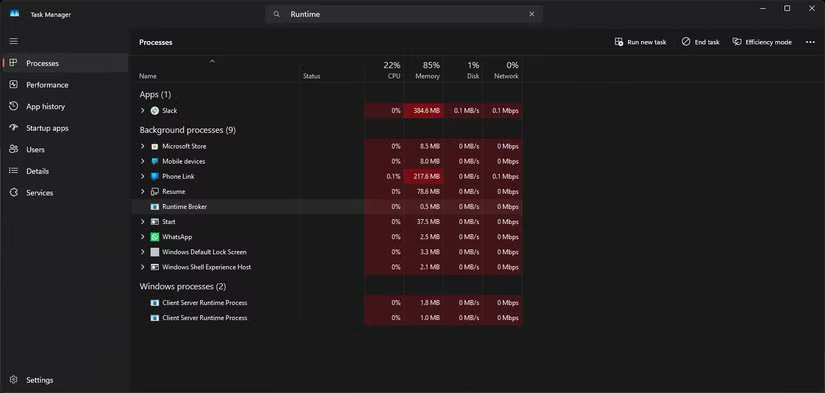
<p style="text-align: justify;">Windows Runtime Broker quản lý quyền cho các ứng dụng Microsoft Store ở chế độ nền. Service này chỉ được cho là sử dụng khoảng 20 đến 30% CPU ở mức tốt nhất, nhưng thường xuyên tăng đột biến về mức sử dụng. Những đợt tăng đột biến bất thường này có thể được kích hoạt bởi một ứng dụng Microsoft Store mà bạn có thể đang sử dụng hoặc một app đã yêu cầu quyền ở chế độ nền.</p>

<p style="text-align: justify;">Trong mọi trường hợp, điều này có thể làm chậm&nbsp;&nbsp;PC&nbsp;trong vài giây và khá khó chịu khi nó xảy ra nhiều lần. Nếu bạn không có đủ&nbsp;RAM, nó thậm chí có thể làm treo hệ thống đến mức cần phải hard reset.</p>

<p style="text-align: justify;">Miễn là bạn không sử dụng bất kỳ ứng dụng Microsoft Store nào, việc tắt Runtime Broker sẽ không ảnh hưởng đến việc sử dụng Windows và giúp bạn tiết kiệm được một lượng lớn tài nguyên CPU.</p>

<figure>
<div style="text-align: justify;"><img alt="" data-i="0" data-src="https://st.quantrimang.com/photos/image/2025/05/28/windows-service-an-ngon-cpu-1.jpg" data-was-processed="true" height="393" src="https://st.quantrimang.com/photos/image/2025/05/28/windows-service-an-ngon-cpu-1.jpg" width="825" /></div>
</figure>

<h2 style="text-align: justify;">2. Windows Search Indexer</h2>

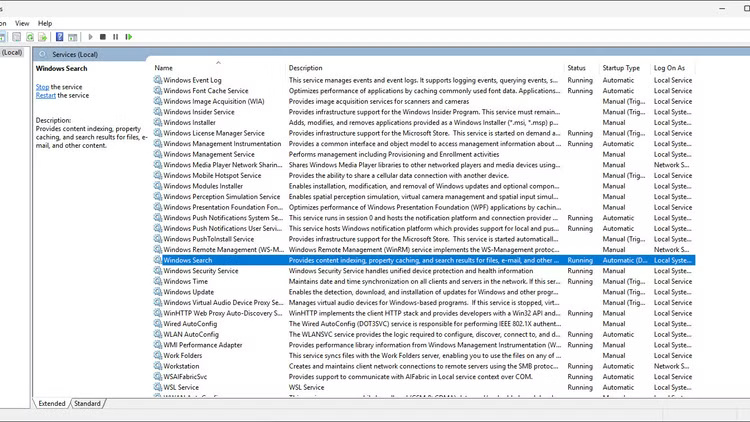
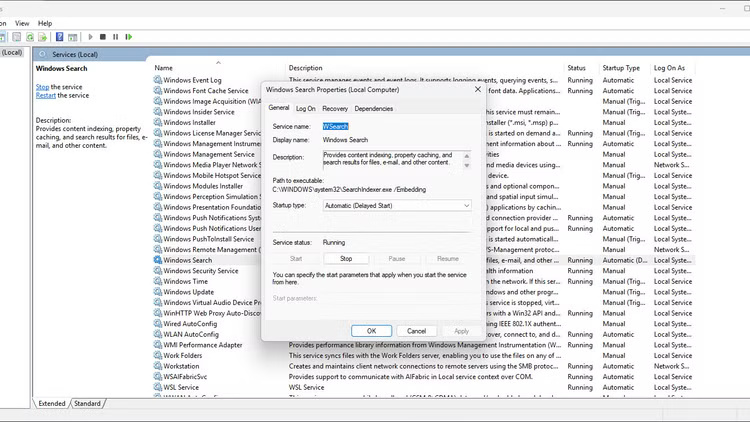
<p style="text-align: justify;">Như tên gọi của nó, Windows Search Indexer chạy ở chế độ nền để duy trì chỉ mục có thể tìm kiếm và cập nhật của các file, tài liệu, hình ảnh, video và email được lưu trữ trên PC. Vì vậy, mặc dù Windows Search Indexer giúp ích rất nhiều khi bạn đang tìm kiếm một file bị mất, nhưng nó có xu hướng làm tăng mức sử dụng CPU khi lập chỉ mục các file lớn hoặc sửa chữa chỉ mục cơ bản.</p>

<p style="text-align: justify;">Nếu bạn không có đủ dung lượng CPU, thì chỉ riêng service này cũng có thể làm chậm Windows đáng kể. Trừ khi liên tục tìm kiếm file, bạn nên tắt service này.</p>

<figure>
<div style="text-align: justify;"><img alt="" data-i="1" data-src="https://st.quantrimang.com/photos/image/2025/05/28/windows-service-an-ngon-cpu-2.jpg" data-was-processed="true" height="422" src="https://st.quantrimang.com/photos/image/2025/05/28/windows-service-an-ngon-cpu-2.jpg" width="750" /></div>
</figure>

<figure>
<div style="text-align: justify;"><img alt="" data-i="2" data-src="https://st.quantrimang.com/photos/image/2025/05/28/windows-service-an-ngon-cpu-3.jpg" data-was-processed="true" height="422" src="https://st.quantrimang.com/photos/image/2025/05/28/windows-service-an-ngon-cpu-3.jpg" width="750" /></div>
</figure>

<figure>
<div style="text-align: justify;"><img alt="" data-i="3" data-src="https://st.quantrimang.com/photos/image/2025/05/28/windows-service-an-ngon-cpu-4.jpg" data-was-processed="true" height="422" src="https://st.quantrimang.com/photos/image/2025/05/28/windows-service-an-ngon-cpu-4.jpg" width="750" /></div>
</figure>

<h2 style="text-align: justify;">3. Antimalware Service Executable</h2>

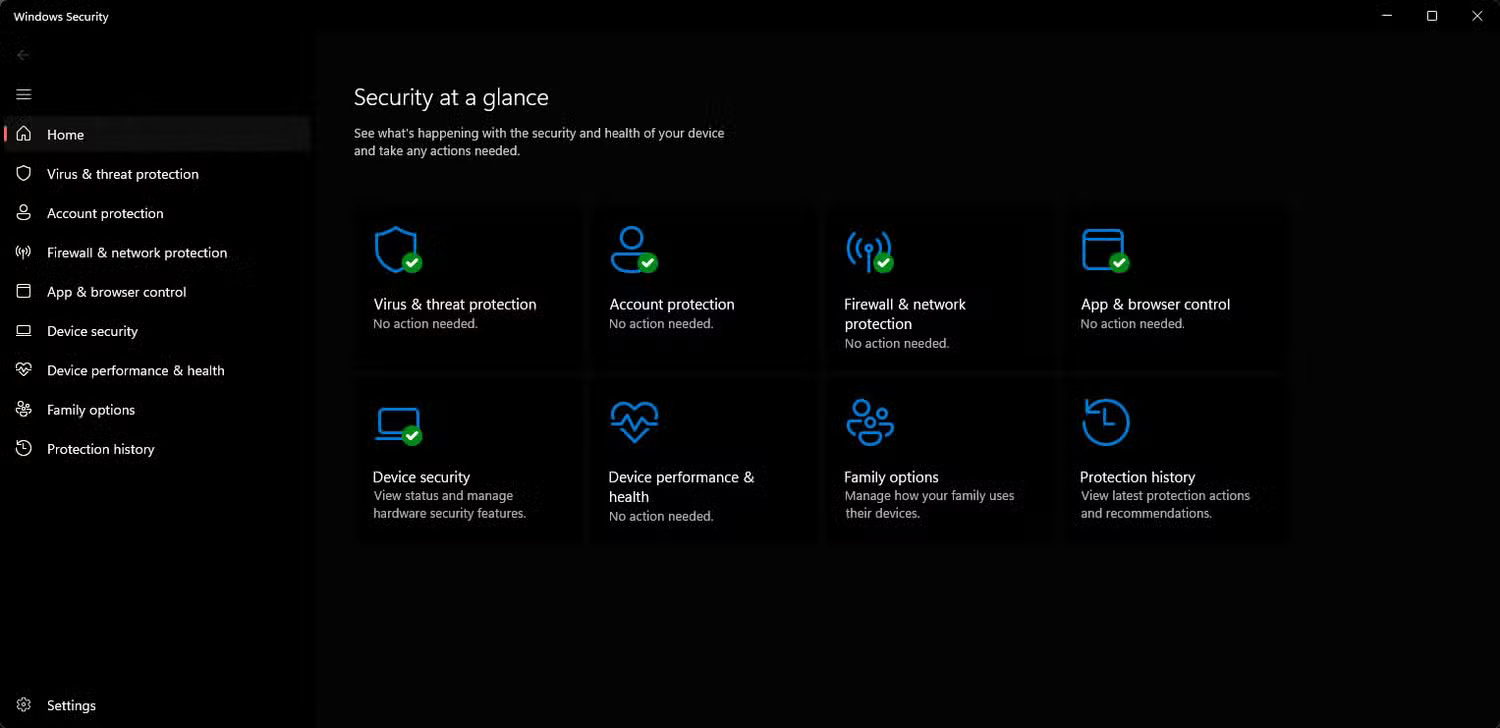
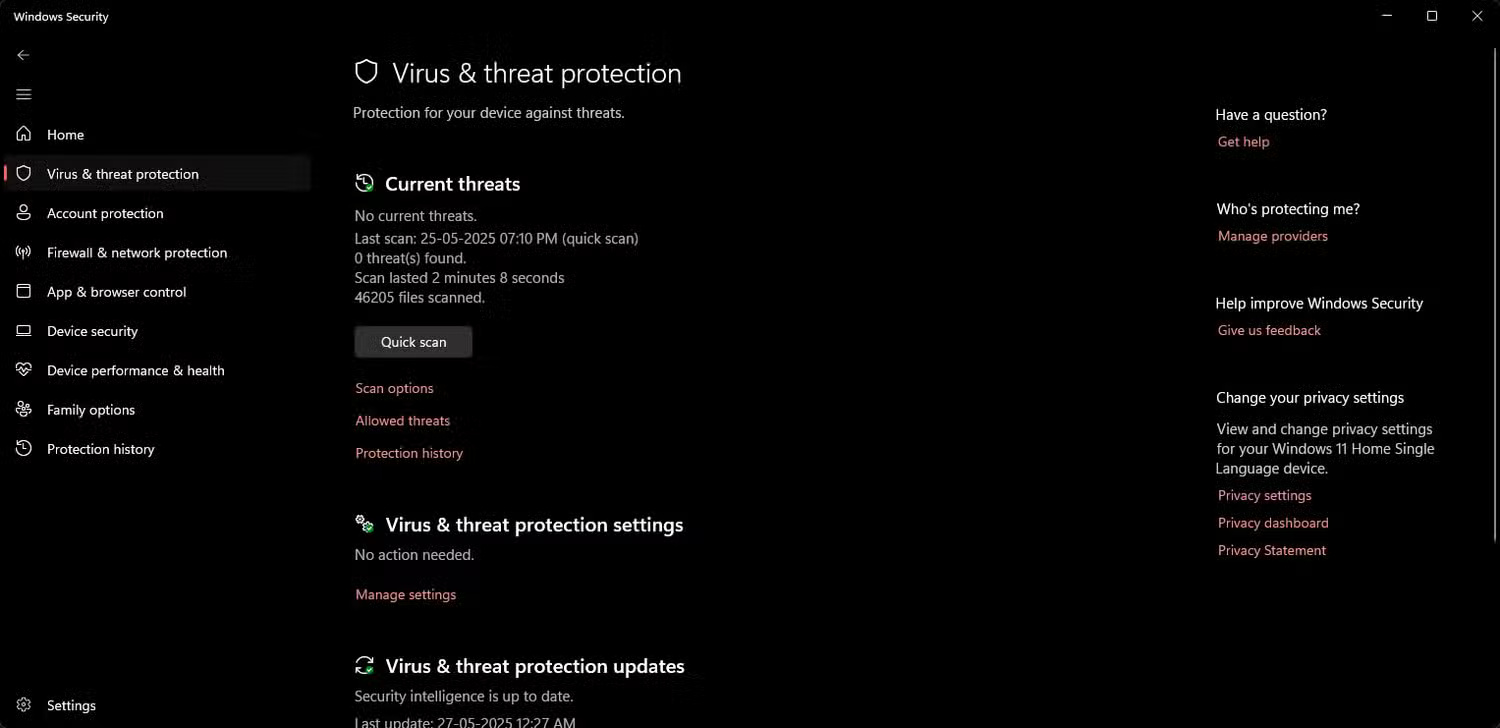
<p style="text-align: justify;">Antimalware Service Executable hay MsMpEng.exe là service Windows Security liên tục chạy ở chế độ nền và quét PC theo thời gian thực để tìm mọi mối đe dọa. Tuy nhiên, đôi khi service này có xu hướng quét các file hoặc thư mục lớn, điều này có thể làm tăng đột biến mức sử dụng CPU.</p>

<p style="text-align: justify;">Nếu bạn lưu trữ nhiều file lớn trên hệ thống, Windows Search Indexer và Antimalware Service Executable có thể chiếm tới 50% CPU.</p>

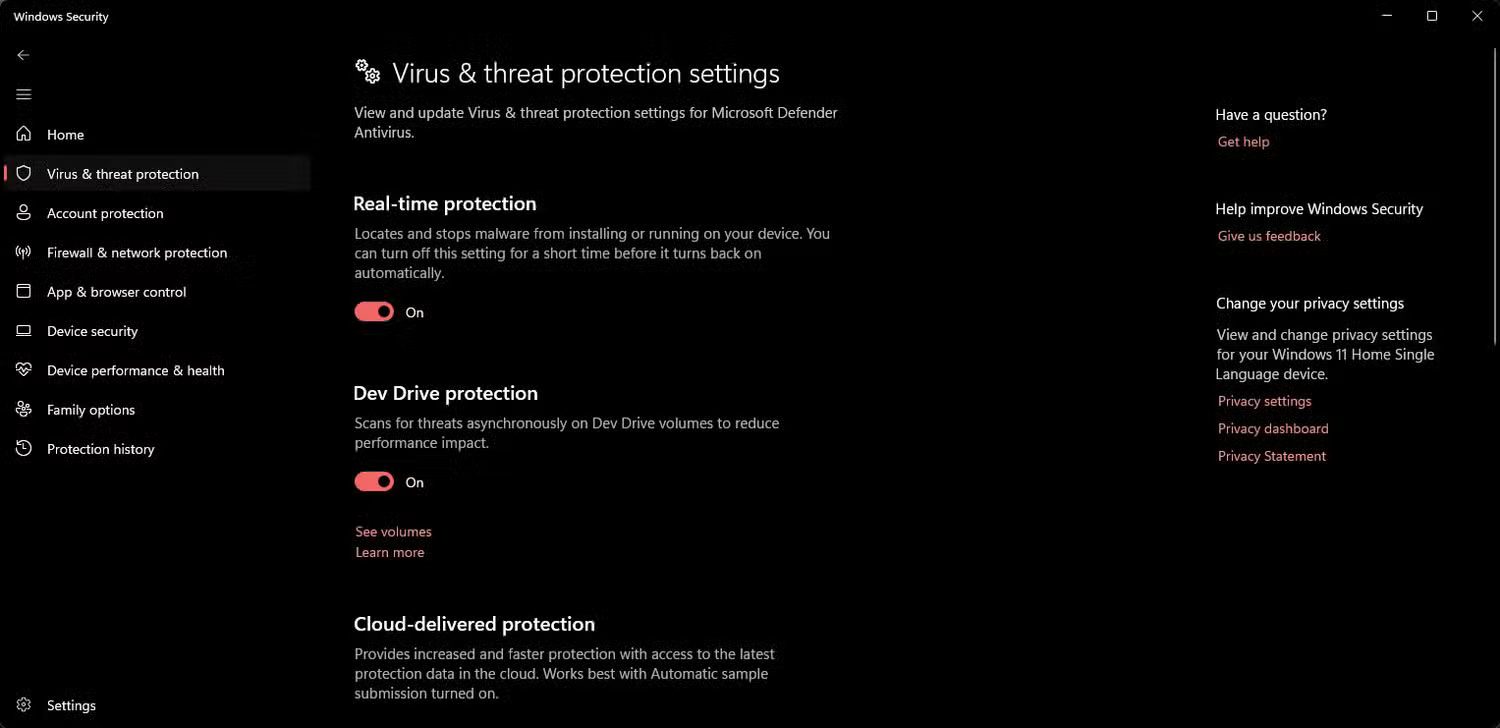
<p style="text-align: justify;">Bạn có thể tắt service, nhưng nó khiến bạn dễ bị nhiễm virus và phần mềm độc hại. Bạn có thể tắt tạm thời từ&nbsp;Task Manager, nhưng quá trình này sẽ diễn ra sớm hơn dự kiến. Để tắt vĩnh viễn, bạn sẽ phải tắt chế độ bảo vệ theo thời gian thực trong Windows Security.</p>

<figure>
<div style="text-align: justify;"><img alt="" data-i="4" data-src="https://st.quantrimang.com/photos/image/2025/05/28/windows-service-an-ngon-cpu-5.jpg" data-was-processed="true" height="728" src="https://st.quantrimang.com/photos/image/2025/05/28/windows-service-an-ngon-cpu-5.jpg" width="1500" /></div>
</figure>

<figure>
<div style="text-align: justify;"><img alt="" data-i="5" data-src="https://st.quantrimang.com/photos/image/2025/05/28/windows-service-an-ngon-cpu-6.jpg" data-was-processed="true" height="728" src="https://st.quantrimang.com/photos/image/2025/05/28/windows-service-an-ngon-cpu-6.jpg" width="1500" /></div>
</figure>

<figure>
<div style="text-align: justify;"><img alt="" data-i="6" data-src="https://st.quantrimang.com/photos/image/2025/05/28/windows-service-an-ngon-cpu-7.jpg" data-was-processed="true" height="728" src="https://st.quantrimang.com/photos/image/2025/05/28/windows-service-an-ngon-cpu-7.jpg" width="1500" /></div>
</figure>

<div style="text-align: justify;">&nbsp;</div>

<h2 style="text-align: justify;">4. CTF Loader</h2>

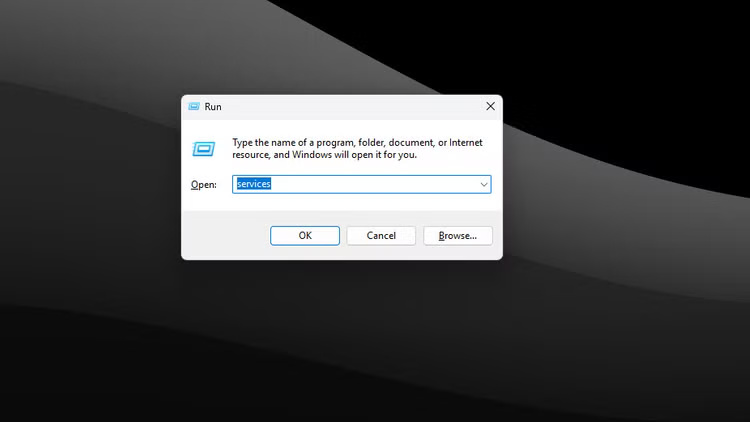
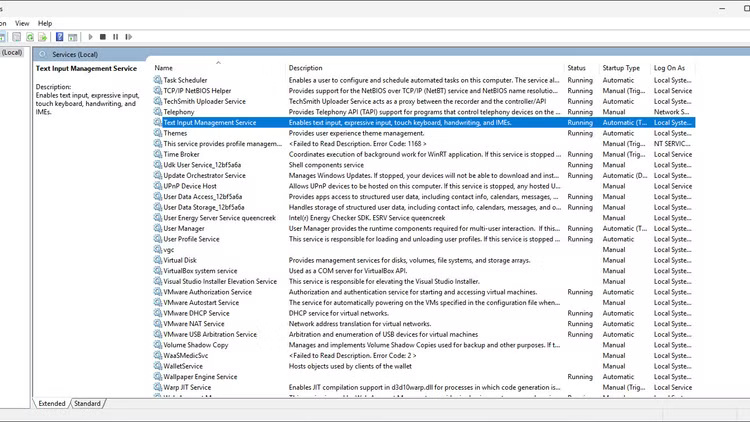
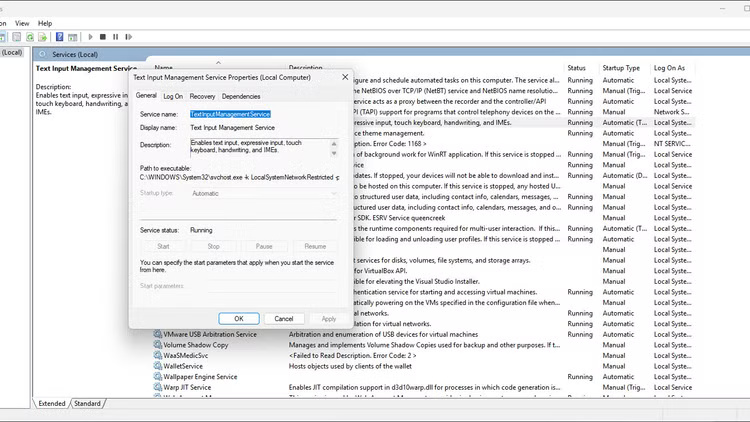
<p style="text-align: justify;">CTF Loader hỗ trợ các phương pháp nhập văn bản thay thế như nhận dạng giọng nói và chữ viết tay. Nếu không sử dụng các tính năng đó, bạn đang lãng phí tài nguyên CPU cho tiến trình liên tục chạy ở chế độ nền này.</p>

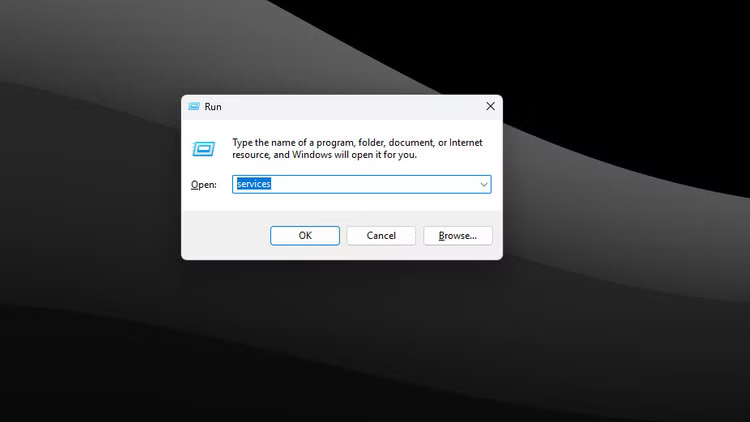
<p style="text-align: justify;">Việc vô hiệu hóa CTF Loader hoặc ctfmon.exe có thể hơi khó khăn. Bạn có thể đóng tiến trình từ Task Manager, nhưng nó có thể tự động kích hoạt và bắt đầu chạy lại. Một giải pháp lâu dài hơn là vô hiệu hóa service thông qua Windows Services.</p>

<figure>
<div style="text-align: justify;"><img alt="" data-i="7" data-src="https://st.quantrimang.com/photos/image/2025/05/28/windows-service-an-ngon-cpu-8.jpg" data-was-processed="true" height="422" src="https://st.quantrimang.com/photos/image/2025/05/28/windows-service-an-ngon-cpu-8.jpg" width="750" /></div>
</figure>

<figure>
<div style="text-align: justify;"><img alt="" data-i="8" data-src="https://st.quantrimang.com/photos/image/2025/05/28/windows-service-an-ngon-cpu-9.jpg" data-was-processed="true" height="422" src="https://st.quantrimang.com/photos/image/2025/05/28/windows-service-an-ngon-cpu-9.jpg" width="750" /></div>
</figure>

<figure>
<div style="text-align: justify;"><img alt="" data-i="9" data-src="https://st.quantrimang.com/photos/image/2025/05/28/windows-service-an-ngon-cpu-10.jpg" data-was-processed="true" height="422" src="https://st.quantrimang.com/photos/image/2025/05/28/windows-service-an-ngon-cpu-10.jpg" width="750" /></div>
</figure>

<h2 style="text-align: justify;">5. Các ứng dụng nền của Microsoft Store</h2>

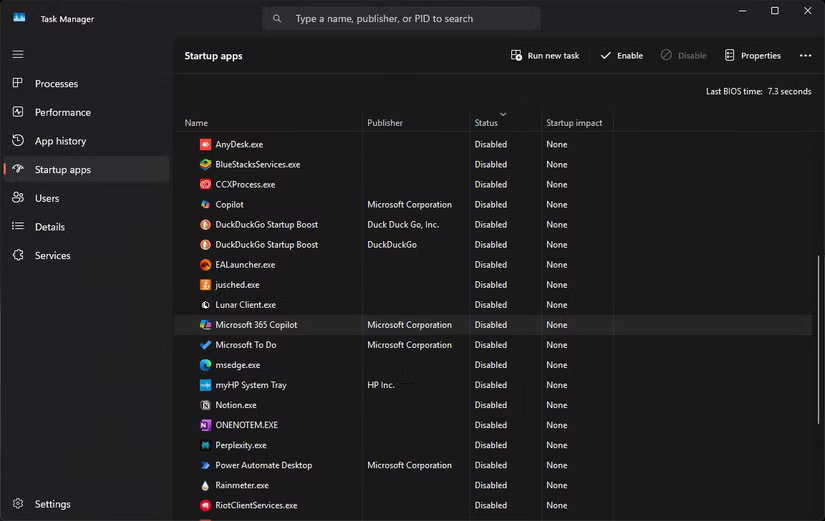
<p style="text-align: justify;">Theo mặc định này, Windows đi kèm với rất nhiều phần mềm rác được cài đặt sẵn. Trong số đó có một số ứng dụng Microsoft Store, như Outlook, Teams, Copilot, v.v... mà bạn có thể không sử dụng hàng ngày. Tuy nhiên, tất cả các ứng dụng này đều được bật sẵn và sẽ tiếp tục chạy ngầm và tiêu tốn tài nguyên hệ thống.</p>

<p style="text-align: justify;">Cách tốt nhất để giải quyết vấn đề này là gỡ cài đặt tất cả các ứng dụng này ngay lập tức. Quantrimang.com đã đề cập đến rất nhiều&nbsp;<a data-type="internal" href="https://quantrimang.com/cong-nghe/7-cach-go-bo-phan-mem-va-ung-dung-tren-windows-8-windows-8-1-109846" title="10 cách xóa ứng dụng trên máy tính Windows, gỡ phần mềm Windows nhanh nhất">cách gỡ cài đặt phần mềm trên Windows</a>&nbsp;nếu bạn cần tham khảo. Nếu muốn giữ lại chúng, bạn có thể tắt để chúng không tự động khởi động cùng Windows.</p>

<figure>
<div style="text-align: justify;"><img alt="" data-i="10" data-src="https://st.quantrimang.com/photos/image/2025/05/28/windows-service-an-ngon-cpu-11.jpg" data-was-processed="true" height="521" src="https://st.quantrimang.com/photos/image/2025/05/28/windows-service-an-ngon-cpu-11.jpg" width="825" /></div>
</figure>

<p style="text-align: justify;">Windows 11&nbsp;có vẻ như đang làm CPU của bạn khó chịu, có rất nhiều thứ đang diễn ra bên trong, không phải tất cả đều hữu ích. Việc tắt một số service nền và các tinh chỉnh khác có thể cung cấp cho bạn thêm tài nguyên phần cứng cần thiết để tận hưởng việc sử dụng Windows.</p>

<div style="text-align: justify;">&nbsp;</div>
		</div>
				<div id="author">
						<p>
				<strong>Nguồn tin:</strong>
				Quantrimang.com:
			</p>
		</div>
	</div>
	<div id="footer" class="clearfix">
		<div id="url">
			<strong>URL của bản tin này: </strong><a href="https://www.nguoicodonvn2008.info/vi/news/savefile/kien-thuc-may-tinh/5-windows-service-an-dang-am-tham-ngon-cpu-10453.html" title="5 Windows service ẩn đang âm thầm ngốn CPU">https://www.nguoicodonvn2008.info/vi/news/savefile/kien-thuc-may-tinh/5-windows-service-an-dang-am-tham-ngon-cpu-10453.html</a>

		</div>
		<div class="clear"></div>
		<div class="copyright">
			&copy; .&#x3A; Nguoicodonvn2008.info - Cõi lòng người cô đơn &#x3A;.
		</div>
		<div id="contact">
			<a href="mailto:admin@nguoicodonvn2008.info">admin@nguoicodonvn2008.info</a>
		</div>
	</div>
</div>
        <div id="timeoutsess" class="chromeframe">
            Bạn đã không sử dụng Site, <a onclick="timeoutsesscancel();" href="https://www.nguoicodonvn2008.info/#">Bấm vào đây để duy trì trạng thái đăng nhập</a>. Thời gian chờ: <span id="secField"> 60 </span> giây
        </div>
        <div id="openidResult" class="nv-alert" style="display:none"></div>
        <div id="openidBt" data-result="" data-redirect=""></div>
		</script>
		<div class="car-top">
  <span><img src="https://www.nguoicodonvn2008.info/themes/default/images/car.png" alt=""></span>
</div>
<script src="https://www.nguoicodonvn2008.info/assets/js/jquery/jquery.min.js"></script>
<script>var nv_base_siteurl="/",nv_lang_data="vi",nv_lang_interface="vi",nv_name_variable="nv",nv_fc_variable="op",nv_lang_variable="language",nv_module_name="news",nv_func_name="savefile",nv_is_user=0, nv_my_ofs=-4,nv_my_abbr="EDT",nv_cookie_prefix="nv4c_e856T",nv_check_pass_mstime=1738000,nv_area_admin=0,nv_safemode=0,theme_responsive=0,nv_recaptcha_ver=2,nv_recaptcha_sitekey="",nv_recaptcha_type="image",XSSsanitize=1;</script>
<script src="https://www.nguoicodonvn2008.info/assets/js/language/vi.js"></script>
<script src="https://www.nguoicodonvn2008.info/assets/js/DOMPurify/purify3.js"></script>
<script src="https://www.nguoicodonvn2008.info/assets/js/global.js"></script>
<script src="https://www.nguoicodonvn2008.info/assets/js/site.js"></script>
<script src="https://www.nguoicodonvn2008.info/themes/default/js/news.js"></script>
<script src="https://www.nguoicodonvn2008.info/themes/default/js/main.js"></script>
<script src="https://www.nguoicodonvn2008.info/themes/default/js/custom.js"></script>
<script type="application/ld+json">
        {
            "@context": "https://schema.org",
            "@type": "Organization",
            "url": "https://www.nguoicodonvn2008.info",
            "logo": "https://www.nguoicodonvn2008.info/uploads/angel.gif"
        }
        </script>
<script src="https://www.nguoicodonvn2008.info/themes/default/js/bootstrap.min.js"></script>
<script type="text/javascript">
var $scrolltop = $('.car-top');
$scrolltop.on('click', function () {
    $('html,body').animate({
        scrollTop: 0
    }, 800);
    $(this).addClass("car-run");
    setTimeout(function(){ $scrolltop.removeClass('car-run');}, 1000);
    return false;
});
$(window).on('scroll', function ()
{ 
    if($(window).scrollTop() >= 200)
    {
        $scrolltop.addClass("show");
        $scrolltop.addClass("car-down");
    }
    else
    {
       $scrolltop.removeClass("show");
       setTimeout(function(){ $scrolltop.removeClass('car-down');}, 300);
    }
});
</script>
</body>
</html>