<!DOCTYPE html>
    <html lang="vi" xmlns="http://www.w3.org/1999/xhtml" prefix="og: http://ogp.me/ns#">
    <head>
<title>3 cách cấu hình để tạo crash dump BSOD trên Windows</title>
<meta name="description" content="3 cách cấu hình để tạo crash dump BSOD trên Windows - Savefile - Tin Tức -...">
<meta name="author" content=".: Nguoicodonvn2008.info - Cõi lòng người cô đơn :.">
<meta name="copyright" content=".: Nguoicodonvn2008.info - Cõi lòng người cô đơn :. [admin@nguoicodonvn2008.info]">
<meta name="robots" content="index, archive, follow, noodp">
<meta name="googlebot" content="index,archive,follow,noodp">
<meta name="msnbot" content="all,index,follow">
<meta name="generator" content="NukeViet v4.5">
<meta http-equiv="Content-Type" content="text/html; charset=utf-8">
<meta property="og:title" content="3 cách cấu hình để tạo crash dump BSOD trên Windows">
<meta property="og:type" content="website">
<meta property="og:description" content="Savefile - Tin Tức - https&#x3A;&#x002F;&#x002F;www.nguoicodonvn2008.info&#x002F;vi&#x002F;news&#x002F;savefile&#x002F;kien-thuc-may-tinh&#x002F;3-cach-cau-hinh-de-tao-crash-dump-bsod-tren-windows-2064.html">
<meta property="og:site_name" content=".&#x3A; Nguoicodonvn2008.info - Cõi lòng người cô đơn &#x3A;.">
<meta property="og:url" content="https://www.nguoicodonvn2008.info/vi/news/savefile/kien-thuc-may-tinh/3-cach-cau-hinh-de-tao-crash-dump-bsod-tren-windows-2064.html">
<link rel="shortcut icon" href="https://www.nguoicodonvn2008.info/favicon.ico">
<link rel="canonical" href="https://www.nguoicodonvn2008.info/vi/news/savefile/kien-thuc-may-tinh/3-cach-cau-hinh-de-tao-crash-dump-bsod-tren-windows-2064.html">
<link rel="alternate" href="https://www.nguoicodonvn2008.info/vi/news/rss/" title="Tin Tức" type="application/rss+xml">
<link rel="alternate" href="https://www.nguoicodonvn2008.info/vi/news/rss/karaoke-dual/" title="Tin Tức - Karaoke Dual" type="application/rss+xml">
<link rel="alternate" href="https://www.nguoicodonvn2008.info/vi/news/rss/nhac-tre/" title="Tin Tức - Nhạc trẻ" type="application/rss+xml">
<link rel="alternate" href="https://www.nguoicodonvn2008.info/vi/news/rss/tru-tinh/" title="Tin Tức - Trữ tình" type="application/rss+xml">
<link rel="alternate" href="https://www.nguoicodonvn2008.info/vi/news/rss/nuoc-ngoai/" title="Tin Tức - Nước ngoài" type="application/rss+xml">
<link rel="alternate" href="https://www.nguoicodonvn2008.info/vi/news/rss/remix/" title="Tin Tức - Remix" type="application/rss+xml">
<link rel="alternate" href="https://www.nguoicodonvn2008.info/vi/news/rss/tam-su-tinh-yeu/" title="Tin Tức - Tâm sự tình yêu" type="application/rss+xml">
<link rel="alternate" href="https://www.nguoicodonvn2008.info/vi/news/rss/tho-suu-tam/" title="Tin Tức - Thơ sưu tầm" type="application/rss+xml">
<link rel="alternate" href="https://www.nguoicodonvn2008.info/vi/news/rss/cuoc-song/" title="Tin Tức - Cuộc sống" type="application/rss+xml">
<link rel="alternate" href="https://www.nguoicodonvn2008.info/vi/news/rss/phan-mem/" title="Tin Tức - Phần mềm" type="application/rss+xml">
<link rel="alternate" href="https://www.nguoicodonvn2008.info/vi/news/rss/kien-thuc-may-tinh/" title="Tin Tức - Kiến thức máy tính" type="application/rss+xml">
<link rel="alternate" href="https://www.nguoicodonvn2008.info/vi/news/rss/hoc-tap/" title="Tin Tức - Học tập" type="application/rss+xml">
<link rel="alternate" href="https://www.nguoicodonvn2008.info/vi/news/rss/tai-lieu/" title="Tin Tức - Tài liệu" type="application/rss+xml">
<link rel="alternate" href="https://www.nguoicodonvn2008.info/vi/news/rss/de-thi/" title="Tin Tức - Đề thi" type="application/rss+xml">
<link rel="preload" as="style" href="https://www.nguoicodonvn2008.info/assets/css/font-awesome.min.css" type="text/css">
<link rel="preload" as="style" href="https://www.nguoicodonvn2008.info/themes/default/css/bootstrap.non-responsive.css" type="text/css">
<link rel="preload" as="style" href="https://www.nguoicodonvn2008.info/themes/default/css/style.css" type="text/css">
<link rel="preload" as="style" href="https://www.nguoicodonvn2008.info/themes/default/css/style.non-responsive.css" type="text/css">
<link rel="preload" as="style" href="https://www.nguoicodonvn2008.info/themes/default/css/news.css" type="text/css">
<link rel="preload" as="style" href="https://www.nguoicodonvn2008.info/themes/default/css/custom.css" type="text/css">
<link rel="preload" as="script" href="https://www.nguoicodonvn2008.info/assets/js/jquery/jquery.min.js" type="text/javascript">
<link rel="preload" as="script" href="https://www.nguoicodonvn2008.info/assets/js/language/vi.js" type="text/javascript">
<link rel="preload" as="script" href="https://www.nguoicodonvn2008.info/assets/js/DOMPurify/purify3.js" type="text/javascript">
<link rel="preload" as="script" href="https://www.nguoicodonvn2008.info/assets/js/global.js" type="text/javascript">
<link rel="preload" as="script" href="https://www.nguoicodonvn2008.info/assets/js/site.js" type="text/javascript">
<link rel="preload" as="script" href="https://www.nguoicodonvn2008.info/themes/default/js/news.js" type="text/javascript">
<link rel="preload" as="script" href="https://www.nguoicodonvn2008.info/themes/default/js/main.js" type="text/javascript">
<link rel="preload" as="script" href="https://www.nguoicodonvn2008.info/themes/default/js/custom.js" type="text/javascript">
<link rel="preload" as="script" href="https://www.nguoicodonvn2008.info/themes/default/js/bootstrap.min.js" type="text/javascript">
<link rel="stylesheet" href="https://www.nguoicodonvn2008.info/assets/css/font-awesome.min.css">
<link rel="stylesheet" href="https://www.nguoicodonvn2008.info/themes/default/css/bootstrap.non-responsive.css">
<link rel="stylesheet" href="https://www.nguoicodonvn2008.info/themes/default/css/style.css">
<link rel="stylesheet" href="https://www.nguoicodonvn2008.info/themes/default/css/style.non-responsive.css">
<link rel="StyleSheet" href="https://www.nguoicodonvn2008.info/themes/default/css/news.css">
<link rel="stylesheet" href="https://www.nguoicodonvn2008.info/themes/default/css/custom.css">
<style type="text/css">
	body{background: #fff;}
</style>
    </head>
    <body>
<div id="print">
	<div id="hd_print">
		<h2 class="pull-left">.&#x3A; Nguoicodonvn2008.info - Cõi lòng người cô đơn &#x3A;.</h2>
		<p class="pull-right"><a title=".&#x3A; Nguoicodonvn2008.info - Cõi lòng người cô đơn &#x3A;." href="https://www.nguoicodonvn2008.info/">https://www.nguoicodonvn2008.info</a></p>
	</div>
	<div class="clear"></div>
	<hr />
	<div id="content">
		<h1>3 cách cấu hình để tạo crash dump BSOD trên Windows</h1>
		<ul class="list-inline">
			<li>Thứ tư - 20/05/2020 01:00</li>
			<li class="hidden-print txtrequired"><em class="fa fa-print">&nbsp;</em><a title="In ra" href="javascript:;" onclick="window.print()">In ra</a></li>
			<li class="hidden-print txtrequired"><em class="fa fa-power-off">&nbsp;</em><a title="Đóng cửa sổ này" href="javascript:;" onclick="window.close()">Đóng cửa sổ này</a></li>
		</ul>
		<div class="clear"></div>
		<div id="hometext">
		</div>
				<div class="imghome">
			<img alt="3 cách cấu hình để tạo crash dump BSOD trên Windows" src="https://st.quantrimang.com/photos/image/2020/05/19/tao-crash-dump-bsod-tren-windows-3.jpg" width="460" class="img-thumbnail" />
		</div>
		<div class="clear"></div>
		<div id="bodytext" class="clearfix">
			<p style="text-align: justify;">Lỗi màn hình xanh chết chóc (BSOD)&nbsp;thường xảy ra khi có lỗi nghiêm trọng và Windows không thể tự khôi phục hay sửa chữa nó. Để xác định nguyên nhân của lỗi màn hình xanh chết chóc, bạn cần cấu hình Windows để tạo minidump mỗi lần xảy ra sự cố.</p>

<h2 style="text-align: justify;">Phương pháp 1: Kích hoạt tính năng tạo minidump bằng System Properties</h2>

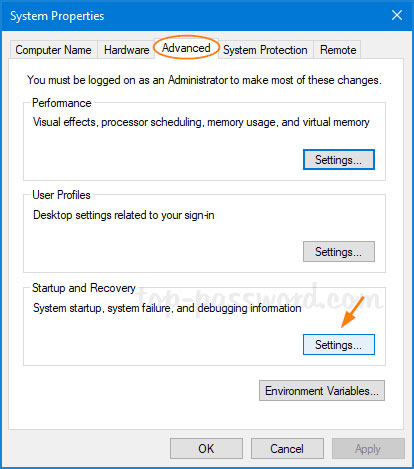
<p style="text-align: justify;">1. Nhấn phím&nbsp;<code>Win</code>+<code>R</code>&nbsp;để hiển thị hộp&nbsp;<strong>Run</strong>&nbsp;và nhập&nbsp;<strong>SystemProperIESAvised,</strong>&nbsp;rồi nhấn&nbsp;<code>Enter</code>&nbsp;để mở cửa sổ&nbsp;<strong>System Properties.</strong></p>

<p style="text-align: justify;">2. Nhấp vào nút&nbsp;<strong>Settings</strong>&nbsp;trong phần&nbsp;<strong>Startup and Recovery</strong>.</p>

<figure>
<div style="text-align: justify;"><img alt="Nhấp vào nút Settings trong phần Startup and Recovery" data-i="0" data-src="https://st.quantrimang.com/photos/image/2020/05/19/tao-crash-dump-bsod-tren-windows-1.jpg" data-was-processed="true" height="469" src="https://st.quantrimang.com/photos/image/2020/05/19/tao-crash-dump-bsod-tren-windows-1.jpg" width="414" /></div>

<figcaption>
<div style="text-align: justify;">Nhấp vào nút Settings trong phần Startup and Recovery</div>
</figcaption>
</figure>

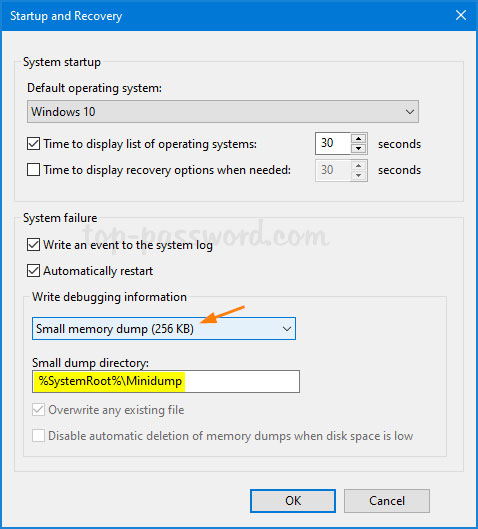
<p style="text-align: justify;">3. Các tùy chọn memory dump nằm trong phần&nbsp;<strong>Write debugging information</strong>. Theo mặc định, nó là&nbsp;<strong>Automatic memory dump</strong>. Chỉ cần thay đổi thành&nbsp;<strong>Small memory dump (256KB)</strong>&nbsp;và bấm&nbsp;<strong>OK.</strong></p>

<figure>
<div style="text-align: justify;"><img alt="Thay đổi thành Small memory dump (256KB)" data-i="1" data-src="https://st.quantrimang.com/photos/image/2020/05/19/tao-crash-dump-bsod-tren-windows-2.jpg" data-was-processed="true" height="529" src="https://st.quantrimang.com/photos/image/2020/05/19/tao-crash-dump-bsod-tren-windows-2.jpg" width="478" /></div>

<figcaption>
<div style="text-align: justify;">Thay đổi thành Small memory dump (256KB)</div>
</figcaption>
</figure>

<p style="text-align: justify;">4. Bất cứ khi nào PC hiển thị lỗi màn hình xanh, nó sẽ tự động thu thập một số thông tin chẩn đoán và lưu trữ chúng trong một file nhỏ mà bạn có thể tìm thấy trong thư mục&nbsp;<strong>C:\Windows\Minidump.</strong></p>

<div style="text-align: justify;">&nbsp;</div>

<h2 style="text-align: justify;">Phương pháp 2: Kích hoạt tính năng tạo minidump bằng cách tinh chỉnh Registry</h2>

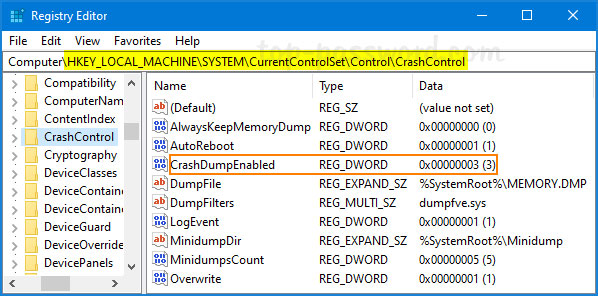
<p style="text-align: justify;">1.&nbsp;Mở Registry Editor&nbsp;và duyệt đến vị trí sau:</p>

<pre id="pre0">
<code>HKEY_LOCAL_MACHINE\SYSTEM\CurrentControlSet\Control\CrashControl</code></pre>

<p style="text-align: justify;">2. Ở bên phải, nhấp đúp vào DWORD 32-bit&nbsp;<strong>CrashDumpEnabled</strong>&nbsp;và thay đổi giá trị của nó từ giá trị mặc định&nbsp;<strong>7</strong>&nbsp;thành&nbsp;<strong>3</strong>.</p>

<figure>
<div style="text-align: justify;"><img alt="Nhấp đúp vào DWORD 32-bit CrashDumpEnabled và thay đổi giá trị của nó từ 7 thành 3" data-i="2" data-src="https://st.quantrimang.com/photos/image/2020/05/19/tao-crash-dump-bsod-tren-windows-3.jpg" data-was-processed="true" height="296" src="https://st.quantrimang.com/photos/image/2020/05/19/tao-crash-dump-bsod-tren-windows-3.jpg" width="598" /></div>

<figcaption>
<div style="text-align: justify;">Nhấp đúp vào DWORD 32-bit CrashDumpEnabled và thay đổi giá trị của nó từ 7 thành 3</div>
</figcaption>
</figure>

<ul>
	<li style="text-align: justify;">0x0: Không có</li>
	<li style="text-align: justify;">0x1: Memory dump hoàn chỉnh</li>
	<li style="text-align: justify;">0x2: Memory dump kernel</li>
	<li style="text-align: justify;">0x3: Memory dump nhỏ (64KB)</li>
	<li style="text-align: justify;">0x7: Memory dump tự động</li>
</ul>

<p style="text-align: justify;">3. Bạn phải khởi động lại Windows để thay đổi registry có hiệu lực.</p>

<h2 style="text-align: justify;">Phương pháp 3: Kích hoạt tính năng tạo minidump bằng Command Prompt</h2>

<p style="text-align: justify;">1.&nbsp;Mở Command Prompt với quyền admin. Nhập lệnh sau để tìm ra loại memory dump bạn đang sử dụng:</p>

<pre id="pre1">
<code>wmic RECOVEROS get DebugInfoType</code></pre>

<p style="text-align: justify;">2. Nếu bạn muốn kích hoạt việc tạo, chạy lệnh sau:</p>

<pre id="pre2">
<code>wmic RECOVEROS set DebugInfoType = 3</code></pre>

<p style="text-align: justify;">3. Khi lệnh hoàn thành, hãy khởi động lại máy tính.</p>

<p style="text-align: justify;">File minidump được lưu trữ ở định dạng nhị phân. Để xem và phân tích nội dung của nó, bạn cần sử dụng phần mềm của bên thứ ba như WinDbg hoặc BlueScreenView.&nbsp;</p>
		</div>
				<div id="author">
						<p>
				<strong>Nguồn tin:</strong>
				Quantrimang.com
			</p>
		</div>
	</div>
	<div id="footer" class="clearfix">
		<div id="url">
			<strong>URL của bản tin này: </strong><a href="https://www.nguoicodonvn2008.info/vi/news/savefile/kien-thuc-may-tinh/3-cach-cau-hinh-de-tao-crash-dump-bsod-tren-windows-2064.html" title="3 cách cấu hình để tạo crash dump BSOD trên Windows">https://www.nguoicodonvn2008.info/vi/news/savefile/kien-thuc-may-tinh/3-cach-cau-hinh-de-tao-crash-dump-bsod-tren-windows-2064.html</a>

		</div>
		<div class="clear"></div>
		<div class="copyright">
			&copy; .&#x3A; Nguoicodonvn2008.info - Cõi lòng người cô đơn &#x3A;.
		</div>
		<div id="contact">
			<a href="mailto:admin@nguoicodonvn2008.info">admin@nguoicodonvn2008.info</a>
		</div>
	</div>
</div>
        <div id="timeoutsess" class="chromeframe">
            Bạn đã không sử dụng Site, <a onclick="timeoutsesscancel();" href="https://www.nguoicodonvn2008.info/#">Bấm vào đây để duy trì trạng thái đăng nhập</a>. Thời gian chờ: <span id="secField"> 60 </span> giây
        </div>
        <div id="openidResult" class="nv-alert" style="display:none"></div>
        <div id="openidBt" data-result="" data-redirect=""></div>
		</script>
		<div class="car-top">
  <span><img src="https://www.nguoicodonvn2008.info/themes/default/images/car.png" alt=""></span>
</div>
<script src="https://www.nguoicodonvn2008.info/assets/js/jquery/jquery.min.js"></script>
<script>var nv_base_siteurl="/",nv_lang_data="vi",nv_lang_interface="vi",nv_name_variable="nv",nv_fc_variable="op",nv_lang_variable="language",nv_module_name="news",nv_func_name="savefile",nv_is_user=0, nv_my_ofs=-4,nv_my_abbr="EDT",nv_cookie_prefix="nv4c_e856T",nv_check_pass_mstime=1738000,nv_area_admin=0,nv_safemode=0,theme_responsive=0,nv_recaptcha_ver=2,nv_recaptcha_sitekey="",nv_recaptcha_type="image",XSSsanitize=1;</script>
<script src="https://www.nguoicodonvn2008.info/assets/js/language/vi.js"></script>
<script src="https://www.nguoicodonvn2008.info/assets/js/DOMPurify/purify3.js"></script>
<script src="https://www.nguoicodonvn2008.info/assets/js/global.js"></script>
<script src="https://www.nguoicodonvn2008.info/assets/js/site.js"></script>
<script src="https://www.nguoicodonvn2008.info/themes/default/js/news.js"></script>
<script src="https://www.nguoicodonvn2008.info/themes/default/js/main.js"></script>
<script src="https://www.nguoicodonvn2008.info/themes/default/js/custom.js"></script>
<script type="application/ld+json">
        {
            "@context": "https://schema.org",
            "@type": "Organization",
            "url": "https://www.nguoicodonvn2008.info",
            "logo": "https://www.nguoicodonvn2008.info/uploads/angel.gif"
        }
        </script>
<script src="https://www.nguoicodonvn2008.info/themes/default/js/bootstrap.min.js"></script>
<script type="text/javascript">
var $scrolltop = $('.car-top');
$scrolltop.on('click', function () {
    $('html,body').animate({
        scrollTop: 0
    }, 800);
    $(this).addClass("car-run");
    setTimeout(function(){ $scrolltop.removeClass('car-run');}, 1000);
    return false;
});
$(window).on('scroll', function ()
{ 
    if($(window).scrollTop() >= 200)
    {
        $scrolltop.addClass("show");
        $scrolltop.addClass("car-down");
    }
    else
    {
       $scrolltop.removeClass("show");
       setTimeout(function(){ $scrolltop.removeClass('car-down');}, 300);
    }
});
</script>
</body>
</html>